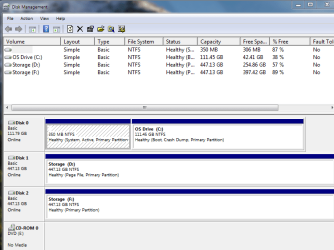
I just installed a new SSD and before formatting, it created a system partition that i was unable to delete. I was able to correctly get the new SSD formatted, Now I receive the message "An operating system wasnt found. try disconnecting....."
I tried selecting the drive and partition from disklist and that didnt help. I also inserted the Win7 recovery disk and that was unable to fix the problem.
My boot disk is an mSata Intel 120gb (OS Drive). Disk management showed there being 2 partitions being system, one being the actual system, and the other being the partition that was created from the new SSD storage drive. It shows 350gb... basically a ghost drive that i wasn't able to delete after formatting the new drive.
Can I make the correct partition active so I can boot again correctly?
I tried selecting the drive and partition from disklist and that didnt help. I also inserted the Win7 recovery disk and that was unable to fix the problem.
My boot disk is an mSata Intel 120gb (OS Drive). Disk management showed there being 2 partitions being system, one being the actual system, and the other being the partition that was created from the new SSD storage drive. It shows 350gb... basically a ghost drive that i wasn't able to delete after formatting the new drive.
Can I make the correct partition active so I can boot again correctly?
My Computer
- Computer type
- Laptop
- Computer Manufacturer/Model Number
- Sager
- OS
- Windows 7 64bit Premium
- CPU
- Intel i7 4900mq
- Memory
- 24gb
- Graphics Card(s)
- Nvidia 780
- Hard Drives
- Intel mSata 120gb
Intel 480gb
Crucial M500 480gb
- Browser
- Chrome