

Anyone notice Outlook 2007 acting strange lately?
For the past two weeks Outlook has been randomly disabling itself and thus far the only way I can fix it is to reboot the system. After that things run fine until it randomly disables itself again. In the image below notice the gray X...
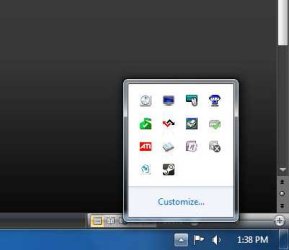
Very annoying
Anyways I ran the Microsoft Office Diagnostics tool and it came up empty. All other office apps run fine, just Outlook has issues, and it's rather recent.
I’m thinking it might have something to do with a recent update but that’s strictly a guess.
Anyone have any clues?
Thanks.
For the past two weeks Outlook has been randomly disabling itself and thus far the only way I can fix it is to reboot the system. After that things run fine until it randomly disables itself again. In the image below notice the gray X...
Very annoying
Anyways I ran the Microsoft Office Diagnostics tool and it came up empty. All other office apps run fine, just Outlook has issues, and it's rather recent.
I’m thinking it might have something to do with a recent update but that’s strictly a guess.
Anyone have any clues?
Thanks.
My Computer
- Computer type
- PC/Desktop
- Computer Manufacturer/Model Number
- Custom built by me.
- OS
- Windows 10 Pro
- CPU
- Intel Core i7-4770K (3.5Ghz)
- Motherboard
- Gigabyte G1 Sniper 5 (F10 Bios)
- Memory
- 32 gig Corsair Dominator Platinum (4x8Gig)
- Graphics Card(s)
- Sapphire Tri-X R9 Fury
- Sound Card
- Soundblaster ZXR
- Monitor(s) Displays
- NEC PA242W 24" LCD Monitor
- Screen Resolution
- 1920 x 1200
- Hard Drives
- Primary - Samsung 850 Pro (512gig), Samsung 840 Pro (256gig), 2TB WD Caviar Black.
- PSU
- EVGA Supernova 1000 G2
- Case
- Cooler Master HAF X
- Cooling
- Corsair H100i with Corsair Air Series SP120 Quiet Fans
- Keyboard
- Logitech Wireless Wave
- Mouse
- Logitech Performance MX
- Internet Speed
- High Speed Cable
- Antivirus
- Norton Security
- Browser
- IE11
- Other Info
- Memory Timings - 1866MHz @ 9-9-9-27-1T @ 1.5 volts


