Outlook 2003 - Backup of Contacts ?

thenoo

New member
Member
VIP
Local time
12:38 PM
Messages
140
I use Outlook 2003 solely for the data I keep in the Contacts section.That is to say that I don't use Outlook for e-mail or for any other of its many functions.

I have always been somewhat "hazy" about just how to keep this Contacts data backed up.

What I've been doing for years is saving the contacts.pst file into a Folder I created and called "Outlook"

Whenever I have occasion to change the details of the Contacts data in MS Outlook 2003 I save this by starting the "Import and Export Wizard". I then perform the following actions:-

Highlight"Export to a file"
NEXT
Under "Select file type to import from" I select "Personal Folder File(.pst)"
NEXT
Under"File to import" I detail the path to the Folder "Outlook" I created as described above here. This Folder contains the "contacts.pst" folder which holds the data required.

Is this the correct way to backup such contact details in Outlook 2003 ?
 

My Computer My Computer

At a glance

Windows 7 Home Premium x64AMD 3000+ 2.00gHZ2048 MbsRAEDON 9800 PRO
Computer Manufacturer/Model Number
Home Built
OS
Windows 7 Home Premium x64
CPU
AMD 3000+ 2.00gHZ
Motherboard
ASUSTeK k8vsedx
Memory
2048 Mbs
Graphics Card(s)
RAEDON 9800 PRO
Monitor(s) Displays
Sony SDM-HS95P 19.1"vis
Hard Drives
2x500 Gbts

My Computer My Computer

At a glance

Windows 7 Ultimate (SP1)AMD Sempron 3600+ATI Radeon Xpress 1150
Computer Manufacturer/Model Number
Vostro
OS
Windows 7 Ultimate (SP1)
CPU
AMD Sempron 3600+
Graphics Card(s)
ATI Radeon Xpress 1150
Screen Resolution
1200 x 800
Hard Drives
WD Scorpio Blue 500 GB
Although your way is correct you could also backup your contacts like this.

1. create a folder called "contacts backup" or whatever you need
2. open outlook, goto your contacts folder.
3. select all the contacts you want to backup ("ctrl +a" = select all)
4. drag all the contacts selected across to the folder you created earlier.
5. do the reverse if you have to restore your contacts
 

Attachments

  • contacts.png
    contacts.png
    98.8 KB · Views: 53

My Computer My Computer

At a glance

Windows 7 Ultimate 64bitAMD Phenom Quad core 9950 black edition16Gb2x XFX Radeon 5850
Computer type
PC/Desktop
Computer Manufacturer/Model Number
Self Built
OS
Windows 7 Ultimate 64bit
CPU
AMD Phenom Quad core 9950 black edition
Motherboard
Gigabyte
Memory
16Gb
Graphics Card(s)
2x XFX Radeon 5850
Sound Card
PCI Express X-Fi Titanium / Logitech G35
Monitor(s) Displays
2x HP 2410i
Screen Resolution
1920x1080
Hard Drives
2x 500Gb Seagate
1x 300Gb Seagate
1x 1Tb Seagate
2x 1Tb Hitatchi
PSU
Jean Tech Storm 700W
Case
Cooler Master COSMOS S
Cooling
Akasa Evo Blue Pro
Keyboard
Logitech G15
Mouse
Mad Catz M.M.O. 7
Internet Speed
12mb
All great answers and great advice guys! :)

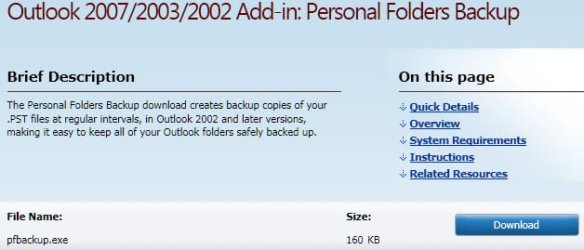
When I used Outlook 2003 and Outlook 2007, I really liked the "pfbackup" add-in. It's a set and forget it type of deal and available here from Microsoft.

ScreenShot00372.jpg

Too bad it doesn't work for the 64 bit version of Outlook 2010 ... :cry:
 

My Computer My Computer

At a glance

Windows 7 Ultimate x64 SP1Core2 Duo4 GBGM965 on-board
Computer Manufacturer/Model Number
Toshiba L355D
OS
Windows 7 Ultimate x64 SP1
CPU
Core2 Duo
Motherboard
Intel
Memory
4 GB
Graphics Card(s)
GM965 on-board
Sound Card
RealTek on-board
Monitor(s) Displays
19"+17"(laptop)
Screen Resolution
1440x900 (x 2)
Hard Drives
500GB Ext. 200GB Internal
PSU
N/A
Case
N/A
Cooling
N/A
All great answers and great advice guys! :)


Too bad it doesn't work for the 64 bit version of Outlook 2010 ... :cry:

It doesn't work in Outlook 2003 64 bit either unfortunately
 

My Computer My Computer

At a glance

Windows 7 Home Premium x64AMD 3000+ 2.00gHZ2048 MbsRAEDON 9800 PRO
Computer Manufacturer/Model Number
Home Built
OS
Windows 7 Home Premium x64
CPU
AMD 3000+ 2.00gHZ
Motherboard
ASUSTeK k8vsedx
Memory
2048 Mbs
Graphics Card(s)
RAEDON 9800 PRO
Monitor(s) Displays
Sony SDM-HS95P 19.1"vis
Hard Drives
2x500 Gbts
Have you looked into my post?
 

My Computer My Computer

At a glance

Windows 7 Ultimate (SP1)AMD Sempron 3600+ATI Radeon Xpress 1150
Computer Manufacturer/Model Number
Vostro
OS
Windows 7 Ultimate (SP1)
CPU
AMD Sempron 3600+
Graphics Card(s)
ATI Radeon Xpress 1150
Screen Resolution
1200 x 800
Hard Drives
WD Scorpio Blue 500 GB
All great answers and great advice guys! :)


Too bad it doesn't work for the 64 bit version of Outlook 2010 ... :cry:

It doesn't work in Outlook 2003 64 bit either unfortunately
Hi, thenoo! :)

There was a 2003 Outlook 64 bit edition? :confused:

I think you are confusing the Office and Windows versions as there was no Outlook 2003 64 bit. 64 bit editions of Office weren't available until Office 2010. The 32 bit edition runs fine on 64 bit Windows but, again, there was no 64 bit edition of Office until Office 2010.

pfbackup, linked to in my earlier post within this thread, should work fine with your Outlook 2003.
 

My Computer My Computer

At a glance

Windows 7 Ultimate x64 SP1Core2 Duo4 GBGM965 on-board
Computer Manufacturer/Model Number
Toshiba L355D
OS
Windows 7 Ultimate x64 SP1
CPU
Core2 Duo
Motherboard
Intel
Memory
4 GB
Graphics Card(s)
GM965 on-board
Sound Card
RealTek on-board
Monitor(s) Displays
19"+17"(laptop)
Screen Resolution
1440x900 (x 2)
Hard Drives
500GB Ext. 200GB Internal
PSU
N/A
Case
N/A
Cooling
N/A
Have you looked into my post?

Yes IE9 I did and that is what I was doing myself , thanks.

That works fine for me in Outlook 2003.
 

My Computer My Computer

At a glance

Windows 7 Home Premium x64AMD 3000+ 2.00gHZ2048 MbsRAEDON 9800 PRO
Computer Manufacturer/Model Number
Home Built
OS
Windows 7 Home Premium x64
CPU
AMD 3000+ 2.00gHZ
Motherboard
ASUSTeK k8vsedx
Memory
2048 Mbs
Graphics Card(s)
RAEDON 9800 PRO
Monitor(s) Displays
Sony SDM-HS95P 19.1"vis
Hard Drives
2x500 Gbts

My Computer My Computer

At a glance

Windows 7 Ultimate (SP1)AMD Sempron 3600+ATI Radeon Xpress 1150
Computer Manufacturer/Model Number
Vostro
OS
Windows 7 Ultimate (SP1)
CPU
AMD Sempron 3600+
Graphics Card(s)
ATI Radeon Xpress 1150
Screen Resolution
1200 x 800
Hard Drives
WD Scorpio Blue 500 GB
Back
Top