Outlook 2003

mangoh

New member
Power User
Local time
7:48 PM
Messages
357
In Outlook 2003 how do you arrange sub folders?

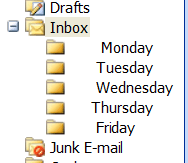
I want the sub folders to be arranged as in the first sub folder from "inbox" to be Monday. The second sub folder to be called Tuesday and so on until Friday.


Uploaded with ImageShack.us

It's for work so I have no option but to use Outlook 2003. Also as it is for work I do not need to have a folder for Saturday/Sunday. The sub folders do not get sorted alphabetically for me, dunno if it is because I am using Outlook 2003.
 
Last edited:

My Computer

OS
Windows 7 Professional 64bit
You have to make the folders in that exact order. Make "Monday" first, and then make "Friday" last.
 

My Computer

Computer type
PC/Desktop
It's not quite that easy. You will find Thurs and Fri find their own position, not the order of the week. here's the only workaround i can find. Bit of a compromise but it works.
 

My Computer

Computer type
PC/Desktop
OS
Microsoft Windows 7 Home Premium 64-bit 7601 Multiprocessor Free Service Pack 1
CPU
Intel(R) Core(TM) i7-3770 CPU @ 3.40GHz
Motherboard
ASUSTeK COMPUTER INC. P8H77-M
Memory
8.00 GB
Graphics Card(s)
Intel(R) HD Graphics 4000
Sound Card
On Board
Monitor(s) Displays
Dell 24"
Screen Resolution
1920 x 1080
Hard Drives
(1) INTEL SSDSC2CT180A3 ATA Device (2) ST500DM002-1BD142 ATA Device (3) WDC WD3200AAKS-75L9A0 ATA Device (4) Generic- Compact Flash USB Device (5) Generic- MS/MS-Pro USB Device (6) Generic- SD/MMC USB Device (7) Generic- SM/xD-Picture USB
PSU
500w Corsair
Case
Cooler Master
Cooling
3 Fans
Keyboard
Logitech MK300
Mouse
Logitech WOM
Internet Speed
75Mb
Antivirus
Norton 360
Browser
Firefox, Opera, IE
It's not quite that easy. You will find Thurs and Fri find their own position, not the order of the week. here's the only workaround i can find. Bit of a compromise but it works.

I don't see the workaround. Maybe it's a problem on my end. Can you post it in a different way?

Anyway, I tried it myself past "Wednesday", and now I see that it orders them alphabetically. So if it were me, then I would number them like this:

"1. Monday"
"2. Tuesday"
"3. Wednesday"
"4. Thursday"
"5. Friday"

It doesn't look as nice, but that's how I would force them to be organized in the way that I want.
 

My Computer

Computer type
PC/Desktop

My Computer

Computer type
PC/Desktop
OS
Microsoft Windows 7 Home Premium 64-bit 7601 Multiprocessor Free Service Pack 1
CPU
Intel(R) Core(TM) i7-3770 CPU @ 3.40GHz
Motherboard
ASUSTeK COMPUTER INC. P8H77-M
Memory
8.00 GB
Graphics Card(s)
Intel(R) HD Graphics 4000
Sound Card
On Board
Monitor(s) Displays
Dell 24"
Screen Resolution
1920 x 1080
Hard Drives
(1) INTEL SSDSC2CT180A3 ATA Device (2) ST500DM002-1BD142 ATA Device (3) WDC WD3200AAKS-75L9A0 ATA Device (4) Generic- Compact Flash USB Device (5) Generic- MS/MS-Pro USB Device (6) Generic- SD/MMC USB Device (7) Generic- SM/xD-Picture USB
PSU
500w Corsair
Case
Cooler Master
Cooling
3 Fans
Keyboard
Logitech MK300
Mouse
Logitech WOM
Internet Speed
75Mb
Antivirus
Norton 360
Browser
Firefox, Opera, IE
Oh wow. lol Well. :)

This kind of makes me wonder a little if any of the newer versions of Outlook provide a way to organize them by just clicking and dragging.
 

My Computer

Computer type
PC/Desktop
You have to make the folders in that exact order. Make "Monday" first, and then make "Friday" last.

Tried this already but still no luck :(

It's not quite that easy. You will find Thurs and Fri find their own position, not the order of the week. here's the only workaround i can find. Bit of a compromise but it works.

It's not quite that easy. You will find Thurs and Fri find their own position, not the order of the week. here's the only workaround i can find. Bit of a compromise but it works.

I don't see the workaround. Maybe it's a problem on my end. Can you post it in a different way?

Anyway, I tried it myself past "Wednesday", and now I see that it orders them alphabetically. So if it were me, then I would number them like this:

"1. Monday"
"2. Tuesday"
"3. Wednesday"
"4. Thursday"
"5. Friday"

It doesn't look as nice, but that's how I would force them to be organized in the way that I want.

Sorry forgot to put in the link:
How to Sort Outlook Folders in Arbitrary, Non-Alphabetic Order - About Email


Just as you suggested anyway, using the number system!
This is what I was trying to avoid, using symbols/numbers etc...

Any other ideas?

Oh wow. lol Well. :)

This kind of makes me wonder a little if any of the newer versions of Outlook provide a way to organize them by just clicking and dragging.

I'm intrigued as well.

I would of thought such a basic thing wouldn't be so hard to do in the 21st century!
 

My Computer

OS
Windows 7 Professional 64bit
You have to make the folders in that exact order. Make "Monday" first, and then make "Friday" last.

Tried this already but still no luck :(

It's not quite that easy. You will find Thurs and Fri find their own position, not the order of the week. here's the only workaround i can find. Bit of a compromise but it works.


Sorry forgot to put in the link:
How to Sort Outlook Folders in Arbitrary, Non-Alphabetic Order - About Email


Just as you suggested anyway, using the number system!
This is what I was trying to avoid, using symbols/numbers etc...

Any other ideas?

Oh wow. lol Well. :)

This kind of makes me wonder a little if any of the newer versions of Outlook provide a way to organize them by just clicking and dragging.

I'm intrigued as well.

I would of thought such a basic thing wouldn't be so hard to do in the 21st century!

Yeah, well we're talking about that giant dictator known as Microsoft. :)
 

My Computer

Computer type
PC/Desktop
If you do resort to adding a number to the front of the name AND you have a lot of folders, you may need to start with 01, 02, 03, etc... or you may find it sorts like this:

1
2
20
21
22
.
.
.
3
30
 

My Computer

Computer type
PC/Desktop
Computer Manufacturer/Model Number
Home Built desktop, Dell G15 5511 Gaming laptop,MS Surface Pro 7 tablet
OS
W10 Pro desktop, W11 laptop, W11 Pro tablet (all 64-bit)
CPU
3.7Ghz 8700K i7, i7-11800H, i7-1065G7
Motherboard
ASUS TUF Z370-Pro Gaming in desktop
Memory
16G desktop, 16G laptop, 4G tablet
Graphics Card(s)
AMD Radeon RX580, RTX 3060, Intel Iris Plus
Sound Card
High Definition Audio (Built-in to mobo)
Monitor(s) Displays
Samsung U32J59 32" (2x), 15.6", 12"
Screen Resolution
3840x2160, 3840x2160, 1920x1080, 2160x1440
Hard Drives
500G SSD for OS; 2T, 10T & 15T HDDs for Data on Desktop, 1TB SSD laptop, 128G SSD tablet.
PSU
Corsair CX 750M
Case
Antec 100
Cooling
CM 212+
Keyboard
IBM Model M - used continuously since 1986
Mouse
Microsoft Pro IntelliMouse
Internet Speed
400M down 8M up
Antivirus
Windows Defender
Browser
FireFox
Other Info
Built my first computer (8Mhz 8088cpu, 640K RAM, 20MB HDD, 2 360K floppy drives) in 1985 and have been building them for myself, relatives and friends ever since.
I doubt this can be done without recourse to numbering. For what it's worth the latest version of Windows Live Mail behaves in exactly the same way! To save anyone else trying i have set put 1 Monday into Word then made the "1" white and tried to copy and paste but that still shows the "1".
 

My Computer

Computer type
PC/Desktop
OS
Microsoft Windows 7 Home Premium 64-bit 7601 Multiprocessor Free Service Pack 1
CPU
Intel(R) Core(TM) i7-3770 CPU @ 3.40GHz
Motherboard
ASUSTeK COMPUTER INC. P8H77-M
Memory
8.00 GB
Graphics Card(s)
Intel(R) HD Graphics 4000
Sound Card
On Board
Monitor(s) Displays
Dell 24"
Screen Resolution
1920 x 1080
Hard Drives
(1) INTEL SSDSC2CT180A3 ATA Device (2) ST500DM002-1BD142 ATA Device (3) WDC WD3200AAKS-75L9A0 ATA Device (4) Generic- Compact Flash USB Device (5) Generic- MS/MS-Pro USB Device (6) Generic- SD/MMC USB Device (7) Generic- SM/xD-Picture USB
PSU
500w Corsair
Case
Cooler Master
Cooling
3 Fans
Keyboard
Logitech MK300
Mouse
Logitech WOM
Internet Speed
75Mb
Antivirus
Norton 360
Browser
Firefox, Opera, IE
Hmm

Would an invisible space (use of alt code) make a difference?

One invisible space and then Monday
Two invisible spaces and then Tuesday
And so on...
 

My Computer

OS
Windows 7 Professional 64bit
It can be done but it's a bit of a fiddle and almost impossible to get the entries lined up properly but it is workable!
One important point, if you give one space to Mon and 2 for Tues then the days will appear in reverse onder. So Monday has 5 spaces Tues 4 wed 3 and so on!
See here

Outlook.PNG
 

My Computer

Computer type
PC/Desktop
OS
Microsoft Windows 7 Home Premium 64-bit 7601 Multiprocessor Free Service Pack 1
CPU
Intel(R) Core(TM) i7-3770 CPU @ 3.40GHz
Motherboard
ASUSTeK COMPUTER INC. P8H77-M
Memory
8.00 GB
Graphics Card(s)
Intel(R) HD Graphics 4000
Sound Card
On Board
Monitor(s) Displays
Dell 24"
Screen Resolution
1920 x 1080
Hard Drives
(1) INTEL SSDSC2CT180A3 ATA Device (2) ST500DM002-1BD142 ATA Device (3) WDC WD3200AAKS-75L9A0 ATA Device (4) Generic- Compact Flash USB Device (5) Generic- MS/MS-Pro USB Device (6) Generic- SD/MMC USB Device (7) Generic- SM/xD-Picture USB
PSU
500w Corsair
Case
Cooler Master
Cooling
3 Fans
Keyboard
Logitech MK300
Mouse
Logitech WOM
Internet Speed
75Mb
Antivirus
Norton 360
Browser
Firefox, Opera, IE
Hi there
Even though your Work uses Outlook 2003 there isn't any reason as to why you can't use Outlook 2007 or 2010 -- or even 2013 as all these will create and read documents in Office 2003 format.

As for the folders - why do you really NEED to have a different folder for each day of the week -- surely just arranging your INBOX / SENT MAIL e-mail by DATE received ands date sent is a much more sensible solution -- then you can create folders related to the TOPIC - E,g BOSS, UNIMPORTANT, PARTIES, etc etc.

Cheers
jimbo
 

My Computer

Computer type
PC/Desktop
Computer Manufacturer/Model Number
Custom built, several laptops HP/ASUS
OS
Linux CENTOS 7 / various Windows OS'es and servers
CPU
Intel i7 Intel i5
Memory
8GB, 16GB
Graphics Card(s)
On Motherboard
Sound Card
Realtek HD audio
Monitor(s) Displays
Apple Cinema display, Samsung LCD
Screen Resolution
1920 X 1080
Hard Drives
4 X 1TB SATA
Mouse
Toshiba wireless laser
Internet Speed
> 20MB up
Hi there
Even though your Work uses Outlook 2003 there isn't any reason as to why you can't use Outlook 2007 or 2010 -- or even 2013 as all these will create and read documents in Office 2003 format.

One good reason is it costs money and it's not cheap. Another is it's rare for the IT department to allow the users to install whatever they want, even if it's something simple like a newer version Outlook.
 

My Computer

Computer type
PC/Desktop
Hi there
Even though your Work uses Outlook 2003 there isn't any reason as to why you can't use Outlook 2007 or 2010 -- or even 2013 as all these will create and read documents in Office 2003 format.

One good reason is it costs money and it's not cheap. Another is it's rare for the IT department to allow the users to install whatever they want, even if it's something simple like a newer version Outlook.

Hi there

You should perhaps speak to your admins about seeing if your company can sign up to the "Use at Home" policy --this way you as an employee (or even as an external subcontractor) can get an ENTERPRISE version of Office 2007 or OFFICE 2010 PRO for just the cost of the DVD media (5 USD when I last worked at a place who had this arrangement).

Ms supplies a surprisingly decent amount of Software on these types of "Use at Home" agreements.

Cheers
jimbo
 

My Computer

Computer type
PC/Desktop
Computer Manufacturer/Model Number
Custom built, several laptops HP/ASUS
OS
Linux CENTOS 7 / various Windows OS'es and servers
CPU
Intel i7 Intel i5
Memory
8GB, 16GB
Graphics Card(s)
On Motherboard
Sound Card
Realtek HD audio
Monitor(s) Displays
Apple Cinema display, Samsung LCD
Screen Resolution
1920 X 1080
Hard Drives
4 X 1TB SATA
Mouse
Toshiba wireless laser
Internet Speed
> 20MB up

My Computer

Computer type
PC/Desktop
Computer Manufacturer/Model Number
Golden Mk. I.4
OS
Windows 10 Pro x64 ; Xubuntu x64
CPU
Intel i7 860 @ 2.80 GHz O/C'ed to 4.0GHz
Motherboard
Gigabyte P55A-UD3R Rev.1. Award BIOS F13
Memory
16GB Corsair Vengance DDR3 @ 661 MHz Dual Channel (9-9-9-24)
Graphics Card(s)
EVGA NVidia GTX 560 1024MB
Sound Card
Realtek Integrated
Monitor(s) Displays
Dual Samsung SyncMaster 2494HS
Screen Resolution
1920*1080 and 1920*1080
Hard Drives
1*Samsung 840 EVO 120GB SSD;
1*OCZ Vertex 2 60GB SSD;
2*Samsung F3 SpinPoint 1TB in RAID0;
1*Samsung F1 SpinPoint 1TB;
2*Western Digital 1TB External USB 3.0
1*Western Digital 500GB External USB 3.0
1*Seagate 500GB External USB 2.0
PSU
Thermaltake ToughPower QFan 750W
Case
Thermaltake Element S VK60001W2Z
Cooling
Corsair H60 Water Cooling, 2*230mm and 2*80mm case fans
Keyboard
Logitech G110
Mouse
Logitech MX518
But would the Company you work for not need to use Office 2013 before employees can use it "At Home".
In any case the chances are that the 2013 Version of Outlook will behave in exactly the same way . Windows Live Mail used the same layout and that works the same as Outlook 2003.
 

My Computer

Computer type
PC/Desktop
OS
Microsoft Windows 7 Home Premium 64-bit 7601 Multiprocessor Free Service Pack 1
CPU
Intel(R) Core(TM) i7-3770 CPU @ 3.40GHz
Motherboard
ASUSTeK COMPUTER INC. P8H77-M
Memory
8.00 GB
Graphics Card(s)
Intel(R) HD Graphics 4000
Sound Card
On Board
Monitor(s) Displays
Dell 24"
Screen Resolution
1920 x 1080
Hard Drives
(1) INTEL SSDSC2CT180A3 ATA Device (2) ST500DM002-1BD142 ATA Device (3) WDC WD3200AAKS-75L9A0 ATA Device (4) Generic- Compact Flash USB Device (5) Generic- MS/MS-Pro USB Device (6) Generic- SD/MMC USB Device (7) Generic- SM/xD-Picture USB
PSU
500w Corsair
Case
Cooler Master
Cooling
3 Fans
Keyboard
Logitech MK300
Mouse
Logitech WOM
Internet Speed
75Mb
Antivirus
Norton 360
Browser
Firefox, Opera, IE
At work we still use Office 2007, but I got both Office 2010 And 2013 Via HUP
 

My Computer

Computer type
PC/Desktop
Computer Manufacturer/Model Number
Golden Mk. I.4
OS
Windows 10 Pro x64 ; Xubuntu x64
CPU
Intel i7 860 @ 2.80 GHz O/C'ed to 4.0GHz
Motherboard
Gigabyte P55A-UD3R Rev.1. Award BIOS F13
Memory
16GB Corsair Vengance DDR3 @ 661 MHz Dual Channel (9-9-9-24)
Graphics Card(s)
EVGA NVidia GTX 560 1024MB
Sound Card
Realtek Integrated
Monitor(s) Displays
Dual Samsung SyncMaster 2494HS
Screen Resolution
1920*1080 and 1920*1080
Hard Drives
1*Samsung 840 EVO 120GB SSD;
1*OCZ Vertex 2 60GB SSD;
2*Samsung F3 SpinPoint 1TB in RAID0;
1*Samsung F1 SpinPoint 1TB;
2*Western Digital 1TB External USB 3.0
1*Western Digital 500GB External USB 3.0
1*Seagate 500GB External USB 2.0
PSU
Thermaltake ToughPower QFan 750W
Case
Thermaltake Element S VK60001W2Z
Cooling
Corsair H60 Water Cooling, 2*230mm and 2*80mm case fans
Keyboard
Logitech G110
Mouse
Logitech MX518
At work we still use Office 2007, but I got both Office 2010 And 2013 Via HUP

Hi there
I've just got Office 2013 also via HUP -- I already have 2007 and 2010 -- but I think I prefer Office 2010 -- I don't like the brilliant white background of Office 2013 -- but agreed the HUP is great --I find it totally amazing that zillions of I.T admins at various clients where I've worked have NEVER heard of the program - which is probably why there are a load of offices around still using Office 2003.

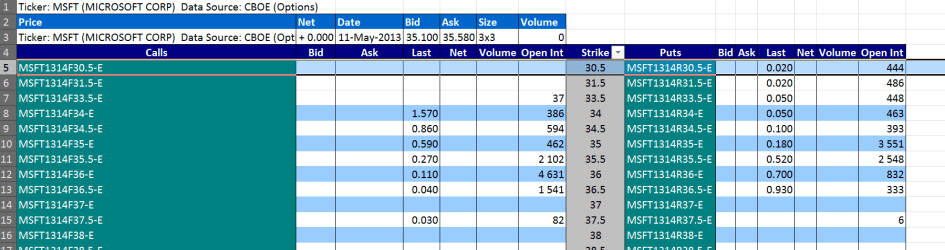
I often get dynamic Stock Market data from the Internet into EXCEL and for any of this type of stuff EXCEL 2003 is not very good --the whole Internet Query stuff was changed in Office 2007 and works brilliantly.

For example Pre Market opening for Options on MSFT from the CBOE (Chicago board of Optiones Exchange --this is rather like the Wall St stock exchange but for OPTIONS).

After the market opens I can run this automatically at intervals I decide to get the current real time market prices.

Cheers
jimbo
 

Attachments

  • cboe.png
    cboe.png
    30.1 KB · Views: 2

My Computer

Computer type
PC/Desktop
Computer Manufacturer/Model Number
Custom built, several laptops HP/ASUS
OS
Linux CENTOS 7 / various Windows OS'es and servers
CPU
Intel i7 Intel i5
Memory
8GB, 16GB
Graphics Card(s)
On Motherboard
Sound Card
Realtek HD audio
Monitor(s) Displays
Apple Cinema display, Samsung LCD
Screen Resolution
1920 X 1080
Hard Drives
4 X 1TB SATA
Mouse
Toshiba wireless laser
Internet Speed
> 20MB up
Back
Top