Hi, I don't know if this will help but you can use this tool (it is safe) to find out what your settings should be for your isp.
Free email settings lookup for POP3, IMAP and SMTP
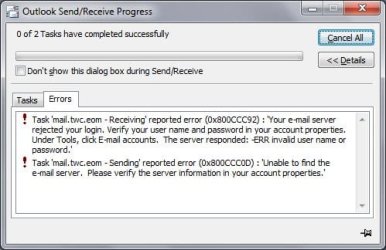
Your post caught my attention because your isp says mail.twc.oem. My server is mail.twc.com I have no idea if that is relevant or not but anyway.... My ISP is Spectrum and if nothing has changed when you verify your settings, it might mean you will have to reset your password. My ISP says it is reset automatically every 6 months. Which makes no sense and to tell you the truth, I reset it as I was told many, many months ago and I'm still connecting okay. I tried to use my online account to reset it and that never worked. So I finally got a real person to walk me through it until it finally worked.
As for a possible replacement for Outlook 2003. (I'm still using it too.) I eventually installed Windows Mail using the great tutorials here. I never was big on Outlook although I still have Office 2003 installed for the rare Word or Excel file I need.
Long story short, I developed a glitch with a friend in the UK and she would often recieve my emails with parts of them in red fonts, which were very hard for her to read. I never saw the changing colors UNTIL... I copied and pasted them into a Word document. Only on my end they were yellow. I narrowed it down to it only (or mostly only) happened if I was doing a copy/paste from a web article. And if I did any editing of what I had pasted, then sometimes the new color format carried out beyond just that range. I found a few things online to try, but my friend is barely able to handle send and receive. She is totally freaked out when it comes to computering. So it just got too hard to try and figure it out from both sides.
I have since found and purchased OE Classic. My needs are quite basic but I believe it does have more features than OE or Windows Mail. There is a free version to try although it might leave a signature or something like that, among a few other restrictions. My biggest complaint is that the developer hasn't figured out how to make it the default mailto yet. So I keep Windows Mail here so I can open and read saved emails without another email viewer. I get nearly immediate response to any problems since I've paid for it, but I think the developer can sometimes have a bit of tunnel vision. He simply could not understand why I would have any need to store any emails outside of OEC because of its many features. lol!
OE Classic - Easy to use Outlook Express replacement
I hope I've been of some help or at least given you some new nudges to finding a solution for your problem.