Outlook 2003

arsci

New member
Local time
7:28 AM
Messages
2
Well I successfully added Windows 7 to my desktop computer. I've been running XP Media Center '03 for almost 5 years now with no issues and thought I would give 7 a shot. Unfortunately I have not been able to completely phase out XP because Outlook 2003 is stuck on the XP partition with all 3000 emails. Important emails. I've tried everything to get somehow get those emails, contacts, calendar, etc. over to the 7 OS and have not been able to. Can anyone help me out? It's been almost 5 years so I no longer have the Outlook '03 CD that came with my computer.

Thanks,

Ryan
 

My Computer

Computer Manufacturer/Model Number
Dell Dimension 5100 & Dell Studio XPS 1640
OS
XP, Vista, 7
Well I successfully added Windows 7 to my desktop computer. I've been running XP Media Center '03 for almost 5 years now with no issues and thought I would give 7 a shot. Unfortunately I have not been able to completely phase out XP because Outlook 2003 is stuck on the XP partition with all 3000 emails. Important emails. I've tried everything to get somehow get those emails, contacts, calendar, etc. over to the 7 OS and have not been able to. Can anyone help me out? It's been almost 5 years so I no longer have the Outlook '03 CD that came with my computer.

Thanks,

Ryan

How about trying this? Download Windows Easy Transfer, then transfer everything from your XP account to a newly made account in 7. If it works you will have your current 7 user account and the newly made user account with the email. From that point you should be able to consolidate into one user account. Just guessing, its hard sometimes, when not actually present to try to correct the problem.
 

My Computer

Computer type
PC/Desktop
Computer Manufacturer/Model Number
Dell XPS 420
OS
Windows 10, Home Clean Install
CPU
Intel Core2 processsor Q8200(2.33Ghz 1333FSB) Quad Core Tech
Motherboard
Dell
Memory
6 gb
Graphics Card(s)
ATI Radeon 256MB HD3650
Sound Card
Intergrated 7.1 Channel Audio
Monitor(s) Displays
Dell SP2009W 20"
Hard Drives
640 GB Serial ATA Hard drive
Cooling
Fan
Keyboard
Dell USB Keyboard
Mouse
Dell Premium Optical USB
Internet Speed
DSL 2.85
What have you tried? You may have to shell out $69 for Office Student Teacher edition (2003 or 2007 will work equally well).

When I went from XP with Outlook 2003 to Vista, I searched my computer for the Outlook .pst files. I had to set folder options to show system files. When the search located them, I copied them to a safe location. I may have had to take ownership first, I don't recall. To do that use this link:Add "Take Ownership" to Explorer Right-Click Menu in Win 7 or Vista

After the new install, I found the outlook files on the new machine and renamed them and then pasted the old files, including the archive file into the folder(s).

When I opened Outlook 2003, all of my old inbox messages and contacts were there, even my spam was there.

There are many tutorials found by Google that do this, but they are even more complicated.

I have since moved to Windows 7 and there was no problem with Outlook after the upgrade.
 

My Computer

Computer type
PC/Desktop
Computer Manufacturer/Model Number
eMachines ET1810-03 (Acer) - single user
OS
Windows 7 Home Premium - always up to date
CPU
Intel E2210 2.2Ghz
Motherboard
(OEM) ECS MCP73VT-PM with AMI BIOS R01-A3 (4-29-2009)
Memory
3Gb DDR2
Graphics Card(s)
NVIDIA GeForce 7050/610I GPU
Sound Card
Realtek ALC888/1200 8-channel HD integrated
Monitor(s) Displays
AOC 22" LED
Screen Resolution
1920 x 1080
Hard Drives
Internal - Seagate 320Gb SATA; External - Western Digital 320Gb USB (3.5" internal drive inside a RocketFish USB enclosure)
Keyboard
Wireless
Mouse
Logitech M705 laser wireless
Internet Speed
TWC Cable Broadband ~ 15 Mbps Down/1 Mbps Up
Antivirus
NIS
Browser
Chrome
Other Info
Microsoft Office 2007, incl Outlook SP3; Netgear router; ubee modem
I'll try out those methods tomorrow morning and update you guys on how it goes. Thanks for your help!
 

My Computer

Computer Manufacturer/Model Number
Dell Dimension 5100 & Dell Studio XPS 1640
OS
XP, Vista, 7
yeah thats a good reason why I havent installed 7 yet, my inbox has 13272 msgs (I gotta clean it out, lol).
 

My Computer

Computer Manufacturer/Model Number
Self built
OS
W764 & W764
CPU
AMD Phenom II X4 810 2.6ghz & AMD|PH II X6 1055T 2.8G AM3 RT
Motherboard
Asus M4A79T Deluxe & ASUS| M4A88TD-V EVO/USB3 880G
Memory
6.0 gb & 16.0 gb (64bit)
Graphics Card(s)
GForce 9800 GTX 512gb & Sapphire HD6870
Sound Card
Integrated
Monitor(s) Displays
1 32" LG 1080 TV
Screen Resolution
1920x1080
Hard Drives
(Phenom X4)
WD 10K 74 GB 3.0gb/s
WD 320 GB
2 X WD 7200 1TB 3.0gb/s
-External HDs-
3 X WD 1 TB 3.0gb/s

(Phenom X6)
WD 10K 300 GB 3.0gb/s
WD 1TB 6.0 gbs
-External HDs-
WD 1 TB 6.0gb/s thru eSATA
WD 1 TB 6.0gb/s thre USB 3.0
PSU
Corsair 750 W & CoolerMaster 700W
Case
CM690 & CM690
Cooling
Both CM690 have 7 120mm Fans
Keyboard
stock USB
Mouse
logitech wireless
Internet Speed
cable
Other Info
I do alot of Video and DVD burning
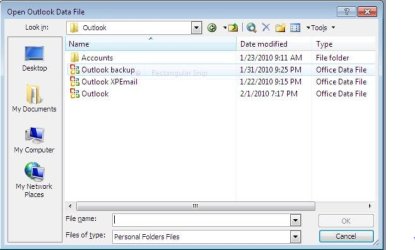
I am having the same problem. I successfully completed a clean install of Windows 7 (32bit). I have copies of my outlook PST files on a flash drive as well as I found them in the folder called "windows old". I was running outlook 2003 on XP and still am in Windows 7 the same outlook 2003. I was instructed by another to copy the outlook xpemail to the outlook folder in Windows 7.
Win 7 Outlook snip.JPG

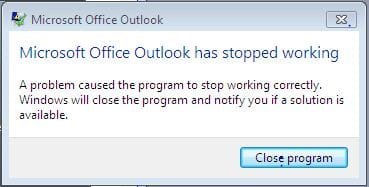
I am attaching screen shots of what occured when I went File, Open, datafile I tried opening OutlookXPEmail (this is my old stuff)

Open Outlook data file.JPG

Outlook stopped working.JPG

Can anyone help?
 

My Computer

Computer Manufacturer/Model Number
Dell Dimension 8300
OS
Windows 7 Home Premium
CPU
Intel Pentium 4 CPU 3.00 GHz 2992 Mhz 1 Core
Memory
2.00 GB (RAM)
outlook xp email . pst is too big to open at this point. export into multiple .pst files then add them back in 1 by 1. attempt to keep under 200,000kb
 

My Computer

OS
7 Pro
Dear Brady,
Thank you for the information. It sounds logical enough. Please excuse my computer ignorance, but how do I go about exporting my large pst file into smaller ones?
Thank you again
 

My Computer

Computer Manufacturer/Model Number
Dell Dimension 8300
OS
Windows 7 Home Premium
CPU
Intel Pentium 4 CPU 3.00 GHz 2992 Mhz 1 Core
Memory
2.00 GB (RAM)
Back
Top