Outlook 2007 Archive & Performance Issues - Linked?

Rhirtix

New member
Member
Local time
3:26 PM
Messages
62
Hi!

I'm running Office 2007 on my machine.

I use Outlook 2007 primarily for work emails.

I began archiving my emails not too long ago. Then, one day, just recently, the archive option disappeared from all application menu locations - File, Tools, etc.

At the same time, Outlook performance has become incredibly slow. Moving between folders within the Inbox requires seconds upon seconds of loading, whereas before, folder contents loaded right when I clicked on the folder.

How do I fix these two issues? Help! :confused:

Thanks in advance!
 
Last edited:

My Computer

OS
Windows 7 x64
CPU
Core i7 950 @ 4Ghz
Motherboard
Asus P6X58D Premium
Memory
Corsair Dominator 12Gb
Graphics Card(s)
EVGA GTX 680 SC
Monitor(s) Displays
Apple 27" LED Cinema Display
Screen Resolution
2560 x 1440
Hard Drives
Intel 510 SSD 256gb + 2 WD Caviar Black drives
PSU
Corsair TX750
Case
Corsair Obsidian 600T
Cooling
Cooler Master Hyper 212 Plus
Keyboard
Logitech G510
Mouse
Logitech M510
Internet Speed
Verizon FIOS
Hi,

Is this your PC at work? Do you have administrator privledges?

Regards,
Golden
 

My Computer

Computer type
PC/Desktop
Computer Manufacturer/Model Number
Golden Mk. I.4
OS
Windows 10 Pro x64 ; Xubuntu x64
CPU
Intel i7 860 @ 2.80 GHz O/C'ed to 4.0GHz
Motherboard
Gigabyte P55A-UD3R Rev.1. Award BIOS F13
Memory
16GB Corsair Vengance DDR3 @ 661 MHz Dual Channel (9-9-9-24)
Graphics Card(s)
EVGA NVidia GTX 560 1024MB
Sound Card
Realtek Integrated
Monitor(s) Displays
Dual Samsung SyncMaster 2494HS
Screen Resolution
1920*1080 and 1920*1080
Hard Drives
1*Samsung 840 EVO 120GB SSD;
1*OCZ Vertex 2 60GB SSD;
2*Samsung F3 SpinPoint 1TB in RAID0;
1*Samsung F1 SpinPoint 1TB;
2*Western Digital 1TB External USB 3.0
1*Western Digital 500GB External USB 3.0
1*Seagate 500GB External USB 2.0
PSU
Thermaltake ToughPower QFan 750W
Case
Thermaltake Element S VK60001W2Z
Cooling
Corsair H60 Water Cooling, 2*230mm and 2*80mm case fans
Keyboard
Logitech G110
Mouse
Logitech MX518
Hi,

Is this your PC at work? Do you have administrator privledges?

Regards,
Golden

No. It's my personal computer. I telecommute. Email system is quite simply. POP3 connection into work email system.
 

My Computer

OS
Windows 7 x64
CPU
Core i7 950 @ 4Ghz
Motherboard
Asus P6X58D Premium
Memory
Corsair Dominator 12Gb
Graphics Card(s)
EVGA GTX 680 SC
Monitor(s) Displays
Apple 27" LED Cinema Display
Screen Resolution
2560 x 1440
Hard Drives
Intel 510 SSD 256gb + 2 WD Caviar Black drives
PSU
Corsair TX750
Case
Corsair Obsidian 600T
Cooling
Cooler Master Hyper 212 Plus
Keyboard
Logitech G510
Mouse
Logitech M510
Internet Speed
Verizon FIOS
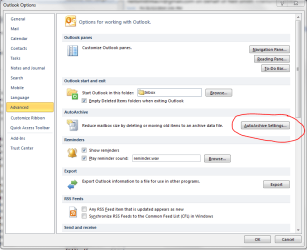
Mmmm. OK. Under Outlook options, Advanced, what is shown in your AutoArchive Settings?
 

Attachments

  • Capture.PNG
    Capture.PNG
    30.8 KB · Views: 36

My Computer

Computer type
PC/Desktop
Computer Manufacturer/Model Number
Golden Mk. I.4
OS
Windows 10 Pro x64 ; Xubuntu x64
CPU
Intel i7 860 @ 2.80 GHz O/C'ed to 4.0GHz
Motherboard
Gigabyte P55A-UD3R Rev.1. Award BIOS F13
Memory
16GB Corsair Vengance DDR3 @ 661 MHz Dual Channel (9-9-9-24)
Graphics Card(s)
EVGA NVidia GTX 560 1024MB
Sound Card
Realtek Integrated
Monitor(s) Displays
Dual Samsung SyncMaster 2494HS
Screen Resolution
1920*1080 and 1920*1080
Hard Drives
1*Samsung 840 EVO 120GB SSD;
1*OCZ Vertex 2 60GB SSD;
2*Samsung F3 SpinPoint 1TB in RAID0;
1*Samsung F1 SpinPoint 1TB;
2*Western Digital 1TB External USB 3.0
1*Western Digital 500GB External USB 3.0
1*Seagate 500GB External USB 2.0
PSU
Thermaltake ToughPower QFan 750W
Case
Thermaltake Element S VK60001W2Z
Cooling
Corsair H60 Water Cooling, 2*230mm and 2*80mm case fans
Keyboard
Logitech G110
Mouse
Logitech MX518
I found the fix for this. It has to do with an Outlook 2007 Security Update. Fix posted below:

The fix for this is actually removal of a recent Microsoft Update.
To uninstall it, go to Control Panel, Programs, Installed Updates, and look for update KB2412171. Uninstall it and AutoArchive comes back and Outlook starts to perform better. Hopefully this will solve your problem.
It took me a while to hunt up the problem and the solution, too.

SOURCE: Outlook 2007 missing “Archive” in File Menu « Tips & Tricks for IT's Blog

(It's the comment by Lisa B)

Thanks!
 

My Computer

OS
Windows 7 x64
CPU
Core i7 950 @ 4Ghz
Motherboard
Asus P6X58D Premium
Memory
Corsair Dominator 12Gb
Graphics Card(s)
EVGA GTX 680 SC
Monitor(s) Displays
Apple 27" LED Cinema Display
Screen Resolution
2560 x 1440
Hard Drives
Intel 510 SSD 256gb + 2 WD Caviar Black drives
PSU
Corsair TX750
Case
Corsair Obsidian 600T
Cooling
Cooler Master Hyper 212 Plus
Keyboard
Logitech G510
Mouse
Logitech M510
Internet Speed
Verizon FIOS
Hi Rirtix,

I've done some investigation, and I think the answer is related to a bad Outlook 2007 update.

The problem update is KB2412171 released on 14 December 2010.

Please go down to post # 9 here:
Missing Archive Option in Outlook 2007 - Windows Software

And to uninstall the update, go here:


Uninstalling KB2412171 on Windows 7 or Windows Vista
  1. Click Start, then click Control Panel.
  2. Click Programs, then under Programs and Features, click View installed updates.
  3. Click entry for KB2412171, then click Uninstall
Corrective Steps to Resolve Issue with (KB2412171) for Microsoft Outlook 2007
Let us know if that works for you please.

Regards,
Golden
 

My Computer

Computer type
PC/Desktop
Computer Manufacturer/Model Number
Golden Mk. I.4
OS
Windows 10 Pro x64 ; Xubuntu x64
CPU
Intel i7 860 @ 2.80 GHz O/C'ed to 4.0GHz
Motherboard
Gigabyte P55A-UD3R Rev.1. Award BIOS F13
Memory
16GB Corsair Vengance DDR3 @ 661 MHz Dual Channel (9-9-9-24)
Graphics Card(s)
EVGA NVidia GTX 560 1024MB
Sound Card
Realtek Integrated
Monitor(s) Displays
Dual Samsung SyncMaster 2494HS
Screen Resolution
1920*1080 and 1920*1080
Hard Drives
1*Samsung 840 EVO 120GB SSD;
1*OCZ Vertex 2 60GB SSD;
2*Samsung F3 SpinPoint 1TB in RAID0;
1*Samsung F1 SpinPoint 1TB;
2*Western Digital 1TB External USB 3.0
1*Western Digital 500GB External USB 3.0
1*Seagate 500GB External USB 2.0
PSU
Thermaltake ToughPower QFan 750W
Case
Thermaltake Element S VK60001W2Z
Cooling
Corsair H60 Water Cooling, 2*230mm and 2*80mm case fans
Keyboard
Logitech G110
Mouse
Logitech MX518
Haha! You beat me to it - well done :)
 

My Computer

Computer type
PC/Desktop
Computer Manufacturer/Model Number
Golden Mk. I.4
OS
Windows 10 Pro x64 ; Xubuntu x64
CPU
Intel i7 860 @ 2.80 GHz O/C'ed to 4.0GHz
Motherboard
Gigabyte P55A-UD3R Rev.1. Award BIOS F13
Memory
16GB Corsair Vengance DDR3 @ 661 MHz Dual Channel (9-9-9-24)
Graphics Card(s)
EVGA NVidia GTX 560 1024MB
Sound Card
Realtek Integrated
Monitor(s) Displays
Dual Samsung SyncMaster 2494HS
Screen Resolution
1920*1080 and 1920*1080
Hard Drives
1*Samsung 840 EVO 120GB SSD;
1*OCZ Vertex 2 60GB SSD;
2*Samsung F3 SpinPoint 1TB in RAID0;
1*Samsung F1 SpinPoint 1TB;
2*Western Digital 1TB External USB 3.0
1*Western Digital 500GB External USB 3.0
1*Seagate 500GB External USB 2.0
PSU
Thermaltake ToughPower QFan 750W
Case
Thermaltake Element S VK60001W2Z
Cooling
Corsair H60 Water Cooling, 2*230mm and 2*80mm case fans
Keyboard
Logitech G110
Mouse
Logitech MX518
Haha! Thanks for the help anyway Golden. Nice to have the verification anyway. :thumbsup:
 

My Computer

OS
Windows 7 x64
CPU
Core i7 950 @ 4Ghz
Motherboard
Asus P6X58D Premium
Memory
Corsair Dominator 12Gb
Graphics Card(s)
EVGA GTX 680 SC
Monitor(s) Displays
Apple 27" LED Cinema Display
Screen Resolution
2560 x 1440
Hard Drives
Intel 510 SSD 256gb + 2 WD Caviar Black drives
PSU
Corsair TX750
Case
Corsair Obsidian 600T
Cooling
Cooler Master Hyper 212 Plus
Keyboard
Logitech G510
Mouse
Logitech M510
Internet Speed
Verizon FIOS
No worries :cool:

If it has solved your problem, then please click the red exclamation mark on your original post, type "SOLVED" and submit. This allows the forum moderators to mark the thread as having a solution, which in turn helps others with the same problem fix the issue quickly.
 

My Computer

Computer type
PC/Desktop
Computer Manufacturer/Model Number
Golden Mk. I.4
OS
Windows 10 Pro x64 ; Xubuntu x64
CPU
Intel i7 860 @ 2.80 GHz O/C'ed to 4.0GHz
Motherboard
Gigabyte P55A-UD3R Rev.1. Award BIOS F13
Memory
16GB Corsair Vengance DDR3 @ 661 MHz Dual Channel (9-9-9-24)
Graphics Card(s)
EVGA NVidia GTX 560 1024MB
Sound Card
Realtek Integrated
Monitor(s) Displays
Dual Samsung SyncMaster 2494HS
Screen Resolution
1920*1080 and 1920*1080
Hard Drives
1*Samsung 840 EVO 120GB SSD;
1*OCZ Vertex 2 60GB SSD;
2*Samsung F3 SpinPoint 1TB in RAID0;
1*Samsung F1 SpinPoint 1TB;
2*Western Digital 1TB External USB 3.0
1*Western Digital 500GB External USB 3.0
1*Seagate 500GB External USB 2.0
PSU
Thermaltake ToughPower QFan 750W
Case
Thermaltake Element S VK60001W2Z
Cooling
Corsair H60 Water Cooling, 2*230mm and 2*80mm case fans
Keyboard
Logitech G110
Mouse
Logitech MX518
Back
Top