I have the new Outlook with Windows 7, and two items with the calendar are driving me crazy.
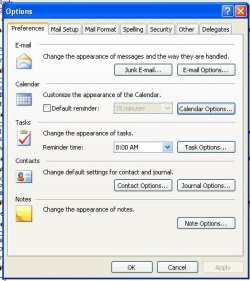
First, the default time to be reminded of an appointment you enter is 18 hours. I assumed there must be an easy way to change this to 1 hour, but after quite a bit of looking I can't find it. Can someone tell me how to change it?
Secondly, the program often changes the "end time" of an appointment to the following day. This is just driving me craqzy. I enter the start time, then how long the appointment will last, save it, and then discover that the program has changed the ending time to the following day. It seems to do it on a random basis, I can't see any rhyme or reason to when it changes it and when it doesn't.
First, the default time to be reminded of an appointment you enter is 18 hours. I assumed there must be an easy way to change this to 1 hour, but after quite a bit of looking I can't find it. Can someone tell me how to change it?
Secondly, the program often changes the "end time" of an appointment to the following day. This is just driving me craqzy. I enter the start time, then how long the appointment will last, save it, and then discover that the program has changed the ending time to the following day. It seems to do it on a random basis, I can't see any rhyme or reason to when it changes it and when it doesn't.
My Computer
- OS
- win 7