Outlook 2007: today cannot send

Banko45

New member
Local time
9:36 AM
Messages
8
I have been reading all the Outlook 2007 'cannot send' comments, but my issue is a new wrinkle. Using my Gmail IPOP function, I have been successfully receiving and sending emails for 4 months with my Outlook 2007. However, starting today, when I try to send a new email or reply to an existing email, the mail goes to my Outbox just fine. But inside my Outbox, the mail is not in italics as it always was before. Hence it never leaves the Outbox.
If have already run SCANPST 3 times, until there are no more errors.
But every time I try to send a new email or reply to an old email, the emails inside my Outbox are still not in italics: so cannot be sent.
Any ideas what is the problem, please?
 
Last edited:

My Computer

Computer Manufacturer/Model Number
Toshiba Portege R830
OS
Operating System Windows 7, 64 bit
The problem is definitely not within the Gmail server (IPOP function). The problem is in the MS Outlook program. The suggestions in 'Troubleshoot Outlook...' does nothing: cannot even access the files they suggest. My solution is to uninstall Office 2007 and installs my old Office 2003. But that does not work either. Why? Because my computer's registry still has all the original Office/Outlook 2007 settings. So, cannot open Outlook 2003, because Outlook is looking for my original .pst file...even after uninstalling Outlook 2007. The registry obviously still has all that original profile info. The only way my new Office installation will be 'new' is if I can remove all my Outlook registries. Anyone know how to do that?
 

My Computer

Computer Manufacturer/Model Number
Toshiba Portege R830
OS
Operating System Windows 7, 64 bit
Here is an MS article for removing Office 2007.
How to uninstall or remove Microsoft Office 2007 suites

Method 4 has the registry info you asked about.

You might want to try the other methods before manually editing the registry.

I always create a System Image Backup before making changes like this.
If something goes wrong and you don't have backup(s) to restore from, you may have a lot more problems!
 

My Computer

Computer type
PC/Desktop
Computer Manufacturer/Model Number
home built
OS
Multi-Boot W7_Pro_x64 W8.1_Pro_x64 W10_Pro_x64 +Linux_VMs +Chromium_VM
CPU
AMD Athlon II x4 620
Motherboard
Gigabyte GA-MA785G-UD3H
Memory
6GB GSkill DDR2 800
Graphics Card(s)
AMD 4670 GPU + AMD 4200 IGP
Sound Card
on board Realtek ALC889A
Monitor(s) Displays
RCA 40" LCD TV, Insignia 32" LCD TV, HP 15" LCD monitor
Screen Resolution
1680 x 1050
Hard Drives
OCZ Vertex 3 120GB,
Samsung F3 1TB (3),
Several others - WD, Seagate, Hitachi, ...
PSU
Corsair 500 W
Case
Rosewill mid tower
Cooling
CM 90mm rifle
Keyboard
Gyration wireless, Logitech wireless, Dell USB wired
Mouse
Gyration wireless, Logitech wireless, V7 USB wired
Internet Speed
Spectrum - 100Mbps D / 10Mbps U
Antivirus
Avast, MBAM3, EMET, WinPatrol
Browser
Pale Moon, Firefox, IE
Other Info
2 multi-boot PC's
Mainly HTPC/Office/Gen purpose (no gaming).
Trendnet USB KVM.
LG DVD burner/Blue Ray Player.
Tray system for removable SATA backup drives.

Not currently OCd, under-volted.
I use Hybrid sleep, rarely re-boot or shutdown.

Hauppauge HD-PVR, Avermedia PCIe TV Tuner, Hauppauge PCI TV Tuner.
Thank you DavidW7ncus. I am going to read through the MS article to see if I can follow it. However, as to creating a System Image Backup: I don't have a clue how to do that. Nor would I know how to use it if there were a resulting problem. I don't have a clue how to work with a System Image Backup if I figured out how to make one. Please understand, I am a complete IT idiot.
 

My Computer

Computer Manufacturer/Model Number
Toshiba Portege R830
OS
Operating System Windows 7, 64 bit
If you're not aware of it, you can log in to the Gmail Web site to send and receive messages.
That would eliminate the need for using Outlook to send messages.
You could use this as a temporary workaround until the Outlook issue is resolved.

Here are a couple of tutorials about Backup Imaging.
I prefer Macrium over Windows Backup as I find it easier to use and understand.
http://www.sevenforums.com/tutorials/73828-imaging-free-macrium.html
http://www.sevenforums.com/tutorials/663-backup-complete-computer-create-image-backup.html

Here a couple more tutorials about using System Restore and backing up the Registry.
http://www.sevenforums.com/tutorials/697-system-restore-point-create.html
http://www.sevenforums.com/tutorials/4230-registry-backup-restore.html

You might be able to do a System Restore now, if you have a Restore Point from before the problem started.
http://www.sevenforums.com/tutorials/700-system-restore.html
That might get your Outlook 2007 working so you can try and figure out what broke it in the first place.

You can use any or all of these backup methods, and have more restore options available whenever needed.
Using one method does not prevent using any of the other methods.

I prefer System Imaging as it is a complete copy of my OS partition and i have used it for years.
I would use any of these backup/restore methods if i ever need to.

I hope I'm not throwing too much at you and confusing the issue.
I just don't want to hear you manually edited the registry and can't boot the PC and have no way to recover without re-installing Windows and all programs!
 

My Computer

Computer type
PC/Desktop
Computer Manufacturer/Model Number
home built
OS
Multi-Boot W7_Pro_x64 W8.1_Pro_x64 W10_Pro_x64 +Linux_VMs +Chromium_VM
CPU
AMD Athlon II x4 620
Motherboard
Gigabyte GA-MA785G-UD3H
Memory
6GB GSkill DDR2 800
Graphics Card(s)
AMD 4670 GPU + AMD 4200 IGP
Sound Card
on board Realtek ALC889A
Monitor(s) Displays
RCA 40" LCD TV, Insignia 32" LCD TV, HP 15" LCD monitor
Screen Resolution
1680 x 1050
Hard Drives
OCZ Vertex 3 120GB,
Samsung F3 1TB (3),
Several others - WD, Seagate, Hitachi, ...
PSU
Corsair 500 W
Case
Rosewill mid tower
Cooling
CM 90mm rifle
Keyboard
Gyration wireless, Logitech wireless, Dell USB wired
Mouse
Gyration wireless, Logitech wireless, V7 USB wired
Internet Speed
Spectrum - 100Mbps D / 10Mbps U
Antivirus
Avast, MBAM3, EMET, WinPatrol
Browser
Pale Moon, Firefox, IE
Other Info
2 multi-boot PC's
Mainly HTPC/Office/Gen purpose (no gaming).
Trendnet USB KVM.
LG DVD burner/Blue Ray Player.
Tray system for removable SATA backup drives.

Not currently OCd, under-volted.
I use Hybrid sleep, rarely re-boot or shutdown.

Hauppauge HD-PVR, Avermedia PCIe TV Tuner, Hauppauge PCI TV Tuner.
I have also been working from the Google server since I opened my Google account, thanks.
Now I have set my restore point and copy/pasted my Registry to my DeskTop.
Trying to follow Microsoft's 'How to uninstall or remove Microsoft Office 2007 suites', but cannot get past the first step.
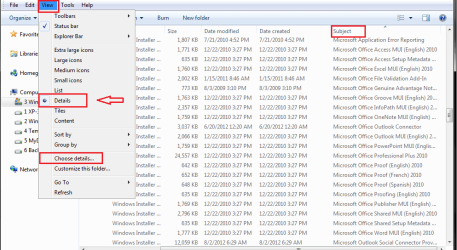
Per the article, from the Start menu, I have gone to programs/accessories/run and typed installer/OK.
Your instructions say, 'On the View menu, click Choose Details...'
But there is not any 'Choose Details' anywhere on the installer page. On the View menu (task bar) above, the only options are Organize, Include in library, Share with, Burn and New folder.
Where is 'Choose Details' please?
Now I am afraid every step in this article will have the same problem: Microsoft 7 will not have the correct instructions.
Is there a more current article that has all the necessary components in my Microsoft 7 OS, please?
 

My Computer

Computer Manufacturer/Model Number
Toshiba Portege R830
OS
Operating System Windows 7, 64 bit
You're referring to Method 4 / Step 1, right?
Did you follow the instructions before Step1 for Folder Options settings and Viewing?
My screen print shows what i see following Method 4 instructions.
What do you see, and can you post a screen print if yours is different?

OfcSP01.png
 

My Computer

Computer type
PC/Desktop
Computer Manufacturer/Model Number
home built
OS
Multi-Boot W7_Pro_x64 W8.1_Pro_x64 W10_Pro_x64 +Linux_VMs +Chromium_VM
CPU
AMD Athlon II x4 620
Motherboard
Gigabyte GA-MA785G-UD3H
Memory
6GB GSkill DDR2 800
Graphics Card(s)
AMD 4670 GPU + AMD 4200 IGP
Sound Card
on board Realtek ALC889A
Monitor(s) Displays
RCA 40" LCD TV, Insignia 32" LCD TV, HP 15" LCD monitor
Screen Resolution
1680 x 1050
Hard Drives
OCZ Vertex 3 120GB,
Samsung F3 1TB (3),
Several others - WD, Seagate, Hitachi, ...
PSU
Corsair 500 W
Case
Rosewill mid tower
Cooling
CM 90mm rifle
Keyboard
Gyration wireless, Logitech wireless, Dell USB wired
Mouse
Gyration wireless, Logitech wireless, V7 USB wired
Internet Speed
Spectrum - 100Mbps D / 10Mbps U
Antivirus
Avast, MBAM3, EMET, WinPatrol
Browser
Pale Moon, Firefox, IE
Other Info
2 multi-boot PC's
Mainly HTPC/Office/Gen purpose (no gaming).
Trendnet USB KVM.
LG DVD burner/Blue Ray Player.
Tray system for removable SATA backup drives.

Not currently OCd, under-volted.
I use Hybrid sleep, rarely re-boot or shutdown.

Hauppauge HD-PVR, Avermedia PCIe TV Tuner, Hauppauge PCI TV Tuner.
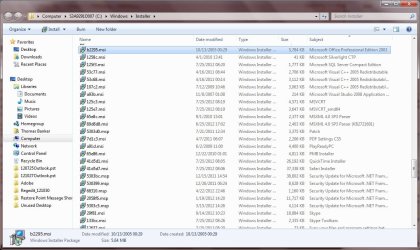
Yes, Method 4. Yes I had already performed all the prerequisites regarding hidden files & folders and hide extensions were already cleared before. For the menu bar, I had been clicking 'alt', but it didn't show the menu bar until just now.
However, please see this attached screen shot: no Office 2007. Only office 2003, because, after uninstalling 2007 for my Outlook problem, I installed 2003 so I could use Word and Excel. But, even when I try to open Outlook in 2003, the registry presets are still in there for 2007, so I cannot open Outlook.
So, where are the 2007 registry items, please?
 

Attachments

  • Installer_121031.jpg
    Installer_121031.jpg
    119.9 KB · Views: 7

My Computer

Computer Manufacturer/Model Number
Toshiba Portege R830
OS
Operating System Windows 7, 64 bit

My Computer

Computer type
PC/Desktop
Computer Manufacturer/Model Number
Packard Bell
OS
Windows 7 Home Premium 64bit
CPU
Intel(R) Core(TM) i3-2120 CPU @ 3.30GHz
Motherboard
Packard Bell IPISB-AG
Memory
3.00 GB
Graphics Card(s)
(1) Intel(R) HD Graphics (2) VNC Mirror Driver
Sound Card
Realtek High Definition Audio
Monitor(s) Displays
AIO LCD
Screen Resolution
1920 x 1080
Hard Drives
WDC WD10EADX-22TDHB0 ATA Device
Fixed hard disk media
4 partitions
931.51 GB
Keyboard
Wireless
Mouse
Wireless
Antivirus
Microsoft Security Essentials
Browser
IE; Firefox
Other Info
Also:
Samsung N220 Plus Netbook - Windows 7 Home
HP laptop
iPad 5
Yes, Method 4. Yes I had already performed all the prerequisites regarding hidden files & folders and hide extensions were already cleared before. For the menu bar, I had been clicking 'alt', but it didn't show the menu bar until just now.
However, please see this attached screen shot: no Office 2007. Only office 2003, because, after uninstalling 2007 for my Outlook problem, I installed 2003 so I could use Word and Excel. But, even when I try to open Outlook in 2003, the registry presets are still in there for 2007, so I cannot open Outlook.
So, where are the 2007 registry items, please?

If you don't find a solution in the link Irene gave you...

Based on your pic you don't have any Office 2007 Installer packages remaining that need to be removed.
So you have completed the requirements for Step 1 and can move on with Step 2.

Unfortunately you have already installed Office 2003 before completing the Office 2007 removal as described in the MS article.
So, your situation is more complicated and following the remaining steps may cause more problems with Office 2003!

The Office 2007 registry keys are documented in Method 4 "Step 5: Remove the registry subkeys of the 2007 Microsoft Office system."

But you need to understand that some of these keys may also be needed for Office 2003!
I don't know for sure, but just a warning !

I would continue on with Step 2 for removing Office 2007 and see what happens.
But, I have backup images i can restore!

You may need to somehow fix Office 2003 after following the guide to uninstall Office 2007.
You may need to find a similar guide for uninstalling Office 2003, or try uninstalling/re-installing Office 2003 after completing the steps to remove Office 2007.

So, for future reference create a backup image before making major system changes so you can restore easily and quickly.
 

My Computer

Computer type
PC/Desktop
Computer Manufacturer/Model Number
home built
OS
Multi-Boot W7_Pro_x64 W8.1_Pro_x64 W10_Pro_x64 +Linux_VMs +Chromium_VM
CPU
AMD Athlon II x4 620
Motherboard
Gigabyte GA-MA785G-UD3H
Memory
6GB GSkill DDR2 800
Graphics Card(s)
AMD 4670 GPU + AMD 4200 IGP
Sound Card
on board Realtek ALC889A
Monitor(s) Displays
RCA 40" LCD TV, Insignia 32" LCD TV, HP 15" LCD monitor
Screen Resolution
1680 x 1050
Hard Drives
OCZ Vertex 3 120GB,
Samsung F3 1TB (3),
Several others - WD, Seagate, Hitachi, ...
PSU
Corsair 500 W
Case
Rosewill mid tower
Cooling
CM 90mm rifle
Keyboard
Gyration wireless, Logitech wireless, Dell USB wired
Mouse
Gyration wireless, Logitech wireless, V7 USB wired
Internet Speed
Spectrum - 100Mbps D / 10Mbps U
Antivirus
Avast, MBAM3, EMET, WinPatrol
Browser
Pale Moon, Firefox, IE
Other Info
2 multi-boot PC's
Mainly HTPC/Office/Gen purpose (no gaming).
Trendnet USB KVM.
LG DVD burner/Blue Ray Player.
Tray system for removable SATA backup drives.

Not currently OCd, under-volted.
I use Hybrid sleep, rarely re-boot or shutdown.

Hauppauge HD-PVR, Avermedia PCIe TV Tuner, Hauppauge PCI TV Tuner.
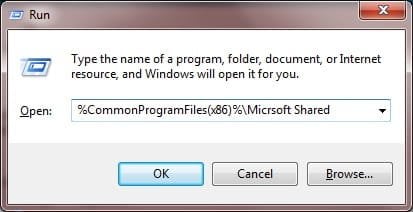
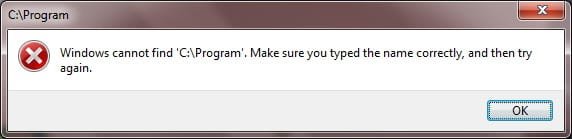
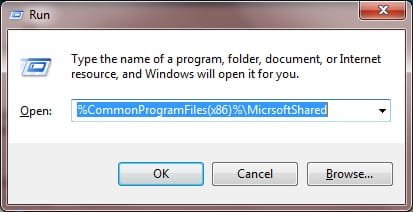
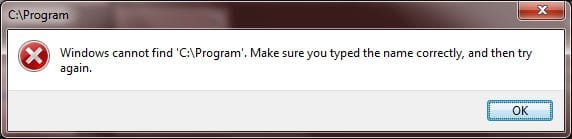
Still working on Method 4, in spite of no Office 2007 appearing in the window from the previous screen shot, I continued on to Step 3, which also does not seem to work. 4 screen shots here show the results of trying to find Office 12 & Source Engine. Whether with a space between 'Microsoft Office', or no space 'MicrosoftOffice', it is not possible to proceed.
What am I doing wrong here, please?
 

Attachments

  • Step3_121101_a.jpg
    Step3_121101_a.jpg
    14.2 KB · Views: 0
  • Step3_121101_b.jpg
    Step3_121101_b.jpg
    10.9 KB · Views: 0
  • Step3_121101_c.jpg
    Step3_121101_c.jpg
    14.2 KB · Views: 0
  • Step3_121101_d.jpg
    Step3_121101_d.jpg
    11 KB · Views: 0

My Computer

Computer Manufacturer/Model Number
Toshiba Portege R830
OS
Operating System Windows 7, 64 bit
Your reply came in while I was composing this new reply with 4 attachments. So, now I'm more confused than ever.
Now you said someone named Irene sent me a link? But I never received anything from an Irene.
Then you say, "for future reference create a backup image before making major system changes so you can restore easily and quickly."
But I have never made any 'images' before, only did made a 'System Restore' point and copied/pasted my regedit.
So, 1) I did not make any 'image' and 2) do not know how to restore anything.
At this point, it is looking like I am going to have to format my hard disc and install all these programs again...from scratch.
Like I said, I am an IT idiot, and obviously don't really understand what you are instructing me.
Do you have any other suggestions easier than formatting my hard disc?
 

My Computer

Computer Manufacturer/Model Number
Toshiba Portege R830
OS
Operating System Windows 7, 64 bit
Trying to follow Microsoft's 'How to uninstall or remove Microsoft Office 2007 suites', but cannot get past the first step.
Could this help?:
Fix problems with programs that can't be installed or uninstalled
The link which I added is in my previous post to your thread. If you touch the blue wording above it will open in a new tab/window.

If, as you say, you are not computer knowledgeable, I would advise you to not to proceed with changes to the registry. I think you said that you have created a restore point - if so, you could restore your system to that point. Read the information in this link --> What is System Restore?
 

My Computer

Computer type
PC/Desktop
Computer Manufacturer/Model Number
Packard Bell
OS
Windows 7 Home Premium 64bit
CPU
Intel(R) Core(TM) i3-2120 CPU @ 3.30GHz
Motherboard
Packard Bell IPISB-AG
Memory
3.00 GB
Graphics Card(s)
(1) Intel(R) HD Graphics (2) VNC Mirror Driver
Sound Card
Realtek High Definition Audio
Monitor(s) Displays
AIO LCD
Screen Resolution
1920 x 1080
Hard Drives
WDC WD10EADX-22TDHB0 ATA Device
Fixed hard disk media
4 partitions
931.51 GB
Keyboard
Wireless
Mouse
Wireless
Antivirus
Microsoft Security Essentials
Browser
IE; Firefox
Other Info
Also:
Samsung N220 Plus Netbook - Windows 7 Home
HP laptop
iPad 5
Thanks Irene - good advice!
+1
 

My Computer

Computer type
PC/Desktop
Computer Manufacturer/Model Number
home built
OS
Multi-Boot W7_Pro_x64 W8.1_Pro_x64 W10_Pro_x64 +Linux_VMs +Chromium_VM
CPU
AMD Athlon II x4 620
Motherboard
Gigabyte GA-MA785G-UD3H
Memory
6GB GSkill DDR2 800
Graphics Card(s)
AMD 4670 GPU + AMD 4200 IGP
Sound Card
on board Realtek ALC889A
Monitor(s) Displays
RCA 40" LCD TV, Insignia 32" LCD TV, HP 15" LCD monitor
Screen Resolution
1680 x 1050
Hard Drives
OCZ Vertex 3 120GB,
Samsung F3 1TB (3),
Several others - WD, Seagate, Hitachi, ...
PSU
Corsair 500 W
Case
Rosewill mid tower
Cooling
CM 90mm rifle
Keyboard
Gyration wireless, Logitech wireless, Dell USB wired
Mouse
Gyration wireless, Logitech wireless, V7 USB wired
Internet Speed
Spectrum - 100Mbps D / 10Mbps U
Antivirus
Avast, MBAM3, EMET, WinPatrol
Browser
Pale Moon, Firefox, IE
Other Info
2 multi-boot PC's
Mainly HTPC/Office/Gen purpose (no gaming).
Trendnet USB KVM.
LG DVD burner/Blue Ray Player.
Tray system for removable SATA backup drives.

Not currently OCd, under-volted.
I use Hybrid sleep, rarely re-boot or shutdown.

Hauppauge HD-PVR, Avermedia PCIe TV Tuner, Hauppauge PCI TV Tuner.
Microsoft Fix-It did not work

Dear Irene and David,
Thank you for your Microsoft fix-it program. I tried it 2 ways. 1st way was with Office 2007 installed: I tried to remove Outlook 2007. Then reinstalled Outlook 2007 from my DVD. Same problem when I try to open Outlook: it looks for my original .pst files and will not open Outlook until it finds the .pst files. So it closes Outlook.
2nd way was to uninstall Office 2007 and run the Microsoft Fix-It program. But it cannot find Office or Outlook 2007.
Does that mean the only solution to remove all of Outlook 2007 is to format my hard disc?
 

My Computer

Computer Manufacturer/Model Number
Toshiba Portege R830
OS
Operating System Windows 7, 64 bit
Does that mean the only solution to remove all of Outlook 2007 is to format my hard disc?

It may not be the ONLY solution, but i think it is your best solution now.
You could spend more time trying to fix the Outlook problem than you would by doing a clean re-install.
You may have more system problems than just the Outlook issue.
Make sure you have all personal data backed up and have a copy for all required Activation/Registration keys before re-installing.

This is my opinion - you can wait to see if others have a better idea.

The http://www.sevenforums.com/tutorials/219487-clean-reinstall-factory-oem-windows-7-a.html tutorial by Gregrocker explains a re-install.

Again, i suggest learning to use Backup/Restore so you can minimize problems like this and recover easily and quickly.
 

My Computer

Computer type
PC/Desktop
Computer Manufacturer/Model Number
home built
OS
Multi-Boot W7_Pro_x64 W8.1_Pro_x64 W10_Pro_x64 +Linux_VMs +Chromium_VM
CPU
AMD Athlon II x4 620
Motherboard
Gigabyte GA-MA785G-UD3H
Memory
6GB GSkill DDR2 800
Graphics Card(s)
AMD 4670 GPU + AMD 4200 IGP
Sound Card
on board Realtek ALC889A
Monitor(s) Displays
RCA 40" LCD TV, Insignia 32" LCD TV, HP 15" LCD monitor
Screen Resolution
1680 x 1050
Hard Drives
OCZ Vertex 3 120GB,
Samsung F3 1TB (3),
Several others - WD, Seagate, Hitachi, ...
PSU
Corsair 500 W
Case
Rosewill mid tower
Cooling
CM 90mm rifle
Keyboard
Gyration wireless, Logitech wireless, Dell USB wired
Mouse
Gyration wireless, Logitech wireless, V7 USB wired
Internet Speed
Spectrum - 100Mbps D / 10Mbps U
Antivirus
Avast, MBAM3, EMET, WinPatrol
Browser
Pale Moon, Firefox, IE
Other Info
2 multi-boot PC's
Mainly HTPC/Office/Gen purpose (no gaming).
Trendnet USB KVM.
LG DVD burner/Blue Ray Player.
Tray system for removable SATA backup drives.

Not currently OCd, under-volted.
I use Hybrid sleep, rarely re-boot or shutdown.

Hauppauge HD-PVR, Avermedia PCIe TV Tuner, Hauppauge PCI TV Tuner.

My Computer

Computer type
PC/Desktop
Computer Manufacturer/Model Number
Packard Bell
OS
Windows 7 Home Premium 64bit
CPU
Intel(R) Core(TM) i3-2120 CPU @ 3.30GHz
Motherboard
Packard Bell IPISB-AG
Memory
3.00 GB
Graphics Card(s)
(1) Intel(R) HD Graphics (2) VNC Mirror Driver
Sound Card
Realtek High Definition Audio
Monitor(s) Displays
AIO LCD
Screen Resolution
1920 x 1080
Hard Drives
WDC WD10EADX-22TDHB0 ATA Device
Fixed hard disk media
4 partitions
931.51 GB
Keyboard
Wireless
Mouse
Wireless
Antivirus
Microsoft Security Essentials
Browser
IE; Firefox
Other Info
Also:
Samsung N220 Plus Netbook - Windows 7 Home
HP laptop
iPad 5
Back
Top