
Solved Outlook 2010 auto complete problems

takenaback

New member
Local time
6:17 AM
Messages
31
I can't get Outlook 2010 auto complete e-mail addresses to remain from session to session. Auto complete is removed every time I start Outlook again. I can put them in every session by dragging all my contacts to the inbox and pressing control + K to initiate auto complete for all my addresses, but once I close down Outlook and restart again they are not there and I have to physically type the address in which is becoming a bit of a drag. As you can see from the following image I have auto complete selected.
2-10-2010 12-23-35 PM.png
Any help would be appreciated.
 

My Computer My Computer

At a glance

Windows 7 64bit UltimateCore i7 870 OC 4GhzKingston 8G(2x2G)2000Mhz PC16000 DDR3Sapphire ATI HD4350 512M DDR2 VGA DVI HDMI LP...
Computer Manufacturer/Model Number
custom-built
OS
Windows 7 64bit Ultimate
CPU
Core i7 870 OC 4Ghz
Motherboard
Gigabyte GA-P55-UD4 P55 DDR3
Memory
Kingston 8G(2x2G)2000Mhz PC16000 DDR3
Graphics Card(s)
Sapphire ATI HD4350 512M DDR2 VGA DVI HDMI LP Silent Heatsin
Sound Card
on-board
Monitor(s) Displays
Asus VK222U
Hard Drives
WD 1TB SATAII HDD 64M Cache Green Power/
WD 1TB SATAII HDD 64M Cache Green Power External esata Backup
PSU
Corsair HX-620
Case
NZXT Hush
Cooling
2 120mm case fans/Noctua NH-U12P Special Edition SE2
Keyboard
Cherry silent keyboard
Mouse
Logitech Marble man mouse wheel
Internet Speed
8.2Mbps/.86Mbps
Other Info
Logitech Z-2300 THX 2.1 Speakers System/Quickcam Pro 9000
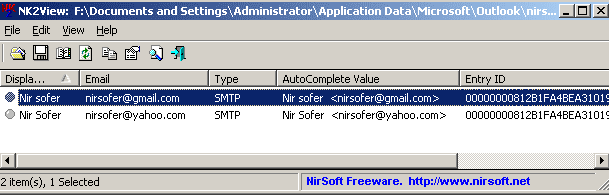
For the benefit of anybody else who has this problem I was having trouble getting the auto complete e-mail list to remain after the current session. I had used a program called PC tuneup and it obviously emptied my auto complete list and my usual method of dragging all my contacts to the inbox and pressing control K would only work for the current session. In other words when I closed outlook and reopened it the auto complete list was empty. I ended up downloading a little app called nk2view and it works really well, not to mention that it made adding e-mail addresses to the auto complete list very easy.
3-10-2010 6-40-48 PM.png
 

My Computer My Computer

At a glance

Windows 7 64bit UltimateCore i7 870 OC 4GhzKingston 8G(2x2G)2000Mhz PC16000 DDR3Sapphire ATI HD4350 512M DDR2 VGA DVI HDMI LP...
Computer Manufacturer/Model Number
custom-built
OS
Windows 7 64bit Ultimate
CPU
Core i7 870 OC 4Ghz
Motherboard
Gigabyte GA-P55-UD4 P55 DDR3
Memory
Kingston 8G(2x2G)2000Mhz PC16000 DDR3
Graphics Card(s)
Sapphire ATI HD4350 512M DDR2 VGA DVI HDMI LP Silent Heatsin
Sound Card
on-board
Monitor(s) Displays
Asus VK222U
Hard Drives
WD 1TB SATAII HDD 64M Cache Green Power/
WD 1TB SATAII HDD 64M Cache Green Power External esata Backup
PSU
Corsair HX-620
Case
NZXT Hush
Cooling
2 120mm case fans/Noctua NH-U12P Special Edition SE2
Keyboard
Cherry silent keyboard
Mouse
Logitech Marble man mouse wheel
Internet Speed
8.2Mbps/.86Mbps
Other Info
Logitech Z-2300 THX 2.1 Speakers System/Quickcam Pro 9000

My Computer My Computer

At a glance

Win 7 x64 Enterprise4GBOnboard
Computer Manufacturer/Model Number
Lenovo X200t
OS
Win 7 x64 Enterprise
Memory
4GB
Graphics Card(s)
Onboard
I guess the lesson here is not to use programs such as PCtuneUp with Win 7 unless one understands all of the ramifications inherent in doing so.
 

My Computer My Computer

At a glance

Windows 7 Ultimate x64 SP1Core2 Duo4 GBGM965 on-board
Computer Manufacturer/Model Number
Toshiba L355D
OS
Windows 7 Ultimate x64 SP1
CPU
Core2 Duo
Motherboard
Intel
Memory
4 GB
Graphics Card(s)
GM965 on-board
Sound Card
RealTek on-board
Monitor(s) Displays
19"+17"(laptop)
Screen Resolution
1440x900 (x 2)
Hard Drives
500GB Ext. 200GB Internal
PSU
N/A
Case
N/A
Cooling
N/A
I actually had the problem recur and using NK2View wouldn't work the second time but I eliminated PC tuneup as the culprit as I hadn't run it a second time. I then downloaded NK2Edit and that rectified the problem. It was brought to my attention that I had corrupted the primary .PST file, emptying the "Suggested Contacts" folder. I did run scanpst.exe located in (c:\Program Files\Microsoft Office\Office14), several errors were found, repaired and this time the problem hasn't recurred. So it is probable that using NK2edit and scanpst.exe both work.
 

My Computer My Computer

At a glance

Windows 7 64bit UltimateCore i7 870 OC 4GhzKingston 8G(2x2G)2000Mhz PC16000 DDR3Sapphire ATI HD4350 512M DDR2 VGA DVI HDMI LP...
Computer Manufacturer/Model Number
custom-built
OS
Windows 7 64bit Ultimate
CPU
Core i7 870 OC 4Ghz
Motherboard
Gigabyte GA-P55-UD4 P55 DDR3
Memory
Kingston 8G(2x2G)2000Mhz PC16000 DDR3
Graphics Card(s)
Sapphire ATI HD4350 512M DDR2 VGA DVI HDMI LP Silent Heatsin
Sound Card
on-board
Monitor(s) Displays
Asus VK222U
Hard Drives
WD 1TB SATAII HDD 64M Cache Green Power/
WD 1TB SATAII HDD 64M Cache Green Power External esata Backup
PSU
Corsair HX-620
Case
NZXT Hush
Cooling
2 120mm case fans/Noctua NH-U12P Special Edition SE2
Keyboard
Cherry silent keyboard
Mouse
Logitech Marble man mouse wheel
Internet Speed
8.2Mbps/.86Mbps
Other Info
Logitech Z-2300 THX 2.1 Speakers System/Quickcam Pro 9000
Back
Top