Solved Outlook 2010 Calendar

PBryant

New member
Local time
9:23 PM
Messages
2
Hello;

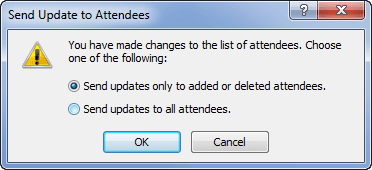
I have an end user (CEO Admin) who generates recurring meetings for senior staff. When she adds an attendee to a meeting, she chooses the option to send only to this attendee - but when saving the change, the notification still goes to all attendees. While not catastrophic, the issue needs resolution.

She is running Windows 7 Enterprise 64 bit with Office 2010 32 bit.

Thank You and I appreciate your help.
 

My Computer

OS
Windows 7 Enterprise 64 bit

Attachments

  • meeting-update-attendees.png
    meeting-update-attendees.png
    6.9 KB · Views: 14

My Computer

Computer type
PC/Desktop
Computer Manufacturer/Model Number
Packard Bell
OS
Windows 7 Home Premium 64bit
CPU
Intel(R) Core(TM) i3-2120 CPU @ 3.30GHz
Motherboard
Packard Bell IPISB-AG
Memory
3.00 GB
Graphics Card(s)
(1) Intel(R) HD Graphics (2) VNC Mirror Driver
Sound Card
Realtek High Definition Audio
Monitor(s) Displays
AIO LCD
Screen Resolution
1920 x 1080
Hard Drives
WDC WD10EADX-22TDHB0 ATA Device
Fixed hard disk media
4 partitions
931.51 GB
Keyboard
Wireless
Mouse
Wireless
Antivirus
Microsoft Security Essentials
Browser
IE; Firefox
Other Info
Also:
Samsung N220 Plus Netbook - Windows 7 Home
HP laptop
iPad 5
Thank You for responding, Irene. Yes, she receives the dialog box and selects to send only to the affected attendee. Now - what I did was to gingerly request an opportunity to observe her process when adding\deleting an attendee to\from an existing meeting. - a dicey request at best - she was a bit grumbly about it. What her process involved was to open the meeting series, which as you know, will open an email type dialog with all the attendees listed in semi-colon separated delineation. What she did was to add or remove the attendee from this list (instead of using the scheduling assistant) and upon clicking "send" would see the afore mentioned dialog box and make the "only this attendee" selection. Since the names of all attendees populated the "To" line, the update would be sent to everyone regardless of her choice. Her reply upon hearing my explanation?

"So, you're saying it was user error?"

imagine my horror. :)
 

My Computer

OS
Windows 7 Enterprise 64 bit
"So, you're saying it was user error?"

imagine my horror. :)

laugh-1.gif
laugh-1.gif


Love it! Glad you're sorted though. ;)
 

My Computer

Computer type
PC/Desktop
Computer Manufacturer/Model Number
Packard Bell
OS
Windows 7 Home Premium 64bit
CPU
Intel(R) Core(TM) i3-2120 CPU @ 3.30GHz
Motherboard
Packard Bell IPISB-AG
Memory
3.00 GB
Graphics Card(s)
(1) Intel(R) HD Graphics (2) VNC Mirror Driver
Sound Card
Realtek High Definition Audio
Monitor(s) Displays
AIO LCD
Screen Resolution
1920 x 1080
Hard Drives
WDC WD10EADX-22TDHB0 ATA Device
Fixed hard disk media
4 partitions
931.51 GB
Keyboard
Wireless
Mouse
Wireless
Antivirus
Microsoft Security Essentials
Browser
IE; Firefox
Other Info
Also:
Samsung N220 Plus Netbook - Windows 7 Home
HP laptop
iPad 5
Back
Top