Outlook 2010 Default Account

Parvardigar

New member
Member
Local time
1:30 AM
Messages
76

I am starting a new thread. Last week I posted a complexsituation with captures attached of a serious issue with Outlook 2010. Before I started work I created a Acronis TIBimage – and as I worked – and degradation developed, tweaking Outlook 2010, Ihad to repeatedly resort to that original image to get back to the originalstarting point/.

I have managed to get Outlook 2010 working except for thisone issue. Please look over the captures attached. It deals with Brent’s emailaccount – listed in duplicate.

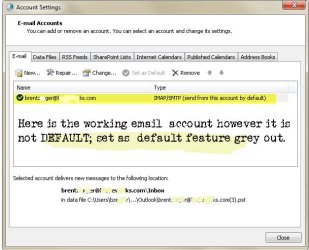
In my experiments I keep ending up with two accounts. InControl Panel/Mail/Email tab is listed the working Brent email account. Thataccount is not marked as Default. Because in Mail/Email Brent account is notmarked as default I have issues. That working Brent account that not marked asDefault I can send and receive.

There are two Brent email accounts. Two exact accounts -with a slight variable. I have in Mail/Emailthis account: [email protected]

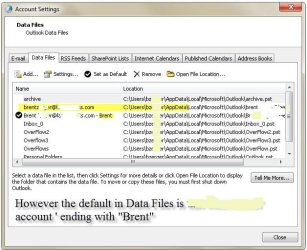
In Mail/Data File I have this:

[email protected]
[email protected]

If [email protected]were marked as Default I would have no issues with the Brent account.

Because the [email protected]is marked as default that creates the problem. And I cannot delete the [email protected]account in Mail/Data File. If I could delete the Default [email protected] Iwould then be able to mark [email protected]as Default.

I have spent days on this this. Creating restore points,creating new TIB files and so forth.

How I ended up with struggling with the two accounts isthis: if I run NK2edit to populate Outlook’s contacts with a massive list ofdata I get the message that NK2edit cannot find the Default email account. Becausein Mail/Email the account listed there is not marked as Default.

I have learned that if I delete the working email account from Data Files I fully and completelycompromise and corrupt the normal functionality of Outlook2010. That I learnedby my previous experiments. Brent canobviously work with Outlook 2010. I have instructed him to ignore [email protected] andto work only with [email protected]

Also I took a look at Regedit/Outlook and thought I couldpossibly delete files that were unused. I will attach this capture also.

One last comment: in my journey I did a Outlook repair. Thatdid not help. I then did a uninstall of Office and reinstalled Office – and Outlookended up with the two accounts.

Thanks for your attentions,
 

Attachments
  • bren001.jpg
    bren001.jpg
    64.3 KB · Views: 10
  • bren003.jpg
    bren003.jpg
    79.8 KB · Views: 10
  • bren00regeditoutlook.jpg
    bren00regeditoutlook.jpg
    122.1 KB · Views: 2

My Computer

Computer type
PC/Desktop
OS
Microsoft Windows 7 Professional 64-bit 7601 Multiprocessor Free Service Pack 1
CPU
Intel(R) Xeon(R) CPU 5150 @ 2.66GHz
Motherboard
Hewlett-Packard 0A08h
Memory
32.00 GB
Graphics Card(s)
(1) LogMeIn Mirror Driver (2) NVIDIA Quadro FX 1500
Sound Card
High Definition Audio Device
Screen Resolution
1280 x 800 x 32 bits (4294967296 colors) @ 74 Hz
Hard Drives
(1) (2) (3)
I rarely use the Control Panel > Mail and profiles when setting up Outlook as POP3 or IMAP. I just leave the profile as the default (Outlook I think.)

For POP3
Install and open Outlook. Continue without email support. It will create a default Outlook.pst in Documents > Outlook Files.
File > Open > Open Outlook Data File and open any and all my transferred .pst
File > Account settings > Data Files and assign the default to whichever I want
Close outlook and reopen with new data file as default.
Right-click the default Outlook file it created and close. Then I delete it.

Now I setup my POP accounts in Account settings email accounts making sure to point to my default pst as I like all mail coming into 1 inbox.

Have not had any issues doing it this way.

HTH
 

My Computer

Computer type
PC/Desktop
OS
Windows 7 Pro 64-bit
In your image:

382790d1456932660-outlook-2010-default-account-bren001.jpg


...your comment that "Set as Default" is greyed out is correct as the selected account is already marked as default.

You need to associate that account with the correct pst file as now it is linked to the Brent pst.

Regards,
GEWB
 

My Computer

Computer type
PC/Desktop
Computer Manufacturer/Model Number
(7 different computers booting up to 10 systems)
OS
Linux Mint / XP / Win7 Home, Pro, Ultimate / Win8.1 / Win10
Other Info
Four desktops, two laptops, one notebook and one tablet
parvardigar. You seem to have email .pst files all over your computer. You have a lot on your C drive, one on your F drive & a lot more on your G drive.

This is your previous thread.
http://www.sevenforums.com/microsoft-office/392225-unable-apply-default-real-email-account.html

With all these .pst files, no wonder you are having problems. As I suggested in your previous Thread, you should copy all these files to a new folder. Here is what I suggested then.

"I would suggest making a new Folder in your Documents section & call it Outlook Old. Then copy all the existing files in C:\Users\bzerger\AppData\Local\Microsoft\Outlook. You should be able to find this under Users. Open Computer from the Start button & select local disc C: & finding Users.

When you have done that, delete all the files in the Outlook folder that were in your Users Outlook folder. You will have to do that with Outlook closed.
Now open Outlook & set up a new email account that you normally use. This will give you completely fresh Outlook .pst & data files. Make sure this account is running the way it should. This email account will now be the Default one. If all is well you can then decide what you need from the old files that have been moved to your documents section. To do this;

Open Outlook, select File & then Open & Export, then Import/Export & follow through on importing old data into the Outlook Users folder. Do not copy any email addresses that are duplicates of the new one you have just set up."

At the time I suggested this I did not realise you also had .pst files on your other drives. You might also consider deleting as many of those .pst files as you can, as they can be very confusing.
 

My Computer

Computer type
PC/Desktop
Computer Manufacturer/Model Number
Self built using existing case
OS
Windows 7 Home Premium 64 bit sp1
CPU
Intel i5 3570 3.4Ghz Ivy Bridge SKT 1155 quad core
Motherboard
Gigabyte Z77-HD3 SKT 1155 2xSata 3, 4x USB 3.0
Memory
G-Skill Rip Jaws 16Gb (8x2) DDR3 -1600 PC3 12800 CL 10 red
Graphics Card(s)
Gigabyte NVIDIA GT610 1Gb DDR3 810/1200 PCI-E 2.0 Silent
Sound Card
NVIDIA High Definition & Realtech High Definition Audio
Monitor(s) Displays
2 x Philips 226V4L 16:9 aspect ratio
Screen Resolution
1920 x 1080 HD
Hard Drives
Samsung 840 Pro 256gb SSD, SATA 3.
Hitachi Touro Portable 1tb, USB 3.0 HDD used for image b/ups.
PSU
Corsair VS450
Case
Codeng
Cooling
PSU fan & CPU fan
Keyboard
Logitech
Mouse
Logitech Wireless trackball M570
Internet Speed
Wireless 3G. 3mg down & 550kb up.
Antivirus
Bitdefender Internet Security 2020
Browser
Opera (Current Version) & Firefox
Other Info
MS Office 2013 Pro. Davis weather station software. MGE Nova 600 avr UPS.
When I worked in corporate America my jobs required numerous PST files under several accounts so what you have is not that unusual. However, I recommend a better organization and naming structure to try and instill some order to your work.

Next, use DuckDuckGo (or Google) to search for setting up accounts and pointing existing PST data files (you may find that the IMPORT function is not what you want!).

Regards,
GEWB
 

My Computer

Computer type
PC/Desktop
Computer Manufacturer/Model Number
(7 different computers booting up to 10 systems)
OS
Linux Mint / XP / Win7 Home, Pro, Ultimate / Win8.1 / Win10
Other Info
Four desktops, two laptops, one notebook and one tablet
Back
Top