OUTLOOK 2010 - EASY MAIL BACKUP Folders etc

jimbo45

New member
Guru
Gold Member
VIP
Local time
8:13 PM
Messages
5,941
Location
Hafnarfjörður IS
Hi all
While there are other methods of "Backing up " Email folders etc this method is EASY.

1) DOWNLOAD PFBACKUP.EXE from the Microsoft site Download details: Outlook 2007/2003/2002 Add-in: Personal Folders Backup

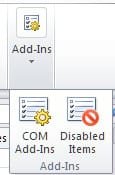
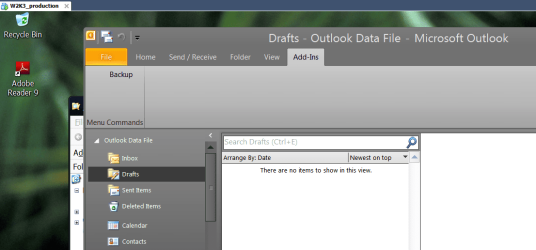
IT DOES work for outlook 2010 but you have to find it in the ADD INS on the menu - image shown.

This IMO is the EASIEST method of saving mail folders - very useful and quick when messing around with office versions on different computers too.

Cheers
jimbo
 

Attachments
  • outlook2010.png
    outlook2010.png
    64.8 KB · Views: 1,042

My Computer My Computer

At a glance

Linux CENTOS 7 / various Windows OS'es and se...Intel i7 Intel i58GB, 16GBOn Motherboard
Computer type
PC/Desktop
Computer Manufacturer/Model Number
Custom built, several laptops HP/ASUS
OS
Linux CENTOS 7 / various Windows OS'es and servers
CPU
Intel i7 Intel i5
Memory
8GB, 16GB
Graphics Card(s)
On Motherboard
Sound Card
Realtek HD audio
Monitor(s) Displays
Apple Cinema display, Samsung LCD
Screen Resolution
1920 X 1080
Hard Drives
4 X 1TB SATA
Mouse
Toshiba wireless laser
Internet Speed
> 20MB up
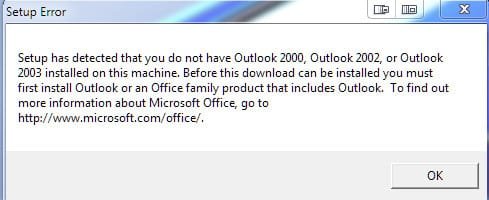
How did you get it to load with office 10? I run and it says error, office 2003 not loaded
 

My Computer My Computer

At a glance

windows 7
OS
windows 7
Hi there
did you download the latest version from MS site.

BTW I DID possibly make an omission -- I was running the 32 bit version of Office 2010 - so it IS possible it doesn't work with Office 2010 X-64 -- My Fault - sorry

It certainly works with Office 2010 X-86.

Cheers
jimbo
 

My Computer My Computer

At a glance

Linux CENTOS 7 / various Windows OS'es and se...Intel i7 Intel i58GB, 16GBOn Motherboard
Computer type
PC/Desktop
Computer Manufacturer/Model Number
Custom built, several laptops HP/ASUS
OS
Linux CENTOS 7 / various Windows OS'es and servers
CPU
Intel i7 Intel i5
Memory
8GB, 16GB
Graphics Card(s)
On Motherboard
Sound Card
Realtek HD audio
Monitor(s) Displays
Apple Cinema display, Samsung LCD
Screen Resolution
1920 X 1080
Hard Drives
4 X 1TB SATA
Mouse
Toshiba wireless laser
Internet Speed
> 20MB up
Yep, got the latest, which is real old. From your link. I am running office 10 x64 bit
 

My Computer My Computer

At a glance

windows 7
OS
windows 7
it does not come on the outlook of the user but on admin...

I have installed win 7 and office 2010 on a workstation and the user I am logged on is not administrator of the local computer or of the Active Directory (yes, the computer is member of an AD, and so is the user I am logged on).
I tried to install the add-on for backing up the mail in outlook, and I was asked to give an administrator's user credentials, and to my surprise, the add-on was added to the outlook of the administrator account on that machine... (I speak about the administrator of the Domain, which had its office 2010 and outlook (with his account) on the same machine...
How can I install the add in on the outlook of the user I am logged in (which is not administrator)?
 

My Computer My Computer

At a glance

win 7
OS
win 7
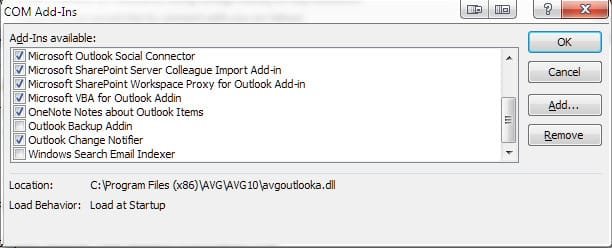
Definitely doesn't work on the 64 bit Office 2010 version of Outlook:
ScreenShot00033.jpg

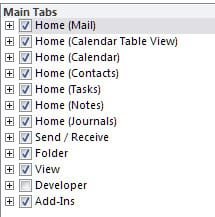
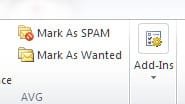
I fact, even though I have add-ins checked:
ScreenShot00034.jpg

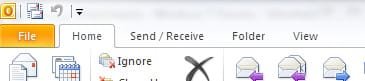
It does not show on the Ribbon:
ScreenShot00035.jpg

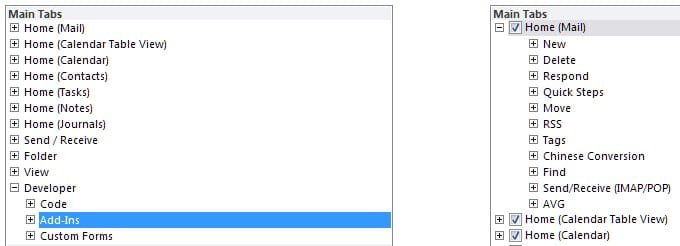
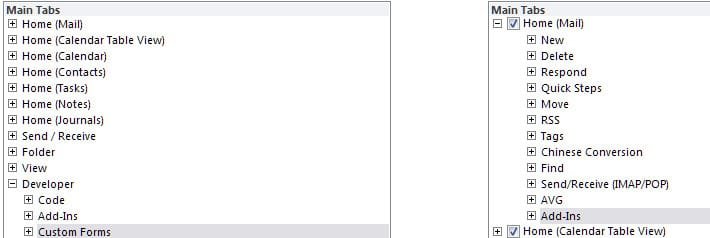
EDIT: I found a way to add the "Add-ins" via the developer tab
ScreenShot00040.jpg

...to the Home menu
ScreenShot00041.jpg ScreenShot00042.jpg ScreenShot00043.jpg

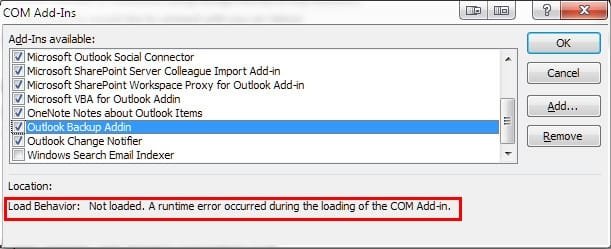
...then check the backup addin
ScreenShot00039.jpg

...but it doesn't stick
ScreenShot00045.jpg

Apparently, the backup add-in is left over from my Office 2007 install since I could not re-install the down load. Might as well uninstall it...

I have also learned the Add-ins Ribbon tab will not appear unless one has a compatible add-in installed.

This is a developer site but it explains the issue:
The "Add-ins" tab in Office 2010 is a special dynamic tab that contains only visible custom command bar controls that were added by a COM add-in code to the CommandBars collection. If your add-in does not add command bar controls or adds but makes them invisible, the "Add-ins" tab will not show up.
 
Last edited:

My Computer My Computer

At a glance

Windows 7 Ultimate x64 SP1Core2 Duo4 GBGM965 on-board
Computer Manufacturer/Model Number
Toshiba L355D
OS
Windows 7 Ultimate x64 SP1
CPU
Core2 Duo
Motherboard
Intel
Memory
4 GB
Graphics Card(s)
GM965 on-board
Sound Card
RealTek on-board
Monitor(s) Displays
19"+17"(laptop)
Screen Resolution
1440x900 (x 2)
Hard Drives
500GB Ext. 200GB Internal
PSU
N/A
Case
N/A
Cooling
N/A
Works oob with 2010 x86 - thanks Jimbo ;)
 

My Computers My Computers

  • At a glance

    Windows 11 Pro x64 [Latest Release and Releas...Ryzen 9 5950X, 3.8 - 5.2 MHz64GB [2 x 32GB] DDR4 3200MHz4GB NVIDIA GEFORCE GTX 1650 Ti
    Computer type
    PC/Desktop
    Computer Manufacturer/Model Number
    ChillBlast - Custom to my design
    OS
    Windows 11 Pro x64 [Latest Release and Release Preview]
    CPU
    Ryzen 9 5950X, 3.8 - 5.2 MHz
    Motherboard
    Asus Prime X570-Pro
    Memory
    64GB [2 x 32GB] DDR4 3200MHz
    Graphics Card(s)
    4GB NVIDIA GEFORCE GTX 1650 Ti
    Sound Card
    On-board SPDIF to 5.1 System + HDMI [5.1 system]
    Monitor(s) Displays
    32" UHD 32 Bit HDR Monitor + 43" UHD 4K 32Bit HDR TV
    Screen Resolution
    2 x 3840 x 2160 @60Hz
    Hard Drives
    1TB M2 SSD OS, 500GB Fast Access SSD, 2 x 8TB Data + Various Externals from 1TB to 4TB, 10TB NAS
    PSU
    NZXT C750 80 PLUS Gold 750W Modular PSU
    Case
    Workstation Case [Matt Black]
    Cooling
    NZXT Kraken X63 280mm CPU Cooler +2x Quiet Case fans
    Keyboard
    Logitech Wireless MX Keys & K400 + others
    Mouse
    Logitech Wireless MX Master 3S
    Internet Speed
    920 MB Down 50 MB Up
    Antivirus
    BitDefender Total Security Pro
    Browser
    Chrome (always run latest Non-Beta)
    Other Info
    Also run ...
    Laptop - Quad 8GB - Windows 10 Pro x64
    Nexus 7 Android tablet x2
    Samsung 10.2" tablet
    Blackview TAB 8 4G Android Tablet c/w Keyboard
    Wacom Intuos Pro Medium Pen Pad
    Wacom Intuos Pro Small Pen Pad
    Wacom Expresskeys Remote
    Loopdeck+ Graphics Controller
    Shuttle Pro v2 Control
  • At a glance

    Windows 11 Pro x64 Latest RPIntel I7 10750H 5.0GHz32GB [2x16GB] DDR4 2933 MHznVidia GTX1650Ti 4 GB GDDR6
    Computer type
    Laptop
    System Manufacturer/Model Number
    Dell XPS 17 10750H
    OS
    Windows 11 Pro x64 Latest RP
    CPU
    Intel I7 10750H 5.0GHz
    Motherboard
    Dell XPS
    Memory
    32GB [2x16GB] DDR4 2933 MHz
    Graphics Card(s)
    nVidia GTX1650Ti 4 GB GDDR6
    Sound Card
    Stock [Realtek] 4 Speaker
    Monitor(s) Displays
    17" IPS UHD+ Infinity Edge Touchscreen
    Screen Resolution
    3840 x 2400
    Hard Drives
    2TB M2 NVMe, 4TB External + various 500GB & 1TB External NVMe (also have access to spinner HDD from
    PSU
    Stock
    Case
    Stock XPS Aluminium & Carbon Fibre
    Cooling
    Stock - Active Fan Control
    Keyboard
    Backlit + Various Logitech
    Mouse
    Stock Track Pad + Logitech MX Trackball
    Internet Speed
    72 MB Down 18MB Up
    Browser
    Chrome
    Other Info
    Also run ...
    Laptop - Quad 8GB - Windows 10 Pro x64
    Nexus 7 Android tablet x2
    10.2" tablet
    Sony Z3 Android Smartphone
    Wacom Intuos Pro Medium Pen Pad
    Wacom Intuos Pro Small Pen Pad
    Wacom Expresskeys Remote
    Loopdeck+ Graphics Controller
    Shuttle Pro v2 Control Pad
    10TB NAS
Back
Top