Solved Outlook 2010 - Formatting non read titles

amflores

New member
Member
Local time
7:49 PM
Messages
97
Location
Rio de Janeiro, Brazil
Hello,

How do I format the titles of non-read messages in my Outlook 2010?
I wish I could format them in bold and color so they willl standout among the read ones, allowing me not to forget about them.

I understand this formatting is possible, but don't know how to do.

Help will be appreciated .

Cheers,
Flores
 

My Computer My Computer

At a glance

Windows 7 Home Premium 32bits
Computer type
Laptop
Computer Manufacturer/Model Number
DELL Vostro 1510
OS
Windows 7 Home Premium 32bits
Hard Drives
Seagate external HD 500Gb
Browser
IE11 and Chrome
Other Info
DELL Vostro 1510
Here's how:
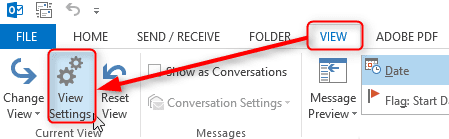
  • Click Ribbon > View > View settings:

    2014-04-13_14h29_10.png
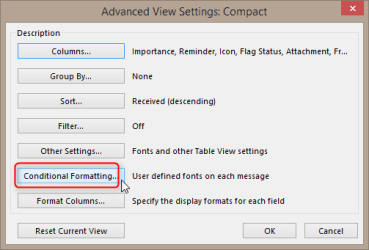
  • Click Conditional Formatting:

    2014-04-13_14h30_13.png
  • Select Unread messages, click Font:

    2014-04-13_14h30_52.png
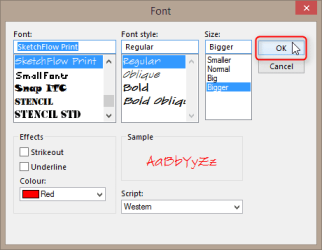
  • Change the font for Unread messages as you wish, click OK:

    2014-04-13_14h32_16.png
  • Click OK to close Conditional Formatting dialog
  • Click OK to close Advanced View settings dialog
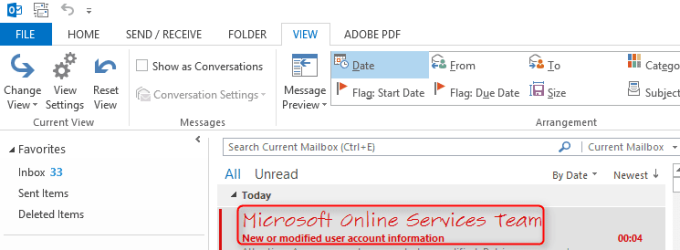
  • Now your unread messages are shown as you want to:

    2014-04-13_14h33_07.png
Please notice you have to do this separately for each mailbox, for instance if you have set up both your work and private email in Outlook and they are set up using their own respective mailbox / PST file, you need to change the settings as told above on both mailboxes.

Kari
 

My Computer My Computer

At a glance

Windows 10 Pro x64 EN-GB1.6 GHz Intel Core i7-720QM Processor6 GBATI Mobility Radeon HD 5850 Graphics
Computer type
Laptop
Computer Manufacturer/Model Number
HP ENVY 17-1150eg
OS
Windows 10 Pro x64 EN-GB
CPU
1.6 GHz Intel Core i7-720QM Processor
Memory
6 GB
Graphics Card(s)
ATI Mobility Radeon HD 5850 Graphics
Sound Card
Beats sound system with integrated subwoofer
Monitor(s) Displays
17" laptop display, 22" LED and 32" Full HD TV through HDMI
Screen Resolution
1600*900 (1), 1920*1080 (2&3)
Hard Drives
Internal: 2 x 500 GB SATA Hard Disk Drive 7200 rpm
External: 2TB for backups, 3TB USB3 network drive for media
Cooling
As Envy runs a bit warm, I have it on a Cooler Master pad
Keyboard
Logitech diNovo Media Desktop Laser (bluetooth)
Mouse
Logitech Performance Mouse MX
Internet Speed
50/10 Mbps VDSL
Antivirus
Windows Defender 4.3.9431.0
Browser
Maxthon 3.5.2., IE11
Hi Kari,

That simple!!!!

Thanks a lot for your didactic help.

Regards,
Flores
 

My Computer My Computer

At a glance

Windows 7 Home Premium 32bits
Computer type
Laptop
Computer Manufacturer/Model Number
DELL Vostro 1510
OS
Windows 7 Home Premium 32bits
Hard Drives
Seagate external HD 500Gb
Browser
IE11 and Chrome
Other Info
DELL Vostro 1510
You are welcome :).
 

My Computer My Computer

At a glance

Windows 10 Pro x64 EN-GB1.6 GHz Intel Core i7-720QM Processor6 GBATI Mobility Radeon HD 5850 Graphics
Computer type
Laptop
Computer Manufacturer/Model Number
HP ENVY 17-1150eg
OS
Windows 10 Pro x64 EN-GB
CPU
1.6 GHz Intel Core i7-720QM Processor
Memory
6 GB
Graphics Card(s)
ATI Mobility Radeon HD 5850 Graphics
Sound Card
Beats sound system with integrated subwoofer
Monitor(s) Displays
17" laptop display, 22" LED and 32" Full HD TV through HDMI
Screen Resolution
1600*900 (1), 1920*1080 (2&3)
Hard Drives
Internal: 2 x 500 GB SATA Hard Disk Drive 7200 rpm
External: 2TB for backups, 3TB USB3 network drive for media
Cooling
As Envy runs a bit warm, I have it on a Cooler Master pad
Keyboard
Logitech diNovo Media Desktop Laser (bluetooth)
Mouse
Logitech Performance Mouse MX
Internet Speed
50/10 Mbps VDSL
Antivirus
Windows Defender 4.3.9431.0
Browser
Maxthon 3.5.2., IE11
Back
Top