Outlook 2010 hangs "Loading" - pls help

zapp22

New member
Power User
VIP
Local time
2:45 PM
Messages
730
Location
Tejas, northern Mexico
this is a bit of a critical issue - big Outlook 2010 client running on a netbook, big data store/s. I figured someday it would be an issue and we're there.
basically I can't get the patient to lie still - when we open, it hangs "loading" - presumably jjust loading the main profile.
Need some tips.

should I run scanpst.exe? if so, ... :( i've noticed that scanpst isn't always installed... its not on my own Office 2007 pro. ms adamantly claims I'm defective but it just ain't on the drive.

I plan to try to get it to run in safe mode, but then what?
 

My Computer

Computer Manufacturer/Model Number
HP DC7600, HP DC7600[2], HP DC7100, Samsung NC10
OS
Windows XP Pro SP3, Windows 7 Pro 32-bit, Windows 7 Ultimate 64bit, Windows XP Home SP3

CPU
Pentium 4 3.2GHz, Pentium 4 3.4GHz 64bit, Atom,
Motherboard
Dunno
Memory
4GB matched, 1GB, 2.5GB, 4.0 GB
Graphics Card(s)
Geforce 8400 GS and others
Sound Card
RealteK ALC260 and others
Monitor(s) Displays
Asus HD
Screen Resolution
1920x1080
Hard Drives
WD Caviar 640gb SATA
Cooling
We Be Cool
confirmed. no "scanpst.exe" is on the HD...office 2010, just like Office 2007
 

My Computer

Computer Manufacturer/Model Number
HP DC7600, HP DC7600[2], HP DC7100, Samsung NC10
OS
Windows XP Pro SP3, Windows 7 Pro 32-bit, Windows 7 Ultimate 64bit, Windows XP Home SP3
CPU
Pentium 4 3.2GHz, Pentium 4 3.4GHz 64bit, Atom,
Motherboard
Dunno
Memory
4GB matched, 1GB, 2.5GB, 4.0 GB
Graphics Card(s)
Geforce 8400 GS and others
Sound Card
RealteK ALC260 and others
Monitor(s) Displays
Asus HD
Screen Resolution
1920x1080
Hard Drives
WD Caviar 640gb SATA
Cooling
We Be Cool
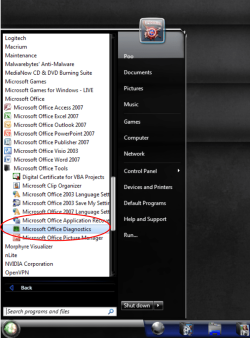
You should have a "microsoft diagnostics" tool under

> Start
> All programs
> Microsoft office
> Microsoft office tools
> Microsoft office diagnostics

This is the new detect and repair option ... soz I don't have office 2010 but it's supposed to be the same as 2007, hope this helps ;)
 

Attachments

  • microsoft diagnostics.png
    microsoft diagnostics.png
    145.1 KB · Views: 32

My Computer

Computer type
PC/Desktop
Computer Manufacturer/Model Number
Self Built
OS
Windows 7 Ultimate 64bit
CPU
AMD Phenom Quad core 9950 black edition
Motherboard
Gigabyte
Memory
16Gb
Graphics Card(s)
2x XFX Radeon 5850
Sound Card
PCI Express X-Fi Titanium / Logitech G35
Monitor(s) Displays
2x HP 2410i
Screen Resolution
1920x1080
Hard Drives
2x 500Gb Seagate
1x 300Gb Seagate
1x 1Tb Seagate
2x 1Tb Hitatchi
PSU
Jean Tech Storm 700W
Case
Cooler Master COSMOS S
Cooling
Akasa Evo Blue Pro
Keyboard
Logitech G15
Mouse
Mad Catz M.M.O. 7
Internet Speed
12mb
we'll give it a shot.
how do I stop outlook 2010 from trying to [unsuccessfully] load a profile? tried msconfig>diagnostic startup> outlook.exe /safe trying to run the embedded cleanup tools, but hung again.
 

My Computer

Computer Manufacturer/Model Number
HP DC7600, HP DC7600[2], HP DC7100, Samsung NC10
OS
Windows XP Pro SP3, Windows 7 Pro 32-bit, Windows 7 Ultimate 64bit, Windows XP Home SP3
CPU
Pentium 4 3.2GHz, Pentium 4 3.4GHz 64bit, Atom,
Motherboard
Dunno
Memory
4GB matched, 1GB, 2.5GB, 4.0 GB
Graphics Card(s)
Geforce 8400 GS and others
Sound Card
RealteK ALC260 and others
Monitor(s) Displays
Asus HD
Screen Resolution
1920x1080
Hard Drives
WD Caviar 640gb SATA
Cooling
We Be Cool
how to manually copy/save the main data files so that the folders/contents and stashed data is not lost if we uninstall/reinstall?
 

My Computer

Computer Manufacturer/Model Number
HP DC7600, HP DC7600[2], HP DC7100, Samsung NC10
OS
Windows XP Pro SP3, Windows 7 Pro 32-bit, Windows 7 Ultimate 64bit, Windows XP Home SP3
CPU
Pentium 4 3.2GHz, Pentium 4 3.4GHz 64bit, Atom,
Motherboard
Dunno
Memory
4GB matched, 1GB, 2.5GB, 4.0 GB
Graphics Card(s)
Geforce 8400 GS and others
Sound Card
RealteK ALC260 and others
Monitor(s) Displays
Asus HD
Screen Resolution
1920x1080
Hard Drives
WD Caviar 640gb SATA
Cooling
We Be Cool
You need to backup your pst file. This can be found in

c:\Users\YourName\AppData\Local\Microsoft\Outlook

ScanPst is located in

32-bit Windows; C:\Program Files\Microsoft Office\Office14
64-bit Windows; C:\Program Files (x86)\Microsoft Office\Office14
 

My Computer

Computer type
PC/Desktop
Computer Manufacturer/Model Number
Self Built
OS
Windows 7 Ultimate 64bit
CPU
AMD Phenom Quad core 9950 black edition
Motherboard
Gigabyte
Memory
16Gb
Graphics Card(s)
2x XFX Radeon 5850
Sound Card
PCI Express X-Fi Titanium / Logitech G35
Monitor(s) Displays
2x HP 2410i
Screen Resolution
1920x1080
Hard Drives
2x 500Gb Seagate
1x 300Gb Seagate
1x 1Tb Seagate
2x 1Tb Hitatchi
PSU
Jean Tech Storm 700W
Case
Cooler Master COSMOS S
Cooling
Akasa Evo Blue Pro
Keyboard
Logitech G15
Mouse
Mad Catz M.M.O. 7
Internet Speed
12mb
scanpst isn't there.

Reading through the notes on Diagnostics I wouldn't think it could help this sort of issue. Apparently what we've run afoul of is well known.
see: Complete Outlook 2010 Lock-Up when accessing archive pst files

a remarkable 'pile-on' toward the end of the thread. I did not do the Exchange installation, but given the unremarkable skills of the crew that did, I bet they did what folks in that thread did, setting up Exchange in a manner that ignores the idiosyncrasies of a client [the boss in this case] using Office 2010. they all wish they had banned MSO 2010 and stuck with MSO 2007 for mail purposes... yikes.

So, any idea what I need to rename/delete on the local hard drive to have any chance of successfully rebuilding the client? Exchange is nominally working ok - OWA works
 

My Computer

Computer Manufacturer/Model Number
HP DC7600, HP DC7600[2], HP DC7100, Samsung NC10
OS
Windows XP Pro SP3, Windows 7 Pro 32-bit, Windows 7 Ultimate 64bit, Windows XP Home SP3
CPU
Pentium 4 3.2GHz, Pentium 4 3.4GHz 64bit, Atom,
Motherboard
Dunno
Memory
4GB matched, 1GB, 2.5GB, 4.0 GB
Graphics Card(s)
Geforce 8400 GS and others
Sound Card
RealteK ALC260 and others
Monitor(s) Displays
Asus HD
Screen Resolution
1920x1080
Hard Drives
WD Caviar 640gb SATA
Cooling
We Be Cool
just another suggestion

Could there have been any new Outlook Add-ins installed recently?
The Loading screen is where Outlook loads all the Add-Ins
 

My Computer

OS
Windows 7 Professional x64, Windows 7 Professional x32
CPU
i7-2630QM 2.00GHz
Memory
4GB
Graphics Card(s)
Nvidia GeForce 540M
Internet Speed
12Mbps
Back
Top