outlook 2010 increase .OST automatically.

cheitac

New member
Local time
10:07 AM
Messages
5
Hi all.

My Outlook data file (.ost) increase automaticallly it uses 49GB disk spase. after that it crashes or become unresponding. after deleting file and reopen outlook it connects server and download mails. after two or three dayes data file increase automatically.:confused: I use cached exchange mode and my inbox is only 1.5GB why outlook increase OST size to 49GB. how can i fix it?

I Try another computer and have same problem with that account.
thanks!
 

My Computer My Computer

Computer Manufacturer/Model Number
Acer
OS
Windows 7 Ultimate x64
CPU
i7
Motherboard
acer
Memory
4GB
Graphics Card(s)
2GB
Hard Drives
500GB
PSU
750
Welcome to Seven Forums,

Have you checked your Outlook's Folder Size and see which one is taking up a lot space -Inbox, Sent items, etc.?
You may move large files to your Archive folder.

Also, have you tried compressing the .ost file?
How to compact PST and OST files to eliminate deleted item space in Outlook

Have you talked to your Network/Exchange Admin? He can set a limit on your Mailbox Quota in Exchange Server to prevent this. Each employee in our network is limited bet. 2 to 5gb max per User mailbox.

Also, your issue need to be dealt with by your Network Admin.
 

My Computer My Computer

Computer Manufacturer/Model Number
Lenovo Desktop/Samsung Laptop
OS
Win7 & Win8 64bit
CPU
Intel i5
Internet Speed
Charter-20 Mbps
Antivirus
Avast
Browser
FF, IE9 and Chrome
outlook .ost increase in size

Thanks for reply! :)

I have 5GB quota on exchange server. I'm interesting why network admin? what might be problem? I noticed that same problem have other three users too. i check inbox folder sizes and all are same size that situated on exchange. why outlook increase size?
thanks.
 

My Computer My Computer

Computer Manufacturer/Model Number
Acer
OS
Windows 7 Ultimate x64
CPU
i7
Motherboard
acer
Memory
4GB
Graphics Card(s)
2GB
Hard Drives
500GB
PSU
750
Did you manually delete the .ost file?
after deleting file and reopen outlook it connects server and download mails.
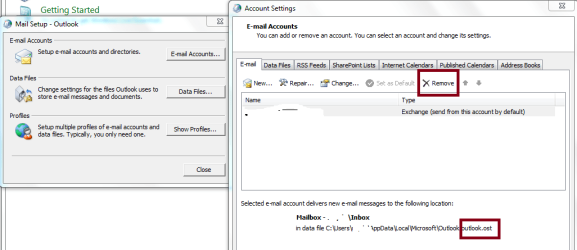
Why not remove the exchange email account from Control Panel>Mail then reconfigure email exchange account again? This will re-create a new .ost. Have you also done this? See attached file, I have erased sensitive info, just an FYI.

Also, are you guys using Microsoft CRM Add-on to your Outlook?
 

Attachments

  • Exchange-Capture.PNG
    Exchange-Capture.PNG
    23.3 KB · Views: 105

My Computer My Computer

Computer Manufacturer/Model Number
Lenovo Desktop/Samsung Laptop
OS
Win7 & Win8 64bit
CPU
Intel i5
Internet Speed
Charter-20 Mbps
Antivirus
Avast
Browser
FF, IE9 and Chrome
outlook .ost increase aotomatically

Hi all!

We try to remove and recreate. but same occur. We try another new computer with new os too. there was same problem. i noticed that there are some users with same problems too and there numbers increase in weeks.

What might be problem?
 

My Computer My Computer

Computer Manufacturer/Model Number
Acer
OS
Windows 7 Ultimate x64
CPU
i7
Motherboard
acer
Memory
4GB
Graphics Card(s)
2GB
Hard Drives
500GB
PSU
750
I'd check the Event Viewer logs from Exchange Server, something is not right.

I have never encountered this type of issue yet, hopefully I won't. :D
 

My Computer My Computer

Computer Manufacturer/Model Number
Lenovo Desktop/Samsung Laptop
OS
Win7 & Win8 64bit
CPU
Intel i5
Internet Speed
Charter-20 Mbps
Antivirus
Avast
Browser
FF, IE9 and Chrome
Thanks for reply! :)

I have 5GB quota on exchange server. I'm interesting why network admin? what might be problem? I noticed that same problem have other three users too. i check inbox folder sizes and all are same size that situated on exchange. why outlook increase size?
thanks.

Hmm, thinking out loud here...

Have the admin DOUBLE CHECK the user quota.

If I recall, using the Exchange Management Console (EMC) one sets the limits in KB, or if using the Exchange Management Shell one uses MB to set the limits.

It is really EASY to be "off" by a few digits so "5GB" becomes "50GB" (where 50GB becomes a 49GB file on the local hard drive) especially if you think you're using MB when it should be KB.

Keep us posted!

Regards,
GEWB
 

My Computer My Computer

Computer type
PC/Desktop
Computer Manufacturer/Model Number
(7 different computers booting up to 10 systems)
OS
Linux Mint / XP / Win7 Home, Pro, Ultimate / Win8.1 / Win10
Other Info
Four desktops, two laptops, one notebook and one tablet
user quota on server is true. i use GUI and set it in KB. on server side i think all is ok.
 

My Computer My Computer

Computer Manufacturer/Model Number
Acer
OS
Windows 7 Ultimate x64
CPU
i7
Motherboard
acer
Memory
4GB
Graphics Card(s)
2GB
Hard Drives
500GB
PSU
750
Server value in KB = 5242880

Can you confirm?

Regards,
GEWB
 

My Computer My Computer

Computer type
PC/Desktop
Computer Manufacturer/Model Number
(7 different computers booting up to 10 systems)
OS
Linux Mint / XP / Win7 Home, Pro, Ultimate / Win8.1 / Win10
Other Info
Four desktops, two laptops, one notebook and one tablet
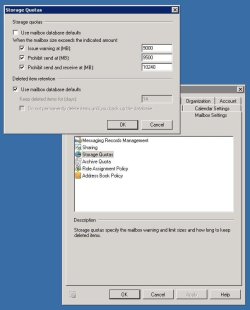
I have this configuration on one user who have same problem

mailbox quota.jpg
 

My Computer My Computer

Computer Manufacturer/Model Number
Acer
OS
Windows 7 Ultimate x64
CPU
i7
Motherboard
acer
Memory
4GB
Graphics Card(s)
2GB
Hard Drives
500GB
PSU
750

My Computer My Computer

Computer Manufacturer/Model Number
Lenovo Desktop/Samsung Laptop
OS
Win7 & Win8 64bit
CPU
Intel i5
Internet Speed
Charter-20 Mbps
Antivirus
Avast
Browser
FF, IE9 and Chrome
Back
Top