

I have configured Outlook 2010 to filter out top level international domains and other languages (encoding options). It's all coming in to my inbox instead of junk mail folder. Have all updates. I keep getting spam from China so either the blocking of top level domain or Chinese characters should be caught. Set to Low and trying High settings.
My Computer
At a glance
Windows 7 Professional x64, SP1i5-520M8GB DDR3ATI HD 4570, 512K
- Computer Manufacturer/Model Number
- Dell Studio 15 1558 Laptop
- OS
- Windows 7 Professional x64, SP1
- CPU
- i5-520M
- Memory
- 8GB DDR3
- Graphics Card(s)
- ATI HD 4570, 512K
- Hard Drives
- Intel 320, 120GB
- Other Info
- Back-lit KB, web cam, 9 cell battery.


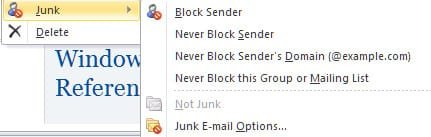

 I have a long list of blocked senders. Since it's not filtering on encoding either, something is fubarred. I just checked and it did dump one into the junk email bucket with Chinese characters. But my guess is because I changed the settings from Low to High. I only POP my two domain name adresses in Outlook and use Gmail for everything else. I already added CN.COM. I was using Office 2003. Uninstalled it, cleaned the registry, re-boooted and then installed Office 2010. One of the reasons I moved from 2003 to 2010 was the lack of filtering junk email well. Opted for 32 bit Office 2010 FWIW.
