Solved Outlook 2010- Running script error

momanium

New member
Member
Local time
11:38 PM
Messages
50
Hi, My Outlook has started giving me this issue everytime I start it. Any Ideas of why it says "an error has occured in the script on this page". Any ideas:confused:, PICTURE ATTATCHED
 

Attachments

  • Outlook opening error.jpg
    Outlook opening error.jpg
    12.1 KB · Views: 23

My Computer

OS
Windows Xp Home 32 Bit, Windows 7 Home Premium 64 bit

Hi,

We need a bit more detail please. Did this just start by itself, or after you changed something? When does this error occur -- what are you clicking to make this happen? Have you received any unusual spam email these last few days?

Regards,
Golden
 

My Computer

Computer type
PC/Desktop
Computer Manufacturer/Model Number
Golden Mk. I.4
OS
Windows 10 Pro x64 ; Xubuntu x64
CPU
Intel i7 860 @ 2.80 GHz O/C'ed to 4.0GHz
Motherboard
Gigabyte P55A-UD3R Rev.1. Award BIOS F13
Memory
16GB Corsair Vengance DDR3 @ 661 MHz Dual Channel (9-9-9-24)
Graphics Card(s)
EVGA NVidia GTX 560 1024MB
Sound Card
Realtek Integrated
Monitor(s) Displays
Dual Samsung SyncMaster 2494HS
Screen Resolution
1920*1080 and 1920*1080
Hard Drives
1*Samsung 840 EVO 120GB SSD;
1*OCZ Vertex 2 60GB SSD;
2*Samsung F3 SpinPoint 1TB in RAID0;
1*Samsung F1 SpinPoint 1TB;
2*Western Digital 1TB External USB 3.0
1*Western Digital 500GB External USB 3.0
1*Seagate 500GB External USB 2.0
PSU
Thermaltake ToughPower QFan 750W
Case
Thermaltake Element S VK60001W2Z
Cooling
Corsair H60 Water Cooling, 2*230mm and 2*80mm case fans
Keyboard
Logitech G110
Mouse
Logitech MX518
Hi thanks for replying, I dont think I made any major changes. It just happens right after I open Outlook automatically. Also, I havent reveived any weird email
 

My Computer

OS
Windows Xp Home 32 Bit, Windows 7 Home Premium 64 bit
Hi, momanium! :)

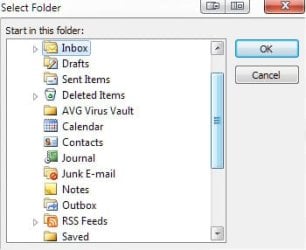
There are a few areas in Outlook that can be examined for this error. The most common error would be a message in your inbox, formatted as HTML, has a bad JS attached. I am assuming you have Outlook configured to open into your inbox upon start up, correct?

ScreenShot00364.jpg

You could temporarily change the start up location as indicated above to "Calendar" (see below) then check to see if the issue continues. If it does not, it is definitely an issue with a message you have received.

ScreenShot00365.jpg

I'm not suggesting you leave it changed, just presenting it as a trouble shooting method to narrow the source of the issue you are having.

The other area to examine would be add-ins. Trouble shoot the messages in the inbox as described above, first, and, if that doesn't fix it, we can work from there.
 

My Computer

Computer Manufacturer/Model Number
Toshiba L355D
OS
Windows 7 Ultimate x64 SP1
CPU
Core2 Duo
Motherboard
Intel
Memory
4 GB
Graphics Card(s)
GM965 on-board
Sound Card
RealTek on-board
Monitor(s) Displays
19"+17"(laptop)
Screen Resolution
1440x900 (x 2)
Hard Drives
500GB Ext. 200GB Internal
PSU
N/A
Case
N/A
Cooling
N/A
  • Like
Reactions: JMH
Set to outlook today

Hi, thanks I went there and it was set to Outlook Today. Right, so I changed it to Inbox and now it opens fine. So it will hopefully stay fixed :D
 

My Computer

OS
Windows Xp Home 32 Bit, Windows 7 Home Premium 64 bit
Awesome, momanium! :)

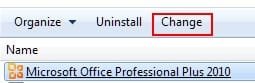
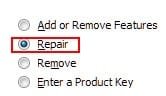
Why your "Outlook Today" is giving you the script error is odd, though. Perhaps a repair install of Office 2010 would help?

ScreenShot00370.jpg ScreenShot00371.jpg

It's worth a shot. Nonetheless, I'm very happy you have resolved the issue. :D
 

My Computer

Computer Manufacturer/Model Number
Toshiba L355D
OS
Windows 7 Ultimate x64 SP1
CPU
Core2 Duo
Motherboard
Intel
Memory
4 GB
Graphics Card(s)
GM965 on-board
Sound Card
RealTek on-board
Monitor(s) Displays
19"+17"(laptop)
Screen Resolution
1440x900 (x 2)
Hard Drives
500GB Ext. 200GB Internal
PSU
N/A
Case
N/A
Cooling
N/A
Hi, please could somebody tell me how to reinstall/repair Outlook 2010 on Windows 7 - I have searched everywhere and thought this would be an easy thing to do. Apparently not!

Thank you in advance,

James
 

My Computer

OS
Windows 7 64 bit
Hi James, welcome to SevenForums. :D

This might help:
Fix Outlook 2010 Problem: PST File Repair Tool

Please post back to let us know if this resolves the problem, or if we can help further. :)

P.S. Might be useful to know what problem required the repair. ;)
 

My Computer

Computer type
PC/Desktop
Computer Manufacturer/Model Number
Packard Bell
OS
Windows 7 Home Premium 64bit
CPU
Intel(R) Core(TM) i3-2120 CPU @ 3.30GHz
Motherboard
Packard Bell IPISB-AG
Memory
3.00 GB
Graphics Card(s)
(1) Intel(R) HD Graphics (2) VNC Mirror Driver
Sound Card
Realtek High Definition Audio
Monitor(s) Displays
AIO LCD
Screen Resolution
1920 x 1080
Hard Drives
WDC WD10EADX-22TDHB0 ATA Device
Fixed hard disk media
4 partitions
931.51 GB
Keyboard
Wireless
Mouse
Wireless
Antivirus
Microsoft Security Essentials
Browser
IE; Firefox
Other Info
Also:
Samsung N220 Plus Netbook - Windows 7 Home
HP laptop
iPad 5
Hi Irene, thank you for your reply. I managed to fix it by repairing Office 2010 by selecting: Control Panel, Programs and Features, MS Office 2010, Change. Typically I found this out about five minutes after my post - apologies for not saying I'd fixed the problem.

Thanks again for your reply though - it's reassuring to know that for future issues this is a good place to come for help! :)
 

My Computer

OS
Windows 7 64 bit
Hi Irene, thank you for your reply. I managed to fix it by repairing Office 2010 by selecting: Control Panel, Programs and Features, MS Office 2010, Change. Typically I found this out about five minutes after my post - apologies for not saying I'd fixed the problem.

Thanks again for your reply though - it's reassuring to know that for future issues this is a good place to come for help! :)

Thank for posting back, JK. :D
 

My Computer

Computer type
PC/Desktop
Computer Manufacturer/Model Number
Packard Bell
OS
Windows 7 Home Premium 64bit
CPU
Intel(R) Core(TM) i3-2120 CPU @ 3.30GHz
Motherboard
Packard Bell IPISB-AG
Memory
3.00 GB
Graphics Card(s)
(1) Intel(R) HD Graphics (2) VNC Mirror Driver
Sound Card
Realtek High Definition Audio
Monitor(s) Displays
AIO LCD
Screen Resolution
1920 x 1080
Hard Drives
WDC WD10EADX-22TDHB0 ATA Device
Fixed hard disk media
4 partitions
931.51 GB
Keyboard
Wireless
Mouse
Wireless
Antivirus
Microsoft Security Essentials
Browser
IE; Firefox
Other Info
Also:
Samsung N220 Plus Netbook - Windows 7 Home
HP laptop
iPad 5
Thank you!!!

The notification window when I wanted to reply to this said the last post was 123 days ago - but I'm still going to say !!thanks a ton!! for this thread and the helpful replies, it saved me clumps of hair from being yanked out of my scalp :D

BTW-I tried the Repair Office Professional option first and it worked. The cause for my issue to begin with, I suspect, was installing an older version Microsoft Office Pro (2000) extension no longer available onto a computer running Office Pro 2010.
 
Last edited:

My Computer

OS
Windows 7 Professional 64-bit
The notification window when I wanted to reply to this said the last post was 123 days ago - but I'm still going to say !!thanks a ton!! for this thread and the helpful replies, it saved me clumps of hair from being yanked out of my scalp :D

BTW-I tried the Repair Office Professional option first and it worked. The cause for my issue to begin with, I suspect, was installing an older version Microsoft Office Pro (2000) extension no longer available onto a computer running Office Pro 2010.
Welcome to the forum, wayout66.

Pleased that you found the thread helpful. :D
 

My Computer

Computer type
PC/Desktop
Computer Manufacturer/Model Number
Packard Bell
OS
Windows 7 Home Premium 64bit
CPU
Intel(R) Core(TM) i3-2120 CPU @ 3.30GHz
Motherboard
Packard Bell IPISB-AG
Memory
3.00 GB
Graphics Card(s)
(1) Intel(R) HD Graphics (2) VNC Mirror Driver
Sound Card
Realtek High Definition Audio
Monitor(s) Displays
AIO LCD
Screen Resolution
1920 x 1080
Hard Drives
WDC WD10EADX-22TDHB0 ATA Device
Fixed hard disk media
4 partitions
931.51 GB
Keyboard
Wireless
Mouse
Wireless
Antivirus
Microsoft Security Essentials
Browser
IE; Firefox
Other Info
Also:
Samsung N220 Plus Netbook - Windows 7 Home
HP laptop
iPad 5
Back
Top