
Okay, so when I use a template for an email, it messes the whole thing up. Colors disappear, font changes, even bolding and underlining vanish, and I believe links no longer work. That is once it is sent, the "draft" everything looks perfect.
However I can take all the text from a template and put it in a new email and it will send as it should. I can even Forward the copy in my Sent Folder in Outlook and it will forward it as a Good email with no mess ups.
I could really use help with this as it is a nuisance when doing 10 or 20 emails based off of templates... I have tried to recreate the same templates but still have no luck with them. They were originally made with Outlook 2k3 if it matters.
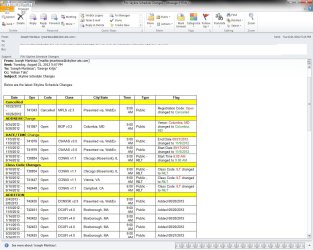
Outlook1.jpg is how it looks before sending and how it should turn out..
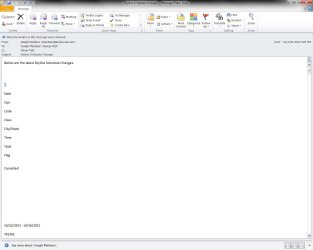
Outlook2.jpg is how it gets sent back to me and anyone else viewing the email..
However I can take all the text from a template and put it in a new email and it will send as it should. I can even Forward the copy in my Sent Folder in Outlook and it will forward it as a Good email with no mess ups.
I could really use help with this as it is a nuisance when doing 10 or 20 emails based off of templates... I have tried to recreate the same templates but still have no luck with them. They were originally made with Outlook 2k3 if it matters.
Outlook1.jpg is how it looks before sending and how it should turn out..
Outlook2.jpg is how it gets sent back to me and anyone else viewing the email..
Attachments
My Computer
- OS
- Windows 7 Pro x64
