Outlook 2010

PatK100

New member
Local time
4:34 PM
Messages
2
Hi there

Anyone know if it is possible to Export and import the email account settings in Outlook 2010.

It was poosible to export and import in Outlook 2003 and it was possible to export and import teh setting in the registry for Outlook 2007.

I can not fine anywhere to export settings for Outlook 2010.

Help please.


Pat
 

My Computer

OS
Windows 7
Yes, follow these instructions..


1. Click the Office button in the upper-left corner.

2. Click Saving.

3. Click Export.

4. Click Export on the right side.

source
 

My Computer

Computer type
PC/Desktop
Computer Manufacturer/Model Number
LENOVO K450 @3.0GHZ
OS
64-bit Windows 8.1 Pro
CPU
Core(TM) i5 CPU 4330 Haswell @ 3.20GHz
Motherboard
LENOVO
Memory
12.00 GB
Graphics Card(s)
Intel(R) HD Graphics
Sound Card
Intel HD integtrated
Monitor(s) Displays
HP 25' ISP Monitor
Screen Resolution
1900/1020
Hard Drives
(1) ST1000DM003-1CH162 (2) Generic STORAGE DEVICE USB Device (3) Generic STORAGE DEVICE USB Device
Internet Speed
100mb down/10mb up
Yes, follow these instructions..


1. Click the Office button in the upper-left corner.

2. Click Saving.

3. Click Export.

4. Click Export on the right side.

source

I tried that in my copy of Outlook 2010 and did not see what you suggested was there.

Note my copy of Outlook uses local account and local .pst file info - instead of server based mail.

When I click the "outlook" icon in the upper left corner, all I get are choices to save as, close, minimize, etc.

Viz.:
Outlook button in upper left.png

Can you please explain how you did this / what I am doing wrong?

Thanks!

Jim (JR)
 

My Computer

Computer type
PC/Desktop
OS
Two soup cans and some string.
CPU
Multi-Processor - TWO large rubber bands!
Memory
Huh? Wassit?! I don't remember. . .
Monitor(s) Displays
Etch-a-Sketch.
Screen Resolution
To have less glitches this year.
Mouse
Nope. Killed 'em all off last summer.
Other Info
I actually have several machines that all frustrate me. That's why I'm here, not to try and impress people with sordid tales of outrageous hardware.
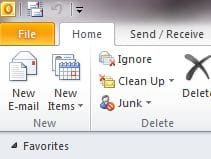
You're clicking the wrong icon - File is the one you want.

Capture.JPG
 

My Computer

Computer Manufacturer/Model Number
HP Pavilion Elite 495UK
OS
Windows 7 Ultimate SP1 64-Bit
CPU
Intel Core i7 870 @ 2.93GHz
Motherboard
MSI 2A9C (CPU1)
Memory
8Gb Dual-Channel DDR3 @ 664MHz
Graphics Card(s)
nVidia GeForce GTX 460 1024MB dedicated RAM
Sound Card
Realtek HD Audio
Monitor(s) Displays
HP2310i
Screen Resolution
1920 x 1080
Hard Drives
1x1954GB Hitachi HDS22020ALA 330 (RAID), 1x1954GB Hitachi External for backup and storage
PSU
460W
Case
HP Elite
Cooling
Air cooled
Keyboard
Logitech K750 solar-powered keyboard
Mouse
Logitech Wireless M180 mouse
Internet Speed
2Mb
Other Info
Pure Avanti Flow Internet Radio with iPod Dock, 64Gb iPod, HP USB Speakers, Sony MDR-V500 Headphones, Sony Vaio F-Series Laptop
Patk100, welcome to the windows 7 forums.

A bit of confusion with the import icon, it is really a import/export option.
click on the import and as the source earlier indicated, you then get the option to export.

Rich
 

My Computer

Computer type
Laptop
Computer Manufacturer/Model Number
Toshiba Laptop Qosimo X870
OS
Windows 7 Pro x64 SP1
CPU
Intel Core I7
Motherboard
Toshiba Qosmio
Memory
16 Gigs
Graphics Card(s)
NVIDIA GeForce GTX 670M
Monitor(s) Displays
17.7" laptop
Screen Resolution
1600 x 900
Hard Drives
256 Gig SanDisk SSD for C
256 Gig Intel SSD for D
Internet Speed
50/25 FIOS
Antivirus
Vipre (all you can eat for 10 machines)
Browser
IE and FF
Other Info
I have dos 6.22, wfwg 3.11, win98, 2000 and xp VHD's available for testing. MS's Virtual PC works great.
Hi Pak100 :D

Touch the File Tab (top left) > Options > Advanced > Export will be listed on the right (5th item in the list).
 

My Computer

Computer type
PC/Desktop
Computer Manufacturer/Model Number
Packard Bell
OS
Windows 7 Home Premium 64bit
CPU
Intel(R) Core(TM) i3-2120 CPU @ 3.30GHz
Motherboard
Packard Bell IPISB-AG
Memory
3.00 GB
Graphics Card(s)
(1) Intel(R) HD Graphics (2) VNC Mirror Driver
Sound Card
Realtek High Definition Audio
Monitor(s) Displays
AIO LCD
Screen Resolution
1920 x 1080
Hard Drives
WDC WD10EADX-22TDHB0 ATA Device
Fixed hard disk media
4 partitions
931.51 GB
Keyboard
Wireless
Mouse
Wireless
Antivirus
Microsoft Security Essentials
Browser
IE; Firefox
Other Info
Also:
Samsung N220 Plus Netbook - Windows 7 Home
HP laptop
iPad 5
Account Settings

The question was how do you export the ACCOUNT SETTINGS so to me that not the email or calendar or contacts. In Outlook Express you could export your account but I have never seen it in Outlook. I reimage my system every now and then and it would be great to just import my GMail Outlook Account.
Jack
 

My Computer

OS
Windows 7

My Computer

Computer Manufacturer/Model Number
HP Pavilion Elite 495UK
OS
Windows 7 Ultimate SP1 64-Bit
CPU
Intel Core i7 870 @ 2.93GHz
Motherboard
MSI 2A9C (CPU1)
Memory
8Gb Dual-Channel DDR3 @ 664MHz
Graphics Card(s)
nVidia GeForce GTX 460 1024MB dedicated RAM
Sound Card
Realtek HD Audio
Monitor(s) Displays
HP2310i
Screen Resolution
1920 x 1080
Hard Drives
1x1954GB Hitachi HDS22020ALA 330 (RAID), 1x1954GB Hitachi External for backup and storage
PSU
460W
Case
HP Elite
Cooling
Air cooled
Keyboard
Logitech K750 solar-powered keyboard
Mouse
Logitech Wireless M180 mouse
Internet Speed
2Mb
Other Info
Pure Avanti Flow Internet Radio with iPod Dock, 64Gb iPod, HP USB Speakers, Sony MDR-V500 Headphones, Sony Vaio F-Series Laptop

My Computer

Computer type
PC/Desktop
Computer Manufacturer/Model Number
Packard Bell
OS
Windows 7 Home Premium 64bit
CPU
Intel(R) Core(TM) i3-2120 CPU @ 3.30GHz
Motherboard
Packard Bell IPISB-AG
Memory
3.00 GB
Graphics Card(s)
(1) Intel(R) HD Graphics (2) VNC Mirror Driver
Sound Card
Realtek High Definition Audio
Monitor(s) Displays
AIO LCD
Screen Resolution
1920 x 1080
Hard Drives
WDC WD10EADX-22TDHB0 ATA Device
Fixed hard disk media
4 partitions
931.51 GB
Keyboard
Wireless
Mouse
Wireless
Antivirus
Microsoft Security Essentials
Browser
IE; Firefox
Other Info
Also:
Samsung N220 Plus Netbook - Windows 7 Home
HP laptop
iPad 5
The REAL solution!

I'm sorry I know this thread is really old but it was one of the first results that came up when searching Google. Unfortunately Irene that is not how you backup up email account settings in Outlook. It will work for backing up the email, calendar, and contact data but the accounts themselves will not be exported. Microsoft even admits that this is not possible. If you look at the link posted earlier at:

You cannot import or export e-mail accounts with .IAF files in Outlook

you will notice they are talking about importing from other programs into outlook, not exporting from outlook. They removed the ability to export from any version of Outlook newer than Outlook 2000

There is a solution / workaround that involves exporting a registry key. It is posted on these forums here:

http://www.sevenforums.com/backup-restore/179858-how-backup-outlook-profiles.html

Again, sorry to resurrect such an old thread but I wanted to help other people who got here from Google like I did. :p
 
Last edited:

My Computer

Computer Manufacturer/Model Number
Custom Built
OS
Windows 7 Ultimate 64-bit
CPU
i7 920 @ 3.4 Ghz
Motherboard
Asus Rampage II
Memory
6 GB DDR3 1600Mhz OCZ Gold
Graphics Card(s)
EVGA GTX 570
Sound Card
Creative X-Fi
Monitor(s) Displays
2x 22"
Screen Resolution
1080p
Hard Drives
3x 320GB
2x 1TB
1x 2TB
PSU
Thermaltake 750Watt
Case
Thermaltake Armor
Cooling
Custom Liquid Cooling
Keyboard
Razor Blackwidow
Mouse
Logitech G500
Internet Speed
25 Mbps
Other Info
Also have a Dell XPS 1645. i7 Q 720, 6GB RAM, 640 GB HDD, ATI Radeon 6570M, Windows 7 Ultimate x64
The reason you can't easily export account settings is SECURITY.

Surely you can imagine someone copying your account settings and having full access to all your email accounts.
 

My Computer

OS
Windows 7 Ultimate
bullshit

The reason you can't easily export account settings is SECURITY.

Surely you can imagine someone copying your account settings and having full access to all your email accounts.

Bullshit.....what users are trying to export are settings and customisations to the outlook ribbon, to the fonts, signatures etc.

Basically setting this up each and everytime is a mess in Outlook/office.

Very dissapointing this hasnt been fixed in 2010 as i'm sure i read it somewhere that this was a new feature.

Its a shame, i read you can now even synch open tabs in Firefox these days......MS falling behind in this basic feature for people that use multiple pc's connected to exchange.
 

My Computer

OS
Windows 7 ultimate.
Back
Top