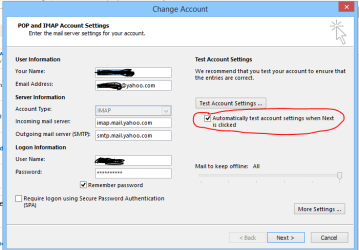
If that is really an account that is not setup before, then I really don't know why mine doen't allow me to use the checkbox. Is anyone else with an updated Outlook 2013 able to set up an IMAP account without network connection?
Found a ridiculous, but definitely working, solution.
I'm also baffled as to why MS decided to implement it this way, or if it just "slipped under the rug", but I found a way around it
Go to setup your email server manually.
Go to "More Settings" and select the "Advanced" tab.
Set the Outgoing server to port 465 and select "SSL" under "Use the following type of encrypted connection".
Select OK and try again. It came up with an error that was stating it didn't have a valid certificate (continue anyway) and then it worked.
Go back into the account options, and you'll find that the checkbox for "Automatically test account settings when Next is clicked" can be deselected. Deselect this, go back to where you changed the port and change it back to whatever it was before. Click OK, click Next, and you're good to go.
Again, it's ridiculous. But it worked for me. Hope it works for you guys.
Give me some rep if it does so I know I helped!
Last edited:
My Computer
At a glance
Windows 7 Ultimate x64Intel Core i7-3770K16GBGeForce GTX 670
We got around it by specifying a local SMTP server (and credentials) to receive the test email. Once the account is created, you can edit it and change the SMTP server information back to what you originally intended it to be and, because you are editing, you can also untick the box that insists on doing a test. Save it all and all is well.
It is ridiculous to have to do this, but it does work at least.