
Solved Outlook cookies

urbanspaceman1

New member
Power User
VIP
Local time
9:24 AM
Messages
332
I'm using Outlook as my email program and IE11 as my browser. I clear all my temporary internet files etc on a semi constant basis. Just recently I have started viewing Internet Properties, Settings (Browsing History), View Files, and I have discovered that viewing stored emails from, for example, E.ON power supplier, dumps a bunch of cookies onto my system. I haven't identified every culprit, but regardless of that, I am somewhat perplexed and concerned that viewing stored emails should allow this to happen. Any words of advice would be greatly appreciated, as always.
 

My Computer

Computer type
PC/Desktop
Computer Manufacturer/Model Number
Cyberpower PC
OS
windows 7 premium home 64bit
CPU
intel core i5 2500 3.3Ghz 6mb cache OEM
Motherboard
Asus P8Z68-V LX Intel Z68 Chipset DDR3 ATX USB 3
Memory
8GB (2x4GB) PC10666 DDR3/1333mhz Dual
Graphics Card(s)
AMD ATI Radeon Powercolor HD5670 1GB passive cooled
Sound Card
Creative/Soundblaster Digital Music Premium HD/X-Fi-HD
Monitor(s) Displays
Samsung 22; Hanns.G 19
Screen Resolution
1680 x 1050
Hard Drives
SSD: 120 GB Intel 520 Series SATA III
HDD2:West Dig 1TB SATA III 32mb 6gb/s
Hot swap HDD3: 1tb Barracuda Sata 3 32mb 6gb/s
PSU
Coolermaster Elitepower 500wt
Case
NZXT Hush 2
Cooling
Coolermaster Hyper TX3
Mouse
Logitech M570 Trackball
Internet Speed
50mbs
Antivirus
Malwarebytes3. cont' below:
Browser
IE11
Other Info
Windows Firewall.
Hitman-Pro.alert3.
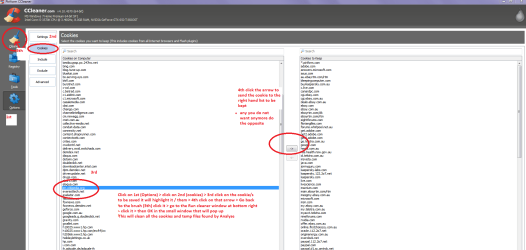
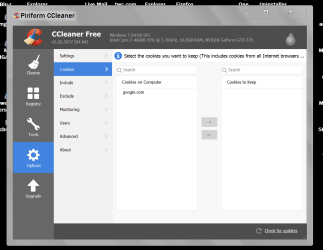
Hello urban mate have you tried using CCleaner to get rid of the cookies? I use it on a regular basis making sure the cookies for my passworded sites are saved into the right hand panel before deleting the rest.

Have attached a pic of what I do hope it makes sense to you:)

Edit Should ahve sadi what is doen in the pic is after you have Analysed and got the results you then go to Options
 

Attachments

  • CCcookies.PNG
    CCcookies.PNG
    49.7 KB · Views: 4

My Computer

Computer type
PC/Desktop
Computer Manufacturer/Model Number
Own build (new) Desk1 / Asus ROG Win 7 / Desk2 1st build
OS
Desk1 7 Home Prem / Desk2 10 Pro / Main lap Asus ROG 10 Pro 2 laptop Toshiba 7 Pro Asus P2520 7 & 10
CPU
Desk1 i5 3750K / Laptop i7 GTX 860M / Desk2 i5 2500
Motherboard
Desk1 Asus P877-V / Desk2 Gigabyte H67 UD3H / Laptop ?
Memory
Desk1 8GB (1866) / Desk2 16GB (1333) / Laptop 8Gb DDR3
Graphics Card(s)
Desk 1& 2NVidia GTX 650 & Laptops on board Intel
Sound Card
Desk 1 & 2 -XONAR DG Realtek High Def audio Laptop
Monitor(s) Displays
Desk 1 Benq HD 2450 / Desk2 Philips 24" / Laptop 17.5"
Screen Resolution
1920x1080 D1 & D2 & Laptop 1
Hard Drives
Desk1 Samsung 120GB 830 SSD
Asus ROG 256GB 850 Pro SSD
Desk2 Samsung 840 256 SSD
Toshiba 120GB EVO
PSU
Desk 1 Corsair HX 1050/ Laptop ? / Desk 2 Corsair HX 650
Case
Desk 1 Cooler HAF XM ? Toshiba laptop / Desk2 Coolermaster
Cooling
Fans on all Desk1 -2 Desk2 - all Coolermasters 5 Laptop ?
Keyboard
Desk 1 MS Sidewinder X6 Desk 2 MS Sidewinder X 4
Mouse
Desk 1&2 - Gigabyte MS 900 gamer - laptop - Logitec wireless
Internet Speed
ADSL2+
Other Info
One other Desktop (tester) and spare Toshba laptop both with SSD's
Running Kaspersky 2016 ISS on all machines config'd identically
Logitec audio stereo systems on each machine (x3)
Canon MG5250MFC
Router/modem TP-Link running WPA2SK
Looking at my initial posting I realise that it is misleading and a little ambiguous: when I say I delete all my temporary internet files I should have stated that it also includes All cookies: I never save any cookies on my system. I also realised that the files that appear in 'View Files' may not be cookies as most of them are pngs. I think cookies are text files aren't they?
 

My Computer

Computer type
PC/Desktop
Computer Manufacturer/Model Number
Cyberpower PC
OS
windows 7 premium home 64bit
CPU
intel core i5 2500 3.3Ghz 6mb cache OEM
Motherboard
Asus P8Z68-V LX Intel Z68 Chipset DDR3 ATX USB 3
Memory
8GB (2x4GB) PC10666 DDR3/1333mhz Dual
Graphics Card(s)
AMD ATI Radeon Powercolor HD5670 1GB passive cooled
Sound Card
Creative/Soundblaster Digital Music Premium HD/X-Fi-HD
Monitor(s) Displays
Samsung 22; Hanns.G 19
Screen Resolution
1680 x 1050
Hard Drives
SSD: 120 GB Intel 520 Series SATA III
HDD2:West Dig 1TB SATA III 32mb 6gb/s
Hot swap HDD3: 1tb Barracuda Sata 3 32mb 6gb/s
PSU
Coolermaster Elitepower 500wt
Case
NZXT Hush 2
Cooling
Coolermaster Hyper TX3
Mouse
Logitech M570 Trackball
Internet Speed
50mbs
Antivirus
Malwarebytes3. cont' below:
Browser
IE11
Other Info
Windows Firewall.
Hitman-Pro.alert3.
To be honest urban I am not sure what they are apart from small amounts of data left on the machine from sites one visits. I myself use Chrome as the browser - IE11 I haven't used for a long time now.

Seems to me from what you say that cookies can take a few different forms?? I shall have to do some digging around as now you have got my curiosity up.;)

All I know is that I just clean the machines with CC and Windows Disk Cleanup on a regular basis.
 

My Computer

Computer type
PC/Desktop
Computer Manufacturer/Model Number
Own build (new) Desk1 / Asus ROG Win 7 / Desk2 1st build
OS
Desk1 7 Home Prem / Desk2 10 Pro / Main lap Asus ROG 10 Pro 2 laptop Toshiba 7 Pro Asus P2520 7 & 10
CPU
Desk1 i5 3750K / Laptop i7 GTX 860M / Desk2 i5 2500
Motherboard
Desk1 Asus P877-V / Desk2 Gigabyte H67 UD3H / Laptop ?
Memory
Desk1 8GB (1866) / Desk2 16GB (1333) / Laptop 8Gb DDR3
Graphics Card(s)
Desk 1& 2NVidia GTX 650 & Laptops on board Intel
Sound Card
Desk 1 & 2 -XONAR DG Realtek High Def audio Laptop
Monitor(s) Displays
Desk 1 Benq HD 2450 / Desk2 Philips 24" / Laptop 17.5"
Screen Resolution
1920x1080 D1 & D2 & Laptop 1
Hard Drives
Desk1 Samsung 120GB 830 SSD
Asus ROG 256GB 850 Pro SSD
Desk2 Samsung 840 256 SSD
Toshiba 120GB EVO
PSU
Desk 1 Corsair HX 1050/ Laptop ? / Desk 2 Corsair HX 650
Case
Desk 1 Cooler HAF XM ? Toshiba laptop / Desk2 Coolermaster
Cooling
Fans on all Desk1 -2 Desk2 - all Coolermasters 5 Laptop ?
Keyboard
Desk 1 MS Sidewinder X6 Desk 2 MS Sidewinder X 4
Mouse
Desk 1&2 - Gigabyte MS 900 gamer - laptop - Logitec wireless
Internet Speed
ADSL2+
Other Info
One other Desktop (tester) and spare Toshba laptop both with SSD's
Running Kaspersky 2016 ISS on all machines config'd identically
Logitec audio stereo systems on each machine (x3)
Canon MG5250MFC
Router/modem TP-Link running WPA2SK
This has nothing to do with IE11; this is all to do with emails in Outlook. This is the location of the files: C:\Users\Keith\AppData\Local\Microsoft\Windows\Temporary Internet Files\
What I am curious to understand is why an email, opened in Outlook, should generate internet files: jpegs, pngs, etc. Curious and a little concerned.
 

My Computer

Computer type
PC/Desktop
Computer Manufacturer/Model Number
Cyberpower PC
OS
windows 7 premium home 64bit
CPU
intel core i5 2500 3.3Ghz 6mb cache OEM
Motherboard
Asus P8Z68-V LX Intel Z68 Chipset DDR3 ATX USB 3
Memory
8GB (2x4GB) PC10666 DDR3/1333mhz Dual
Graphics Card(s)
AMD ATI Radeon Powercolor HD5670 1GB passive cooled
Sound Card
Creative/Soundblaster Digital Music Premium HD/X-Fi-HD
Monitor(s) Displays
Samsung 22; Hanns.G 19
Screen Resolution
1680 x 1050
Hard Drives
SSD: 120 GB Intel 520 Series SATA III
HDD2:West Dig 1TB SATA III 32mb 6gb/s
Hot swap HDD3: 1tb Barracuda Sata 3 32mb 6gb/s
PSU
Coolermaster Elitepower 500wt
Case
NZXT Hush 2
Cooling
Coolermaster Hyper TX3
Mouse
Logitech M570 Trackball
Internet Speed
50mbs
Antivirus
Malwarebytes3. cont' below:
Browser
IE11
Other Info
Windows Firewall.
Hitman-Pro.alert3.
Your C:\Users etc. files do not specifically mention Outlook files. Temporary internet files are files generated whenever you access the internet.

You can easily remove these files by running Win Disc Clean up. Win Disc clean up is found in Control Panel. If you Right Click on it & Run as Administrator it will remove old not needed Windows Update files & some temporary files not needed.

If you wish to remove cookies you should follow ICIT2LOL's advice & run Ccleaner.
 

My Computer

Computer type
PC/Desktop
Computer Manufacturer/Model Number
Self built using existing case
OS
Windows 7 Home Premium 64 bit sp1
CPU
Intel i5 3570 3.4Ghz Ivy Bridge SKT 1155 quad core
Motherboard
Gigabyte Z77-HD3 SKT 1155 2xSata 3, 4x USB 3.0
Memory
G-Skill Rip Jaws 16Gb (8x2) DDR3 -1600 PC3 12800 CL 10 red
Graphics Card(s)
Gigabyte NVIDIA GT610 1Gb DDR3 810/1200 PCI-E 2.0 Silent
Sound Card
NVIDIA High Definition & Realtech High Definition Audio
Monitor(s) Displays
2 x Philips 226V4L 16:9 aspect ratio
Screen Resolution
1920 x 1080 HD
Hard Drives
Samsung 840 Pro 256gb SSD, SATA 3.
Hitachi Touro Portable 1tb, USB 3.0 HDD used for image b/ups.
PSU
Corsair VS450
Case
Codeng
Cooling
PSU fan & CPU fan
Keyboard
Logitech
Mouse
Logitech Wireless trackball M570
Internet Speed
Wireless 3G. 3mg down & 550kb up.
Antivirus
Bitdefender Internet Security 2020
Browser
Opera (Current Version) & Firefox
Other Info
MS Office 2013 Pro. Davis weather station software. MGE Nova 600 avr UPS.
This has nothing to do with IE11; this is all to do with emails in Outlook. This is the location of the files: C:\Users\Keith\AppData\Local\Microsoft\Windows\Temporary Internet Files\
What I am curious to understand is why an email, opened in Outlook, should generate internet files: jpegs, pngs, etc. Curious and a little concerned.

Ok mate my bad I saw it as something related. Now as to the cookies in the mail I have no idea why they should be those files types.

I did mention as has Ranger that the disk cleanup is what I use in conjunction with CCleaner to clear any junk from my machines.
 

My Computer

Computer type
PC/Desktop
Computer Manufacturer/Model Number
Own build (new) Desk1 / Asus ROG Win 7 / Desk2 1st build
OS
Desk1 7 Home Prem / Desk2 10 Pro / Main lap Asus ROG 10 Pro 2 laptop Toshiba 7 Pro Asus P2520 7 & 10
CPU
Desk1 i5 3750K / Laptop i7 GTX 860M / Desk2 i5 2500
Motherboard
Desk1 Asus P877-V / Desk2 Gigabyte H67 UD3H / Laptop ?
Memory
Desk1 8GB (1866) / Desk2 16GB (1333) / Laptop 8Gb DDR3
Graphics Card(s)
Desk 1& 2NVidia GTX 650 & Laptops on board Intel
Sound Card
Desk 1 & 2 -XONAR DG Realtek High Def audio Laptop
Monitor(s) Displays
Desk 1 Benq HD 2450 / Desk2 Philips 24" / Laptop 17.5"
Screen Resolution
1920x1080 D1 & D2 & Laptop 1
Hard Drives
Desk1 Samsung 120GB 830 SSD
Asus ROG 256GB 850 Pro SSD
Desk2 Samsung 840 256 SSD
Toshiba 120GB EVO
PSU
Desk 1 Corsair HX 1050/ Laptop ? / Desk 2 Corsair HX 650
Case
Desk 1 Cooler HAF XM ? Toshiba laptop / Desk2 Coolermaster
Cooling
Fans on all Desk1 -2 Desk2 - all Coolermasters 5 Laptop ?
Keyboard
Desk 1 MS Sidewinder X6 Desk 2 MS Sidewinder X 4
Mouse
Desk 1&2 - Gigabyte MS 900 gamer - laptop - Logitec wireless
Internet Speed
ADSL2+
Other Info
One other Desktop (tester) and spare Toshba laptop both with SSD's
Running Kaspersky 2016 ISS on all machines config'd identically
Logitec audio stereo systems on each machine (x3)
Canon MG5250MFC
Router/modem TP-Link running WPA2SK
I have no difficulty keeping everything clean: Internet Properties allows me to do that, along with Disk Cleanup and a program suggested on this forum: TFC from Old Timer. What made me curious was that viewing emails would generate temporary internet files in that location. I'll just ignore them and delete them; I generally delete all Temp Net Files after every browser session anyway, which includes those generated by Outlook; I never keep Cookies on my machine, as I have no use for them. OK, as ever: thanks Folks for your help.
 

My Computer

Computer type
PC/Desktop
Computer Manufacturer/Model Number
Cyberpower PC
OS
windows 7 premium home 64bit
CPU
intel core i5 2500 3.3Ghz 6mb cache OEM
Motherboard
Asus P8Z68-V LX Intel Z68 Chipset DDR3 ATX USB 3
Memory
8GB (2x4GB) PC10666 DDR3/1333mhz Dual
Graphics Card(s)
AMD ATI Radeon Powercolor HD5670 1GB passive cooled
Sound Card
Creative/Soundblaster Digital Music Premium HD/X-Fi-HD
Monitor(s) Displays
Samsung 22; Hanns.G 19
Screen Resolution
1680 x 1050
Hard Drives
SSD: 120 GB Intel 520 Series SATA III
HDD2:West Dig 1TB SATA III 32mb 6gb/s
Hot swap HDD3: 1tb Barracuda Sata 3 32mb 6gb/s
PSU
Coolermaster Elitepower 500wt
Case
NZXT Hush 2
Cooling
Coolermaster Hyper TX3
Mouse
Logitech M570 Trackball
Internet Speed
50mbs
Antivirus
Malwarebytes3. cont' below:
Browser
IE11
Other Info
Windows Firewall.
Hitman-Pro.alert3.
I think the .jpeg and .png files stored in your temp folder are generated from the images that are included in the emails. Those images are linked to the website. Depending on your Privacy settings, the images are normally blocked to protect your privacy.
 
Last edited:

My Computer

Computer type
PC/Desktop
OS
Windows 7 Home 64-bit
Yes, that makes sense. I do get image boxes in my emails all the time. Does this mean that in order to view those images they would have to link to the website? Is that why they are blocked? I've never understood what was blocking them, despite scrutinising my security settings. I guess I'm missing something. Not that I want to link to websites in order to view images in emails. If I really want to see them I go to the website - assuming it is a recognised site. Thank-you yet again.
 

My Computer

Computer type
PC/Desktop
Computer Manufacturer/Model Number
Cyberpower PC
OS
windows 7 premium home 64bit
CPU
intel core i5 2500 3.3Ghz 6mb cache OEM
Motherboard
Asus P8Z68-V LX Intel Z68 Chipset DDR3 ATX USB 3
Memory
8GB (2x4GB) PC10666 DDR3/1333mhz Dual
Graphics Card(s)
AMD ATI Radeon Powercolor HD5670 1GB passive cooled
Sound Card
Creative/Soundblaster Digital Music Premium HD/X-Fi-HD
Monitor(s) Displays
Samsung 22; Hanns.G 19
Screen Resolution
1680 x 1050
Hard Drives
SSD: 120 GB Intel 520 Series SATA III
HDD2:West Dig 1TB SATA III 32mb 6gb/s
Hot swap HDD3: 1tb Barracuda Sata 3 32mb 6gb/s
PSU
Coolermaster Elitepower 500wt
Case
NZXT Hush 2
Cooling
Coolermaster Hyper TX3
Mouse
Logitech M570 Trackball
Internet Speed
50mbs
Antivirus
Malwarebytes3. cont' below:
Browser
IE11
Other Info
Windows Firewall.
Hitman-Pro.alert3.

files

I've attached (or I think I have) a screenshot of the files generated by an email from my power company.
 

Attachments

  • screenshot_Thu_Jan_19_15.26.37.png
    screenshot_Thu_Jan_19_15.26.37.png
    12.2 KB · Views: 6

My Computer

Computer type
PC/Desktop
Computer Manufacturer/Model Number
Cyberpower PC
OS
windows 7 premium home 64bit
CPU
intel core i5 2500 3.3Ghz 6mb cache OEM
Motherboard
Asus P8Z68-V LX Intel Z68 Chipset DDR3 ATX USB 3
Memory
8GB (2x4GB) PC10666 DDR3/1333mhz Dual
Graphics Card(s)
AMD ATI Radeon Powercolor HD5670 1GB passive cooled
Sound Card
Creative/Soundblaster Digital Music Premium HD/X-Fi-HD
Monitor(s) Displays
Samsung 22; Hanns.G 19
Screen Resolution
1680 x 1050
Hard Drives
SSD: 120 GB Intel 520 Series SATA III
HDD2:West Dig 1TB SATA III 32mb 6gb/s
Hot swap HDD3: 1tb Barracuda Sata 3 32mb 6gb/s
PSU
Coolermaster Elitepower 500wt
Case
NZXT Hush 2
Cooling
Coolermaster Hyper TX3
Mouse
Logitech M570 Trackball
Internet Speed
50mbs
Antivirus
Malwarebytes3. cont' below:
Browser
IE11
Other Info
Windows Firewall.
Hitman-Pro.alert3.
Yes, that makes sense. I do get image boxes in my emails all the time. Does this mean that in order to view those images they would have to link to the website? Is that why they are blocked? I've never understood what was blocking them, despite scrutinising my security settings. I guess I'm missing something. Not that I want to link to websites in order to view images in emails. If I really want to see them I go to the website - assuming it is a recognised site. Thank-you yet again.

Yes, to view the images they would need online access unless you adjust your settings to view emails offline, in which case any images would be downloaded, too. At least that is the case with my email client. I think images are normally blocked to avoid spammers with malicious intent from collecting personal data like IP address' and any other types of tracking data. Most are innocuous in nature like the website you mentioned in your post.
 

My Computer

Computer type
PC/Desktop
OS
Windows 7 Home 64-bit
Hmm well I use Chrome and it has a blocking setting for images and it seems to work just fine for me but thats Chrome:huh:
 

My Computer

Computer type
PC/Desktop
Computer Manufacturer/Model Number
Own build (new) Desk1 / Asus ROG Win 7 / Desk2 1st build
OS
Desk1 7 Home Prem / Desk2 10 Pro / Main lap Asus ROG 10 Pro 2 laptop Toshiba 7 Pro Asus P2520 7 & 10
CPU
Desk1 i5 3750K / Laptop i7 GTX 860M / Desk2 i5 2500
Motherboard
Desk1 Asus P877-V / Desk2 Gigabyte H67 UD3H / Laptop ?
Memory
Desk1 8GB (1866) / Desk2 16GB (1333) / Laptop 8Gb DDR3
Graphics Card(s)
Desk 1& 2NVidia GTX 650 & Laptops on board Intel
Sound Card
Desk 1 & 2 -XONAR DG Realtek High Def audio Laptop
Monitor(s) Displays
Desk 1 Benq HD 2450 / Desk2 Philips 24" / Laptop 17.5"
Screen Resolution
1920x1080 D1 & D2 & Laptop 1
Hard Drives
Desk1 Samsung 120GB 830 SSD
Asus ROG 256GB 850 Pro SSD
Desk2 Samsung 840 256 SSD
Toshiba 120GB EVO
PSU
Desk 1 Corsair HX 1050/ Laptop ? / Desk 2 Corsair HX 650
Case
Desk 1 Cooler HAF XM ? Toshiba laptop / Desk2 Coolermaster
Cooling
Fans on all Desk1 -2 Desk2 - all Coolermasters 5 Laptop ?
Keyboard
Desk 1 MS Sidewinder X6 Desk 2 MS Sidewinder X 4
Mouse
Desk 1&2 - Gigabyte MS 900 gamer - laptop - Logitec wireless
Internet Speed
ADSL2+
Other Info
One other Desktop (tester) and spare Toshba laptop both with SSD's
Running Kaspersky 2016 ISS on all machines config'd identically
Logitec audio stereo systems on each machine (x3)
Canon MG5250MFC
Router/modem TP-Link running WPA2SK
Just thinking out loud with my keyboard.

Email's with pictures you want to save, just move the pictures to a special folder.
Then delete them from the email or delete the email.

My cookie collection.


Cookies today only.PNG


I clean thing several times a day.

Jack
 

My Computer

Computer type
PC/Desktop
Computer Manufacturer/Model Number
Home made Desktop
OS
Windows 10 Pro. 64/ version 1709 Windows 7 Pro/64
CPU
Intel i7-6800K @ 4.3
Motherboard
ASUS X-99 Deluxe II
Memory
Corsair Platinum 16 gig @2400
Graphics Card(s)
EVGA GTX 1070 OC
Monitor(s) Displays
Asus 27" LED LCD/VE278Q
Screen Resolution
1920-1080 or 1280-720 HDMI
Hard Drives
INTEL SSD 730-240 Gb Sata 3.0/
PSU
EVGA Platium 1200W
Case
Phanteks Luxe Tempered Glass 8 fans/ one radiator
Cooling
XSPC/ Water Cooled CPU
Keyboard
Das 4 Professional
Mouse
Logitech M705/MX Anywhere 2-S
Internet Speed
100 mbits
Antivirus
Microsoft Security Essentials/ Malwarebytes Premium 3.0/ SAS
Browser
I.E. 11 default/Firefox/ ISP Time Warner Cable/Spectrum
Other Info
LG BluRay Burner/
Sound system-KLipsch-THX/
Icy Dock ssd Hot Swap bays.
urbanspaceman1. Are you using a Live Mail Account or a Hotmail Account as these have been switched to Outlook.com & my Live Mail Account generates these odd files, now that I have changed my profile as requested by MS.

In a brief reading on the web I found that Live Mail Accounts will still be available, but only through the web, so it seems they are being converted to HTML files but read as normal emails in Outlook. This is only my guessing at this, so you may have more info to add, or it may help you sort out the problem.

I am going to close my Live Mail Account with MS & open a new email account with my other email provider as I am sick of the hassles. This MS website might be of interest as well. Although it's to do with Live Mail 2012 it does explain what is happening.

Windows Live Mail 2012 will not connect to Outlook.com - Outlook
 
Last edited:

My Computer

Computer type
PC/Desktop
Computer Manufacturer/Model Number
Self built using existing case
OS
Windows 7 Home Premium 64 bit sp1
CPU
Intel i5 3570 3.4Ghz Ivy Bridge SKT 1155 quad core
Motherboard
Gigabyte Z77-HD3 SKT 1155 2xSata 3, 4x USB 3.0
Memory
G-Skill Rip Jaws 16Gb (8x2) DDR3 -1600 PC3 12800 CL 10 red
Graphics Card(s)
Gigabyte NVIDIA GT610 1Gb DDR3 810/1200 PCI-E 2.0 Silent
Sound Card
NVIDIA High Definition & Realtech High Definition Audio
Monitor(s) Displays
2 x Philips 226V4L 16:9 aspect ratio
Screen Resolution
1920 x 1080 HD
Hard Drives
Samsung 840 Pro 256gb SSD, SATA 3.
Hitachi Touro Portable 1tb, USB 3.0 HDD used for image b/ups.
PSU
Corsair VS450
Case
Codeng
Cooling
PSU fan & CPU fan
Keyboard
Logitech
Mouse
Logitech Wireless trackball M570
Internet Speed
Wireless 3G. 3mg down & 550kb up.
Antivirus
Bitdefender Internet Security 2020
Browser
Opera (Current Version) & Firefox
Other Info
MS Office 2013 Pro. Davis weather station software. MGE Nova 600 avr UPS.
I am using a Virgin/Blueyonder account as pop3 into Outlook (the Office email program) and have been for over a decade. It would appear that there is nothing sinister in these files being saved by the email/email program; and considering they get deleted every time I end an internet browsing session I feel confident in ignoring their brief existence, especially given that it appears they are only ever jpegs and pngs. Perhaps my knee-jerk reaction is typical of modern-day net security paranoia; there's nothing wrong in a healthy dose of paranoia when it's needed. Thanks again Folks.
 

My Computer

Computer type
PC/Desktop
Computer Manufacturer/Model Number
Cyberpower PC
OS
windows 7 premium home 64bit
CPU
intel core i5 2500 3.3Ghz 6mb cache OEM
Motherboard
Asus P8Z68-V LX Intel Z68 Chipset DDR3 ATX USB 3
Memory
8GB (2x4GB) PC10666 DDR3/1333mhz Dual
Graphics Card(s)
AMD ATI Radeon Powercolor HD5670 1GB passive cooled
Sound Card
Creative/Soundblaster Digital Music Premium HD/X-Fi-HD
Monitor(s) Displays
Samsung 22; Hanns.G 19
Screen Resolution
1680 x 1050
Hard Drives
SSD: 120 GB Intel 520 Series SATA III
HDD2:West Dig 1TB SATA III 32mb 6gb/s
Hot swap HDD3: 1tb Barracuda Sata 3 32mb 6gb/s
PSU
Coolermaster Elitepower 500wt
Case
NZXT Hush 2
Cooling
Coolermaster Hyper TX3
Mouse
Logitech M570 Trackball
Internet Speed
50mbs
Antivirus
Malwarebytes3. cont' below:
Browser
IE11
Other Info
Windows Firewall.
Hitman-Pro.alert3.
there's nothing wrong in a healthy dose of paranoia when it's needed.

I agree mate and it was enhanced by all the shenanigans that went on with the 10 upgrade stuff was flying around. Since then I have seen quite a few articles and documentaries on what can be collected by various companies in particular Google - that seem to have almost total knowledge of what anyone has done or is going to do.

The documentary on Google for example was a tad scary in parts because of how the company is setup insomuch the employees who were interviewed in the main part were so secretive about anything dealing with Google (almost like the Scientologist mindset). Well worth a watch if you get chance. It was made by a female French journalist but I cannot remember what it was called I think it was "Inside Google".
 

My Computer

Computer type
PC/Desktop
Computer Manufacturer/Model Number
Own build (new) Desk1 / Asus ROG Win 7 / Desk2 1st build
OS
Desk1 7 Home Prem / Desk2 10 Pro / Main lap Asus ROG 10 Pro 2 laptop Toshiba 7 Pro Asus P2520 7 & 10
CPU
Desk1 i5 3750K / Laptop i7 GTX 860M / Desk2 i5 2500
Motherboard
Desk1 Asus P877-V / Desk2 Gigabyte H67 UD3H / Laptop ?
Memory
Desk1 8GB (1866) / Desk2 16GB (1333) / Laptop 8Gb DDR3
Graphics Card(s)
Desk 1& 2NVidia GTX 650 & Laptops on board Intel
Sound Card
Desk 1 & 2 -XONAR DG Realtek High Def audio Laptop
Monitor(s) Displays
Desk 1 Benq HD 2450 / Desk2 Philips 24" / Laptop 17.5"
Screen Resolution
1920x1080 D1 & D2 & Laptop 1
Hard Drives
Desk1 Samsung 120GB 830 SSD
Asus ROG 256GB 850 Pro SSD
Desk2 Samsung 840 256 SSD
Toshiba 120GB EVO
PSU
Desk 1 Corsair HX 1050/ Laptop ? / Desk 2 Corsair HX 650
Case
Desk 1 Cooler HAF XM ? Toshiba laptop / Desk2 Coolermaster
Cooling
Fans on all Desk1 -2 Desk2 - all Coolermasters 5 Laptop ?
Keyboard
Desk 1 MS Sidewinder X6 Desk 2 MS Sidewinder X 4
Mouse
Desk 1&2 - Gigabyte MS 900 gamer - laptop - Logitec wireless
Internet Speed
ADSL2+
Other Info
One other Desktop (tester) and spare Toshba laptop both with SSD's
Running Kaspersky 2016 ISS on all machines config'd identically
Logitec audio stereo systems on each machine (x3)
Canon MG5250MFC
Router/modem TP-Link running WPA2SK
I've been suspicious of Google since the very beginning despite respecting a lot of their achievements. I've actually always used Bing as a search engine, but I suspect it is no safer. There is no Google on my computer. I endure it on my phone and tablet because the phone is just a phone and apart from the odd browse when I'm away from home, I'm never on-line. I don't use Face-ache or Splitter either: have no use for them. Yet I'm actually rather cavalier about handing out information, so long as it doesn't link to anything it shouldn't. I certainly don't use mobile devices for anything concerning money. I think my paranoia is suitably constrained most of the time; this recent issue was more of a curiosity. Ciao, Keith.
 

My Computer

Computer type
PC/Desktop
Computer Manufacturer/Model Number
Cyberpower PC
OS
windows 7 premium home 64bit
CPU
intel core i5 2500 3.3Ghz 6mb cache OEM
Motherboard
Asus P8Z68-V LX Intel Z68 Chipset DDR3 ATX USB 3
Memory
8GB (2x4GB) PC10666 DDR3/1333mhz Dual
Graphics Card(s)
AMD ATI Radeon Powercolor HD5670 1GB passive cooled
Sound Card
Creative/Soundblaster Digital Music Premium HD/X-Fi-HD
Monitor(s) Displays
Samsung 22; Hanns.G 19
Screen Resolution
1680 x 1050
Hard Drives
SSD: 120 GB Intel 520 Series SATA III
HDD2:West Dig 1TB SATA III 32mb 6gb/s
Hot swap HDD3: 1tb Barracuda Sata 3 32mb 6gb/s
PSU
Coolermaster Elitepower 500wt
Case
NZXT Hush 2
Cooling
Coolermaster Hyper TX3
Mouse
Logitech M570 Trackball
Internet Speed
50mbs
Antivirus
Malwarebytes3. cont' below:
Browser
IE11
Other Info
Windows Firewall.
Hitman-Pro.alert3.
I am with you Keith it did occur to me that after watching that doco on Google and reading articles on many of those large corporations that the only secure way of staying safe on the net is to say nothing. I even would go so far as to say that encryption is not infallible either because if data can be encrypted it follows that some of the smarter people in computing could also and theoretically of course un- encrypt said data.

You only have to look at what that Anonymous group can do - it isn't rocket science to figure out that they are not the only ones capable of such operations - so one can never know know who is watching.

I also do not use any of that inane and quite banal (to me) social networking stuff and I wonder sometimes what induces people to just st around and watch and read absolute rubbish.

But I must get off the soap box eh?

John:cool:
 

My Computer

Computer type
PC/Desktop
Computer Manufacturer/Model Number
Own build (new) Desk1 / Asus ROG Win 7 / Desk2 1st build
OS
Desk1 7 Home Prem / Desk2 10 Pro / Main lap Asus ROG 10 Pro 2 laptop Toshiba 7 Pro Asus P2520 7 & 10
CPU
Desk1 i5 3750K / Laptop i7 GTX 860M / Desk2 i5 2500
Motherboard
Desk1 Asus P877-V / Desk2 Gigabyte H67 UD3H / Laptop ?
Memory
Desk1 8GB (1866) / Desk2 16GB (1333) / Laptop 8Gb DDR3
Graphics Card(s)
Desk 1& 2NVidia GTX 650 & Laptops on board Intel
Sound Card
Desk 1 & 2 -XONAR DG Realtek High Def audio Laptop
Monitor(s) Displays
Desk 1 Benq HD 2450 / Desk2 Philips 24" / Laptop 17.5"
Screen Resolution
1920x1080 D1 & D2 & Laptop 1
Hard Drives
Desk1 Samsung 120GB 830 SSD
Asus ROG 256GB 850 Pro SSD
Desk2 Samsung 840 256 SSD
Toshiba 120GB EVO
PSU
Desk 1 Corsair HX 1050/ Laptop ? / Desk 2 Corsair HX 650
Case
Desk 1 Cooler HAF XM ? Toshiba laptop / Desk2 Coolermaster
Cooling
Fans on all Desk1 -2 Desk2 - all Coolermasters 5 Laptop ?
Keyboard
Desk 1 MS Sidewinder X6 Desk 2 MS Sidewinder X 4
Mouse
Desk 1&2 - Gigabyte MS 900 gamer - laptop - Logitec wireless
Internet Speed
ADSL2+
Other Info
One other Desktop (tester) and spare Toshba laptop both with SSD's
Running Kaspersky 2016 ISS on all machines config'd identically
Logitec audio stereo systems on each machine (x3)
Canon MG5250MFC
Router/modem TP-Link running WPA2SK
Back
Top