Outlook dont want to be my default program

baxxter

New member
Member
VIP
Local time
6:46 PM
Messages
266
I have Outlook and Windows Live Email 2011,I made Outlook my default program,but when I open my inbox from the messenger it open by W Live email !!
I removed W Live Email and tried it again ,it opend by the IE browser
 

My Computer My Computer

At a glance

Windows 7 Ultimate SP1 64 BitIntel Core i7-2630QM 2.00GHz4 Gb ddr3Nvidia 520 1G
Computer Manufacturer/Model Number
Dell Insporon N7110
OS
Windows 7 Ultimate SP1 64 Bit
CPU
Intel Core i7-2630QM 2.00GHz
Memory
4 Gb ddr3
Graphics Card(s)
Nvidia 520 1G
Monitor(s) Displays
1600 X 900
Screen Resolution
1440*900
Hard Drives
500 GB + 500 GB
Internet Speed
1 mb
Again, did you restart your system after uninstallation of Windows live ?
 

My Computer My Computer

At a glance

Windows 7
OS
Windows 7
yes :D
 

My Computer My Computer

At a glance

Windows 7 Ultimate SP1 64 BitIntel Core i7-2630QM 2.00GHz4 Gb ddr3Nvidia 520 1G
Computer Manufacturer/Model Number
Dell Insporon N7110
OS
Windows 7 Ultimate SP1 64 Bit
CPU
Intel Core i7-2630QM 2.00GHz
Memory
4 Gb ddr3
Graphics Card(s)
Nvidia 520 1G
Monitor(s) Displays
1600 X 900
Screen Resolution
1440*900
Hard Drives
500 GB + 500 GB
Internet Speed
1 mb
So? Hope that solved your problem!
Your big smile lets think so :) !
 

My Computer My Computer

At a glance

Windows 7
OS
Windows 7
No it didnt ,I meant Im not that stupid to dont restart :)
 

My Computer My Computer

At a glance

Windows 7 Ultimate SP1 64 BitIntel Core i7-2630QM 2.00GHz4 Gb ddr3Nvidia 520 1G
Computer Manufacturer/Model Number
Dell Insporon N7110
OS
Windows 7 Ultimate SP1 64 Bit
CPU
Intel Core i7-2630QM 2.00GHz
Memory
4 Gb ddr3
Graphics Card(s)
Nvidia 520 1G
Monitor(s) Displays
1600 X 900
Screen Resolution
1440*900
Hard Drives
500 GB + 500 GB
Internet Speed
1 mb
A couple questions. Are you trying to open JUST your Outlook inbox? If so, it's probably easiest if you just use outlook instead of trying to link it through messenger. If you are trying to view multiple email inboxes (webmail, work email) then I recommend using Windows Live2011, since that's what it's designed for.

Have you check all of the preferences and settings within messenger? It sounds like it was defaulted to WinLive, and now that you've deleted it, the program needs new instructions.
 

My Computer My Computer

At a glance

XP Professional, 7 Professional
OS
XP Professional, 7 Professional
I want to open just one inbox
 

My Computer My Computer

At a glance

Windows 7 Ultimate SP1 64 BitIntel Core i7-2630QM 2.00GHz4 Gb ddr3Nvidia 520 1G
Computer Manufacturer/Model Number
Dell Insporon N7110
OS
Windows 7 Ultimate SP1 64 Bit
CPU
Intel Core i7-2630QM 2.00GHz
Memory
4 Gb ddr3
Graphics Card(s)
Nvidia 520 1G
Monitor(s) Displays
1600 X 900
Screen Resolution
1440*900
Hard Drives
500 GB + 500 GB
Internet Speed
1 mb
any one can help ?
 

My Computer My Computer

At a glance

Windows 7 Ultimate SP1 64 BitIntel Core i7-2630QM 2.00GHz4 Gb ddr3Nvidia 520 1G
Computer Manufacturer/Model Number
Dell Insporon N7110
OS
Windows 7 Ultimate SP1 64 Bit
CPU
Intel Core i7-2630QM 2.00GHz
Memory
4 Gb ddr3
Graphics Card(s)
Nvidia 520 1G
Monitor(s) Displays
1600 X 900
Screen Resolution
1440*900
Hard Drives
500 GB + 500 GB
Internet Speed
1 mb
Hi,

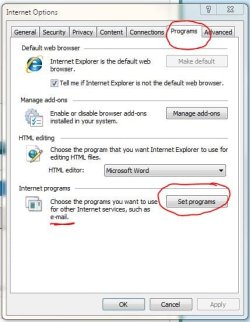
Please try the option shown here.

Regards,
Golden
 

Attachments

  • Capture.JPG
    Capture.JPG
    43.2 KB · Views: 2

My Computer My Computer

At a glance

Windows 10 Pro x64 ; Xubuntu x64Intel i7 860 @ 2.80 GHz O/C'ed to 4.0GHz16GB Corsair Vengance DDR3 @ 661 MHz Dual Cha...EVGA NVidia GTX 560 1024MB
Computer type
PC/Desktop
Computer Manufacturer/Model Number
Golden Mk. I.4
OS
Windows 10 Pro x64 ; Xubuntu x64
CPU
Intel i7 860 @ 2.80 GHz O/C'ed to 4.0GHz
Motherboard
Gigabyte P55A-UD3R Rev.1. Award BIOS F13
Memory
16GB Corsair Vengance DDR3 @ 661 MHz Dual Channel (9-9-9-24)
Graphics Card(s)
EVGA NVidia GTX 560 1024MB
Sound Card
Realtek Integrated
Monitor(s) Displays
Dual Samsung SyncMaster 2494HS
Screen Resolution
1920*1080 and 1920*1080
Hard Drives
1*Samsung 840 EVO 120GB SSD;
1*OCZ Vertex 2 60GB SSD;
2*Samsung F3 SpinPoint 1TB in RAID0;
1*Samsung F1 SpinPoint 1TB;
2*Western Digital 1TB External USB 3.0
1*Western Digital 500GB External USB 3.0
1*Seagate 500GB External USB 2.0
PSU
Thermaltake ToughPower QFan 750W
Case
Thermaltake Element S VK60001W2Z
Cooling
Corsair H60 Water Cooling, 2*230mm and 2*80mm case fans
Keyboard
Logitech G110
Mouse
Logitech MX518
I tried it alot of times ,didnt work !!
 

My Computer My Computer

At a glance

Windows 7 Ultimate SP1 64 BitIntel Core i7-2630QM 2.00GHz4 Gb ddr3Nvidia 520 1G
Computer Manufacturer/Model Number
Dell Insporon N7110
OS
Windows 7 Ultimate SP1 64 Bit
CPU
Intel Core i7-2630QM 2.00GHz
Memory
4 Gb ddr3
Graphics Card(s)
Nvidia 520 1G
Monitor(s) Displays
1600 X 900
Screen Resolution
1440*900
Hard Drives
500 GB + 500 GB
Internet Speed
1 mb
Perhaps something in here might help:
How to change Windows Live Mail association with Messenger, for email ?? - Vista Forums

Re: How to change Windows Live Mail association with Messenger, for email ??

To stop WLM from signing on(automatically or prompting) with/for a Live ID when opening:
WLM/Tools/Options/Connection/Stop signing on

For Messenger(from the online Help available after opening Messenger)
<qp>
Sign in automatically and set your online status:
Windows Live Messenger can sign you in automatically and set your status when you connect to the Internet. The sign-in
automatically tool is useful on a private computer. However, if you use a public or shared computer, others can access your account
if you select Remember my password.

Set Messenger to sign you in automatically.:
In the Messenger sign-in window, enter your e-mail address and password.
Select the Remember me and the Remember my password check boxes.
Select the Sign me in automatically check box to turn on automatic sign-in.
Your selections take effect the next time you open Messenger.

Tips
To set your status, click the arrow button next to Sign in as, and then select the status you want Messenger to display when you
sign in.
To remove your sign-in information, clear the Remember Me and the Remember my Password check boxes.
Note
If you're using Windows Vista and have your Presentation Settings enabled, you won't be interrupted by notifications when your
status is set to Busy.
 

My Computer My Computer

At a glance

Windows 7 Home Premium 64bitIntel(R) Core(TM) i3-2120 CPU @ 3.30GHz3.00 GB(1) Intel(R) HD Graphics (2) VNC Mirror Driver
Computer type
PC/Desktop
Computer Manufacturer/Model Number
Packard Bell
OS
Windows 7 Home Premium 64bit
CPU
Intel(R) Core(TM) i3-2120 CPU @ 3.30GHz
Motherboard
Packard Bell IPISB-AG
Memory
3.00 GB
Graphics Card(s)
(1) Intel(R) HD Graphics (2) VNC Mirror Driver
Sound Card
Realtek High Definition Audio
Monitor(s) Displays
AIO LCD
Screen Resolution
1920 x 1080
Hard Drives
WDC WD10EADX-22TDHB0 ATA Device
Fixed hard disk media
4 partitions
931.51 GB
Keyboard
Wireless
Mouse
Wireless
Antivirus
Microsoft Security Essentials
Browser
IE; Firefox
Other Info
Also:
Samsung N220 Plus Netbook - Windows 7 Home
HP laptop
iPad 5
Outlook still doesnt open when i click on the inbox (I have MICROSOFT.OFFICE.2010.PROFESSIONAL.RTM.VOLUME.COMBO)
 

My Computer My Computer

At a glance

Windows 7 Ultimate SP1 64 BitIntel Core i7-2630QM 2.00GHz4 Gb ddr3Nvidia 520 1G
Computer Manufacturer/Model Number
Dell Insporon N7110
OS
Windows 7 Ultimate SP1 64 Bit
CPU
Intel Core i7-2630QM 2.00GHz
Memory
4 Gb ddr3
Graphics Card(s)
Nvidia 520 1G
Monitor(s) Displays
1600 X 900
Screen Resolution
1440*900
Hard Drives
500 GB + 500 GB
Internet Speed
1 mb
...?!
 

My Computer My Computer

At a glance

Windows 7 Ultimate SP1 64 BitIntel Core i7-2630QM 2.00GHz4 Gb ddr3Nvidia 520 1G
Computer Manufacturer/Model Number
Dell Insporon N7110
OS
Windows 7 Ultimate SP1 64 Bit
CPU
Intel Core i7-2630QM 2.00GHz
Memory
4 Gb ddr3
Graphics Card(s)
Nvidia 520 1G
Monitor(s) Displays
1600 X 900
Screen Resolution
1440*900
Hard Drives
500 GB + 500 GB
Internet Speed
1 mb
Back
Top