Reading your posts it is impossible to tell if you are having this issue with
- a Live mail account using Outlook.com web interface
- OR -
- an email account using Microsoft Outlook 20XX email client (2003, 2007, 2010 or 2013 version)
- OR -
- an email account using Windows Live mail client
As I do no longer have Windows Live email client installed on any of my computers, I am only able to answer to you if you use one of the two first alternatives. The outlook.com web interface or Microsoft Outlook client do not simply decide to "forget" some pages of your messages, they are there and ready to be printed.
Outlook.com mail web interface:
Using
Outlook.com web interface for a Live or Hotmail email account, to print a message you need to click the three dots symbol to open a context menu and select
Print:
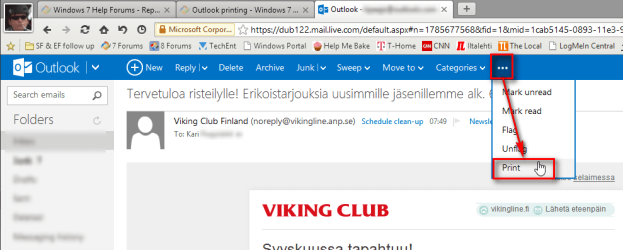
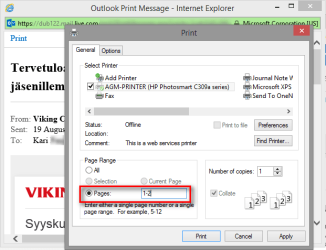
The browser opens a Print Preview window (or tab, depending on what browser you are using) and the Windows Print dialog.
Example using Internet Explorer browser, a new Print Preview window opens:
Example using Maxthon browser, a new Print Preview tab opens:
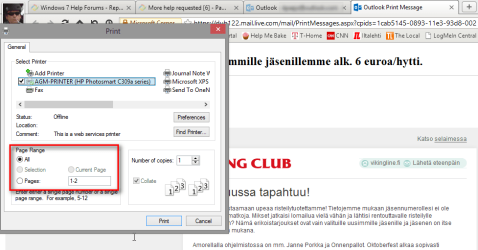
Now select the page range to be printed in Print dialog.
Actual look of the Print Preview varies depending on what browser you are using but the same functions are there regardless of the browser.
Microsoft Outlook 20XX:
Click
File >
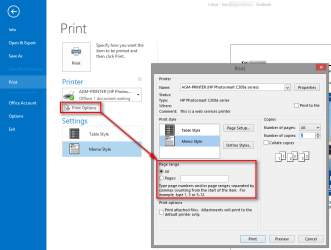
Print, on a multipage message use selectors at the bottom of the page to preview one or all pages:

When happy with preview click Print Options to open a dialog window to select page range to be printed:
Kari
Note
For future readers of this thread:
Please notice that when asking help at the Seven Forums you must give us a possibility to help you. If you only reveal as little information as possible letting us guess, you might not get any help. It is not good for yourself if telling and describing your issue takes several posts or if it will never be really told.
Here's an example of a correct first post, describing an issue. It is purely an example and as such has nothing to do with the issue discussed in this thread. Here's how I had asked a similar question:
Example post said:
I am using a Live.com email address with Microsoft Outlook 2013 email client. When I go to File > Print, the preview only shows page 1 of a multipage message and gives no options to either preview or print other than that first page.
The issue first occurred when my email service was offline several hours due a server crash. Before that the print preview showed all pages of a message and I could print all pages.



 The ..., Print should pull up the print dialog of your printer(s) and let you chose which pages, etc. In any case, I understand that isn't what you want. Have you tried it in a different browser to see if you get the same result? I don't have any emails with multiple pages to see how mine reacts. Let me post to the Gurus and see if anyone has any ideas. A Guy