Outlook: Way to forward entire custom folder of emails?

Delicieuxz

Banned
Local time
8:17 PM
Messages
36
I'm made a folder in which I've collected all emails of a certain topic, with several dozen emails within. I'd like to forward the entire folder to a new address, is there a way to do this?

I contacted Outlook support, but they don't ever respond (not much for "support", I guess).
 

My Computer My Computer

At a glance

Windows 7 Ultimate 64Intel i5 2500kPatriot Viper Xtreme 8GB 1866 mhz 9-11-9-27 1...Gigabyte R9 280x
Computer type
PC/Desktop
OS
Windows 7 Ultimate 64
CPU
Intel i5 2500k
Motherboard
ASUS P8P67 Pro Rev 3.1
Memory
Patriot Viper Xtreme 8GB 1866 mhz 9-11-9-27 1.65v
Graphics Card(s)
Gigabyte R9 280x
Sound Card
Auzentech Xi-Fi Prelude 7.1
Monitor(s) Displays
Samsung SyncMaster 2693 HM
Screen Resolution
1920x1200
Hard Drives
Corsair Force GT 90 gb SSD
WD Caviar Black 1TB
WD Caviar Green 2TB
PSU
OCZ ZX 1250w
Case
Corsair Graphite 600T
Cooling
stock
Mouse
Logitech G400
Antivirus
AVG (seldom)
Browser
Chrome, Firefox, IE
I assume you are talking about Microsoft Outlook email client, not about the web based Outlook.com email service?

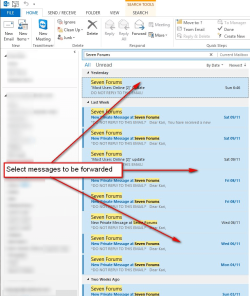
In Ms Outlook you can forward multiple messages quite easily. Do this:
  • Select messages to be forwarded by holding down the CTRL button and selecting messages one by one, or press CTRL + A within a folder to select all messages:
    2013-11-11_191531.png
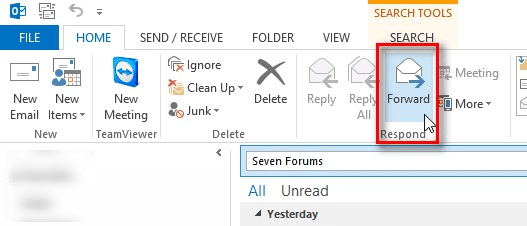
  • Click Forward on Ribbon:
    2013-11-11_191613.png
  • All selected email messages are now attached (as attachments) to a new message. Give the recipients email address and send your message:
    2013-11-11_191656.png
Kari
 

My Computer My Computer

At a glance

Windows 10 Pro x64 EN-GB1.6 GHz Intel Core i7-720QM Processor6 GBATI Mobility Radeon HD 5850 Graphics
Computer type
Laptop
Computer Manufacturer/Model Number
HP ENVY 17-1150eg
OS
Windows 10 Pro x64 EN-GB
CPU
1.6 GHz Intel Core i7-720QM Processor
Memory
6 GB
Graphics Card(s)
ATI Mobility Radeon HD 5850 Graphics
Sound Card
Beats sound system with integrated subwoofer
Monitor(s) Displays
17" laptop display, 22" LED and 32" Full HD TV through HDMI
Screen Resolution
1600*900 (1), 1920*1080 (2&3)
Hard Drives
Internal: 2 x 500 GB SATA Hard Disk Drive 7200 rpm
External: 2TB for backups, 3TB USB3 network drive for media
Cooling
As Envy runs a bit warm, I have it on a Cooler Master pad
Keyboard
Logitech diNovo Media Desktop Laser (bluetooth)
Mouse
Logitech Performance Mouse MX
Internet Speed
50/10 Mbps VDSL
Antivirus
Windows Defender 4.3.9431.0
Browser
Maxthon 3.5.2., IE11
Thanks, though I'm indeed referring to the browser service.
 

My Computer My Computer

At a glance

Windows 7 Ultimate 64Intel i5 2500kPatriot Viper Xtreme 8GB 1866 mhz 9-11-9-27 1...Gigabyte R9 280x
Computer type
PC/Desktop
OS
Windows 7 Ultimate 64
CPU
Intel i5 2500k
Motherboard
ASUS P8P67 Pro Rev 3.1
Memory
Patriot Viper Xtreme 8GB 1866 mhz 9-11-9-27 1.65v
Graphics Card(s)
Gigabyte R9 280x
Sound Card
Auzentech Xi-Fi Prelude 7.1
Monitor(s) Displays
Samsung SyncMaster 2693 HM
Screen Resolution
1920x1200
Hard Drives
Corsair Force GT 90 gb SSD
WD Caviar Black 1TB
WD Caviar Green 2TB
PSU
OCZ ZX 1250w
Case
Corsair Graphite 600T
Cooling
stock
Mouse
Logitech G400
Antivirus
AVG (seldom)
Browser
Chrome, Firefox, IE
OK. Just for the future requests and questions: Outlook and Outlook.com are two very different things!

Forwarding multiple messages is not possible using Outlook.com web interface. You need to read your Outlook.com email messages to an email client, then use the client tools to do the forwarding.

Although I am not sure as I am not using it myself, as far as I know also the free Windows Live Mail client, part of Windows Essentials can do this as described in my previous post for Ms Outlook.

Kari
 

My Computer My Computer

At a glance

Windows 10 Pro x64 EN-GB1.6 GHz Intel Core i7-720QM Processor6 GBATI Mobility Radeon HD 5850 Graphics
Computer type
Laptop
Computer Manufacturer/Model Number
HP ENVY 17-1150eg
OS
Windows 10 Pro x64 EN-GB
CPU
1.6 GHz Intel Core i7-720QM Processor
Memory
6 GB
Graphics Card(s)
ATI Mobility Radeon HD 5850 Graphics
Sound Card
Beats sound system with integrated subwoofer
Monitor(s) Displays
17" laptop display, 22" LED and 32" Full HD TV through HDMI
Screen Resolution
1600*900 (1), 1920*1080 (2&3)
Hard Drives
Internal: 2 x 500 GB SATA Hard Disk Drive 7200 rpm
External: 2TB for backups, 3TB USB3 network drive for media
Cooling
As Envy runs a bit warm, I have it on a Cooler Master pad
Keyboard
Logitech diNovo Media Desktop Laser (bluetooth)
Mouse
Logitech Performance Mouse MX
Internet Speed
50/10 Mbps VDSL
Antivirus
Windows Defender 4.3.9431.0
Browser
Maxthon 3.5.2., IE11
Alright, thanks for that information! Is there a way within Outlook, then, to forward a folder as a folder, so that it arrives at its destination as all contained within that folder? That would be a very neat and useful feature.
 

My Computer My Computer

At a glance

Windows 7 Ultimate 64Intel i5 2500kPatriot Viper Xtreme 8GB 1866 mhz 9-11-9-27 1...Gigabyte R9 280x
Computer type
PC/Desktop
OS
Windows 7 Ultimate 64
CPU
Intel i5 2500k
Motherboard
ASUS P8P67 Pro Rev 3.1
Memory
Patriot Viper Xtreme 8GB 1866 mhz 9-11-9-27 1.65v
Graphics Card(s)
Gigabyte R9 280x
Sound Card
Auzentech Xi-Fi Prelude 7.1
Monitor(s) Displays
Samsung SyncMaster 2693 HM
Screen Resolution
1920x1200
Hard Drives
Corsair Force GT 90 gb SSD
WD Caviar Black 1TB
WD Caviar Green 2TB
PSU
OCZ ZX 1250w
Case
Corsair Graphite 600T
Cooling
stock
Mouse
Logitech G400
Antivirus
AVG (seldom)
Browser
Chrome, Firefox, IE
In Outlook, forwarding multiple messages is as far as I know only possible as described in my first post in this thread.
 

My Computer My Computer

At a glance

Windows 10 Pro x64 EN-GB1.6 GHz Intel Core i7-720QM Processor6 GBATI Mobility Radeon HD 5850 Graphics
Computer type
Laptop
Computer Manufacturer/Model Number
HP ENVY 17-1150eg
OS
Windows 10 Pro x64 EN-GB
CPU
1.6 GHz Intel Core i7-720QM Processor
Memory
6 GB
Graphics Card(s)
ATI Mobility Radeon HD 5850 Graphics
Sound Card
Beats sound system with integrated subwoofer
Monitor(s) Displays
17" laptop display, 22" LED and 32" Full HD TV through HDMI
Screen Resolution
1600*900 (1), 1920*1080 (2&3)
Hard Drives
Internal: 2 x 500 GB SATA Hard Disk Drive 7200 rpm
External: 2TB for backups, 3TB USB3 network drive for media
Cooling
As Envy runs a bit warm, I have it on a Cooler Master pad
Keyboard
Logitech diNovo Media Desktop Laser (bluetooth)
Mouse
Logitech Performance Mouse MX
Internet Speed
50/10 Mbps VDSL
Antivirus
Windows Defender 4.3.9431.0
Browser
Maxthon 3.5.2., IE11
Back
Top