Solved OutLook

Paul1360

New member
Power User
Local time
7:48 PM
Messages
191
Location
Brynna-Wales
Hi,
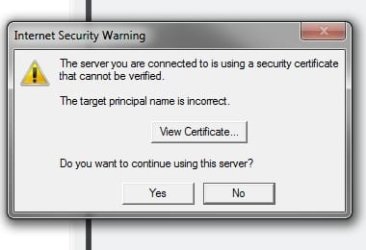
Yesterday when I went to my MS Outlook 2007 to check for emails I had this appear and now everytime it's the same.
Anybody know whats it all about please?????????

iechyd da
 

Attachments

  • MSO.jpg
    MSO.jpg
    12.7 KB · Views: 13

My Computer

Computer type
PC/Desktop
Computer Manufacturer/Model Number
Advent & Acer
OS
Win 8.1 Ultimate and Home Premium x64 bit

try the following:

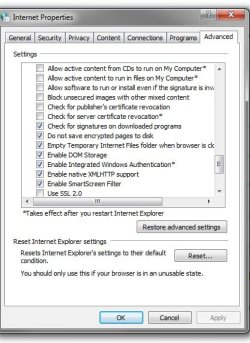
Click tools> internet options>click advanced tab>uncheck the box that says "check for server certificate revocation" under security heading.

Let me know how you go.
 

My Computer

OS
Windows 7 Professional x64 Backtrack 4 R2
CPU
Intel Core i5-650
Motherboard
Gigabyte P55-UD3
Memory
4 GB Geil PC3 12800
Graphics Card(s)
HIS HD 4870 X2
Sound Card
Sound Blaster X-Fi Titanium Fatal1ty Champion
Monitor(s) Displays
BenQ 22" G2220HD
Hard Drives
Seagate Barracuda 7200.12 500GB
PSU
Antec High Current Gamer 620W Power Supply
Case
Thermaltake Armor+ MX
Keyboard
Microsoft SideWinder X6
Mouse
Razer Abyssus
Hi Clinkz,
Well i was not able to locate what you said but know I can't send or receive emails now so am looking into that. Will let you know
iechyd da
 

My Computer

Computer type
PC/Desktop
Computer Manufacturer/Model Number
Advent & Acer
OS
Win 8.1 Ultimate and Home Premium x64 bit
You can find the option through control panel as well, go to:

control panel> internet options>click advanced tab> a list of options will appear, scroll down to the bottom and you will find the heading security the "check for server certificate revocation" is there, you just have to toggle it off. Sorry if i didn't explain well enough.
 

My Computer

OS
Windows 7 Professional x64 Backtrack 4 R2
CPU
Intel Core i5-650
Motherboard
Gigabyte P55-UD3
Memory
4 GB Geil PC3 12800
Graphics Card(s)
HIS HD 4870 X2
Sound Card
Sound Blaster X-Fi Titanium Fatal1ty Champion
Monitor(s) Displays
BenQ 22" G2220HD
Hard Drives
Seagate Barracuda 7200.12 500GB
PSU
Antec High Current Gamer 620W Power Supply
Case
Thermaltake Armor+ MX
Keyboard
Microsoft SideWinder X6
Mouse
Razer Abyssus
Ok soz I misunderstood your post. I've just done what you said and am now looking into the other problem

iechyd da
 

My Computer

Computer type
PC/Desktop
Computer Manufacturer/Model Number
Advent & Acer
OS
Win 8.1 Ultimate and Home Premium x64 bit
Ok soz I misunderstood your post. I've just done what you said and am now looking into the other problem

iechyd da

Care to elaborate on the other problem, maybe someone here can help?
 

My Computer

OS
Windows 7 Professional x64 Backtrack 4 R2
CPU
Intel Core i5-650
Motherboard
Gigabyte P55-UD3
Memory
4 GB Geil PC3 12800
Graphics Card(s)
HIS HD 4870 X2
Sound Card
Sound Blaster X-Fi Titanium Fatal1ty Champion
Monitor(s) Displays
BenQ 22" G2220HD
Hard Drives
Seagate Barracuda 7200.12 500GB
PSU
Antec High Current Gamer 620W Power Supply
Case
Thermaltake Armor+ MX
Keyboard
Microsoft SideWinder X6
Mouse
Razer Abyssus
Well for some unknown reason was not able to send/receive emails from my Yahoo account. So I removed it and rebooted outlook then set yahoo up again and now it's working ok, very odd if you ask me.
Ok as you can see below I did what you said but alas still the same about the certificate warning

iechyd da
 

Attachments

  • Untitled.jpg
    Untitled.jpg
    42 KB · Views: 71

My Computer

Computer type
PC/Desktop
Computer Manufacturer/Model Number
Advent & Acer
OS
Win 8.1 Ultimate and Home Premium x64 bit
There you go then for some unknown reason this morning the problem has gone away and the server certificate box no longer pops up:confused::confused:
Sorry just noticed that over night an update was install about this problem (K2525375)
iechyd da
 
Last edited:

My Computer

Computer type
PC/Desktop
Computer Manufacturer/Model Number
Advent & Acer
OS
Win 8.1 Ultimate and Home Premium x64 bit
Back
Top