Solved Over 100GB Gone After Doing A Clean Install

Derekblack

New member
Local time
11:29 AM
Messages
7
Recently my computer has been running a bit slow, so I decided to erase everything in order to get some memory back, to see if it will help. As I wasn't exactly sure how to delete everything on my hard drive, I attempted to just reinstall Win7 again, but with a clean install. I'm pretty sure I screwed something up here... I think I might have 2 copies of Win7 on my computer now, because after I did the clean install, I have over 100GB less disk space free now. Any help would be greatly appreciated, thank you.


(Sorry if this is in the wrong forum)
 

My Computer My Computer

OS
Windows 7 Home Premium 64bit

My Computer My Computer

Computer type
PC/Desktop
Computer Manufacturer/Model Number
Self Built
OS
Windows 7 Ultimate 64bit
CPU
AMD Phenom Quad core 9950 black edition
Motherboard
Gigabyte
Memory
16Gb
Graphics Card(s)
2x XFX Radeon 5850
Sound Card
PCI Express X-Fi Titanium / Logitech G35
Monitor(s) Displays
2x HP 2410i
Screen Resolution
1920x1080
Hard Drives
2x 500Gb Seagate
1x 300Gb Seagate
1x 1Tb Seagate
2x 1Tb Hitatchi
PSU
Jean Tech Storm 700W
Case
Cooler Master COSMOS S
Cooling
Akasa Evo Blue Pro
Keyboard
Logitech G15
Mouse
Mad Catz M.M.O. 7
Internet Speed
12mb
Hello Derek,

Could you post a screenshot of your Disk Management (diskmgmt.msc) showing all of you HDD's layout? It'll help us determine if you do or not. :)
 

My Computer My Computer

Computer type
PC/Desktop
Computer Manufacturer/Model Number
Self built custom
OS
64-bit Windows 11 Pro for Workstations
CPU
Intel i7-8700K OC'd to 5 GHz
Motherboard
ASUS ROG Maximus XI Formula Z390
Memory
64 GB (4x16GB) G.SKILL TridentZ RGB DDR4 3600 MHz
Graphics Card(s)
ASUS ROG-STRIX-GTX1080TI-O11G-GAMING
Sound Card
Integrated
Monitor(s) Displays
2 x Samsung Odyssey G7 27"
Screen Resolution
2560x1440
Hard Drives
1TB Samsung 990 PRO M.2,
4TB Samsung 990 PRO PRO M.2,
TerraMaster F8 SSD Plus NAS
PSU
Seasonic Prime Titanium 850W
Case
Thermaltake Core P3
Cooling
Corsair Hydro H115i
Keyboard
Logitech wireless K800
Mouse
Logitech MX Master 4
Internet Speed
2 Gb/s Download and 100 Mb/s Upload
Antivirus
Malwarebyte Anti-Malware Premium
Browser
Google Chrome
Other Info
Logitech Z625 speaker system,
Logitech BRIO 4K Pro webcam,
HP Color LaserJet Pro MFP M477fdn,
APC SMART-UPS RT 1000 XL - SURT1000XLI,
Galaxy S23 Plus phone
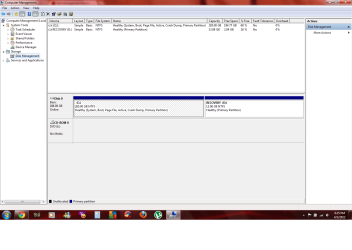
It wasn't exactly over 100GB of memory lost, but I didn't have much on my computer, only about 10GB used and now I have about 80GB used. My disk space free used to be in the mid 90s, now it's in the 60s. This is my Disk Management...
 

Attachments

  • Untitled.png
    Untitled.png
    47.7 KB · Views: 88

My Computer My Computer

OS
Windows 7 Home Premium 64bit
If you look at your Disk Mangement listings columns, it shows you're only using 10gb on C.
 
I'm not sure what you mean... If I'm only using 10GB on C then why do I only have 68% of my disk space on C free?
 

My Computer My Computer

OS
Windows 7 Home Premium 64bit
Derek,

I think that should have either been about 10GB used on D: , or 90.23GB (about 100GB) used on C: . :)

You might look through the tutorial below to see if it may help to find out what is using up your HDD space. Are you sure you did a clean install? Check to see if you may have a C:\Windows.old folder (option 5 below).

http://www.sevenforums.com/tutorials/129976-hard-disk-space-free-up-recover.html
 

My Computer My Computer

Computer type
PC/Desktop
Computer Manufacturer/Model Number
Self built custom
OS
64-bit Windows 11 Pro for Workstations
CPU
Intel i7-8700K OC'd to 5 GHz
Motherboard
ASUS ROG Maximus XI Formula Z390
Memory
64 GB (4x16GB) G.SKILL TridentZ RGB DDR4 3600 MHz
Graphics Card(s)
ASUS ROG-STRIX-GTX1080TI-O11G-GAMING
Sound Card
Integrated
Monitor(s) Displays
2 x Samsung Odyssey G7 27"
Screen Resolution
2560x1440
Hard Drives
1TB Samsung 990 PRO M.2,
4TB Samsung 990 PRO PRO M.2,
TerraMaster F8 SSD Plus NAS
PSU
Seasonic Prime Titanium 850W
Case
Thermaltake Core P3
Cooling
Corsair Hydro H115i
Keyboard
Logitech wireless K800
Mouse
Logitech MX Master 4
Internet Speed
2 Gb/s Download and 100 Mb/s Upload
Antivirus
Malwarebyte Anti-Malware Premium
Browser
Google Chrome
Other Info
Logitech Z625 speaker system,
Logitech BRIO 4K Pro webcam,
HP Color LaserJet Pro MFP M477fdn,
APC SMART-UPS RT 1000 XL - SURT1000XLI,
Galaxy S23 Plus phone
go to your hard drive C:. do you have a folder called windows.old? if you do, its ur old windows setup. go to disk cleanup to remove it
 

My Computer My Computer

Computer Manufacturer/Model Number
Acer Aspire 7551-7422
OS
Windows Home Premium 64bit
CPU
AMD Phenom II N970 Quad-core processor 2.20 GHz
Memory
4GB
Graphics Card(s)
ATI Mobility Radeon HD 4250
Sound Card
RealTek high definition audio/ATI high definition audio devi
Monitor(s) Displays
Generic PnP Monitor (1600x900)
Hard Drives
500GB
I checked and it appears that I do have a windows.old folder. Is there any special way to delete it, or just click and delete?

Btw, thank you for all your help, this has been bugging me. :)
 

My Computer My Computer

OS
Windows 7 Home Premium 64bit

My Computer My Computer

Computer type
PC/Desktop
Computer Manufacturer/Model Number
Self built custom
OS
64-bit Windows 11 Pro for Workstations
CPU
Intel i7-8700K OC'd to 5 GHz
Motherboard
ASUS ROG Maximus XI Formula Z390
Memory
64 GB (4x16GB) G.SKILL TridentZ RGB DDR4 3600 MHz
Graphics Card(s)
ASUS ROG-STRIX-GTX1080TI-O11G-GAMING
Sound Card
Integrated
Monitor(s) Displays
2 x Samsung Odyssey G7 27"
Screen Resolution
2560x1440
Hard Drives
1TB Samsung 990 PRO M.2,
4TB Samsung 990 PRO PRO M.2,
TerraMaster F8 SSD Plus NAS
PSU
Seasonic Prime Titanium 850W
Case
Thermaltake Core P3
Cooling
Corsair Hydro H115i
Keyboard
Logitech wireless K800
Mouse
Logitech MX Master 4
Internet Speed
2 Gb/s Download and 100 Mb/s Upload
Antivirus
Malwarebyte Anti-Malware Premium
Browser
Google Chrome
Other Info
Logitech Z625 speaker system,
Logitech BRIO 4K Pro webcam,
HP Color LaserJet Pro MFP M477fdn,
APC SMART-UPS RT 1000 XL - SURT1000XLI,
Galaxy S23 Plus phone
I'm not sure what you mean... If I'm only using 10GB on C then why do I only have 68% of my disk space on C free?

I was using the figures presented in the listings column 205 gb capacity with 195 gb free space. If this varies from the capacity shown on the drive map after deleting windows.old then double check the listings given with free Partition Wizard bootable CD as Disk Mgmt can err but PW CD is usually correct.
 
Poor capture quality, Greg. It actually says 285gb, not 205gb.
 

My Computer My Computer

Computer type
PC/Desktop
Computer Manufacturer/Model Number
Homebuilt
OS
windows 7 32
CPU
Intel i7 4770K
Motherboard
Asus Z97-A
Memory
Corsair Vengeance 8gb DDR3 2133(PC3 17000)
Graphics Card(s)
nVidia GTX 660 2gb
Sound Card
Asus Xonar D1
Monitor(s) Displays
Dell Ultrasharp UM2913WM
Screen Resolution
2560x1080 32
Hard Drives
PNY 240gb SSD
Seagate 500gb SSD
PSU
Corsair CXM 600
Case
Fractal Design Define R4
Cooling
Arctic Freezer Xtreme rev 2
Keyboard
Logitech K800 Wireless Illuminated
Mouse
MicroSoft 5000
Internet Speed
Cable
Antivirus
MSE
Browser
IE 11 and Chrome
Other Info
Samsung DVD-RW
Cambridge 4.1 speakers
Hauppauge HVR-950 USB Tuner
Asus Optimized Overclock to 4.4ghz
Thanks for all the help, I got my disk space back. :D
 

My Computer My Computer

OS
Windows 7 Home Premium 64bit
Thanks Derek. In my defense I should tell you I've been stranded in the DFW airport since tornadoes and a hail storm damaged 111 planes canceling all flights yesterday afternoon. I had little sleep and should have zoomed in on the listings column since it looked like a perfect zero. I also should have cross-checked it with the size given in the drive map. Embarrassing in front of the boss, but hopefully excusable. :o

Glad it worked out for you.
 
Back
Top