
Solved Over 7 hours ram usage hits 100% - sometimes randomly shows artifacts

antman84

New member
Local time
9:34 AM
Messages
12
Hi all,

I've spent some time looking around for a solution but I have been unable to find anything that helps. I'm hoping someone here can give me a clue as to what my issue/problem could be.

I'm finding that I can leave my PC on for no more than 8 hours. After 8 hours ram usage spikes to 100% applications start to crash and I then am forced to reboot the system.

I thought it could be multiple things - I replaced the SSD with a brand new one. I tried uninstalling and reinstalling video drivers, I removed the latest applications I have installed, I have looked at process explorer and RAMMap and i'm not finding any applications that are using more memory than they actually should. These applications all look good..

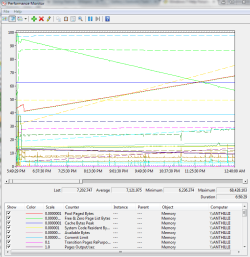
I grabbed a data set from Performance Monitor to show what I have been seeing and it doesn't look normal to me. Does anyone have any ideas on what the issue could be? Could it be a Windows patch or bad ram at this point? Is my video card is bad shape?
 

Attachments
  • Capture.PNG
    Capture.PNG
    27 KB · Views: 1

My Computer My Computer

At a glance

Microsoft Windows 7 Ultimate 64-bit 7601 Mult...Intel(R) Core(TM) i7 CPU 920 @ 2.67GHz18.00 GBNVIDIA GeForce GTX 760
Computer type
PC/Desktop
Computer Manufacturer/Model Number
Custom Build
OS
Microsoft Windows 7 Ultimate 64-bit 7601 Multiprocessor Free Service Pack 1
CPU
Intel(R) Core(TM) i7 CPU 920 @ 2.67GHz
Motherboard
ASUSTeK Computer INC. P6X58D-E
Memory
18.00 GB
Graphics Card(s)
NVIDIA GeForce GTX 760
Sound Card
(1) Razer Surround Audio Controller (2) NVIDIA High Defini
Screen Resolution
1680 x 1050 x 32 bits (4294967296 colors) @ 120 Hz
Hard Drives
(1) ATA ST31000528AS SCSI Disk Device (2) Samsung SSD 840 EVO 250G SCSI Disk Device (3) WDC WD10 02FAEX-00Y9A0 SCSI Disk Device

My Computer My Computer

At a glance

Windows 10, Home Clean InstallIntel Core2 processsor Q8200(2.33Ghz 1333FSB)...6 gbATI Radeon 256MB HD3650
Computer type
PC/Desktop
Computer Manufacturer/Model Number
Dell XPS 420
OS
Windows 10, Home Clean Install
CPU
Intel Core2 processsor Q8200(2.33Ghz 1333FSB) Quad Core Tech
Motherboard
Dell
Memory
6 gb
Graphics Card(s)
ATI Radeon 256MB HD3650
Sound Card
Intergrated 7.1 Channel Audio
Monitor(s) Displays
Dell SP2009W 20"
Hard Drives
640 GB Serial ATA Hard drive
Cooling
Fan
Keyboard
Dell USB Keyboard
Mouse
Dell Premium Optical USB
Internet Speed
DSL 2.85
Hi rich,

Thanks for the reply! I scanned the system with memtest.for over 26 hours and and no errors showed up. Everything came back clean. Malware bytes shows clean and antivirus also shows clean. Have any ideas? Could it be a software issue or video card problem?
 

My Computer My Computer

At a glance

Microsoft Windows 7 Ultimate 64-bit 7601 Mult...Intel(R) Core(TM) i7 CPU 920 @ 2.67GHz18.00 GBNVIDIA GeForce GTX 760
Computer type
PC/Desktop
Computer Manufacturer/Model Number
Custom Build
OS
Microsoft Windows 7 Ultimate 64-bit 7601 Multiprocessor Free Service Pack 1
CPU
Intel(R) Core(TM) i7 CPU 920 @ 2.67GHz
Motherboard
ASUSTeK Computer INC. P6X58D-E
Memory
18.00 GB
Graphics Card(s)
NVIDIA GeForce GTX 760
Sound Card
(1) Razer Surround Audio Controller (2) NVIDIA High Defini
Screen Resolution
1680 x 1050 x 32 bits (4294967296 colors) @ 120 Hz
Hard Drives
(1) ATA ST31000528AS SCSI Disk Device (2) Samsung SSD 840 EVO 250G SCSI Disk Device (3) WDC WD10 02FAEX-00Y9A0 SCSI Disk Device
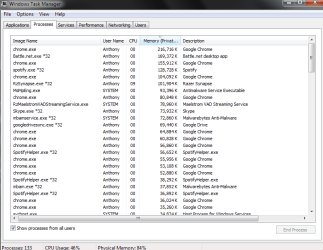
When you have the problem, again, go to search by the start button, type task manager, click on task manager, then go to the process tab and check what is using all your memory
 

My Computer My Computer

At a glance

Windows 10, Home Clean InstallIntel Core2 processsor Q8200(2.33Ghz 1333FSB)...6 gbATI Radeon 256MB HD3650
Computer type
PC/Desktop
Computer Manufacturer/Model Number
Dell XPS 420
OS
Windows 10, Home Clean Install
CPU
Intel Core2 processsor Q8200(2.33Ghz 1333FSB) Quad Core Tech
Motherboard
Dell
Memory
6 gb
Graphics Card(s)
ATI Radeon 256MB HD3650
Sound Card
Intergrated 7.1 Channel Audio
Monitor(s) Displays
Dell SP2009W 20"
Hard Drives
640 GB Serial ATA Hard drive
Cooling
Fan
Keyboard
Dell USB Keyboard
Mouse
Dell Premium Optical USB
Internet Speed
DSL 2.85
The problem happens over time.. Nothing looks abnormal to using more memory than expected...

Here's some more pictures to help illustrate.
 

Attachments

  • Capture.PNG
    Capture.PNG
    13.6 KB · Views: 0
  • Capture2.PNG
    Capture2.PNG
    21.6 KB · Views: 0

My Computer My Computer

At a glance

Microsoft Windows 7 Ultimate 64-bit 7601 Mult...Intel(R) Core(TM) i7 CPU 920 @ 2.67GHz18.00 GBNVIDIA GeForce GTX 760
Computer type
PC/Desktop
Computer Manufacturer/Model Number
Custom Build
OS
Microsoft Windows 7 Ultimate 64-bit 7601 Multiprocessor Free Service Pack 1
CPU
Intel(R) Core(TM) i7 CPU 920 @ 2.67GHz
Motherboard
ASUSTeK Computer INC. P6X58D-E
Memory
18.00 GB
Graphics Card(s)
NVIDIA GeForce GTX 760
Sound Card
(1) Razer Surround Audio Controller (2) NVIDIA High Defini
Screen Resolution
1680 x 1050 x 32 bits (4294967296 colors) @ 120 Hz
Hard Drives
(1) ATA ST31000528AS SCSI Disk Device (2) Samsung SSD 840 EVO 250G SCSI Disk Device (3) WDC WD10 02FAEX-00Y9A0 SCSI Disk Device
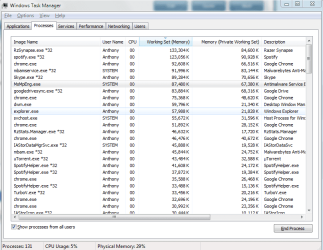
Post a screenshot of the process list showing and sorted by "Working Set (Memory)". You will have to add this column from the View menu. The "Memory (Private Working Set)" column shown does not fully account for process usage.

The Nonpaged kernel usage is high but not nearly high enough to account for what is observed.
 

My Computer My Computer

At a glance

Windows 7 Pro 64 bitXeon W35208 GBNvidia Geforce 210
Computer type
PC/Desktop
Computer Manufacturer/Model Number
HP
OS
Windows 7 Pro 64 bit
CPU
Xeon W3520
Memory
8 GB
Graphics Card(s)
Nvidia Geforce 210
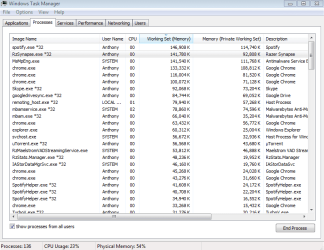
I was forced to reboot because the system locked up so now everything is showing fine. This is what it looks like right now. I will post another screenshot tomorrow morning to show the difference in one evening.
 

Attachments

  • Capture.PNG
    Capture.PNG
    32.3 KB · Views: 1
Last edited:

My Computer My Computer

At a glance

Microsoft Windows 7 Ultimate 64-bit 7601 Mult...Intel(R) Core(TM) i7 CPU 920 @ 2.67GHz18.00 GBNVIDIA GeForce GTX 760
Computer type
PC/Desktop
Computer Manufacturer/Model Number
Custom Build
OS
Microsoft Windows 7 Ultimate 64-bit 7601 Multiprocessor Free Service Pack 1
CPU
Intel(R) Core(TM) i7 CPU 920 @ 2.67GHz
Motherboard
ASUSTeK Computer INC. P6X58D-E
Memory
18.00 GB
Graphics Card(s)
NVIDIA GeForce GTX 760
Sound Card
(1) Razer Surround Audio Controller (2) NVIDIA High Defini
Screen Resolution
1680 x 1050 x 32 bits (4294967296 colors) @ 120 Hz
Hard Drives
(1) ATA ST31000528AS SCSI Disk Device (2) Samsung SSD 840 EVO 250G SCSI Disk Device (3) WDC WD10 02FAEX-00Y9A0 SCSI Disk Device
Attachments

  • Capture.PNG
    Capture.PNG
    24 KB · Views: 1

My Computer My Computer

At a glance

Microsoft Windows 7 Ultimate 64-bit 7601 Mult...Intel(R) Core(TM) i7 CPU 920 @ 2.67GHz18.00 GBNVIDIA GeForce GTX 760
Computer type
PC/Desktop
Computer Manufacturer/Model Number
Custom Build
OS
Microsoft Windows 7 Ultimate 64-bit 7601 Multiprocessor Free Service Pack 1
CPU
Intel(R) Core(TM) i7 CPU 920 @ 2.67GHz
Motherboard
ASUSTeK Computer INC. P6X58D-E
Memory
18.00 GB
Graphics Card(s)
NVIDIA GeForce GTX 760
Sound Card
(1) Razer Surround Audio Controller (2) NVIDIA High Defini
Screen Resolution
1680 x 1050 x 32 bits (4294967296 colors) @ 120 Hz
Hard Drives
(1) ATA ST31000528AS SCSI Disk Device (2) Samsung SSD 840 EVO 250G SCSI Disk Device (3) WDC WD10 02FAEX-00Y9A0 SCSI Disk Device
Any ideas?
 

My Computer My Computer

At a glance

Microsoft Windows 7 Ultimate 64-bit 7601 Mult...Intel(R) Core(TM) i7 CPU 920 @ 2.67GHz18.00 GBNVIDIA GeForce GTX 760
Computer type
PC/Desktop
Computer Manufacturer/Model Number
Custom Build
OS
Microsoft Windows 7 Ultimate 64-bit 7601 Multiprocessor Free Service Pack 1
CPU
Intel(R) Core(TM) i7 CPU 920 @ 2.67GHz
Motherboard
ASUSTeK Computer INC. P6X58D-E
Memory
18.00 GB
Graphics Card(s)
NVIDIA GeForce GTX 760
Sound Card
(1) Razer Surround Audio Controller (2) NVIDIA High Defini
Screen Resolution
1680 x 1050 x 32 bits (4294967296 colors) @ 120 Hz
Hard Drives
(1) ATA ST31000528AS SCSI Disk Device (2) Samsung SSD 840 EVO 250G SCSI Disk Device (3) WDC WD10 02FAEX-00Y9A0 SCSI Disk Device
I have had a similar issue. Used to run with 8Gb of RAM, and after only few hours running Win7 64-bit RAM would keep maxing out. But I didn't poke around long, assumed it was faulty RAM, went bought another 8Gb (4Gbx2 sticks) of the same set of RAM (good sale at the time) and tried that out. Ended up with the same issue, few hours in RAM would max even with 16Gb's. Tried different slots (dual RAM sticks btw), tried different tower (RAM was NOT faulty). At that point I automatically assumed corruption. Got a different .ISO (assumed the one I previously used must've been a faulty boot), not a problem since.

Just my experience, perhaps you'll have better luck and safe OS/data from a clean install.

Goodluck.
 

My Computer My Computer

At a glance

Micro$oft 64-bit16Gb
OS
Micro$oft 64-bit
Memory
16Gb
Monitor(s) Displays
LCD
Screen Resolution
1080p
Hard Drives
120Gb + 2Tb + 750Gb
PSU
800W
Cooling
Liquid
Other Info
( . Y . )
I'm starting to think It's time to upgrade to 8.1 from Windows 7... If I can't figure this issue out that'll be the next action I take... If that doesn't work a clean install might be something I do... OR build a new rig...
 

My Computer My Computer

At a glance

Microsoft Windows 7 Ultimate 64-bit 7601 Mult...Intel(R) Core(TM) i7 CPU 920 @ 2.67GHz18.00 GBNVIDIA GeForce GTX 760
Computer type
PC/Desktop
Computer Manufacturer/Model Number
Custom Build
OS
Microsoft Windows 7 Ultimate 64-bit 7601 Multiprocessor Free Service Pack 1
CPU
Intel(R) Core(TM) i7 CPU 920 @ 2.67GHz
Motherboard
ASUSTeK Computer INC. P6X58D-E
Memory
18.00 GB
Graphics Card(s)
NVIDIA GeForce GTX 760
Sound Card
(1) Razer Surround Audio Controller (2) NVIDIA High Defini
Screen Resolution
1680 x 1050 x 32 bits (4294967296 colors) @ 120 Hz
Hard Drives
(1) ATA ST31000528AS SCSI Disk Device (2) Samsung SSD 840 EVO 250G SCSI Disk Device (3) WDC WD10 02FAEX-00Y9A0 SCSI Disk Device
Have you changed your pagefile or how the memory is used?
I always let Windows 7 manage memory.
 

My Computer My Computer

At a glance

Windows 10 Pro. 64/ version 1709 Windows 7 Pr...Intel i7-6800K @ 4.3Corsair Platinum 16 gig @2400EVGA GTX 1070 OC
Computer type
PC/Desktop
Computer Manufacturer/Model Number
Home made Desktop
OS
Windows 10 Pro. 64/ version 1709 Windows 7 Pro/64
CPU
Intel i7-6800K @ 4.3
Motherboard
ASUS X-99 Deluxe II
Memory
Corsair Platinum 16 gig @2400
Graphics Card(s)
EVGA GTX 1070 OC
Monitor(s) Displays
Asus 27" LED LCD/VE278Q
Screen Resolution
1920-1080 or 1280-720 HDMI
Hard Drives
INTEL SSD 730-240 Gb Sata 3.0/
PSU
EVGA Platium 1200W
Case
Phanteks Luxe Tempered Glass 8 fans/ one radiator
Cooling
XSPC/ Water Cooled CPU
Keyboard
Das 4 Professional
Mouse
Logitech M705/MX Anywhere 2-S
Internet Speed
100 mbits
Antivirus
Microsoft Security Essentials/ Malwarebytes Premium 3.0/ SAS
Browser
I.E. 11 default/Firefox/ ISP Time Warner Cable/Spectrum
Other Info
LG BluRay Burner/
Sound system-KLipsch-THX/
Icy Dock ssd Hot Swap bays.
From the commit limit of 35 GB the pagefile must be about 17 GB. This should be more than enough and with the current commit of 16 GB it appears that it is. There is no way to tell in Task Manager how much of that is actually being used.

The current usage is far higher than is accounted for by anything shown in Task manager.

In a 64 bit OS the file cache can grow very large. In a busy file server it would typically be the largest portion of system RAM but in a workstation it would take some very unusual usage patterns to drive it that high. Task Manager will tell us nothing of this. In Windows 7 the value for "Cached" oddly enough does not include the file cache.

Performance Monitor "Cache Bytes" in the Memory section will show the size of the file cache.

Malware could be responsible for the high usage. But with the current sophistication that malware has reached AV products cannot be relied on to detect it.
 

My Computer My Computer

At a glance

Windows 7 Pro 64 bitXeon W35208 GBNvidia Geforce 210
Computer type
PC/Desktop
Computer Manufacturer/Model Number
HP
OS
Windows 7 Pro 64 bit
CPU
Xeon W3520
Memory
8 GB
Graphics Card(s)
Nvidia Geforce 210
The Samsung magician software changes how the pagefile is set but I just changed it to let windows maintain it.. so i'll see what happens i guess..
 

My Computer My Computer

At a glance

Microsoft Windows 7 Ultimate 64-bit 7601 Mult...Intel(R) Core(TM) i7 CPU 920 @ 2.67GHz18.00 GBNVIDIA GeForce GTX 760
Computer type
PC/Desktop
Computer Manufacturer/Model Number
Custom Build
OS
Microsoft Windows 7 Ultimate 64-bit 7601 Multiprocessor Free Service Pack 1
CPU
Intel(R) Core(TM) i7 CPU 920 @ 2.67GHz
Motherboard
ASUSTeK Computer INC. P6X58D-E
Memory
18.00 GB
Graphics Card(s)
NVIDIA GeForce GTX 760
Sound Card
(1) Razer Surround Audio Controller (2) NVIDIA High Defini
Screen Resolution
1680 x 1050 x 32 bits (4294967296 colors) @ 120 Hz
Hard Drives
(1) ATA ST31000528AS SCSI Disk Device (2) Samsung SSD 840 EVO 250G SCSI Disk Device (3) WDC WD10 02FAEX-00Y9A0 SCSI Disk Device
I gave up and installed windows 8.1 everything is back to normal now.. Thanks for the help everyone!
 

My Computer My Computer

At a glance

Microsoft Windows 7 Ultimate 64-bit 7601 Mult...Intel(R) Core(TM) i7 CPU 920 @ 2.67GHz18.00 GBNVIDIA GeForce GTX 760
Computer type
PC/Desktop
Computer Manufacturer/Model Number
Custom Build
OS
Microsoft Windows 7 Ultimate 64-bit 7601 Multiprocessor Free Service Pack 1
CPU
Intel(R) Core(TM) i7 CPU 920 @ 2.67GHz
Motherboard
ASUSTeK Computer INC. P6X58D-E
Memory
18.00 GB
Graphics Card(s)
NVIDIA GeForce GTX 760
Sound Card
(1) Razer Surround Audio Controller (2) NVIDIA High Defini
Screen Resolution
1680 x 1050 x 32 bits (4294967296 colors) @ 120 Hz
Hard Drives
(1) ATA ST31000528AS SCSI Disk Device (2) Samsung SSD 840 EVO 250G SCSI Disk Device (3) WDC WD10 02FAEX-00Y9A0 SCSI Disk Device
Back
Top