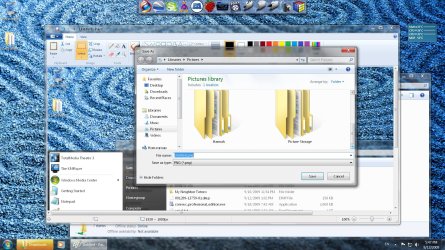
Over bright folder color

samhfoley

New member
Member
VIP
Local time
11:32 AM
Messages
96
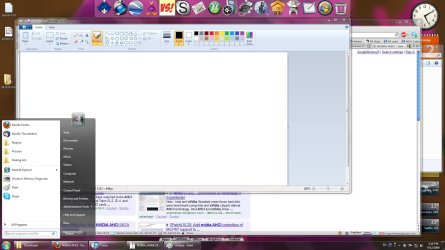
I had a friend remote desktop in today to analyze a couple blue screens I've had this past week. When he was done my color looks over-bright. The Windows folders that are supposed to look tan now look bright yellow. I've included a screenshot of both my desktop which is fine and my HTPC which is not. Anyone know how I can revert the color back to normal?? I tried resetting the HDTV's color scheme to default, but that didn't work....Any help would be greatly appreciated.

Thanks
Sam

I also tried to go into the advanced setting and restore all of the Windwws defaults, but that also did not work.
 

Attachments
  • desktop.jpg
    desktop.jpg
    173 KB · Views: 167
  • htpc.jpg
    htpc.jpg
    386.4 KB · Views: 157
Last edited:

My Computer

OS
vista 32 bit and 64 bit
Hi Sam,

Can you repost the images, this time have the same on both as it is difficult to see what you mean when they are showing different.
 

My Computer

Computer type
PC/Desktop
Computer Manufacturer/Model Number
Dwarf Dwf/11/2012 r09/2013
OS
Windows 8.1 Pro RTM x64
CPU
Intel Core-i5-3570K 4-core @ 3.4GHz (Ivy Bridge) (OC 4.4GHz)
Motherboard
ASRock Z77 Extreme4-M
Memory
4 x 4GB DDR3-1600 Corsair Vengeance CMZ8GX3M2A1600C9B (16GB)
Graphics Card(s)
MSI GeForce GTX770 Gaming OC 2GB
Sound Card
Realtek High Definition on board solution (ALC 898)
Monitor(s) Displays
ViewSonic VA1912w Widescreen (VGA)
Screen Resolution
1440x900
Hard Drives
OCZ Agility 3 SSD 120GB SATA III x2 (RAID 0)
Samsung HD501LJ 500GB SATA II x2
Hitachi HDS721010CLA332 1TB SATA II
Iomega 1.5TB Ext USB 2.0
WD 2.0TB Ext USB 3.0
PSU
XFX Pro Series 850W Semi-Modular
Case
Gigabyte IF233
Cooling
1 x 120mm Front Inlet 1 x 120mm Rear Exhaust
Keyboard
Microsoft Comfort Curve Keyboard 3000 (USB)
Mouse
Microsoft Comfort Mouse 3000 for Business (USB)
Internet Speed
NetGear DG834Gv3 ADSL Modem/Router (Ethernet) ~4.0 Mb/s (O2)
Antivirus
Avast! 8.0.1497
Browser
IE 11
Other Info
Optical Drive: HL-DT-ST BD-RE BH10LS30 SATA Bluray
Lexmark S305 Printer/Scanner/Copier (USB)
WEI Score: 8.1/8.1/8.5/8.5/8.25
Asus Eee PC 1011PX Netbook (Windows 7 x86 Starter)
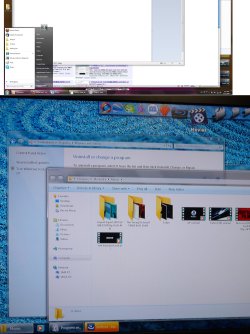
Huh, now that's something. If I look at the screenshot of my HTPC where the folders are yellowish and when a taskbar item is highlighted it appears yellow. IF I look at that same screenshot on my desktop (which is uneffected), it looks normal. So you are right both images I posted look identical. I have to try and figure out a way to show the difference. Let me take a picture with my camera....


Also when I 1st start Windows it displays in normal color for about 1-2 seconds before it goes yellowy. Hold on let me upload the images again

Is the picture clear? I tried disabling all start up programs but the problem persists, I have all possible updates through Windows update...
 

Attachments

  • comparison.jpg
    comparison.jpg
    481.4 KB · Views: 70
Last edited by a moderator:

My Computer

OS
vista 32 bit and 64 bit
That looks better, or should I say it illustrates your problem better. Have you checked the colour temerature settings on your monitors? Set them both to sRGB and see if that makes any difference. What are the make and model numbers of your monitors? Some specs of your system would also help, in particular your graphics card as it could also be a driver issue. What was the reason for your BSODs?
 

My Computer

Computer type
PC/Desktop
Computer Manufacturer/Model Number
Dwarf Dwf/11/2012 r09/2013
OS
Windows 8.1 Pro RTM x64
CPU
Intel Core-i5-3570K 4-core @ 3.4GHz (Ivy Bridge) (OC 4.4GHz)
Motherboard
ASRock Z77 Extreme4-M
Memory
4 x 4GB DDR3-1600 Corsair Vengeance CMZ8GX3M2A1600C9B (16GB)
Graphics Card(s)
MSI GeForce GTX770 Gaming OC 2GB
Sound Card
Realtek High Definition on board solution (ALC 898)
Monitor(s) Displays
ViewSonic VA1912w Widescreen (VGA)
Screen Resolution
1440x900
Hard Drives
OCZ Agility 3 SSD 120GB SATA III x2 (RAID 0)
Samsung HD501LJ 500GB SATA II x2
Hitachi HDS721010CLA332 1TB SATA II
Iomega 1.5TB Ext USB 2.0
WD 2.0TB Ext USB 3.0
PSU
XFX Pro Series 850W Semi-Modular
Case
Gigabyte IF233
Cooling
1 x 120mm Front Inlet 1 x 120mm Rear Exhaust
Keyboard
Microsoft Comfort Curve Keyboard 3000 (USB)
Mouse
Microsoft Comfort Mouse 3000 for Business (USB)
Internet Speed
NetGear DG834Gv3 ADSL Modem/Router (Ethernet) ~4.0 Mb/s (O2)
Antivirus
Avast! 8.0.1497
Browser
IE 11
Other Info
Optical Drive: HL-DT-ST BD-RE BH10LS30 SATA Bluray
Lexmark S305 Printer/Scanner/Copier (USB)
WEI Score: 8.1/8.1/8.5/8.5/8.25
Asus Eee PC 1011PX Netbook (Windows 7 x86 Starter)
Perhaps this...

Right Click Desktop
Personalize
 

Attachments

  • Capture.PNG
    Capture.PNG
    62.7 KB · Views: 139
He said they were USB related and the only USB attached to the HTPC was my Logitech DiNovo keyboard so I uninstalled the software and reinstalled it using compatibility mode.

The HTPC monitor is my HDTV which is a sharp LC-37GX5 and my MB is M3N78-VM with built in video card which is running SPDIF to HDMI into my Xonar HDAV 1.3 Slim sound card's HDMI in port, and then the Xonar HDMI out is running to my OnkyoTX-SA607 and then to the TV from the Onkyo's HDMI out. Everything was working great till he remoted in....

Desktop monitor only has 2 options RGB and YPbPr. It is currently on RGB.
 

My Computer

OS
vista 32 bit and 64 bit
Perhaps this...

Right Click Desktop
Personalize


I tried that, but it every setting looks to be correct when I go through those steps. Nothing looks like it needs changing based on the "good" images they provide.
 

My Computer

OS
vista 32 bit and 64 bit
Check, Sharp HD TV is also in RGB
 

My Computer

OS
vista 32 bit and 64 bit
I came across your topic in trying to track down a solution to the exact same problem. Those neon folders are horrific!

I just found the solution to my own problem though, and thought I'd pop in and let you know.

I have an Nvidia graphics card, and for some reason its software randomly decided to do something. If you have the same, go to the Nvidia control panel. Under the Display task, select "Adjust desktop colour settings". Scroll to the bottom and you'll see something called "Digital vibrancy" and an adjustment bar. Mine was up to 70%. I dragged it back to 0% and folders went back to normal. :geek:

If you have an ATI card there might be an equivalent issue going on, e.g. colour settings are usually the same amount, if settings for things like RGB or brightness and contrast are wildly different then putting them to an equal setting should help resolve it.
 

My Computer

OS
Vista
Back
Top