
Over clocked and it doesn't seem any difference

dannyboy2005

New member
Member
VIP
Local time
5:54 AM
Messages
177
I have O/c my 2.8 rig to 3.8. It shows that in CPUz that the core speed is 3.8 Ghz but its not showing up in my 'Widows specification' in control panel. Any reason why?

CPU-Z Validator 3.1
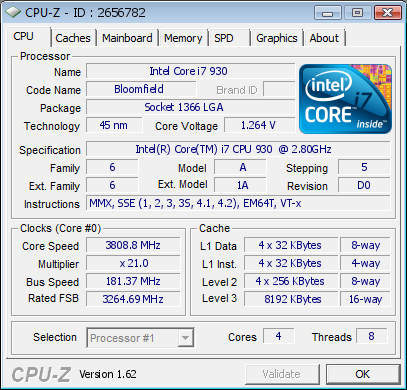
2656782.png


P.s. It is very stable with Prime95 for a few hours. It doesn't seem much faster at starting up though.

P.s.s. Am I better to lower the multiplier (x21.0) to say x8 and increase the FSB from 181 to 476?, thus giving me 3.8Ghz.

I am still a bit of a noob at this so anything is welcome.

Cheers
Dan
 

My Computer My Computer

At a glance

Windows 7 Pro X64Intel i7, 930 2.8Ghz - O/c to 4Ghz @ 1.29v3x2GB = 6GB Mushkin Redline 998805Nvidia Geforce 8800GTX
Computer Manufacturer/Model Number
Home Grown
OS
Windows 7 Pro X64
CPU
Intel i7, 930 2.8Ghz - O/c to 4Ghz @ 1.29v
Motherboard
ASUS Rampage II Gene
Memory
3x2GB = 6GB Mushkin Redline 998805
Graphics Card(s)
Nvidia Geforce 8800GTX
Sound Card
Audigy Soundblaster 24 Bit Extreme
Monitor(s) Displays
Samsung SyncMaster 913N
Screen Resolution
1280 x 1024
Hard Drives
1x Western Digital 500GB, 16MB Crèche, 7,200RPM
1x Western Digital 150GB, 2MB Crèche, 7,200RPM
1x Seagate 250GB, 16MB Crèche, 7,200RPM
PSU
Thermaltake 850W PSU
Case
A butchered case with holes cut out for extra cooling lol
Cooling
CPU = Corsair H50 with 2x 120mm Noctua NF-S12B fans on rad
Keyboard
QWERTY
Mouse
Micky
Internet Speed
Not fast enough
I was in the same boat as you I tried playing around with my 860 trying as high as 4g with and without HT and to be honest when it came to games I noticed like 0 difference the 1 thing I noticed was that stuff like 7zip/rar packing & unpacking became quicker but that's about it, and what I have read since its an unlocked cpu its better to keep the multi as high and fsb low. So right now I have sett mine at 166 MHz at 21x where default is 133 and just left it at that and turned of the HT since HT don't help much with games
 

My Computer My Computer

At a glance

Windows 7 Home Premium x64Intel Core i7 860 (Lynnfield)Corsair Vengeance 9,9,9,24 1600Mhz 1.50v 2x4GAsus nVidia 560 GTX
Computer type
PC/Desktop
OS
Windows 7 Home Premium x64
CPU
Intel Core i7 860 (Lynnfield)
Motherboard
Asus P7P55D (LGA1156)
Memory
Corsair Vengeance 9,9,9,24 1600Mhz 1.50v 2x4G
Graphics Card(s)
Asus nVidia 560 GTX
Sound Card
Asus Xonar DG
Monitor(s) Displays
Acer P235H & NEC E201W
Screen Resolution
1920x1080 & 900x1600
Hard Drives
2
PSU
Corsair 650 Modular
Case
Corsair 800D
Cooling
Corsair H80 with Noctua fans
Keyboard
Ducky Shine
Mouse
tT Theron
Internet Speed
100/100
Browser
IE10
Hi Dannyboy, don't worry about the overclock not showing up in windows, from previous experience it never does for me. Windows just reports the stock values for the CPU no matter what.

You won't notice any difference in start up speed by overclocking the CPU, if you want faster start up's I recommend getting a SSD, this will be a massive difference in start up and responsiveness all round.

The main advantage of overclocking your CPU can often be to gain a few extra FPS in gaming, often an older CPU can be a bottleneck for a new powerful GPU so overclocking can remove some of this bottleneck.
You should notice the difference in benchmarks going from 2.8 to 3.8, but you will be hard pushed to notice much real world difference.

Hope this helps a little.

Paul.
 

My Computer My Computer

At a glance

Windows 7 Professional 64 bit
OS
Windows 7 Professional 64 bit
Make a comparison with video encoding. There you should see a difference. Most other programs are not really very CPU intensive. So the difference will not be noticeable.

Btw: I also suggest you get a SSD. Then you will see a real performance improvement.
 

My Computer My Computer

At a glance

Vista, Windows7, Mint Mate, Zorin, Windows 8from 1.6GHz Duo to i7
Computer Manufacturer/Model Number
HP, Dell, Gateway, Toshiba - 4 laptops and 2 desktops
OS
Vista, Windows7, Mint Mate, Zorin, Windows 8
CPU
from 1.6GHz Duo to i7
Monitor(s) Displays
2x HP w2207
Hard Drives
5x HDD, 7x SSD, 12x Externals
Keyboard
with trackball - no mices
Mouse
Trackball mice
Internet Speed
DSL 6000
You'd be amazed what a difference a SSD will make with the system and programs on it. Boot seconds can be counted on two hands (and maybe a foot) and programs pop up by the time your finger is off the Enter key.
 

My Computer My Computer

At a glance

Windows 7 Pro-x64i7-2600 3.4GHz - 3.8GHz Turbo8Gb - 2x4GB, Muskin 991770 PC3-1333Integrated Intel HD 2000
Computer type
PC/Desktop
Computer Manufacturer/Model Number
Built 2/11/2011
OS
Windows 7 Pro-x64
CPU
i7-2600 3.4GHz - 3.8GHz Turbo
Motherboard
Intel DH67BL-B3
Memory
8Gb - 2x4GB, Muskin 991770 PC3-1333
Graphics Card(s)
Integrated Intel HD 2000
Sound Card
Integrated Intel 10.1 HD, RealTek ALC892
Monitor(s) Displays
Asus LCD VH222H, Haier HL24XSL2a
Screen Resolution
1920x1080, 1920x1080
Hard Drives
Crucial SSD C300-128Gb,
Western Digital WD5002AALX - 500Gb,
Western Digital WD7501AALS - 750Gb
PSU
Seasonic 650W 80+ Gold Modular
Case
Rosewill Defender
Cooling
Stock CPU, Four 120mm case fans, PCH fan added
Keyboard
Logitech EX100 Y-RBH94 Wireless
Mouse
Logitech EX100 M-RCE95 Wireless
Internet Speed
3.0/1.5 Mbs
Antivirus
Microsoft Security Essentials
Browser
Microsoft Internet Explorer 11
Other Info
Antec Veris Premier-Multimedia IR Station,
Cyber Accoustics-3602 Speakers,
AFT XM-5U Card Reader,
Hauppauge TV-HVR-2250,
Sony LX300 USB Turntable
No two computer will have the same effect with a over clock. All computer will be effected drastically when installing a SSD. I have over clocked my computer from stock 3.2 to 4.5 and found a sweet spot at 4.0 with a SSD. Like I said; no two computers are the same. I doubt if any body on this site has the same specs as I do because there are just to many combination of hardware and software that one can have.
 

My Computer My Computer

At a glance

Windows 10 Pro. 64/ version 1709 Windows 7 Pr...Intel i7-6800K @ 4.3Corsair Platinum 16 gig @2400EVGA GTX 1070 OC
Computer type
PC/Desktop
Computer Manufacturer/Model Number
Home made Desktop
OS
Windows 10 Pro. 64/ version 1709 Windows 7 Pro/64
CPU
Intel i7-6800K @ 4.3
Motherboard
ASUS X-99 Deluxe II
Memory
Corsair Platinum 16 gig @2400
Graphics Card(s)
EVGA GTX 1070 OC
Monitor(s) Displays
Asus 27" LED LCD/VE278Q
Screen Resolution
1920-1080 or 1280-720 HDMI
Hard Drives
INTEL SSD 730-240 Gb Sata 3.0/
PSU
EVGA Platium 1200W
Case
Phanteks Luxe Tempered Glass 8 fans/ one radiator
Cooling
XSPC/ Water Cooled CPU
Keyboard
Das 4 Professional
Mouse
Logitech M705/MX Anywhere 2-S
Internet Speed
100 mbits
Antivirus
Microsoft Security Essentials/ Malwarebytes Premium 3.0/ SAS
Browser
I.E. 11 default/Firefox/ ISP Time Warner Cable/Spectrum
Other Info
LG BluRay Burner/
Sound system-KLipsch-THX/
Icy Dock ssd Hot Swap bays.
Day to day computing you won't see a difference. Programs and applications that use multiple cores and actually stress them will run a little easier because of the increased clock frequency. Also, games will benefit a little bit, like Paul said above, and you may gain a few FPS. An SSD will give you the responsiveness no other piece of hardware can. Don't worry that you can't feel your overclock, just be happy it's there!
 

My Computer My Computer

At a glance

Windows 7 Professional 64bit SP1Intel Core i5-3570K @ 4.5GHzCorsair Vengeance 16GB (4x4) @1866MHz CL 9-9-...EVGA GTX 750 Ti FTW
Computer type
PC/Desktop
Computer Manufacturer/Model Number
Custom Built
OS
Windows 7 Professional 64bit SP1
CPU
Intel Core i5-3570K @ 4.5GHz
Motherboard
Asus Sabertooth Z77
Memory
Corsair Vengeance 16GB (4x4) @1866MHz CL 9-9-9-24 1T
Graphics Card(s)
EVGA GTX 750 Ti FTW
Sound Card
Onboard Audio
Monitor(s) Displays
Dell S2309W
Screen Resolution
1920x1080
Hard Drives
Samsung 830 128GB SSD - OS
(4) Seagate 5TB HDD
(1) Seagate 2TB HDD
PSU
Seasonic X750 80+ Gold Full Modular
Case
Antec Eleven Hundred Super Mid Tower
Cooling
Intel Liquid Cooler
Keyboard
Max Nighthawk X8 Mechanical keyboard
Mouse
Mionix Naos 7000
Internet Speed
50 Mbps Down / 10 Mbps Up
Antivirus
Microsoft Security Essentials/Malwarebytes Anti-Malware
Browser
Chrome/Firefox
Other Info
Klipsch ProMedia 2.1's
Asus RT-N66R Wireless Router
Back
Top