Overclock And DRAM Frequency

bludgard69

Banned
Local time
4:24 AM
Messages
241
Location
South Carolina
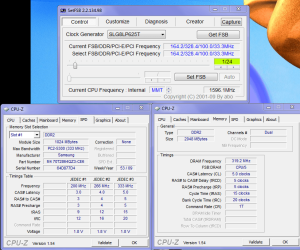
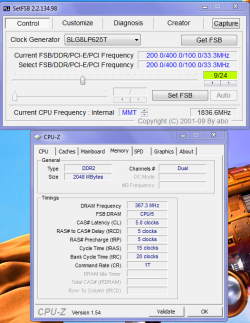
I heard that notebooks shouldn't be oc-ed,yet I had to experiment.I got the 1.6G up to 1.9G.Everything ran smooth.Temps remained the same.Prime95 ran torture test for 4 hours and no problems.Performance was increased and stable. My only concern is that the DRAM frequency went over the specified max(333mhz) to like 360mhz.I have since refrained from oc-ing for reasons of possibly damaging the DDR2.Are my concerns over this legitamate?I also ran m mem diagnostics_pagefile-off,extended.No issues. I'm getting my temps and speeds from CPUID products.I think they are pretty accurate. Thanks for any insight.
 

My Computer

Computer Manufacturer/Model Number
Acer Aspire 5517-5427 Notebook
OS
MS Windows 7 Home Premium 64-bit
CPU
AMD K8/AMD Athlon(tm) Processor TF-20 @1.6G
Motherboard
Acer Aspire 5517 (Socket S1G1)
Memory
2.0GB Dual-Channel DDR2 @ 319MHz 5-5-5-15
Graphics Card(s)
ATI Radeon HD 3200 Graphics (Acer Incorporated [ALI])
Sound Card
Realtek High Definition Audio
Monitor(s) Displays
Generic PnP Monitor @ 1366x768
Hard Drives
244.20GB Western Digital WDC WD2500BEVT-22A23T0 ATA Device (IDE)
PSU
Stock
Case
Stock
Cooling
Stock
Mouse
Gigaware-Wireless
Internet Speed
HA!
Did I post in the wrong forum?:confused:
 

My Computer

Computer Manufacturer/Model Number
Acer Aspire 5517-5427 Notebook
OS
MS Windows 7 Home Premium 64-bit
CPU
AMD K8/AMD Athlon(tm) Processor TF-20 @1.6G
Motherboard
Acer Aspire 5517 (Socket S1G1)
Memory
2.0GB Dual-Channel DDR2 @ 319MHz 5-5-5-15
Graphics Card(s)
ATI Radeon HD 3200 Graphics (Acer Incorporated [ALI])
Sound Card
Realtek High Definition Audio
Monitor(s) Displays
Generic PnP Monitor @ 1366x768
Hard Drives
244.20GB Western Digital WDC WD2500BEVT-22A23T0 ATA Device (IDE)
PSU
Stock
Case
Stock
Cooling
Stock
Mouse
Gigaware-Wireless
Internet Speed
HA!

My Computer

Computer type
PC/Desktop
Computer Manufacturer/Model Number
Custom Build
OS
Windows 7 Professional SP1 - x64 [Non-UEFI Boot]
CPU
Ivy Bridge Core i5 3570K (Delidded)
Motherboard
Asus P8Z77-V LE PLUS
Memory
G.Skill "Ares" DDR3 PC3-12800 - 1600MHz (16Gb)
Graphics Card(s)
Asus Dual-RX480-O4G
Sound Card
Creative Sound Blaster Z w/5.1 sound system
Monitor(s) Displays
Asus IPS 23"
Screen Resolution
16/9
Hard Drives
Internal:
500Go Sata 6Gb/s (x2)
500Go Sata 3Gb/s (x2)
SSD 60Go Sata 6Gb/s
PSU
In Win C 900W Series 80+ Platinum
Case
Thermaltake Chaser A71
Cooling
Custom Water Cooling Loop
Keyboard
Cooler Master QuickFire XTi
Mouse
Razer Imperator 2012 (4G)
Antivirus
MSE
Browser
IE 11.0.xxx Rtm
Other Info
"Raid0" with Intel Smart Response Technology (HDD/SSD)
I heard that notebooks shouldn't be oc-ed,yet I had to experiment.I got the 1.6G up to 1.9G.Everything ran smooth.Temps remained the same.Prime95 ran torture test for 4 hours and no problems.Performance was increased and stable. My only concern is that the DRAM frequency went over the specified max(333mhz) to like 360mhz.I have since refrained from oc-ing for reasons of possibly damaging the DDR2.Are my concerns over this legitamate?I also ran m mem diagnostics_pagefile-off,extended.No issues. I'm getting my temps and speeds from CPUID products.I think they are pretty accurate. Thanks for any insight.

Yes, they are legitimate concerns. However, it does depend upon the type of ram you are using. Some ram can take running out of spec better than other types. Since this:
I heard that notebooks shouldn't be oc-ed...
and you are comfortable in doing it to your notebook, then you should go into your bios and check the ram timings and set the frequency back one step (from 333MHz to 266MHz -- if you can even do it with your laptop) That way, when you increase the clock speed, the ram will increase too, but not over the 333MHz which is the spec for your DDR2-667 ram)
 

My Computer

Computer Manufacturer/Model Number
Rig 1
OS
Windows 7 Ultimate x64
CPU
AMD Phenom II X4 940 Black Edition @ 3.4GHz (AM2+)
Motherboard
Gigabyte GA-MA790X-UD4P (AM2+)
Memory
Corsair CM2X4096-8500C5 (4 X 2GB)
Graphics Card(s)
XFX Radeon HD 5770 / Diamond Radeon HD 5770 CrossFireX
Sound Card
Asus Xonar DS (PCI)
Monitor(s) Displays
Samsung SyncMaster 932bw+ (3)
Screen Resolution
4320x900
Hard Drives
OCZ Vertex 2 80 GB - Windows 7 System --
WD Caviar Black 1TB - Music, Movies, Vids, Pics --
WD Caviar Black 640GB - User Profiles & Games --
WD My Book 320GB external
PSU
Corsair CMPSU-750TX
Case
Cooler Master HAF 932
Cooling
Corsair Hydro Series H50
Keyboard
Logitech Desktop Wave
Mouse
Logitech LX8 Laser
Internet Speed
20 down / 2 up
Other Info
LG GGC-H20L Blu-Ray / HDDVD combo --
Hauppauge HVR-1250 --
Silverstone MFP-51 --
Logitech Webcam C600
Screen-Shots

If I understand correctly,I can't change BIOS on this notebook.It's why I used SETFSB.I've tried AMD Overdrive but most controls were greyed out.BIOS again is my guess.:rolleyes:By the way,thanks for response.
 

Attachments

  • NORM.PNG
    NORM.PNG
    65.5 KB · Views: 162
  • OC-ED.PNG
    OC-ED.PNG
    49.9 KB · Views: 106

My Computer

Computer Manufacturer/Model Number
Acer Aspire 5517-5427 Notebook
OS
MS Windows 7 Home Premium 64-bit
CPU
AMD K8/AMD Athlon(tm) Processor TF-20 @1.6G
Motherboard
Acer Aspire 5517 (Socket S1G1)
Memory
2.0GB Dual-Channel DDR2 @ 319MHz 5-5-5-15
Graphics Card(s)
ATI Radeon HD 3200 Graphics (Acer Incorporated [ALI])
Sound Card
Realtek High Definition Audio
Monitor(s) Displays
Generic PnP Monitor @ 1366x768
Hard Drives
244.20GB Western Digital WDC WD2500BEVT-22A23T0 ATA Device (IDE)
PSU
Stock
Case
Stock
Cooling
Stock
Mouse
Gigaware-Wireless
Internet Speed
HA!
Yeah, I didn't think you'd have much chance in changing the BIOS.

AMD Overdrive is supposed to be for the 7-Series chipset from AMD, so it wouldn't surprise me that most of the features are grayed out.

I've never heard of SETFSB, but if it has an option to set the ram frequency, then set it one step back from 333MHz, or to 266MHz)
 

My Computer

Computer Manufacturer/Model Number
Rig 1
OS
Windows 7 Ultimate x64
CPU
AMD Phenom II X4 940 Black Edition @ 3.4GHz (AM2+)
Motherboard
Gigabyte GA-MA790X-UD4P (AM2+)
Memory
Corsair CM2X4096-8500C5 (4 X 2GB)
Graphics Card(s)
XFX Radeon HD 5770 / Diamond Radeon HD 5770 CrossFireX
Sound Card
Asus Xonar DS (PCI)
Monitor(s) Displays
Samsung SyncMaster 932bw+ (3)
Screen Resolution
4320x900
Hard Drives
OCZ Vertex 2 80 GB - Windows 7 System --
WD Caviar Black 1TB - Music, Movies, Vids, Pics --
WD Caviar Black 640GB - User Profiles & Games --
WD My Book 320GB external
PSU
Corsair CMPSU-750TX
Case
Cooler Master HAF 932
Cooling
Corsair Hydro Series H50
Keyboard
Logitech Desktop Wave
Mouse
Logitech LX8 Laser
Internet Speed
20 down / 2 up
Other Info
LG GGC-H20L Blu-Ray / HDDVD combo --
Hauppauge HVR-1250 --
Silverstone MFP-51 --
Logitech Webcam C600
Hi,again mpcrsc562.There are no control settings.I think only Front side bus.Thanks again for response.SetFSB_HomePage
 

My Computer

Computer Manufacturer/Model Number
Acer Aspire 5517-5427 Notebook
OS
MS Windows 7 Home Premium 64-bit
CPU
AMD K8/AMD Athlon(tm) Processor TF-20 @1.6G
Motherboard
Acer Aspire 5517 (Socket S1G1)
Memory
2.0GB Dual-Channel DDR2 @ 319MHz 5-5-5-15
Graphics Card(s)
ATI Radeon HD 3200 Graphics (Acer Incorporated [ALI])
Sound Card
Realtek High Definition Audio
Monitor(s) Displays
Generic PnP Monitor @ 1366x768
Hard Drives
244.20GB Western Digital WDC WD2500BEVT-22A23T0 ATA Device (IDE)
PSU
Stock
Case
Stock
Cooling
Stock
Mouse
Gigaware-Wireless
Internet Speed
HA!
Man...............I'm gonna have to get a desktop to play with.Too many restrictions on Laptop.:DThis is going to turn out to be an exspensive hooby.Could spend money and time on worse things............
 

My Computer

Computer Manufacturer/Model Number
Acer Aspire 5517-5427 Notebook
OS
MS Windows 7 Home Premium 64-bit
CPU
AMD K8/AMD Athlon(tm) Processor TF-20 @1.6G
Motherboard
Acer Aspire 5517 (Socket S1G1)
Memory
2.0GB Dual-Channel DDR2 @ 319MHz 5-5-5-15
Graphics Card(s)
ATI Radeon HD 3200 Graphics (Acer Incorporated [ALI])
Sound Card
Realtek High Definition Audio
Monitor(s) Displays
Generic PnP Monitor @ 1366x768
Hard Drives
244.20GB Western Digital WDC WD2500BEVT-22A23T0 ATA Device (IDE)
PSU
Stock
Case
Stock
Cooling
Stock
Mouse
Gigaware-Wireless
Internet Speed
HA!
Man...............I'm gonna have to get a desktop to play with.Too many restrictions on Laptop.:DThis is going to turn out to be an exspensive hooby.Could spend money and time on worse things............

It's not the restrictions of a laptop, per se, it is that you have a store bought pc mass produced by a major pc manufacturer. If you had an Acer, HP, Dell, etc, desktop, you'd probably still be hampered in what you could do to it (by way of bios, overclocking, etc) without the use of some 3rd party software (as you have used with the SETFSB)
 

My Computer

Computer Manufacturer/Model Number
Rig 1
OS
Windows 7 Ultimate x64
CPU
AMD Phenom II X4 940 Black Edition @ 3.4GHz (AM2+)
Motherboard
Gigabyte GA-MA790X-UD4P (AM2+)
Memory
Corsair CM2X4096-8500C5 (4 X 2GB)
Graphics Card(s)
XFX Radeon HD 5770 / Diamond Radeon HD 5770 CrossFireX
Sound Card
Asus Xonar DS (PCI)
Monitor(s) Displays
Samsung SyncMaster 932bw+ (3)
Screen Resolution
4320x900
Hard Drives
OCZ Vertex 2 80 GB - Windows 7 System --
WD Caviar Black 1TB - Music, Movies, Vids, Pics --
WD Caviar Black 640GB - User Profiles & Games --
WD My Book 320GB external
PSU
Corsair CMPSU-750TX
Case
Cooler Master HAF 932
Cooling
Corsair Hydro Series H50
Keyboard
Logitech Desktop Wave
Mouse
Logitech LX8 Laser
Internet Speed
20 down / 2 up
Other Info
LG GGC-H20L Blu-Ray / HDDVD combo --
Hauppauge HVR-1250 --
Silverstone MFP-51 --
Logitech Webcam C600
Thanks again for your timely and applicable response,mpcrsc562.
 

My Computer

Computer Manufacturer/Model Number
Acer Aspire 5517-5427 Notebook
OS
MS Windows 7 Home Premium 64-bit
CPU
AMD K8/AMD Athlon(tm) Processor TF-20 @1.6G
Motherboard
Acer Aspire 5517 (Socket S1G1)
Memory
2.0GB Dual-Channel DDR2 @ 319MHz 5-5-5-15
Graphics Card(s)
ATI Radeon HD 3200 Graphics (Acer Incorporated [ALI])
Sound Card
Realtek High Definition Audio
Monitor(s) Displays
Generic PnP Monitor @ 1366x768
Hard Drives
244.20GB Western Digital WDC WD2500BEVT-22A23T0 ATA Device (IDE)
PSU
Stock
Case
Stock
Cooling
Stock
Mouse
Gigaware-Wireless
Internet Speed
HA!
If I understand correctly,I can't change BIOS on this notebook.It's why I used SETFSB.I've tried AMD Overdrive but most controls were greyed out.BIOS again is my guess.:rolleyes:By the way,thanks for response.

I used SetFSB on an HP Dv5000 series few years ago. That was working fine, i had to borrow the value from another similar HP Computer, 'cause could get the proper value working well. As said mpcrsc562 some stick Ram are faster than others.

Bios are most locked in Laptop, and modded bios that can be found are quite dangerous to use if you do not know how to revert back to original one, you have to find the same modded bios as the one installed to trick the thing.

You can also use something like RightMark CPU Clock Utility (RMClock) aswell here.

But i don't think both with SetFsb can be run together.
 

My Computer

Computer type
PC/Desktop
Computer Manufacturer/Model Number
Custom Build
OS
Windows 7 Professional SP1 - x64 [Non-UEFI Boot]
CPU
Ivy Bridge Core i5 3570K (Delidded)
Motherboard
Asus P8Z77-V LE PLUS
Memory
G.Skill "Ares" DDR3 PC3-12800 - 1600MHz (16Gb)
Graphics Card(s)
Asus Dual-RX480-O4G
Sound Card
Creative Sound Blaster Z w/5.1 sound system
Monitor(s) Displays
Asus IPS 23"
Screen Resolution
16/9
Hard Drives
Internal:
500Go Sata 6Gb/s (x2)
500Go Sata 3Gb/s (x2)
SSD 60Go Sata 6Gb/s
PSU
In Win C 900W Series 80+ Platinum
Case
Thermaltake Chaser A71
Cooling
Custom Water Cooling Loop
Keyboard
Cooler Master QuickFire XTi
Mouse
Razer Imperator 2012 (4G)
Antivirus
MSE
Browser
IE 11.0.xxx Rtm
Other Info
"Raid0" with Intel Smart Response Technology (HDD/SSD)
Hello,again.If I double my DDR,will my max. frequency still remain the same?(DDR2@333Mhz).Or is there some kind of esoteric formula that's involved?:confused:Thanks for any insight.
 

My Computer

Computer Manufacturer/Model Number
Acer Aspire 5517-5427 Notebook
OS
MS Windows 7 Home Premium 64-bit
CPU
AMD K8/AMD Athlon(tm) Processor TF-20 @1.6G
Motherboard
Acer Aspire 5517 (Socket S1G1)
Memory
2.0GB Dual-Channel DDR2 @ 319MHz 5-5-5-15
Graphics Card(s)
ATI Radeon HD 3200 Graphics (Acer Incorporated [ALI])
Sound Card
Realtek High Definition Audio
Monitor(s) Displays
Generic PnP Monitor @ 1366x768
Hard Drives
244.20GB Western Digital WDC WD2500BEVT-22A23T0 ATA Device (IDE)
PSU
Stock
Case
Stock
Cooling
Stock
Mouse
Gigaware-Wireless
Internet Speed
HA!
Hi bludgard,

Memory is rated; RAM is not set at a certain speed. This means your 333MHz DDR will operate at a minimum of 333MHz, given stock voltage. It can run faster, and it can also run slower... by how much all depends on the quality of the IC's on the sticks.

In terms of memory, if you're able to run it faster without having to increase voltage, then you're not going to do any harm. The only questions are, "will it, and is it stable at this frequency?" If it's stable, with memtest before Windows, and either Orthos (dual Orthos if you have a quad) or Linpack within Windows, then you can run without worry of corrupting your OS.

It may run warmer, but not by a noticeable amount. However, when it comes to heat, every little bit hurts, so you do still have to be mindful of system temps as laptops are the worst environments in which to overclock... my advice on overclocking the RAM is the same as it was for overclocking your video card... it's not worth it... the laptop is too small, and the minimal gains you get aren't worth the risks you take given the machine's specs.

If you double the amount of RAM you have with more 333MHz RAM, they will still all operate at 333MHz. If you add RAM that is faster, they will all still operate at 333MHz (defaulting to the speed of the slowest stick), or whatever frequency you set.
 

My Computer

OS
7 Ultimate x64
CPU
i5-2500k
Motherboard
Asus P8P67 Pro
Memory
8GB G.Skill Ripjaws X F3-12800CL7D-8GBXH 1866MHz 8-9-8-24
Graphics Card(s)
EVGA GTX 570 SC
Sound Card
X-Fi Titanium Fatality
Monitor(s) Displays
Samsung S27A550H 27" LED
Screen Resolution
1920x1080
Hard Drives
OCZ Vertex 3 120GB.
1TB Samsung F3.
2TB Samsung F4.
PSU
PC Power & Cooling Silencer 760
Case
Lian Li Lancool K62
Cooling
Thermalright Venomous X Black/Scythe S-Flex/Shin-Etsu X23
Keyboard
MS Natural Elite 4000 Ergonomic
Mouse
Logitech G500
Internet Speed
6MB/768
Other Info
Logitech Z-5500 505 watts.
D-Link DGL-4500.
Tripp-Lite Smart Pro 1500.
Thank you for breaking it down for me.I've searched for this information-to no avail.I get specs and more specs,but no real working knowledge. Mabe I wasn't looking in the right place.;)Yea,I did some soul searching and commited to plan on building a suitable machine for play.(COMMITED TO PLAN ON)Sounds like me.Boy,I'll run a subject into the ground,huh?See ya again.:)
 

My Computer

Computer Manufacturer/Model Number
Acer Aspire 5517-5427 Notebook
OS
MS Windows 7 Home Premium 64-bit
CPU
AMD K8/AMD Athlon(tm) Processor TF-20 @1.6G
Motherboard
Acer Aspire 5517 (Socket S1G1)
Memory
2.0GB Dual-Channel DDR2 @ 319MHz 5-5-5-15
Graphics Card(s)
ATI Radeon HD 3200 Graphics (Acer Incorporated [ALI])
Sound Card
Realtek High Definition Audio
Monitor(s) Displays
Generic PnP Monitor @ 1366x768
Hard Drives
244.20GB Western Digital WDC WD2500BEVT-22A23T0 ATA Device (IDE)
PSU
Stock
Case
Stock
Cooling
Stock
Mouse
Gigaware-Wireless
Internet Speed
HA!
Back
Top