
OVERCLOCK Intel E2140

samitnair

New member
Local time
4:56 AM
Messages
4
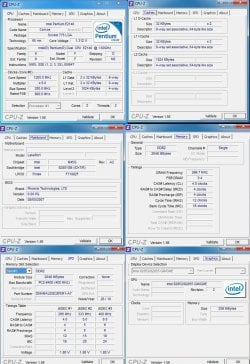
Hi i working on a system with windows 7 pro 86x but am unable to play any games/even the aero effect sucks......due to performance issue..... I would like to learn bout overclocking but as i searched on Google...It gives a disclaimer "DANGER"...Am ready to take the risk but the articles on the web are of different specifications...So please let me know a Step by Step tutorial to overclock the CPU......:sarc:
 

Attachments
  • overclock.jpg
    overclock.jpg
    188 KB · Views: 157

My Computer

Computer Manufacturer/Model Number
HP
OS
Win 7 Ulimate 64x SP1
CPU
I7
Memory
4GB
Graphics Card(s)
ATI 512
Sound Card
SoundBlaster
If your computer isn't powerful enough to play games, then overclocking really isn't going to do anything for you. You really need to buy a newer computer for gaming (especially graphics heavy games).

~Lordbob
 

My Computer

Computer Manufacturer/Model Number
Hera
OS
Windows 7 Ultimate x64, Mint 9
CPU
Intel i5-2500k
Motherboard
ASUS P8P67 Pro
Memory
2x 4Gb Corsair VENGEANCE DDR3-1600
Graphics Card(s)
NVidia GeForce N260GTX Twin Frozr
Sound Card
Realtek HD OnBoard Audio
Monitor(s) Displays
ASUS 24" Monitor
Screen Resolution
1920x1080
Hard Drives
G.SKILL Phoenix Series 60GB SATA II MLC Internal Solid State Drive (SSD)
SAMSUNG Spinpoint F3R 1TB 7200 RPM 32MB Cache SATA II
PSU
Cooler Master Real Power Pro 750W
Case
Cooler Master Haf 932
Cooling
Fans
Keyboard
Razer Tarantula
Mouse
Razer Lachesis
Internet Speed
not fast enough
Thanks for the reply

I will consider for an upgrade.....infact i would be going for a new PC.....but i wanted to learn:geek: overclocking basics...if anyone can guide me or a video tutorial would be great
 

My Computer

Computer Manufacturer/Model Number
HP
OS
Win 7 Ulimate 64x SP1
CPU
I7
Memory
4GB
Graphics Card(s)
ATI 512
Sound Card
SoundBlaster
I would first buy a graphics card. The one you have on your motherboard will not take advantage of any overclock you give it. If your will to spend money I could suggest graphics cards that I believe to be the best at your budget. If your search on ebay for one at a 50 dollar price range, it will be light years ahead performance over your current one. I would say this is better than any 500 dollar computer upgrade since visuals mostly rely on graphics cards, alsomost prebuilt computer come with horable cards.
 

My Computer

OS
Windows 7 Ultimate x64
CPU
Athlon II x2 215 @ 2700 MHz
Motherboard
MSI 870A G54
Memory
G. Skill 8 GB ddr3 @ 1600
Graphics Card(s)
MSI R5670 PM1G
After you get a graphics card then I would say you should invest time into overclocking. Your processor is actually an extremely good processor for overclocking. If you your motherboard will take it you can potentially more than double its speed. This would put it at the level of processors that cost around one hundred dollars.
 

My Computer

OS
Windows 7 Ultimate x64
CPU
Athlon II x2 215 @ 2700 MHz
Motherboard
MSI 870A G54
Memory
G. Skill 8 GB ddr3 @ 1600
Graphics Card(s)
MSI R5670 PM1G

My Computer

Computer Manufacturer/Model Number
Hera
OS
Windows 7 Ultimate x64, Mint 9
CPU
Intel i5-2500k
Motherboard
ASUS P8P67 Pro
Memory
2x 4Gb Corsair VENGEANCE DDR3-1600
Graphics Card(s)
NVidia GeForce N260GTX Twin Frozr
Sound Card
Realtek HD OnBoard Audio
Monitor(s) Displays
ASUS 24" Monitor
Screen Resolution
1920x1080
Hard Drives
G.SKILL Phoenix Series 60GB SATA II MLC Internal Solid State Drive (SSD)
SAMSUNG Spinpoint F3R 1TB 7200 RPM 32MB Cache SATA II
PSU
Cooler Master Real Power Pro 750W
Case
Cooler Master Haf 932
Cooling
Fans
Keyboard
Razer Tarantula
Mouse
Razer Lachesis
Internet Speed
not fast enough
Before we talk about overclocking lets just see if we can get advice him on graphics card hardware.
 

My Computer

OS
Windows 7 Ultimate x64
CPU
Athlon II x2 215 @ 2700 MHz
Motherboard
MSI 870A G54
Memory
G. Skill 8 GB ddr3 @ 1600
Graphics Card(s)
MSI R5670 PM1G
Back
Top