Overclocking Corsair Vengeance Ram

Tomha

New member
Member
VIP
Local time
7:39 PM
Messages
391
Location
Auckland, New Zealand
Has anyone tried it? I bought a kit of it recently and would like to either tighten the timings to 8-8-8-24 or up the speed a bit, does anyone have advice or experience on the matter? I haven't tried overclocking before :P

Thanks
 

My Computer

Computer type
PC/Desktop
Computer Manufacturer/Model Number
Custom Build
OS
Windows 7 Professional 64bit
CPU
Intel i7 3770k 3.5ghz
Motherboard
Asus P8Z77-V Deluxe
Memory
Corsair Vengeance 16gb (4x4gb)
Graphics Card(s)
Gigabyte G1 Gaming GTX970
Sound Card
None
Monitor(s) Displays
3x AOC 12367fh 23"
Screen Resolution
1920x1080
Hard Drives
Western Digital Caviar Black 1TB - 64mb cache
Western Digital Caviar Green 1TB - 32mb cache
Samsung 830 SSD 128Gb Boot Drive
PSU
Corsair AX-860W ATX
Case
Corsair 500R black
Cooling
Corsair 500r Stock cooling (3x120mm, 1x200mm) & Corsair H100
Keyboard
Logitech G110 gaming keyboard
Mouse
Logitech G500s
Other Info
Corsair Hydro 100 CPU Cooler
Ocing/tightening RAM is very much down to individual modules. Success/failure varies a lot.


To adjust your RAM, it's done throughout BIOS.

In the BIOS, not sure where it is on the giga boards, but it's usually in the advanced>DRAM timing control or some such.


If the stock timings are 9-9-9-24, start slowly ie 8-9-8-24. Check for stability. Don't go changing settings in one fell swoop.

If still stable, lower the tRCD down to 8 as well ie 8-8-8-24 Check.
If not stable, you could try keeping the tRCD at 9 and lower the tRAS to 22, or even 20 ie 8-9-8-20

There are further sub-timings, that can be adjusted - but that starts heading into advanced territory.


And since you only have two modules totalling 4 GB, you could also try lowering the command rate (CR) from 2T to 1T.


To up the mhz, it's pretty much the reverse. You'll have to start loosening timings ie 10-10-10-32 (CR) 2T. If the RAM can handle a higher frequency, you can then start the tightening procedure. 9-10-9-28 etc

Tbh, there's a lot of trial and error for some dubious returns. How much you want to play/test with it is up to you.
 

My Computer

Computer type
PC/Desktop
Computer Manufacturer/Model Number
Systems by SmartEyeball
OS
8 Pro x64
CPU
i7 3770K 4.6GHz
Motherboard
ASUS P8Z77 WS
Memory
16GB G.Skill Trident X 2666mhz
Graphics Card(s)
x2 EVGA 780 Ti Superclocked SLI
Sound Card
SB X-FI Surround 5.1 PRO USB / ATH-AD900 Headphones
Monitor(s) Displays
x3 Dell U2410 / 58" Samsung
Screen Resolution
5760*1200/ 1920*1200
Hard Drives
2x Intel 520 240GB (RAID 0) * 2x WD Caviar Blacks 2TB (RAID 0) * 2TB WD Caviar Black * Sony Optirac DVD
PSU
Silverstone Strider Evolution 1200W
Case
Thermaltake Level 10 GT Snow Edition
Cooling
Noctua NH-D14
Keyboard
Topre Realforce // Ducky Shine MX Black // Filco Ninja TKL
Mouse
Thermaltake Theron (Highly Recommended) + Razer Imperator
Antivirus
MSE
Browser
IE, FF, WaterFox
Other Info
GT Extreme V2 Sim Racing Cockpit + 40" LCD and K/B Mouse stand ▼
Fanatec CSR Elite Wheel + Clubsport V1 Pedals + CSR shifter/7G-H ▼Saitek X52 Pro ▼ TrackIR 5 Pro
Buttkicker v2 Seat Rumbler with Dedicated 5.1 and Sub Woofer attached to frame ▼
=
Bloody Big Grin
Thanks a lot for the advice, although I'm not sure what things like tRAS actually means, it's still helpful. Also if it makes a difference it's 4x4gb sticks, 2 8gb packs I got in a sweet deal.

I hear that it provides no noticeable difference and is hardly worth the trouble, but then you get 1333mhz kits at 8-8-8-24 latencies that run better, am I to assume this extra 2gb/s or 1.5 second improvement is not really noticeable?
 

My Computer

Computer type
PC/Desktop
Computer Manufacturer/Model Number
Custom Build
OS
Windows 7 Professional 64bit
CPU
Intel i7 3770k 3.5ghz
Motherboard
Asus P8Z77-V Deluxe
Memory
Corsair Vengeance 16gb (4x4gb)
Graphics Card(s)
Gigabyte G1 Gaming GTX970
Sound Card
None
Monitor(s) Displays
3x AOC 12367fh 23"
Screen Resolution
1920x1080
Hard Drives
Western Digital Caviar Black 1TB - 64mb cache
Western Digital Caviar Green 1TB - 32mb cache
Samsung 830 SSD 128Gb Boot Drive
PSU
Corsair AX-860W ATX
Case
Corsair 500R black
Cooling
Corsair 500r Stock cooling (3x120mm, 1x200mm) & Corsair H100
Keyboard
Logitech G110 gaming keyboard
Mouse
Logitech G500s
Other Info
Corsair Hydro 100 CPU Cooler
You won't notice a lot of difference outside of benchmarks
 

My Computer

Computer Manufacturer/Model Number
tw33k
OS
Windows 7 Ultimate (x64) SP1
CPU
Intel 3770k 4.6GHz
Motherboard
ASUS Maximus V Formula
Memory
8GB (2x 4GB) Crucial Ballistix
Graphics Card(s)
Sapphire 7950 (1060/1600)
Sound Card
On Board Realtek HD Audio
Monitor(s) Displays
27" Acer B273HU (via HDMI)
Screen Resolution
2048 x 1152
Hard Drives
Crucial M4 128GB
2TB WD Black
1TB Samsung F3 SATA
1TB WD Elite External
2TB WD USB 3.0
PSU
Corsair AX750 Gold
Case
Corsair Obsidian 800DW
Cooling
Corsair H100 (2x AP-121/2x UK-3000 push/pull)
Keyboard
Microsoft Wireless 5000
Mouse
Microsoft Wireless 5000
Internet Speed
5mb/s
Other Info
Logitech z-2300 2.1 speakers
Lamptron FC-5 v2
Thanks a lot for the advice, although I'm not sure what things like tRAS actually means, it's still helpful.

Sorry. Got carried away :o

All those terms relate to the timings (and what affects what). They are what you see when in the BIOS and in apps like CPU-Z -

ie:

cpuz.JPG


Also if it makes a difference it's 4x4gb sticks, 2 8gb packs I got in a sweet deal.

It does :)

4 filled dimm slots of 4GB modules - Ocing the RAM is now harder due to more variables involved (voltage/individual module capabilities etc) ;)

Doable - but realistically not worth it.


I hear that it provides no noticeable difference and is hardly worth the trouble, but then you get 1333mhz kits at 8-8-8-24 latencies that run better, am I to assume this extra 2gb/s or 1.5 second improvement is not really noticeable?

The way RAM is sold, depends on how 'well binned' it is.

For example, from a production run (yield) of X amount of modules, those modules that perform better than others from the same yield are 'matched' with similar performing modules and then sold as kits.

Since some RAM quality is better than others, they are then sold at varying performance/price points. The 'poorer binned' modules are usually the budget/high latency kits. ie 9-9-9-24 1333mhz

The slightly better ones are sold at the same speed, but with lower latencies because they handle it. Or, they keep the 9-9-9-24 timings but sell it as 1600mhz and so on and so forth.

To keep quotas for a range etc, some RAM that is capable of high Mhz/low latency are sold as a slower kit to 'make up the numbers'. This is where luck of the draw comes into it. Those that can squeeze more mhz or tighter timings from cheaper/lower speed modules might actually have some of the modules that are better binned, yet 'sacrificed' to make up the numbers. Those that can't, have a module/s already at their limit.

It's a simplified explanation, but hopefully it gives you an idea why some can 'wring more out of' the same model you have.

(The binning process also applies to CPUs, GPU's etc. That's why some CPU's and GPU's will overclock really high with really low voltages, compared to others who have to max the volts just to hit the same clock speed. )


You won't notice a lot of difference outside of benchmarks

That pretty much sums it up. Particularly with 16GB.

If they have an X.M.P profile - set it and forget it. As tw33k mentioned, outside of benchmarks, the 'noticeable' performance difference is practically negligible.

(You've really got to start wringing the nuts off it to visibly notice a difference)

 

My Computer

Computer type
PC/Desktop
Computer Manufacturer/Model Number
Systems by SmartEyeball
OS
8 Pro x64
CPU
i7 3770K 4.6GHz
Motherboard
ASUS P8Z77 WS
Memory
16GB G.Skill Trident X 2666mhz
Graphics Card(s)
x2 EVGA 780 Ti Superclocked SLI
Sound Card
SB X-FI Surround 5.1 PRO USB / ATH-AD900 Headphones
Monitor(s) Displays
x3 Dell U2410 / 58" Samsung
Screen Resolution
5760*1200/ 1920*1200
Hard Drives
2x Intel 520 240GB (RAID 0) * 2x WD Caviar Blacks 2TB (RAID 0) * 2TB WD Caviar Black * Sony Optirac DVD
PSU
Silverstone Strider Evolution 1200W
Case
Thermaltake Level 10 GT Snow Edition
Cooling
Noctua NH-D14
Keyboard
Topre Realforce // Ducky Shine MX Black // Filco Ninja TKL
Mouse
Thermaltake Theron (Highly Recommended) + Razer Imperator
Antivirus
MSE
Browser
IE, FF, WaterFox
Other Info
GT Extreme V2 Sim Racing Cockpit + 40" LCD and K/B Mouse stand ▼
Fanatec CSR Elite Wheel + Clubsport V1 Pedals + CSR shifter/7G-H ▼Saitek X52 Pro ▼ TrackIR 5 Pro
Buttkicker v2 Seat Rumbler with Dedicated 5.1 and Sub Woofer attached to frame ▼
=
Bloody Big Grin
ive got vengence 1866mhz ram in my rig, im under clocking mine lol.

its 1866mhz at 1.5v, my asus board default is 1.25v, so its running at 1333mhz.

Like stated above its pointless. you wont notice it in gaming, and it will account for milliseconds when using desktop and stuff.

If your looking to speed things up shove in an SSD :D
 

My Computer

Computer type
PC/Desktop
Computer Manufacturer/Model Number
Built by badgers!!!
OS
Windows 7 Ultimate x64, & Mac OS X 10.9.2
CPU
Intel Core i5 2500k
Motherboard
Asus P8z68 LE
Memory
Corsair Vengence 8gb 1866mhz
Graphics Card(s)
Nvidia GTX 770 OC
Monitor(s) Displays
2x ASUS LED 22" IPS
Screen Resolution
3840x1080
Hard Drives
240GB Crucial M500 SSD
120gb Corsair Force 3 SSD
1TB Western Digital
PSU
Corsair HX650w Modular
Case
Corsair Air 540
Cooling
Corsair H60 Push/Pull
Keyboard
Corsair K70/ Logitech G27 wheel
Mouse
Saitek R.A.T 9
Internet Speed
Too slow!
Other Info
AMD fusion E350N Home server-Windows Home Server 2011 (also made by badgers!)
2011 Macbook 2.4ghz Core2Duo, 4gb ddr3, 120gb Ocz Vertex SSD
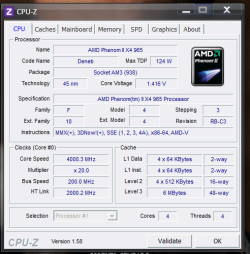
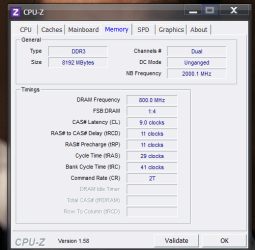
these are my Timmings use-ing Corsair Vengeance Ram 1600 Mhz , I was able to clock it at it's normal speed because , I boosted the CPU to 4.0 Ghz with no Voltage tweeks my board has many overclocking features on it

Also if i didn't do that my ram would run at 1333Mhz so by playing with the cpu i got play with the ram as well

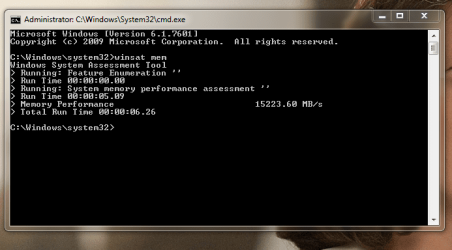
I simpley up the multiplyer and upped the ram to 1600Mhz and walla i was oc'ed stable and all
 

Attachments

  • Overclock.PNG
    Overclock.PNG
    23 KB · Views: 140
  • Ram Timmings.PNG
    Ram Timmings.PNG
    19.1 KB · Views: 148
  • 8gb 1600 corsair.PNG
    8gb 1600 corsair.PNG
    27.6 KB · Views: 234

My Computer

Computer type
PC/Desktop
Computer Manufacturer/Model Number
CoreI7-6700K MrFingerIII Special Builds
OS
Windows 10 Home Premium 64bit sp1
CPU
Intel I7-6700K @ 4.6 Ghz 1.344 volts everyday OC
Motherboard
Asrock Fatality K6 Z170 Socket 1151
Memory
32GB G-Skill TridentZ 3200mhz 16-18-18-38 DDR4
Graphics Card(s)
Sli Gigabyte Windforce GTX 980 G1
Sound Card
AC97 Creative Rage Tactic 3D Headphones Bluetooth
Monitor(s) Displays
27" Asus ROG Swift PG278Q G-Sync 48" Vizio Smart HD TV
Screen Resolution
2560x1440p 27"- 48" Currently Gaming at 2560x1440p Res 2K
Hard Drives
250GB Samsung Evo840SSD Seagate baracuda 500 GB WD Mybook 500Gb 1TB Seagate Barracuda
PSU
HX1050w Corsair Silver 80plus certified crosfire/sli
Case
Enthod Pro Full Tower
Cooling
Corsair H110i GT 280 mm High Performance WaterBlock
Keyboard
Logitech wireless keyboard
Mouse
Logitech wireless mouse
Internet Speed
Cox Cable 100+ mb
Antivirus
WebRoot Spysweeper with Antivirus
Browser
IE-10, Chrome, Opera
Other Info
My Other Rig is a AMD FX8320E @4.6Ghz 16GB Ballistic Sport Ram
Mobo Asrock Fatality 990FX 120GB OCZ SSD 1TB Seagate Barracuda Corsair H75 Cooling PSU Corsair CX750
GPU GTX Gigabyte 970G1
I set the RAM going on its XMP profile for now, which upped the speed to its stock 1600mhz, getting an extra 2-3 gb/s out of it. I would think it would be....but just to check, is this safe/stable?
 

My Computer

Computer type
PC/Desktop
Computer Manufacturer/Model Number
Custom Build
OS
Windows 7 Professional 64bit
CPU
Intel i7 3770k 3.5ghz
Motherboard
Asus P8Z77-V Deluxe
Memory
Corsair Vengeance 16gb (4x4gb)
Graphics Card(s)
Gigabyte G1 Gaming GTX970
Sound Card
None
Monitor(s) Displays
3x AOC 12367fh 23"
Screen Resolution
1920x1080
Hard Drives
Western Digital Caviar Black 1TB - 64mb cache
Western Digital Caviar Green 1TB - 32mb cache
Samsung 830 SSD 128Gb Boot Drive
PSU
Corsair AX-860W ATX
Case
Corsair 500R black
Cooling
Corsair 500r Stock cooling (3x120mm, 1x200mm) & Corsair H100
Keyboard
Logitech G110 gaming keyboard
Mouse
Logitech G500s
Other Info
Corsair Hydro 100 CPU Cooler
That depends entirely on your specific configuration and hardware. Have a go with Memtest86+ at least 6 full passes with no errors. That will tell you it is fine. Any errors are not good and you'll have to adjust some parameters. Note the download is a ways down the page.
 

My Computer

Computer type
PC/Desktop
Computer Manufacturer/Model Number
Home Built Desktop By DataTech
OS
Windows 7 Ultimate X64 SP1
CPU
Intel i5-2550K, Differing ~4.4-4.8GHz No built in GPU
Motherboard
ASUS P8Z68-V PRO/GEN3
Memory
16GB G.Skill Sniper 1866MHz @ 2133MHz 2x8GB
Graphics Card(s)
ASUS GTX650TIB-DC2OC-2GD5, (650TI Boost)
Sound Card
Onboard Realtek 5-1
Monitor(s) Displays
Samsung P2570HD
Screen Resolution
1920x1080
Hard Drives
Samsung 840 Pro 256GB SSD for OS, 500GB Seagate Constellation (Enterprise drive) for Data
PSU
Corsair HX650W
Case
Inwin Dragon Rider
Cooling
Hyper 212 EVO w/two Noctua fans, push-pull, @1300 RPM
Keyboard
E-Z Eyes, bright yellow keys with large characters
Mouse
steelseries SENSEI Laser Pro Gaming
Internet Speed
48-51Mbs Mbs down, 11 Mbs up Xfinity Cable
Antivirus
Norton Internet Security 2013
Browser
IE 10, Opera, Pale Moon if needed
Other Info
4 case fans, LG BluRay-RE, ASUS DVD-RW, Mr. Fusion power supply, 1.21 gigawatts.
Back
Top