overclocking problem with core i5 760

654

New member
Local time
4:55 PM
Messages
6
Hey guys, i'm confused about my problem cause i had my cpu running at 4.0gHZ and my system was rock stable!Then a day after i started my pc and it wouldn't start at all with that cpu speed..now i can only run it at 3.465gHZ!What happened and why can't i overclock it more?:confused:
 

My Computer

OS
Windows 7 Ultimate 32bit
CPU
Intel Core i5 760
Motherboard
Gigabyte P55A-UD4
Memory
Mushkin Stiletto 4GB DDR3-1333
Graphics Card(s)
Twintech Nvidia GTX570
Monitor(s) Displays
LG W2361V-PF TFT Monitor 23''
Screen Resolution
Full HD
PSU
CoolingMaster Silent Pro M700W
Case
Xigmatek Midgard
Cooling
Corsair Air Series A70
Have at look at the event viewer for that time and see if it threw up any errors.
Start>Type Event Viewer>Windows Logs>System then follow it down to the date and time it happened. It may give a hint in a warning or critical event.


I have a limited knowledge on overclocking but in case someone else see's this who knows more,can you post what changes you made for the overclock,the i5 760 is able to take that if i remember correctly.

And at a guess I'd say it was temperature.
 

My Computer

Computer Manufacturer/Model Number
Blue Shards 1.0
OS
Windows 7 Ultimate 64bit
CPU
AMD Phenom II 555 Black Edition Quad Core OC'd to 4.0GHz
Motherboard
ASUS M4A88T-M
Memory
G Skill RipJaw 1333MHz 4GB
Graphics Card(s)
ATI raideon 4250 HD/XFX ATI Radeon 1GB HD4650
Sound Card
Realteck HD Audio
Monitor(s) Displays
2x 22" Widescreen HD Monitors
Hard Drives
500GB Sata 7500RPM
80GB IDE
PSU
850W OCUK Modular
Case
Antec Dark Fleet DF-30
Cooling
Titan Fenrir Pro (CPU)
Keyboard
Logitech Wireless
Mouse
Logitech Wireless
Internet Speed
24Meg
Other Info
Getting soon-
2TB 7200RPM HDD
+8GB RAM
30GB SSD
HD6950/70
What stress test did you run to determine the 4GHz was stable and for how long did you run it and what were the temps?

What were your Vcore, Vtt, PLL and RAM voltages? What kind of RAM and what speed was it running at overclocked?

More info needed.
 

My Computer

Computer type
PC/Desktop
Computer Manufacturer/Model Number
Home built (GeneO industries)/Model 4
OS
Windows 10 Pro. EFI boot partition, full EFI boot
CPU
i7 4770k 4.4GHz (44-44-43-43 turbo) @ 1.248V
Motherboard
ASUS Maximus VI Hero
Memory
16GB (8GBx2) @2200 MHz G.skill Sniper 10-11-10-30-1, 1.6V
Graphics Card(s)
MSI GTX 970 Gaming 4G
Sound Card
Onboard SupremeFX Audio
Monitor(s) Displays
NEC Spectraview 2490WUXi-SV
Screen Resolution
1920 x 1200
Hard Drives
Samsung 850 Pro 256GB (OS), Samsung 2x 128GB 840 Pro SSD in RAID0, 3x WD Blue 6Gb/s 1TB RAID0, WD 2TB Black external USB 3.0, 2TB WD20EARS Green external USB 3.0, 2x 500GB Seagate and 1 750 GB external USB, 1x 350GB external USB3
PSU
Seasonic X-850 (2012 KM3 model)
Case
Fractal Design Define R4
Cooling
NH-D14, NF-F12, NF-A15; NF-P14, NF-P12,NF-A14, S12A PWM
Keyboard
Cooler Master Storm Quickfire Rapid - Brown
Mouse
Logitech G602
Internet Speed
126.4 Mb/s down, 24.3 Mb/s up
Other Info
USB 3.0 x8 , SATA III x8, eSATA, USB 2.0 x6. Samsung DVD R/W drive.

WEI: CPU 7.8, Memory 7.9, Graphics 7.9, Disk 7.9
You may have burned/degraded something running too high a CPU speed. What I don't know. Did you ever do any research on overclocking or did you just use some settings someone else gave you?

That's the danger of using other people’s settings - everyone assumes they can run at 4gig, and just use settings someone else say use without understanding that everyone can’t use the same settings, even if they have the same equipment! Also that some CPU’s can’t do 4gig – That’s why you HAVE to test for stability!!!!

Also running at high CPU speeds like that can and will strain electrical components…. Again another reason you HAVE TO TEST FOR STABILITY!!!!.

Also anytime you run overclock speed like that you HAVE to tweak voltages or you’ll overload and/or overheat components which can fail if they can’t handle the stress – Yet another reason to TEST FOR STABILITY!!!!.

If these things aren’t done you run the risk of damaging your equipment!!!

As one who does overclock I can’t stress enough how important it is to tweak voltages and test for stability….. unless you have money to burn.

I’ve said it plenty of times, hitting 4gig and running at 4gig stable are two different things.

I don't mean to beat up the OP, I just want to provide some clarity on the situation.

My two cents.

With that said, memtest your memory to see if they've started failing - will get memtest errors. If so, replace the memory, reduce your clocks, read about overclocking and than decide if it's worth it.

Good luck.

 

My Computer

Computer type
PC/Desktop
Computer Manufacturer/Model Number
Custom built by me.
OS
Windows 10 Pro
CPU
Intel Core i7-4770K (3.5Ghz)
Motherboard
Gigabyte G1 Sniper 5 (F10 Bios)
Memory
32 gig Corsair Dominator Platinum (4x8Gig)
Graphics Card(s)
Sapphire Tri-X R9 Fury
Sound Card
Soundblaster ZXR
Monitor(s) Displays
NEC PA242W 24" LCD Monitor
Screen Resolution
1920 x 1200
Hard Drives
Primary - Samsung 850 Pro (512gig), Samsung 840 Pro (256gig), 2TB WD Caviar Black.
PSU
EVGA Supernova 1000 G2
Case
Cooler Master HAF X
Cooling
Corsair H100i with Corsair Air Series SP120 Quiet Fans
Keyboard
Logitech Wireless Wave
Mouse
Logitech Performance MX
Internet Speed
High Speed Cable
Antivirus
Norton Security
Browser
IE11
Other Info
Memory Timings - 1866MHz @ 9-9-9-27-1T @ 1.5 volts
Sounds like beating up to me. I just want to know what he did do and go from there, not guess what he didn't do properly, then we can advise how to proceed.
 

My Computer

Computer type
PC/Desktop
Computer Manufacturer/Model Number
Home built (GeneO industries)/Model 4
OS
Windows 10 Pro. EFI boot partition, full EFI boot
CPU
i7 4770k 4.4GHz (44-44-43-43 turbo) @ 1.248V
Motherboard
ASUS Maximus VI Hero
Memory
16GB (8GBx2) @2200 MHz G.skill Sniper 10-11-10-30-1, 1.6V
Graphics Card(s)
MSI GTX 970 Gaming 4G
Sound Card
Onboard SupremeFX Audio
Monitor(s) Displays
NEC Spectraview 2490WUXi-SV
Screen Resolution
1920 x 1200
Hard Drives
Samsung 850 Pro 256GB (OS), Samsung 2x 128GB 840 Pro SSD in RAID0, 3x WD Blue 6Gb/s 1TB RAID0, WD 2TB Black external USB 3.0, 2TB WD20EARS Green external USB 3.0, 2x 500GB Seagate and 1 750 GB external USB, 1x 350GB external USB3
PSU
Seasonic X-850 (2012 KM3 model)
Case
Fractal Design Define R4
Cooling
NH-D14, NF-F12, NF-A15; NF-P14, NF-P12,NF-A14, S12A PWM
Keyboard
Cooler Master Storm Quickfire Rapid - Brown
Mouse
Logitech G602
Internet Speed
126.4 Mb/s down, 24.3 Mb/s up
Other Info
USB 3.0 x8 , SATA III x8, eSATA, USB 2.0 x6. Samsung DVD R/W drive.

WEI: CPU 7.8, Memory 7.9, Graphics 7.9, Disk 7.9
You have yours, I have mine ;)

Later.
 

My Computer

Computer type
PC/Desktop
Computer Manufacturer/Model Number
Custom built by me.
OS
Windows 10 Pro
CPU
Intel Core i7-4770K (3.5Ghz)
Motherboard
Gigabyte G1 Sniper 5 (F10 Bios)
Memory
32 gig Corsair Dominator Platinum (4x8Gig)
Graphics Card(s)
Sapphire Tri-X R9 Fury
Sound Card
Soundblaster ZXR
Monitor(s) Displays
NEC PA242W 24" LCD Monitor
Screen Resolution
1920 x 1200
Hard Drives
Primary - Samsung 850 Pro (512gig), Samsung 840 Pro (256gig), 2TB WD Caviar Black.
PSU
EVGA Supernova 1000 G2
Case
Cooler Master HAF X
Cooling
Corsair H100i with Corsair Air Series SP120 Quiet Fans
Keyboard
Logitech Wireless Wave
Mouse
Logitech Performance MX
Internet Speed
High Speed Cable
Antivirus
Norton Security
Browser
IE11
Other Info
Memory Timings - 1866MHz @ 9-9-9-27-1T @ 1.5 volts
GeneO i primarily have prime95 for stressing and also intelburntest.Temps were propably around 55 degrees!Vcore was at 1.25V and VTT and PLL at stock, ram wasn't overclocked so stock all!
 

My Computer

OS
Windows 7 Ultimate 32bit
CPU
Intel Core i5 760
Motherboard
Gigabyte P55A-UD4
Memory
Mushkin Stiletto 4GB DDR3-1333
Graphics Card(s)
Twintech Nvidia GTX570
Monitor(s) Displays
LG W2361V-PF TFT Monitor 23''
Screen Resolution
Full HD
PSU
CoolingMaster Silent Pro M700W
Case
Xigmatek Midgard
Cooling
Corsair Air Series A70
sygnus21 yeah i did my research i hadn't asked anyone to give me his settings.I tweaked voltages so my cpu would be stable and also stressed my cpu for about 1:30 hours without high temps and also memtested my memory and it showed no faults.
 

My Computer

OS
Windows 7 Ultimate 32bit
CPU
Intel Core i5 760
Motherboard
Gigabyte P55A-UD4
Memory
Mushkin Stiletto 4GB DDR3-1333
Graphics Card(s)
Twintech Nvidia GTX570
Monitor(s) Displays
LG W2361V-PF TFT Monitor 23''
Screen Resolution
Full HD
PSU
CoolingMaster Silent Pro M700W
Case
Xigmatek Midgard
Cooling
Corsair Air Series A70
GeneO i primarily have prime95 for stressing and also intelburntest.Temps were propably around 55 degrees!Vcore was at 1.25V and VTT and PLL at stock, ram wasn't overclocked so stock all!

What's your RAM's specs and voltage?

Also you need to run prime95 and see what your load temps actually are. This will be an indicator of what your voltages are doing.

I use prime95 along with Core Temp of Real Temp to check my temps.

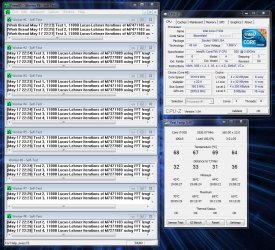
Prime 95 run.JPG

sygnus21 yeah i did my research i hadn't asked anyone to give me his settings.I tweaked voltages so my cpu would be stable and also stressed my cpu for about 1:30 hours without high temps and also memtested my memory and it showed no faults.

That's good to know. It's just that a lot of folks make the mistake of oc'ing without the research neccessary to get it right. At least you did. So that's good.
 

My Computer

Computer type
PC/Desktop
Computer Manufacturer/Model Number
Custom built by me.
OS
Windows 10 Pro
CPU
Intel Core i7-4770K (3.5Ghz)
Motherboard
Gigabyte G1 Sniper 5 (F10 Bios)
Memory
32 gig Corsair Dominator Platinum (4x8Gig)
Graphics Card(s)
Sapphire Tri-X R9 Fury
Sound Card
Soundblaster ZXR
Monitor(s) Displays
NEC PA242W 24" LCD Monitor
Screen Resolution
1920 x 1200
Hard Drives
Primary - Samsung 850 Pro (512gig), Samsung 840 Pro (256gig), 2TB WD Caviar Black.
PSU
EVGA Supernova 1000 G2
Case
Cooler Master HAF X
Cooling
Corsair H100i with Corsair Air Series SP120 Quiet Fans
Keyboard
Logitech Wireless Wave
Mouse
Logitech Performance MX
Internet Speed
High Speed Cable
Antivirus
Norton Security
Browser
IE11
Other Info
Memory Timings - 1866MHz @ 9-9-9-27-1T @ 1.5 volts
GeneO i primarily have prime95 for stressing and also intelburntest.Temps were propably around 55 degrees!Vcore was at 1.25V and VTT and PLL at stock, ram wasn't overclocked so stock all!

Did you run Prime95 small ftt or blend. Try working your way up with a small ftt to test CPU stability and a custom blend using 75% of your memory and a max ff size of 16384. The latter will exercise your memory a lot. 1.5 hours isn't long enough to ensure a stable system. I have had prime95 fail well past that.

Another thing to try is underclock your memory on the settings where you failed. Try the overclock on your CPU to 4 GHz but set the memory multiplier so you underclock it - if you haven't already tried this :D

My experience with my 760 is it gets very finicky fast above 3.8. I have had similar experience - the system seemed rock solid for a few days then all of a sudden it was unstable. Truth is it was unstable all along.

Also, at 4GHz, you will need to increase VTT. At 3.8 mine is at 1.16825 (or something like that). It is not best left on auto. At 4Ghz on the 760 you should be setting the voltages for RAM, CPU an IMC/VTT manually.
 
Last edited:

My Computer

Computer type
PC/Desktop
Computer Manufacturer/Model Number
Home built (GeneO industries)/Model 4
OS
Windows 10 Pro. EFI boot partition, full EFI boot
CPU
i7 4770k 4.4GHz (44-44-43-43 turbo) @ 1.248V
Motherboard
ASUS Maximus VI Hero
Memory
16GB (8GBx2) @2200 MHz G.skill Sniper 10-11-10-30-1, 1.6V
Graphics Card(s)
MSI GTX 970 Gaming 4G
Sound Card
Onboard SupremeFX Audio
Monitor(s) Displays
NEC Spectraview 2490WUXi-SV
Screen Resolution
1920 x 1200
Hard Drives
Samsung 850 Pro 256GB (OS), Samsung 2x 128GB 840 Pro SSD in RAID0, 3x WD Blue 6Gb/s 1TB RAID0, WD 2TB Black external USB 3.0, 2TB WD20EARS Green external USB 3.0, 2x 500GB Seagate and 1 750 GB external USB, 1x 350GB external USB3
PSU
Seasonic X-850 (2012 KM3 model)
Case
Fractal Design Define R4
Cooling
NH-D14, NF-F12, NF-A15; NF-P14, NF-P12,NF-A14, S12A PWM
Keyboard
Cooler Master Storm Quickfire Rapid - Brown
Mouse
Logitech G602
Internet Speed
126.4 Mb/s down, 24.3 Mb/s up
Other Info
USB 3.0 x8 , SATA III x8, eSATA, USB 2.0 x6. Samsung DVD R/W drive.

WEI: CPU 7.8, Memory 7.9, Graphics 7.9, Disk 7.9
GeneO i run Prime95 large FTTs.I'm going to test it with the settings you said and post back the results!I have already tried to underclock my memory but made no difference..Anyways i will increase my VTT to see if that helps :)!
 

My Computer

OS
Windows 7 Ultimate 32bit
CPU
Intel Core i5 760
Motherboard
Gigabyte P55A-UD4
Memory
Mushkin Stiletto 4GB DDR3-1333
Graphics Card(s)
Twintech Nvidia GTX570
Monitor(s) Displays
LG W2361V-PF TFT Monitor 23''
Screen Resolution
Full HD
PSU
CoolingMaster Silent Pro M700W
Case
Xigmatek Midgard
Cooling
Corsair Air Series A70
sygnus21 my ram's stock voltage is 1.5V and stock freq is 1333MHz.Timings are 9-9-9-24.I will post my temps after a long run of Prime95 but as i said temps won't pass 60 degrees at any time!
 

My Computer

OS
Windows 7 Ultimate 32bit
CPU
Intel Core i5 760
Motherboard
Gigabyte P55A-UD4
Memory
Mushkin Stiletto 4GB DDR3-1333
Graphics Card(s)
Twintech Nvidia GTX570
Monitor(s) Displays
LG W2361V-PF TFT Monitor 23''
Screen Resolution
Full HD
PSU
CoolingMaster Silent Pro M700W
Case
Xigmatek Midgard
Cooling
Corsair Air Series A70
Back
Top