overclocking q6600 with pk5c mobo help

l337

New member
Local time
3:08 PM
Messages
115
Location
California
I have trouble with the vcore voltage. When I set it to auto the system runs fine but the under cpu-z and speed fan it shows a vcore of 1.38V. but when I try setting teh vcore to manuel and change it to 1.28 the bios boots but windows does not. I went all the way to 1.32V and windows still didnt boot.

Also i overclocked it to a fsb of 333
 

My Computer My Computer

OS
windows 7 7137 x64
CPU
Intel Core 2 Extreme Quad Processor QX9770
Motherboard
XFX MBN790IUL9 LGA 775 NVIDIA nForce 790i Ultra SLI
Memory
8GB DDR3 1333MHz
Graphics Card(s)
2x Evga 9800GX2 SLI
Monitor(s) Displays
1x Hanns G 21.6"
Screen Resolution
1680 x 1050
Hard Drives
1x 750GB Hitachi
Cooling
Zalman 9900
Why are you trying to set the Vcore lower then the voltage set on Auto, if CPUZ is giving you 1.38v after Vdroop then in the Bios that would be about 1.4v and if you trying to set it manually to a lower voltage then you will not hav any sort of stability.

Why do you want to manualy set the voltage anyway if it works OK on Auto?
 

My Computer My Computer

Computer Manufacturer/Model Number
Home Brew
OS
Windows 7 Ultimate Vista Ultimate x64
CPU
Core 2 Duo E8500 3.16Ghz @ 3.8Ghz
Motherboard
eVGA 750i FTW
Memory
2x2Gigs Patriot PC2-6400 LL
Graphics Card(s)
Inno3D GeForce GTX260 216 SP
Monitor(s) Displays
ASUS VW222U 22" 2ms Response time
Screen Resolution
1680x1050
Hard Drives
SATA 150GB
SATA II 250GB
USB IDE 750GB Ext.
PSU
HYTEC 600W & Thermaltake 650W Toughpower Power Exp
Case
Thermaltake Armor LCS (Liquid Cooling System)
Cooling
Liquid Cooling System
Keyboard
Logitech G15 Gaming Keyboard
Mouse
Logitech G9 Gaming Mouse
Why are you trying to set the Vcore lower then the voltage set on Auto, if CPUZ is giving you 1.38v after Vdroop then in the Bios that would be about 1.4v and if you trying to set it manually to a lower voltage then you will not hav any sort of stability.

Why do you want to manualy set the voltage anyway if it works OK on Auto?

im mainly worried about the temp, as the temp of each core goes to about 66 C
 

My Computer My Computer

OS
windows 7 7137 x64
CPU
Intel Core 2 Extreme Quad Processor QX9770
Motherboard
XFX MBN790IUL9 LGA 775 NVIDIA nForce 790i Ultra SLI
Memory
8GB DDR3 1333MHz
Graphics Card(s)
2x Evga 9800GX2 SLI
Monitor(s) Displays
1x Hanns G 21.6"
Screen Resolution
1680 x 1050
Hard Drives
1x 750GB Hitachi
Cooling
Zalman 9900
Are you still using the stock cooler or after market one and if so which one?
 

My Computer My Computer

Computer Manufacturer/Model Number
Home Brew
OS
Windows 7 Ultimate Vista Ultimate x64
CPU
Core 2 Duo E8500 3.16Ghz @ 3.8Ghz
Motherboard
eVGA 750i FTW
Memory
2x2Gigs Patriot PC2-6400 LL
Graphics Card(s)
Inno3D GeForce GTX260 216 SP
Monitor(s) Displays
ASUS VW222U 22" 2ms Response time
Screen Resolution
1680x1050
Hard Drives
SATA 150GB
SATA II 250GB
USB IDE 750GB Ext.
PSU
HYTEC 600W & Thermaltake 650W Toughpower Power Exp
Case
Thermaltake Armor LCS (Liquid Cooling System)
Cooling
Liquid Cooling System
Keyboard
Logitech G15 Gaming Keyboard
Mouse
Logitech G9 Gaming Mouse
Are you still using the stock cooler or after market one and if so which one?
im using an after market one, zalman 9700
 

My Computer My Computer

OS
windows 7 7137 x64
CPU
Intel Core 2 Extreme Quad Processor QX9770
Motherboard
XFX MBN790IUL9 LGA 775 NVIDIA nForce 790i Ultra SLI
Memory
8GB DDR3 1333MHz
Graphics Card(s)
2x Evga 9800GX2 SLI
Monitor(s) Displays
1x Hanns G 21.6"
Screen Resolution
1680 x 1050
Hard Drives
1x 750GB Hitachi
Cooling
Zalman 9900
Well I just had a look at the specs and it seems pretty good, 65c is not too bad if the CPU is at 100% but if it's going much higher then that maybe you might have a problem with how the Heat sink is seated or maybe you may need to use some better Thermal paste, what are your temps like at idle?
 

My Computer My Computer

Computer Manufacturer/Model Number
Home Brew
OS
Windows 7 Ultimate Vista Ultimate x64
CPU
Core 2 Duo E8500 3.16Ghz @ 3.8Ghz
Motherboard
eVGA 750i FTW
Memory
2x2Gigs Patriot PC2-6400 LL
Graphics Card(s)
Inno3D GeForce GTX260 216 SP
Monitor(s) Displays
ASUS VW222U 22" 2ms Response time
Screen Resolution
1680x1050
Hard Drives
SATA 150GB
SATA II 250GB
USB IDE 750GB Ext.
PSU
HYTEC 600W & Thermaltake 650W Toughpower Power Exp
Case
Thermaltake Armor LCS (Liquid Cooling System)
Cooling
Liquid Cooling System
Keyboard
Logitech G15 Gaming Keyboard
Mouse
Logitech G9 Gaming Mouse
Well I just had a look at the specs and it seems pretty good, 65c is not too bad if the CPU is at 100% but if it's going much higher then that maybe you might have a problem with how the Heat sink is seated or maybe you may need to use some better Thermal paste, what are your temps like at idle?

it says 44 for each core , is there a difference between the core temp and cpu temp?
 

My Computer My Computer

OS
windows 7 7137 x64
CPU
Intel Core 2 Extreme Quad Processor QX9770
Motherboard
XFX MBN790IUL9 LGA 775 NVIDIA nForce 790i Ultra SLI
Memory
8GB DDR3 1333MHz
Graphics Card(s)
2x Evga 9800GX2 SLI
Monitor(s) Displays
1x Hanns G 21.6"
Screen Resolution
1680 x 1050
Hard Drives
1x 750GB Hitachi
Cooling
Zalman 9900
it says 44 for each core , is there a difference between the core temp and cpu temp?

cpu temp is the temp on the chip package, core is inside, the thermal diode on the die itself -- will always be hotter
 

My Computer My Computer

Computer type
Laptop
Computer Manufacturer/Model Number
Apple
OS
El Capitan / Windows 10
CPU
i7-4980HQ
Memory
16GB
Graphics Card(s)
Iris 5200
cpu temp is the temp on the chip package, core is inside, the thermal diode on the die itself -- will always be hotter

thanks, so is 44 idle and 66 load, good core temps?
 

My Computer My Computer

OS
windows 7 7137 x64
CPU
Intel Core 2 Extreme Quad Processor QX9770
Motherboard
XFX MBN790IUL9 LGA 775 NVIDIA nForce 790i Ultra SLI
Memory
8GB DDR3 1333MHz
Graphics Card(s)
2x Evga 9800GX2 SLI
Monitor(s) Displays
1x Hanns G 21.6"
Screen Resolution
1680 x 1050
Hard Drives
1x 750GB Hitachi
Cooling
Zalman 9900
I think that seems about right, what do you think baarod?
 

My Computer My Computer

Computer Manufacturer/Model Number
Home Brew
OS
Windows 7 Ultimate Vista Ultimate x64
CPU
Core 2 Duo E8500 3.16Ghz @ 3.8Ghz
Motherboard
eVGA 750i FTW
Memory
2x2Gigs Patriot PC2-6400 LL
Graphics Card(s)
Inno3D GeForce GTX260 216 SP
Monitor(s) Displays
ASUS VW222U 22" 2ms Response time
Screen Resolution
1680x1050
Hard Drives
SATA 150GB
SATA II 250GB
USB IDE 750GB Ext.
PSU
HYTEC 600W & Thermaltake 650W Toughpower Power Exp
Case
Thermaltake Armor LCS (Liquid Cooling System)
Cooling
Liquid Cooling System
Keyboard
Logitech G15 Gaming Keyboard
Mouse
Logitech G9 Gaming Mouse
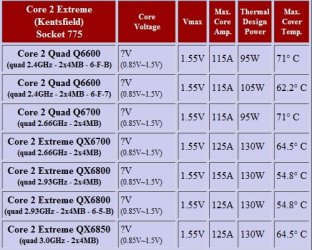
Here's a temp and voltage chart for you.

2009-04-15_141303.jpg
 

My Computer My Computer

Computer Manufacturer/Model Number
Home Brew
OS
Windows 7 Ultimate Vista Ultimate x64
CPU
Core 2 Duo E8500 3.16Ghz @ 3.8Ghz
Motherboard
eVGA 750i FTW
Memory
2x2Gigs Patriot PC2-6400 LL
Graphics Card(s)
Inno3D GeForce GTX260 216 SP
Monitor(s) Displays
ASUS VW222U 22" 2ms Response time
Screen Resolution
1680x1050
Hard Drives
SATA 150GB
SATA II 250GB
USB IDE 750GB Ext.
PSU
HYTEC 600W & Thermaltake 650W Toughpower Power Exp
Case
Thermaltake Armor LCS (Liquid Cooling System)
Cooling
Liquid Cooling System
Keyboard
Logitech G15 Gaming Keyboard
Mouse
Logitech G9 Gaming Mouse

My Computer My Computer

OS
windows 7 7137 x64
CPU
Intel Core 2 Extreme Quad Processor QX9770
Motherboard
XFX MBN790IUL9 LGA 775 NVIDIA nForce 790i Ultra SLI
Memory
8GB DDR3 1333MHz
Graphics Card(s)
2x Evga 9800GX2 SLI
Monitor(s) Displays
1x Hanns G 21.6"
Screen Resolution
1680 x 1050
Hard Drives
1x 750GB Hitachi
Cooling
Zalman 9900
I think that seems about right, what do you think baarod?

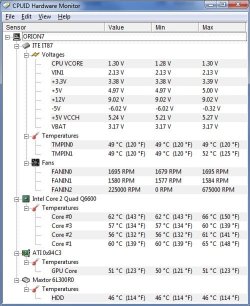
My q6600 @ 3.2GHz stock Intel cooler:
Untitled.jpg
It's run this way for months -- no crashes. FANIN2 is a fluke obviously -- my machine is not a hovercraft.
 

My Computer My Computer

Computer type
Laptop
Computer Manufacturer/Model Number
Apple
OS
El Capitan / Windows 10
CPU
i7-4980HQ
Memory
16GB
Graphics Card(s)
Iris 5200
Since it's not over-volting, your fine ;)
 

My Computer My Computer

Computer type
PC/Desktop
Computer Manufacturer/Model Number
Systems by SmartEyeball
OS
8 Pro x64
CPU
i7 3770K 4.6GHz
Motherboard
ASUS P8Z77 WS
Memory
16GB G.Skill Trident X 2666mhz
Graphics Card(s)
x2 EVGA 780 Ti Superclocked SLI
Sound Card
SB X-FI Surround 5.1 PRO USB / ATH-AD900 Headphones
Monitor(s) Displays
x3 Dell U2410 / 58" Samsung
Screen Resolution
5760*1200/ 1920*1200
Hard Drives
2x Intel 520 240GB (RAID 0) * 2x WD Caviar Blacks 2TB (RAID 0) * 2TB WD Caviar Black * Sony Optirac DVD
PSU
Silverstone Strider Evolution 1200W
Case
Thermaltake Level 10 GT Snow Edition
Cooling
Noctua NH-D14
Keyboard
Topre Realforce // Ducky Shine MX Black // Filco Ninja TKL
Mouse
Thermaltake Theron (Highly Recommended) + Razer Imperator
Antivirus
MSE
Browser
IE, FF, WaterFox
Other Info
GT Extreme V2 Sim Racing Cockpit + 40" LCD and K/B Mouse stand ▼
Fanatec CSR Elite Wheel + Clubsport V1 Pedals + CSR shifter/7G-H ▼Saitek X52 Pro ▼ TrackIR 5 Pro
Buttkicker v2 Seat Rumbler with Dedicated 5.1 and Sub Woofer attached to frame ▼
=
Bloody Big Grin

My Computer My Computer

OS
windows 7 7137 x64
CPU
Intel Core 2 Extreme Quad Processor QX9770
Motherboard
XFX MBN790IUL9 LGA 775 NVIDIA nForce 790i Ultra SLI
Memory
8GB DDR3 1333MHz
Graphics Card(s)
2x Evga 9800GX2 SLI
Monitor(s) Displays
1x Hanns G 21.6"
Screen Resolution
1680 x 1050
Hard Drives
1x 750GB Hitachi
Cooling
Zalman 9900
Back
Top