Overcloking ASUS P5G41C-M LX

pcgamer

New member
Local time
4:25 AM
Messages
187
I have look in the bios on the board and there is no optinos for changing the FSB the 1 option i need to change to manual won't let me is there a way to fix this or enable the opitons as i heard asus has hidden options on there bios?
 

My Computer My Computer

At a glance

Windows 7 Pro 32BitIntel Core 2 Quad Q94004GB DDR2 800MHzPoint Of View Nvidia GTX470
Computer Manufacturer/Model Number
Custom Built By Myself
OS
Windows 7 Pro 32Bit
CPU
Intel Core 2 Quad Q9400
Motherboard
ASUS P5G41C-M LX
Memory
4GB DDR2 800MHz
Graphics Card(s)
Point Of View Nvidia GTX470
Sound Card
6 Channel 5.1 VIA HD
Monitor(s) Displays
23" 1080P Samsung Sync Master 2333
Screen Resolution
1920X1080
Hard Drives
Samsung 750GB SATAII 7200RPM
PSU
XFX XXX Edition 650W
Case
Coolermaster Storm Scout Gaming Case
Cooling
Artic Cooling Pro REV 2, 3X 120MM Red Case Fans
Keyboard
Microsoft 600
Mouse
Microsoft Wireless Bluetrack 5000
Internet Speed
2MBs
Actually they shouldn't be hidden. Before I go on, I want to give you the usual warnings about the possible ill effects of overclocking. If you aren't familiar with overclocking, I'll suggest you do some research before you try it. Make a new thread in the overclocking forum here and get some suggestions and advice first.

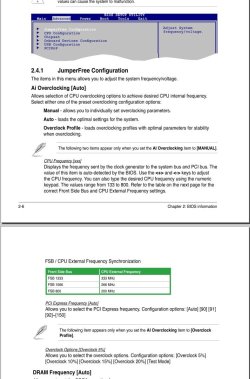
Now, as to your MB's BIOS settings. Look under the Advanced> Jumperfree Configuration

BIOS.jpg

I'll attach your MB manual, have a good look around. And as I say, don't just dive in if you don't have experience, the possibility for system damage is high if done incorrectly.

View attachment 108760

A Guy
 

My Computer My Computer

At a glance

Windows 10 Home x64INTEL Core i5-750 Quad-Core 3.37GHzHyperX Fury Black Series 8GB (2 x 4GB) 1866MhzEVGA GeForce GTX 750 Superclocked 1GB 128-Bit...
Computer type
PC/Desktop
OS
Windows 10 Home x64
CPU
INTEL Core i5-750 Quad-Core 3.37GHz
Motherboard
ASUS P7P55D
Memory
HyperX Fury Black Series 8GB (2 x 4GB) 1866Mhz
Graphics Card(s)
EVGA GeForce GTX 750 Superclocked 1GB 128-Bit GDDR5
Monitor(s) Displays
LG 32MA68HY 32" IPS
Screen Resolution
1920 x 1080
Hard Drives
Samsung 840 Evo 120GB, SEAGATE 500GB Barracuda® 7200.12, SATA 3 Gb/s, 7200 RPM, 16MB cache
PSU
ANTEC TruePower New TP-550, 80 PLUS, 550W
Case
ANTEC Three Hundred Illusion
Cooling
COOLER MASTER Hyper 212 Plus, 4 x 120mm 1 x 140mm Noctua's
Internet Speed
85 + Mbps
Antivirus
Avast
Browser
Vivaldi
Back
Top