Overheating

PwnFrnzy

Hardware & Perfomance
Pro User
Local time
11:35 AM
Messages
500
Location
California, US
Recently I had a freezing problem with my computer, soon after finding out it was an overheating issue. The component overheating was my processor, the freezing understandable knowing the processor shuts down to protect itself in such a scenario. I currently use a fan blowing directly into my case to keep it from overheating and my question is to ask is there any way to keep my processor cool without having to use a fan everyday?
 

My Computer

Computer type
PC/Desktop
Computer Manufacturer/Model Number
Frankenstein PC
OS
Windows 7 Home Premium 64-bit SP1
CPU
Intel core i7 920 @ 2.67Ghz; Bloomfield 45nm Technology
Motherboard
Intel Corporation DX58SO (J1PR)
Memory
16GB Dual-Channel DDR3 @ 540MHz (7-7-7-19)
Graphics Card(s)
4095MB NVIDIA GeForce GTX 960 (EVGA)
Sound Card
N/A Integrated Audio
Monitor(s) Displays
Acer S231HLbid LED Monitor 23"
Screen Resolution
1920x1080 1080p 60Hz
Hard Drives
BOOT: 59GB ADATA SP900 (SSD)
STORAGE 1: 977GB Hitachi HDS721010CLA (SATA) @7200RPM;
STORAGE 2: 465GB Western Digital WDC WD5000AAKS-65YGA0 (SATA) @ 7200RPM;
PSU
EVGA SuperNOVA 750 G1 80+ Gold (120-G1-0750-XR)
Case
Cooler Master Elite Gaming Case Black 430
Cooling
Cooler Master Hyper 212 Heatsink. Front and rear 120mm fan
Keyboard
Rosewill RIKB-11003
Mouse
James Donkey 112S
Internet Speed
200/40
Antivirus
Avast! Antivirus Free
Browser
Cyberfox x64 / FireFox / PaleMoon x64; kept up-to-date
Other Info
Windows Installed on March 21, 2014
We could use more specific info to be of any use but the usual things apply

Location.

Is it under a desk in a corner, or on a desk with plenty of circulation?

Stress

Are you constantly under a high load (either ram or cpu)?

Dirt

when was the last time is was cleaned out (thoroughly) and when was the last application of thermal paste?

A final (though I wouldnt) workaround is liquid cooling if the problem is severe.
 

My Computer

Computer Manufacturer/Model Number
HP Pavillion dv-7 1005 Tx
OS
Win 8 Release candidate 8400
CPU
[email protected]
Memory
4 gigs
Graphics Card(s)
Nvidia 9600M
Sound Card
HD built-in
Monitor(s) Displays
17" Wxga
Screen Resolution
1440x900
Cooling
none
Internet Speed
45Mb down 5Mb up
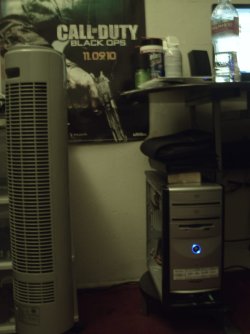
Location is in the picture attached.
Stress is usually shifting from high to idle. I play games on it and it also just sits there at times. The power plan is set to High-Performance.
Dirt is basically non-existent, cleaned out the dust about a month ago.
Last application of thermal paste was when I put in the mobo along with the current processor which I believe was sometime in January, but I'm not sure if it had been a bit earlier than that.
Current thermal compound being used is:
EVERCOOL-350
Model:EC350-TU15
Thermal Conductivity: >7.5w/m-k
Thermal Resistance: <0.06 degrees C-in[squared]/w

Liquid cooling is out of the question. . .
 

Attachments

  • PICT0251.JPG
    PICT0251.JPG
    193.7 KB · Views: 6

My Computer

Computer type
PC/Desktop
Computer Manufacturer/Model Number
Frankenstein PC
OS
Windows 7 Home Premium 64-bit SP1
CPU
Intel core i7 920 @ 2.67Ghz; Bloomfield 45nm Technology
Motherboard
Intel Corporation DX58SO (J1PR)
Memory
16GB Dual-Channel DDR3 @ 540MHz (7-7-7-19)
Graphics Card(s)
4095MB NVIDIA GeForce GTX 960 (EVGA)
Sound Card
N/A Integrated Audio
Monitor(s) Displays
Acer S231HLbid LED Monitor 23"
Screen Resolution
1920x1080 1080p 60Hz
Hard Drives
BOOT: 59GB ADATA SP900 (SSD)
STORAGE 1: 977GB Hitachi HDS721010CLA (SATA) @7200RPM;
STORAGE 2: 465GB Western Digital WDC WD5000AAKS-65YGA0 (SATA) @ 7200RPM;
PSU
EVGA SuperNOVA 750 G1 80+ Gold (120-G1-0750-XR)
Case
Cooler Master Elite Gaming Case Black 430
Cooling
Cooler Master Hyper 212 Heatsink. Front and rear 120mm fan
Keyboard
Rosewill RIKB-11003
Mouse
James Donkey 112S
Internet Speed
200/40
Antivirus
Avast! Antivirus Free
Browser
Cyberfox x64 / FireFox / PaleMoon x64; kept up-to-date
Other Info
Windows Installed on March 21, 2014
Probably your cpu cooler cant keep up with the stress on the cpu, so you might want to get a new one.
 

My Computer

Computer Manufacturer/Model Number
Scan
OS
Windows 7 Ultimate x64
CPU
Intel i7 970 (6-Core)
Motherboard
Gigabyte GA-X58A-UD5
Memory
G.Skill Ripjaws 8GB (2x4GB) CL7
Graphics Card(s)
Nvidia GTX 580
Sound Card
Asus Xonar D2X (7.1 Ch)
Monitor(s) Displays
Insignia 32" Full HD LED-LCD
Screen Resolution
1080p
Hard Drives
Crucial C300 128GB SSD (Main)
WD Black Caviar 1TB 6Gb/s HDD
PSU
Corsair TX950W
Case
CM HAF X
Cooling
Corsair H70
Keyboard
Logitech Wave K350
Mouse
Logitech Wave M510
I honestly don't know what good cooler for my socket type (if any manufacture even makes any for my socket type) would work, or let-alone fit in the limited amount of space inside my case.
 

My Computer

Computer type
PC/Desktop
Computer Manufacturer/Model Number
Frankenstein PC
OS
Windows 7 Home Premium 64-bit SP1
CPU
Intel core i7 920 @ 2.67Ghz; Bloomfield 45nm Technology
Motherboard
Intel Corporation DX58SO (J1PR)
Memory
16GB Dual-Channel DDR3 @ 540MHz (7-7-7-19)
Graphics Card(s)
4095MB NVIDIA GeForce GTX 960 (EVGA)
Sound Card
N/A Integrated Audio
Monitor(s) Displays
Acer S231HLbid LED Monitor 23"
Screen Resolution
1920x1080 1080p 60Hz
Hard Drives
BOOT: 59GB ADATA SP900 (SSD)
STORAGE 1: 977GB Hitachi HDS721010CLA (SATA) @7200RPM;
STORAGE 2: 465GB Western Digital WDC WD5000AAKS-65YGA0 (SATA) @ 7200RPM;
PSU
EVGA SuperNOVA 750 G1 80+ Gold (120-G1-0750-XR)
Case
Cooler Master Elite Gaming Case Black 430
Cooling
Cooler Master Hyper 212 Heatsink. Front and rear 120mm fan
Keyboard
Rosewill RIKB-11003
Mouse
James Donkey 112S
Internet Speed
200/40
Antivirus
Avast! Antivirus Free
Browser
Cyberfox x64 / FireFox / PaleMoon x64; kept up-to-date
Other Info
Windows Installed on March 21, 2014
I seriously recommend an upgrade but if you can't afford of waiting for something then these two are the only ones i could find that might do the trick:
Rosewill RCX-Z100
or
StarTech FANDURONTB

Hope this helps,
Sylo
 

My Computer

Computer Manufacturer/Model Number
Scan
OS
Windows 7 Ultimate x64
CPU
Intel i7 970 (6-Core)
Motherboard
Gigabyte GA-X58A-UD5
Memory
G.Skill Ripjaws 8GB (2x4GB) CL7
Graphics Card(s)
Nvidia GTX 580
Sound Card
Asus Xonar D2X (7.1 Ch)
Monitor(s) Displays
Insignia 32" Full HD LED-LCD
Screen Resolution
1080p
Hard Drives
Crucial C300 128GB SSD (Main)
WD Black Caviar 1TB 6Gb/s HDD
PSU
Corsair TX950W
Case
CM HAF X
Cooling
Corsair H70
Keyboard
Logitech Wave K350
Mouse
Logitech Wave M510

My Computer

OS
7 Ultimate x64
CPU
i5-2500k
Motherboard
Asus P8P67 Pro
Memory
8GB G.Skill Ripjaws X F3-12800CL7D-8GBXH 1866MHz 8-9-8-24
Graphics Card(s)
EVGA GTX 570 SC
Sound Card
X-Fi Titanium Fatality
Monitor(s) Displays
Samsung S27A550H 27" LED
Screen Resolution
1920x1080
Hard Drives
OCZ Vertex 3 120GB.
1TB Samsung F3.
2TB Samsung F4.
PSU
PC Power & Cooling Silencer 760
Case
Lian Li Lancool K62
Cooling
Thermalright Venomous X Black/Scythe S-Flex/Shin-Etsu X23
Keyboard
MS Natural Elite 4000 Ergonomic
Mouse
Logitech G500
Internet Speed
6MB/768
Other Info
Logitech Z-5500 505 watts.
D-Link DGL-4500.
Tripp-Lite Smart Pro 1500.
What are you using for intake (front) or exhaust (back) fans? None? 80 mm? 120mm? slow? fast? Exhaust fans in particular can make a difference in overall internal case temperatures, but I'm not sure it would matter if your processor temps are so high as to cause throttling. Likewise, cable management can make a difference, but probably not enough to make enough difference in your circumstances. Thermal paste is likely a minor consideration unless you have really botched the CPU installation.
 

My Computer

Computer type
PC/Desktop
Computer Manufacturer/Model Number
Ignatz Special; 4 speed manual gearbox; factory air conditioning; one of one
OS
Windows 7 Home Premium SP1, 64-bit
CPU
Intel Skylake i5-6600K, not overclocked
Motherboard
AsRock Z170M Extreme 4, micro ATX
Memory
8 GB HyperX DDR4-2666 (2 x 4 GB)
Graphics Card(s)
none; graphics are integrated on CPU
Sound Card
onboard: Realtek ALC1150; external: USB Behringer UF0-202
Monitor(s) Displays
Dell S2340M 23 inch IPS
Screen Resolution
1600 x 900
Hard Drives
System: Crucial MX100 series SSD, 128 GB;
Data: Samsung Spinpoint 103SJ, 1 TB;
Backup: WD Caviar Green WD30EZRX-00D8PB0, 3 TB
PSU
Rosewill SilentNight 500 watt fanless, semi-modular
Case
Antec Solo II
Cooling
Noctua NH-U12S; Noctua F12 intake, Noctua S12A exhaust
Keyboard
Microsoft 200 6JH-00001 USB
Mouse
Dell or Microsoft optical wired; USB
Antivirus
Microsoft Security Essentials and Malwarebytes Premium
Browser
Pale Moon
Other Info
All fans PWM; speeds at idle: CPU circa 500 rpm; intake circa 600 rpm; exhaust circa 600 rpm; CPU temps 27 idle and 47 C load in a warm room (27 C/81 F) when running Intel Extreme Tuning Utility stress test.
It's a stock case of an old computer I dragged out of the shed in the back yard that my dad put back there. There are no extra fans, meaning no intake or exhaust fans. The case is open to make up for the lack of fans as seen i n the picture I posted earlier.
The processor currently sits at 42 Celsius (107.6 Fahrenheit) with the fan blowing in air, without the fan the processor goes up to 54 Celsius (129.2 Fahrenheit).
I once looked at Speedfan and it kept going back and fourth in the temperatures between 14 Celsius (57.2 Fahrenheit) and 141 Celsius (285.8 Fahrenheit) which I personally think may have only been an issue with Speedfan itself.
 

My Computer

Computer type
PC/Desktop
Computer Manufacturer/Model Number
Frankenstein PC
OS
Windows 7 Home Premium 64-bit SP1
CPU
Intel core i7 920 @ 2.67Ghz; Bloomfield 45nm Technology
Motherboard
Intel Corporation DX58SO (J1PR)
Memory
16GB Dual-Channel DDR3 @ 540MHz (7-7-7-19)
Graphics Card(s)
4095MB NVIDIA GeForce GTX 960 (EVGA)
Sound Card
N/A Integrated Audio
Monitor(s) Displays
Acer S231HLbid LED Monitor 23"
Screen Resolution
1920x1080 1080p 60Hz
Hard Drives
BOOT: 59GB ADATA SP900 (SSD)
STORAGE 1: 977GB Hitachi HDS721010CLA (SATA) @7200RPM;
STORAGE 2: 465GB Western Digital WDC WD5000AAKS-65YGA0 (SATA) @ 7200RPM;
PSU
EVGA SuperNOVA 750 G1 80+ Gold (120-G1-0750-XR)
Case
Cooler Master Elite Gaming Case Black 430
Cooling
Cooler Master Hyper 212 Heatsink. Front and rear 120mm fan
Keyboard
Rosewill RIKB-11003
Mouse
James Donkey 112S
Internet Speed
200/40
Antivirus
Avast! Antivirus Free
Browser
Cyberfox x64 / FireFox / PaleMoon x64; kept up-to-date
Other Info
Windows Installed on March 21, 2014
Back
Top