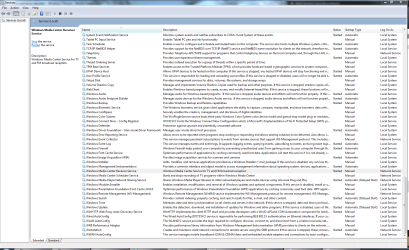
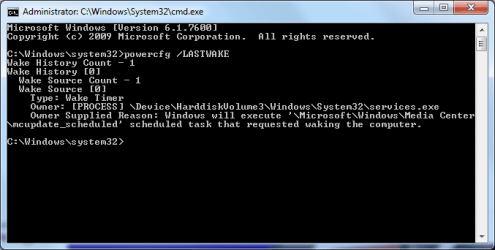
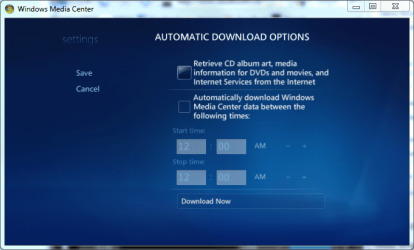
My computer has been turning on randomly in the early morning hours. It's very annoying since I'm still asleep at that time. I have gone into my services menu numerously and disabled Media Center from waking the computer. I also have it set on Media Center's settings to never update. Yet, every week, it still turns one at least once. I go into cmd and type in powercfg -lastwake to make sure, and it's still media center that's turning it on. I go and disable it in the services again...
Is there anyway to manually override this? Even if Media Center wants to wake my computer, is there a way to have a master control denying it to turn on?
I've already looked into the MCE Standby Tool. It's still in beta for Windows 7 and I read many people still have problems with sleep with the latest beta version (which hasn't been updated in like a year now...) MCE Standby Tool 0.9.094 on Windows 7
My Computer
Computer type
Laptop
Computer Manufacturer/Model Number
Sager NP2650 (Clevo W650SZ) - Custom Built
OS
Windows 7 Ultimate 64 bit (6.1, Build 7601) Service Pack 1
Built-in 802.11 Wireless B/G/N - Stock Wireless Card + Bluetooth™ 4.0 | Internal 9-in-1 Card Reader (MMC/RSMMC/SD/Mini SD/SDHC/SDXC/MS/MS Pro/MS Duo) | Built in 2.0 Megapixel Camera | Rosewill RX-358-S BLACK 3.5" SATA to eSATA External Enclosure with Internal 80mm fan
No, I checked my scheduled tasks. Nothing is set to run at ~5AM (which is when my computer keeps turning on) and nothing is set to wake up my computer if during the time of the task, my computer is off/sleeping.
It's Media Center. It always has been. And I just checked in the Services again and Media Center is "started" again....
What the hell am I doing wrong? I have Media Center set to never update.
Attachments
fdsafasdf.PNG
95.8 KB
· Views: 35
wake up.PNG
12 KB
· Views: 15
sssssssss.PNG
71.1 KB
· Views: 10
My Computer
Computer type
Laptop
Computer Manufacturer/Model Number
Sager NP2650 (Clevo W650SZ) - Custom Built
OS
Windows 7 Ultimate 64 bit (6.1, Build 7601) Service Pack 1
Built-in 802.11 Wireless B/G/N - Stock Wireless Card + Bluetooth™ 4.0 | Internal 9-in-1 Card Reader (MMC/RSMMC/SD/Mini SD/SDHC/SDXC/MS/MS Pro/MS Duo) | Built in 2.0 Megapixel Camera | Rosewill RX-358-S BLACK 3.5" SATA to eSATA External Enclosure with Internal 80mm fan
It seems that my power settings were changed.. somehow. I don't know why... I changed them back to what I had and under Advanced settings -> Sleep -> Allow wake timers, it was set to enabled. I always had it disabled. I guess this will override it, hopefully. Again.. don't know how my settings were changed. Weird.
My Computer
Computer type
Laptop
Computer Manufacturer/Model Number
Sager NP2650 (Clevo W650SZ) - Custom Built
OS
Windows 7 Ultimate 64 bit (6.1, Build 7601) Service Pack 1
Built-in 802.11 Wireless B/G/N - Stock Wireless Card + Bluetooth™ 4.0 | Internal 9-in-1 Card Reader (MMC/RSMMC/SD/Mini SD/SDHC/SDXC/MS/MS Pro/MS Duo) | Built in 2.0 Megapixel Camera | Rosewill RX-358-S BLACK 3.5" SATA to eSATA External Enclosure with Internal 80mm fan