Solved oxc000000e Boot failed-required device is inaccessible (Windows 7)

After click in repair:

Show message: System recovery options: Windows found problems with your computer startup options:
Do you want to apply repairs and restart your computer?
View deatils:

I clicked on deatils.. i saw this:
the following startup option will be repaired:
Name : {bootmgr}
Identifer:........
The following startup options will be added:
Name: Windows 7 Home premium (recovered)
Path: Windows
Windows Device: Partioton=E: (430420 MB)

a copy of the current boot configuration data will be saved as c:\boot\BCD.Backup.0001

then I close deatils and Click in Answer Do you want to apply repairs and restart your computer? YES

show message: Failed to save sartup option

first time booted with Windows 7 ( 10 min ago) i saw a drive and last windows in Patition E. but now nothing!!

DISKPART> list vol

Volume ### Ltr Fs Type Size Satus Info
=========================================
Volume 0 F UDF DVD-ROM 3167MB Healthy
Volume 1 C NTFS Partition 200MB Healty
Volum 2 E NTFS Partition 420GB Healty
Volume 3 D NTFS Partiton 30GB Healty
Volume 6 NTFS Partioton 14GB Healty Hidden

listdisk>

Disk 0 Online 465GB 1024KB

Also Windows installed in C:\ Size 465gb why now in E : ?
 

My Computer My Computer

OS
Windows 7 Home Premium 64bit
the three time booted with Windows DVD installed. again in repair show message:

System recovery options: Windows found problems with your computer startup options:
Do you want to apply repairs and restart your computer? YES and restart and now the error is diffrent when want load windows:

File: \Windows\system32\drivers\msahci.sys
Status: 0xc000000f
Info: Windows failed to load beacuse a critical system driver is missing, or corrupt.
 

My Computer My Computer

OS
Windows 7 Home Premium 64bit
Also Windows installed in C:\ Size 465gb why now in E : ?

It's just a drive letter. In windows registry is an entry like:
C: \disksignature\startsector

If it finds a disk with signature disksignature and partition that starts at startsector then windows installation calls it C.

You can add disks, swap cables, and a partition before systempartition .... it stays C for that windows installation. So drive letters stay the same ... as long you don't modify the startsector so move the partition itself.

In win7 winpe (recovery environment) drive letters are different. But actually you are talking to same stuff


So windows boots from what's now called C (200MB system reserved) and windows is on E

In recovery-environment command prompt:
Code:
bcdedit/enum all

Errors? Rubbish? or readable stuff?
what is after lines with device and osdevice? unknown I assume?
 

My Computer My Computer

Computer type
Laptop
Computer Manufacturer/Model Number
ACER ASPIRE 5742G
OS
Microsoft Windows 7 Home Premium 64-bits 7601 Multiprocessor Free Service Pack 1
CPU
Intel(R) Core(TM) i3 CPU M 370 @ 2.40GHz
Motherboard
Acer Aspire 5742G
Memory
4,00 GB
Graphics Card(s)
ATI Mobility Radeon HD 5400 Series
Sound Card
(1) AMD High Definition Audio Device (2) Realtek High Defi
Screen Resolution
1366 x 768 x 32 bits (4294967296 colors) @ 60 Hz
Hard Drives
WDC WD5000BEVT-22ZAT0
the three time booted with Windows DVD installed. again in repair show message:

System recovery options: Windows found problems with your computer startup options:
Do you want to apply repairs and restart your computer? YES and restart and now the error is diffrent when want load windows:

File: \Windows\system32\drivers\msahci.sys
Status: 0xc000000f
Info: Windows failed to load beacuse a critical system driver is missing, or corrupt.
Is that in win7 recovery environment? Or tried normal boot from harddisk?
 

My Computer My Computer

Computer type
Laptop
Computer Manufacturer/Model Number
ACER ASPIRE 5742G
OS
Microsoft Windows 7 Home Premium 64-bits 7601 Multiprocessor Free Service Pack 1
CPU
Intel(R) Core(TM) i3 CPU M 370 @ 2.40GHz
Motherboard
Acer Aspire 5742G
Memory
4,00 GB
Graphics Card(s)
ATI Mobility Radeon HD 5400 Series
Sound Card
(1) AMD High Definition Audio Device (2) Realtek High Defi
Screen Resolution
1366 x 768 x 32 bits (4294967296 colors) @ 60 Hz
Hard Drives
WDC WD5000BEVT-22ZAT0
Code:
bcdedit
Do you see something like this?


Windows-opstartbeheer
---------------------
id {bootmgr}
device partition=C:
path \bootmgr
description Windows Boot Manager
locale nl-NL
inherit {globalsettings}
default {current} =>is same as blue below?
resumeobject {fa1a7f9d-ab26-11df-bc4f-ce7145d50d35}
displayorder {current}
toolsdisplayorder {memdiag}
timeout 10
Windows-opstartlaadprogramma
----------------------------
id {current} =>is same as blue above?
device partition=C: =>is E:?
path \Windows\system32\winload.exe
description Windows 7 Home Premium =>probably with "recovered" appended
locale nl-NL
inherit {bootloadersettings}
recoverysequence {c3c471b7-a336-11e1-a60f-bb1c0958a7b3}
recoveryenabled Yes
osdevice partition=C: =>is E:?
systemroot \Windows
resumeobject {fa1a7f9d-ab26-11df-bc4f-ce7145d50d35}
nx OptIn
------------------------
osdevice en device should be partition=E: in your case
 

My Computer My Computer

Computer type
Laptop
Computer Manufacturer/Model Number
ACER ASPIRE 5742G
OS
Microsoft Windows 7 Home Premium 64-bits 7601 Multiprocessor Free Service Pack 1
CPU
Intel(R) Core(TM) i3 CPU M 370 @ 2.40GHz
Motherboard
Acer Aspire 5742G
Memory
4,00 GB
Graphics Card(s)
ATI Mobility Radeon HD 5400 Series
Sound Card
(1) AMD High Definition Audio Device (2) Realtek High Defi
Screen Resolution
1366 x 768 x 32 bits (4294967296 colors) @ 60 Hz
Hard Drives
WDC WD5000BEVT-22ZAT0
the three time booted with Windows DVD installed. again in repair show message:

System recovery options: Windows found problems with your computer startup options:
Do you want to apply repairs and restart your computer? YES and restart and now the error is diffrent when want load windows:

File: \Windows\system32\drivers\msahci.sys
Status: 0xc000000f
Info: Windows failed to load beacuse a critical system driver is missing, or corrupt.
Is that in win7 recovery environment? Or tried normal boot from harddisk?


normal boot from harddisk!
 

My Computer My Computer

OS
Windows 7 Home Premium 64bit
i booted normally and again repair. and command prompt
i entred :

Code:
bcdedit/enum all
Windows Boot Manager:

identifer <bootmgr>
device Partition =C:
path \bootmgr
description Windows boot manager
locale en-US
default <default>
displayorder <default>
timeout 30

(not this line below:)
inherit {globalsettings}
default {current} =>is same as blue below?
resumeobject {fa1a7f9d-ab26-11df-bc4f-ce7145d50d35}
toolsdisplayorder {memdiag}

Windows Boot Loader:
Identifer <default>
device partiton=E:
path \windows\system32\winload.exe
description Windows 7 Home Premium <recovred>
locale en-US
osdeice partiton=E:
systemboot \Windows

Windows Memory Tester
Identifr <memdiag>
device c:\
path \boot\memtest.exe
description Windows memory Diagnostic
 

My Computer My Computer

OS
Windows 7 Home Premium 64bit
what's recovery-environment? i booted normal!
recovery environment is when booting and then press F8 "repair your computer" or win7 install dvd "repair computer".

So you booted normal and then the error:
File: \Windows\system32\drivers\msahci.sys
Status: 0xc000000f
Info: Windows failed to load beacuse a critical system driver is missing, or corrupt.

He is at least trying to start win7!!

PC had:
-unaccessible boot device with no apparent reason.
-bcd menu cannot be written to
-and now \Windows\system32\drivers\msahci.sys error

And also memory problems in recovery environment! I think your memory has failures.

Boot again in win7 recovery environment and select "memory diagnostics" and let it run a few hours. Post results

In case you see errors you can abort it
 

My Computer My Computer

Computer type
Laptop
Computer Manufacturer/Model Number
ACER ASPIRE 5742G
OS
Microsoft Windows 7 Home Premium 64-bits 7601 Multiprocessor Free Service Pack 1
CPU
Intel(R) Core(TM) i3 CPU M 370 @ 2.40GHz
Motherboard
Acer Aspire 5742G
Memory
4,00 GB
Graphics Card(s)
ATI Mobility Radeon HD 5400 Series
Sound Card
(1) AMD High Definition Audio Device (2) Realtek High Defi
Screen Resolution
1366 x 768 x 32 bits (4294967296 colors) @ 60 Hz
Hard Drives
WDC WD5000BEVT-22ZAT0
i booted normally and again repair. and command prompt
i entred :

Code:
bcdedit/enum all
Windows Boot Manager:

identifer <bootmgr>
device Partition =C:
path \bootmgr
description Windows boot manager
locale en-US
default <default>
displayorder <default>
timeout 30

(not this line below:)
inherit {globalsettings}
default {current} =>is same as blue below?
resumeobject {fa1a7f9d-ab26-11df-bc4f-ce7145d50d35}
toolsdisplayorder {memdiag}

Windows Boot Loader:
Identifer <default>
device partiton=E:
path \windows\system32\winload.exe
description Windows 7 Home Premium <recovred>
locale en-US
osdeice partiton=E:
systemboot \Windows

Windows Memory Tester
Identifr <memdiag>
device c:\
path \boot\memtest.exe
description Windows memory Diagnostic

All fine!!! That's why win7 is booting (at least try to). Windows startup repair did write to boot menu succesfully. (First it failed to save).

Many errors and strange things happen.... perform a memory diagnostics!
 

My Computer My Computer

Computer type
Laptop
Computer Manufacturer/Model Number
ACER ASPIRE 5742G
OS
Microsoft Windows 7 Home Premium 64-bits 7601 Multiprocessor Free Service Pack 1
CPU
Intel(R) Core(TM) i3 CPU M 370 @ 2.40GHz
Motherboard
Acer Aspire 5742G
Memory
4,00 GB
Graphics Card(s)
ATI Mobility Radeon HD 5400 Series
Sound Card
(1) AMD High Definition Audio Device (2) Realtek High Defi
Screen Resolution
1366 x 768 x 32 bits (4294967296 colors) @ 60 Hz
Hard Drives
WDC WD5000BEVT-22ZAT0
what's recovery-environment? i booted normal!
recovery environment is when booting and then press F8 "repair your computer" or win7 install dvd "repair computer".

So you booted normal and then the error:
File: \Windows\system32\drivers\msahci.sys
Status: 0xc000000f
Info: Windows failed to load beacuse a critical system driver is missing, or corrupt.

He is at least trying to start win7!!

PC had:
-unaccessible boot device with no apparent reason.
-bcd menu cannot be written to
-and now \Windows\system32\drivers\msahci.sys error

And also memory problems in recovery environment! I think your memory has failures.

Boot again in win7 recovery environment and select "memory diagnostics" and let it run a few hours. Post results

In case you see errors you can abort it


Why you think memory is failures? you mean for hard disk? i tried with hiron cd and mini windows with Western Digital Test Harddisk and it say me PASSED!

also i recovered all my files losted by GetDataBack. about 150gb. if memory have problem how i recover it?

i tried for Windows Memory Diagnotics Tools.
Status: no problem detected yet
 

My Computer My Computer

OS
Windows 7 Home Premium 64bit
i get this error in startup repair:

The instruction at 0xfba6584d referenced memory at 0x000000008, The memory could not be read.
you got this from startup repair in recovery environment. Seems like memory problems.

And why coudn't bcd not be written (could be disk error also). But it could write later!! so your system start now to win7 (with crash)
And why inaccessable boot device all of sudden
And why msahci.sys not found or corrupt.

it always crashes to msahci.sys error now?
 

My Computer My Computer

Computer type
Laptop
Computer Manufacturer/Model Number
ACER ASPIRE 5742G
OS
Microsoft Windows 7 Home Premium 64-bits 7601 Multiprocessor Free Service Pack 1
CPU
Intel(R) Core(TM) i3 CPU M 370 @ 2.40GHz
Motherboard
Acer Aspire 5742G
Memory
4,00 GB
Graphics Card(s)
ATI Mobility Radeon HD 5400 Series
Sound Card
(1) AMD High Definition Audio Device (2) Realtek High Defi
Screen Resolution
1366 x 768 x 32 bits (4294967296 colors) @ 60 Hz
Hard Drives
WDC WD5000BEVT-22ZAT0
In recovery environment:

Code:
dir  e:\Windows\system32\drivers\msahci.sys
(does it exists?)
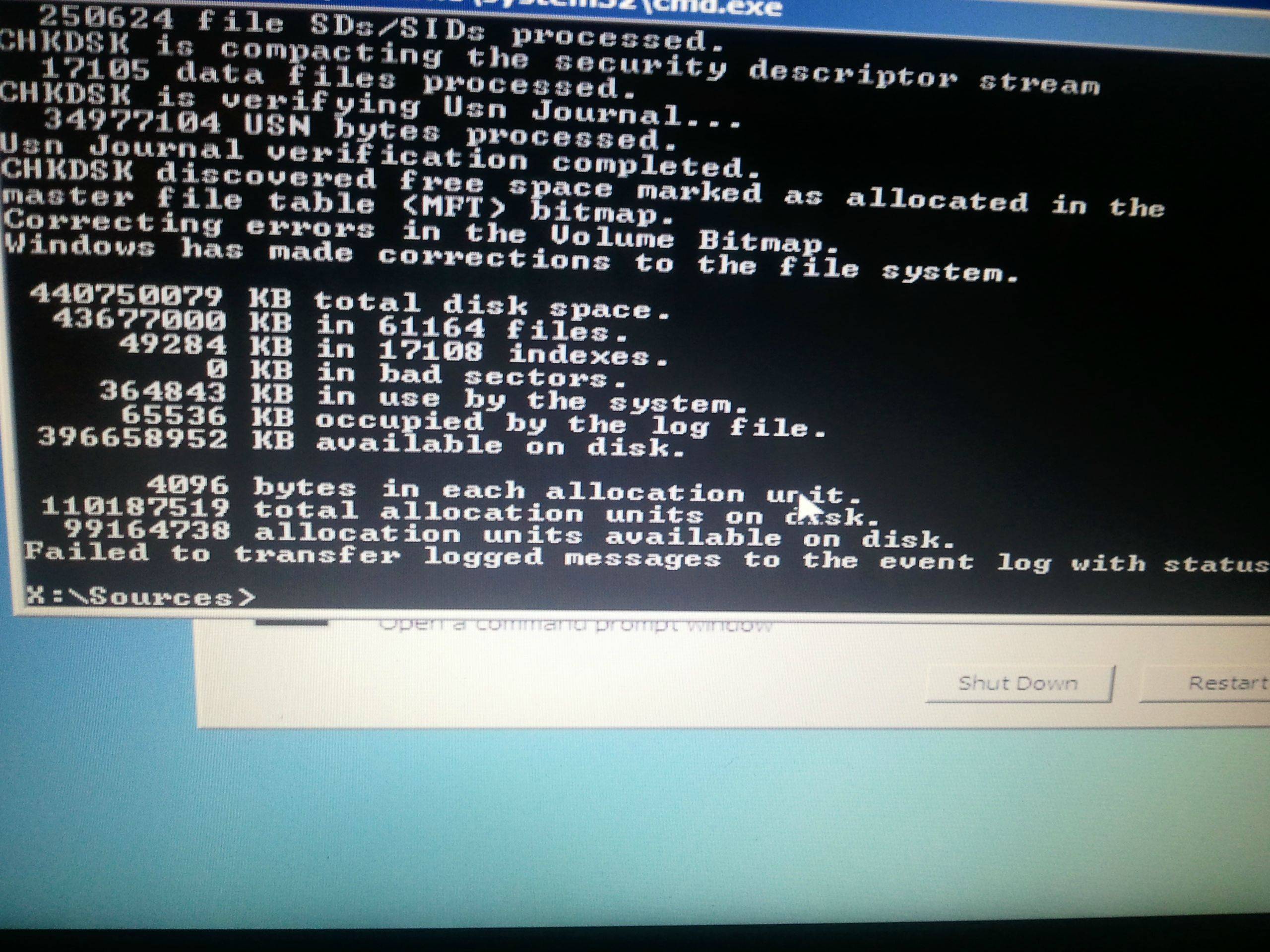
chkdsk/f  e:
chkdsk/f  c:
Any errors on C and E? All fixed? In case there were errors: run it again to see if errors are gone
 

My Computer My Computer

Computer type
Laptop
Computer Manufacturer/Model Number
ACER ASPIRE 5742G
OS
Microsoft Windows 7 Home Premium 64-bits 7601 Multiprocessor Free Service Pack 1
CPU
Intel(R) Core(TM) i3 CPU M 370 @ 2.40GHz
Motherboard
Acer Aspire 5742G
Memory
4,00 GB
Graphics Card(s)
ATI Mobility Radeon HD 5400 Series
Sound Card
(1) AMD High Definition Audio Device (2) Realtek High Defi
Screen Resolution
1366 x 768 x 32 bits (4294967296 colors) @ 60 Hz
Hard Drives
WDC WD5000BEVT-22ZAT0
Do this as well in recovery environment

Code:
sfc  /scannow  /offbootdir=c:\  /offwindir=e:\windows
or maybe it's
Code:
sfc  /scannow  /offbootdir=e:\  /offwindir=e:\windows

But I think the first command. It checks windows file integrity and hopefully repairs errors. Any errors? all repaired?
Run it again to see if all have been repaired
 

My Computer My Computer

Computer type
Laptop
Computer Manufacturer/Model Number
ACER ASPIRE 5742G
OS
Microsoft Windows 7 Home Premium 64-bits 7601 Multiprocessor Free Service Pack 1
CPU
Intel(R) Core(TM) i3 CPU M 370 @ 2.40GHz
Motherboard
Acer Aspire 5742G
Memory
4,00 GB
Graphics Card(s)
ATI Mobility Radeon HD 5400 Series
Sound Card
(1) AMD High Definition Audio Device (2) Realtek High Defi
Screen Resolution
1366 x 768 x 32 bits (4294967296 colors) @ 60 Hz
Hard Drives
WDC WD5000BEVT-22ZAT0
i get this error in startup repair:

The instruction at 0xfba6584d referenced memory at 0x000000008, The memory could not be read.
you got this from startup repair in recovery environment. Seems like memory problems.

And why coudn't bcd not be written (could be disk error also). But it could write later!! so your system start now to win7 (with crash)
And why inaccessable boot device all of sudden
And why msahci.sys not found or corrupt.

it always crashes to msahci.sys error now?

i get this error now! i don't have any error or crash before this problem! if it's for harddisk. send it for guaranteed?
 

My Computer My Computer

OS
Windows 7 Home Premium 64bit
Code:
dir  e:\Windows\system32\drivers\msahci.sys

Code:
It say "File Not Found"

chkdsk/f e:

ZGW7p.jpg


Code:
sfc  /scannow  /offbootdir=c:\  /offwindir=e:\windows
result: Windows Resoure Protection could not perform the requested operation.

Code:
sfc  /scannow  /offbootdir=e:\  /offwindir=e:\windows
same result
 

My Computer My Computer

OS
Windows 7 Home Premium 64bit
Have you made your Lenovo Recovery disks and copied out your files with your boot disk? Copy & Paste - in Windows Recovery Console

If so I would run Lenovo Recovery from it's hotkey at boot, saving the disks as backup in case it fails.

One other thing to try first is to change the active flag to the Win7 partition itself and run Startup Repair - Run 3 Separate Times.

Unfortunately i didn't make lenovo recovery disk. what's hotkey lenovo for recovery factory?
 

My Computer My Computer

OS
Windows 7 Home Premium 64bit
please help me.
I thought I problem is for Partition Table. i used PTDD ( Partition Disk Doctor) bootable. when goto program tell me have a problem with Partition Table. and ask for fix it and i choose YES. but when goto windows Xp with hirron CD bootable. i can't see my hard disk and PTDD created 4 new drive with 3*30GB and 1*250GB.

But my harddisk partition was 450GB Drive C and 30GB Drive D and E (hidden drive for lenovo y460 laptop)

Where is my hard disk? how i can recover partition table such as before ?
 

My Computer My Computer

OS
Windows 7 Home Premium 64bit
You're using a tool there that I've never heard of, and it sounds like it messed up your system pretty badly.

Download the tool we've used to help thousands of users successfully here, free Partition Wizard bootable CD. Burn to CD using Windows Image Burner, boot it and take a camera snap of your maximized Disk Management drive map with listings. We need to see this to proceed.

If you can recognize your 100mb System Reserved partition and/or Win7 partition, you can try the step 8 here to Rebuild the MBR with PW CD: http://www.sevenforums.com/tutorials/219533-troubleshooting-windows-7-failure-boot.html

If this fails and you still have your Recovery partition, try marking it Active to run it at boot using the hotkey given on first boot screen or in your Manual on the Lenovo Downloads webpage for your model.

If you've lost your Win7 partition use the PW Partition Recovery Wizard to reinstate it: Partition Wizard Partition Recovery Wizard Video Help.

Try all of the steps in the Troubleshooting tutorial leading up to copying out your files to Clean reinstall with the Win7 installer provided, or use Factory Recovery disks you made or order from Lenovo Support.
 
Last edited:
Back
Top