p5kpl-am se audio problem

baba123

New member
Local time
2:36 AM
Messages
7
i just installed windows 7 on my xp..which the sound worked just fine
but after i installed win 7 ,the device is working on device manager but there is no sound
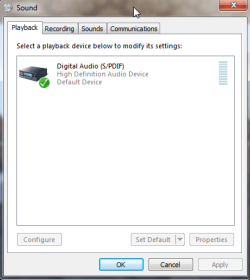
it say "digital audio (S/PDIF)" on the volume option..
i've been searching the solution and they said i have to reinstall the driver with the newest..
but i've download numerous driver and installed it, yet no different..
motherboard : p5kpl-am se (no sound card)
my vendor id :1106
and device id :0397

i wonder if anybody can help me with the link or another solution..
 

My Computer

OS
Windows 7 Ultima x32bit
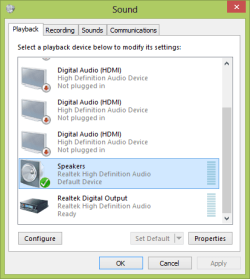
Right-click on the speaker icon in the notification area (RHS of the taskbar, next to the clock) and click on Playback devices.

Capture.PNG

Click on Speakers, then Set Default. Finally, click on OK and close the dialogue panel.
 

My Computer

Computer type
PC/Desktop
Computer Manufacturer/Model Number
Dwarf Dwf/11/2012 r09/2013
OS
Windows 8.1 Pro RTM x64
CPU
Intel Core-i5-3570K 4-core @ 3.4GHz (Ivy Bridge) (OC 4.4GHz)
Motherboard
ASRock Z77 Extreme4-M
Memory
4 x 4GB DDR3-1600 Corsair Vengeance CMZ8GX3M2A1600C9B (16GB)
Graphics Card(s)
MSI GeForce GTX770 Gaming OC 2GB
Sound Card
Realtek High Definition on board solution (ALC 898)
Monitor(s) Displays
ViewSonic VA1912w Widescreen (VGA)
Screen Resolution
1440x900
Hard Drives
OCZ Agility 3 SSD 120GB SATA III x2 (RAID 0)
Samsung HD501LJ 500GB SATA II x2
Hitachi HDS721010CLA332 1TB SATA II
Iomega 1.5TB Ext USB 2.0
WD 2.0TB Ext USB 3.0
PSU
XFX Pro Series 850W Semi-Modular
Case
Gigabyte IF233
Cooling
1 x 120mm Front Inlet 1 x 120mm Rear Exhaust
Keyboard
Microsoft Comfort Curve Keyboard 3000 (USB)
Mouse
Microsoft Comfort Mouse 3000 for Business (USB)
Internet Speed
NetGear DG834Gv3 ADSL Modem/Router (Ethernet) ~4.0 Mb/s (O2)
Antivirus
Avast! 8.0.1497
Browser
IE 11
Other Info
Optical Drive: HL-DT-ST BD-RE BH10LS30 SATA Bluray
Lexmark S305 Printer/Scanner/Copier (USB)
WEI Score: 8.1/8.1/8.5/8.5/8.25
Asus Eee PC 1011PX Netbook (Windows 7 x86 Starter)
The "speakers" should be set as default audio playback device to have sound for the PC speakers or headphones.
 

My Computer

Computer type
PC/Desktop
Computer Manufacturer/Model Number
My Own Build
OS
Windows 10 64 bit
CPU
Intel i7 6700K
Motherboard
ASUS ROG Maximus VIII Hero
Memory
16GB Corsair Dominator
Graphics Card(s)
Intel CPU Graphics
Sound Card
RealTek
Monitor(s) Displays
27" Dell S2719dgf
Screen Resolution
2560X1440
Hard Drives
1 TB Samsung 850 EVO SSD for Win 10 Pro
500GB Samsung 850 EVO SSD for Win 10 Insider
2 TB drive for backup
PSU
EVGA Supernova 750G2
Case
BeQuiet Silent Base 600
Cooling
Deepcool Captain 120EX
Keyboard
Microsoft Wireless 2000
Mouse
Microsoft wireless
Internet Speed
100 MB/sec (Cable)
Antivirus
Microsoft Defender and Malwarebytes
Browser
Edge/Firefox
Other Info
Cakewalk (Sonar) by BandLab and Studio One 4.1 Pro recording studio software. MOTU 896Mk3 Hybrid recording interface, Frontier Tranzport wireless control unit, Behringer X-Touch Control Surface.
Five USB connected optical drives for CD Audio production using Nero BurningROM
I've had this happen to me a couple of times. The only thing I can think of is if speakers aren't detected during driver installation, then the output will default to optical.
 

My Computer

Computer type
PC/Desktop
Computer Manufacturer/Model Number
Dwarf Dwf/11/2012 r09/2013
OS
Windows 8.1 Pro RTM x64
CPU
Intel Core-i5-3570K 4-core @ 3.4GHz (Ivy Bridge) (OC 4.4GHz)
Motherboard
ASRock Z77 Extreme4-M
Memory
4 x 4GB DDR3-1600 Corsair Vengeance CMZ8GX3M2A1600C9B (16GB)
Graphics Card(s)
MSI GeForce GTX770 Gaming OC 2GB
Sound Card
Realtek High Definition on board solution (ALC 898)
Monitor(s) Displays
ViewSonic VA1912w Widescreen (VGA)
Screen Resolution
1440x900
Hard Drives
OCZ Agility 3 SSD 120GB SATA III x2 (RAID 0)
Samsung HD501LJ 500GB SATA II x2
Hitachi HDS721010CLA332 1TB SATA II
Iomega 1.5TB Ext USB 2.0
WD 2.0TB Ext USB 3.0
PSU
XFX Pro Series 850W Semi-Modular
Case
Gigabyte IF233
Cooling
1 x 120mm Front Inlet 1 x 120mm Rear Exhaust
Keyboard
Microsoft Comfort Curve Keyboard 3000 (USB)
Mouse
Microsoft Comfort Mouse 3000 for Business (USB)
Internet Speed
NetGear DG834Gv3 ADSL Modem/Router (Ethernet) ~4.0 Mb/s (O2)
Antivirus
Avast! 8.0.1497
Browser
IE 11
Other Info
Optical Drive: HL-DT-ST BD-RE BH10LS30 SATA Bluray
Lexmark S305 Printer/Scanner/Copier (USB)
WEI Score: 8.1/8.1/8.5/8.5/8.25
Asus Eee PC 1011PX Netbook (Windows 7 x86 Starter)
as you can see there is no "speakers"..i don't know what's wrong with it..

Dwarf- "The only thing I can think of is if speakers aren't detected during driver installation, then the output will default to optical."

did what you mean by "speakers" was my hardware?..then it worked just fine
 

Attachments

  • screenshot001pm.png
    screenshot001pm.png
    11.9 KB · Views: 2

My Computer

OS
Windows 7 Ultima x32bit
Hello everyone,
I think you have to check "show disconnected devices" to see your speaker in the device list

images
 

My Computer

OS
Windows 7 ultimate 64
i had that done too..and still only that s/pdif..

what doubt me about all the driver i downloaded is that there was no folder called "win 7" but "vista 32bit or 64bit"...

so here i'm asking for you guys to give me a trusted link that really provide things that i need..
i know the official website is trusted enough ,and of course i choosed the right option of driver specification
for win 7 but still there was no folder named "win 7"...that's what i thought:D
 

My Computer

OS
Windows 7 Ultima x32bit
thanks i'll try it..:D
hope it work..:sa:
 

My Computer

OS
Windows 7 Ultima x32bit
If the driver Cyril suggested doesn't work.

I'll guess the on-board audio is enabled in the BIOS since you get something that doesn't appear to be a HDMI port, but check anyway.

Download and install the driver from the ASUS website or the Realtek website.

Any change? No, then take a screenshot of the device in device manager and copy and paste the hardware ID from the details tab under it's properties.

Also did it install the Realtek control panel (RtHDVCpl.exe), if it did have a look and see if there's any setting or info in that.
 

My Computer

Computer Manufacturer/Model Number
Self built
OS
Windows 7 Ultimate x64
CPU
Intel Pentium Dual Core E5200 2.5GHz (3.77GHz OC)
Motherboard
Asus P5Q-E
Memory
Corsair 4GB DDR2 (4x1GB CM2X1024-6400C4)
Graphics Card(s)
Palit GeForce GTS 250 (1024MB)
Sound Card
On Board (ADI AD2000B 8ch HD)
Monitor(s) Displays
Samsung 32in LCD TV
Screen Resolution
1360x768
Hard Drives
2 x 1TB Samsung 103SJ (Raid0)
2 x External 500GB Samsung 502IJ (NexStar 3 HD Enclosures)
PSU
550W Antec Neo HE 550
Case
Antec P180
Cooling
Xigmatex Red Scorpion CPU Cooler. 3x120mm Fans
Keyboard
Logitech MX5000 Laser (Combo)
Mouse
Logitech MX5000 Laser (Combo)
Internet Speed
ADSL2+ (avg 10 Mbps Down, 0.80 Mbps up)
Other Info
Gigabyte GN-WP01GS 54g Wireless Lan Card
what doubt me about all the driver i downloaded is that there was no folder called "win 7" but "vista 32bit or 64bit"...
Don't worry about this, if the Vista driver is compatible with Win 7 then they don't double up on the driver or change anything thats not necessary. A few of my drivers don't have a Win 7 folder and work fine.
 

My Computer

Computer Manufacturer/Model Number
Self built
OS
Windows 7 Ultimate x64
CPU
Intel Pentium Dual Core E5200 2.5GHz (3.77GHz OC)
Motherboard
Asus P5Q-E
Memory
Corsair 4GB DDR2 (4x1GB CM2X1024-6400C4)
Graphics Card(s)
Palit GeForce GTS 250 (1024MB)
Sound Card
On Board (ADI AD2000B 8ch HD)
Monitor(s) Displays
Samsung 32in LCD TV
Screen Resolution
1360x768
Hard Drives
2 x 1TB Samsung 103SJ (Raid0)
2 x External 500GB Samsung 502IJ (NexStar 3 HD Enclosures)
PSU
550W Antec Neo HE 550
Case
Antec P180
Cooling
Xigmatex Red Scorpion CPU Cooler. 3x120mm Fans
Keyboard
Logitech MX5000 Laser (Combo)
Mouse
Logitech MX5000 Laser (Combo)
Internet Speed
ADSL2+ (avg 10 Mbps Down, 0.80 Mbps up)
Other Info
Gigabyte GN-WP01GS 54g Wireless Lan Card
duzzy-"Download and install the driver from the ASUS website or the Realtek website."

ans: yes .i had already did that and it said the driver is already the latest one..

duzzy-"Any change? No, then take a screenshot of the device in device manager and copy and paste the hardware ID from the details tab under it's properties."

ans : HDAUDIO\FUNC_01&VEN_1106&DEV_0397&SUBSYS_104383EB&REV_1000
HDAUDIO\FUNC_01&VEN_1106&DEV_0397&SUBSYS_104383EB

duzzy-"Also did it install the Realtek control panel (RtHDVCpl.exe), if it did have a look and see if there's any setting or info in that."

ans: i couldn't open RtHDVCpl.exe, even after changed the compatibility..
 

My Computer

OS
Windows 7 Ultima x32bit
Are you sure that hardware id belongs to your onboard sound and you have the correct motherboard model?

I only ask because the drivers from ASUS are for a Realtek audio chipset and from a quick Google search that id appears to belong to a VIA audio chipset and it's not found in any of the inf files included in the drivers from ASUS.

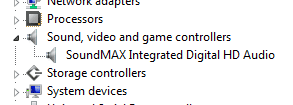
With the driver installed take a screenshot of the "Sound, Video and Game controllers" from the device manager, like my screenshot below.
DeviceManagerSound.png

duzzy-"Also did it install the Realtek control panel (RtHDVCpl.exe), if it did have a look and see if there's any setting or info in that."

ans: i couldn't open RtHDVCpl.exe, even after changed the compatibility..
Was it installed or did you try to open it from the drivers folder that you downloaded?
 

My Computer

Computer Manufacturer/Model Number
Self built
OS
Windows 7 Ultimate x64
CPU
Intel Pentium Dual Core E5200 2.5GHz (3.77GHz OC)
Motherboard
Asus P5Q-E
Memory
Corsair 4GB DDR2 (4x1GB CM2X1024-6400C4)
Graphics Card(s)
Palit GeForce GTS 250 (1024MB)
Sound Card
On Board (ADI AD2000B 8ch HD)
Monitor(s) Displays
Samsung 32in LCD TV
Screen Resolution
1360x768
Hard Drives
2 x 1TB Samsung 103SJ (Raid0)
2 x External 500GB Samsung 502IJ (NexStar 3 HD Enclosures)
PSU
550W Antec Neo HE 550
Case
Antec P180
Cooling
Xigmatex Red Scorpion CPU Cooler. 3x120mm Fans
Keyboard
Logitech MX5000 Laser (Combo)
Mouse
Logitech MX5000 Laser (Combo)
Internet Speed
ADSL2+ (avg 10 Mbps Down, 0.80 Mbps up)
Other Info
Gigabyte GN-WP01GS 54g Wireless Lan Card
Back
Top