P5Q Series

paaliaq

New member
Local time
7:11 PM
Messages
9
Hi,

The CD-ROM of my Mainboard can't be read by windows 7.
What can i do?

My mainboard is ASUS P45 and the CD-ROM is P5Q Series :rolleyes:
 

My Computer

OS
Windows 7
CPU
INTEL E8500
Motherboard
ASUS P45
Memory
Patriot Memor DDR2 4 GB
Graphics Card(s)
ASUS ATI EAH4850
Monitor(s) Displays
Acer AL1916
Keyboard
Logitech
Mouse
Razer Lachesis
Internet Speed
1024
Other Info
I'm not gay.
You could go to the motherboard web site and download whatever you need. What exactly are you needing that Windows 7 can't read?
 

My Computer

Computer Manufacturer/Model Number
home built
OS
Windows 7 Professional x64
CPU
AMD Athlon 64 X2 6000 3.1GHz
Motherboard
Asus M3A78-EM
Memory
G.SKILL 4GB (2 x 2GB) 240-Pin DDR2 SDRAM DDR2 800 (PC2 6400)
Graphics Card(s)
ATI Radeon HD4350 512mb
Sound Card
on board
Monitor(s) Displays
Samsung SyncMaster 206bw
Screen Resolution
1680x1050
Hard Drives
Seagate 250gb
WD 160gb
WD 250gb USB
Maxtor 40gb (backup)
PSU
Thermaltake PurePower 500watt
Case
Apevia
Cooling
2x120 case fans
Keyboard
wireless Logitech
Mouse
wireless Logitech
Internet Speed
DSL (best I can do in the boonies)
Other Info
Lord make my word sweet, in case I have to eat them later...
:) I don't know.

But I don't like when the computer can't read the CD-ROM. But it's ok, i will look on ASUS web site.
Thanks.
 

My Computer

OS
Windows 7
CPU
INTEL E8500
Motherboard
ASUS P45
Memory
Patriot Memor DDR2 4 GB
Graphics Card(s)
ASUS ATI EAH4850
Monitor(s) Displays
Acer AL1916
Keyboard
Logitech
Mouse
Razer Lachesis
Internet Speed
1024
Other Info
I'm not gay.
You may need to go to the web site of your dvd-rom and update the firmware. That could be all you need to do.
 

My Computer

Computer Manufacturer/Model Number
home built
OS
Windows 7 Professional x64
CPU
AMD Athlon 64 X2 6000 3.1GHz
Motherboard
Asus M3A78-EM
Memory
G.SKILL 4GB (2 x 2GB) 240-Pin DDR2 SDRAM DDR2 800 (PC2 6400)
Graphics Card(s)
ATI Radeon HD4350 512mb
Sound Card
on board
Monitor(s) Displays
Samsung SyncMaster 206bw
Screen Resolution
1680x1050
Hard Drives
Seagate 250gb
WD 160gb
WD 250gb USB
Maxtor 40gb (backup)
PSU
Thermaltake PurePower 500watt
Case
Apevia
Cooling
2x120 case fans
Keyboard
wireless Logitech
Mouse
wireless Logitech
Internet Speed
DSL (best I can do in the boonies)
Other Info
Lord make my word sweet, in case I have to eat them later...
How about giving us a better description of the exact symptoms?
 

My Computer

Computer Manufacturer/Model Number
Custom
OS
Windows 7 Ultimate RTM (Technet)
CPU
3.00 gigahertz Intel Core2 Duo E8400
Motherboard
ASUSTeK Computer INC. P5K/EPU Rev 1.xx
Memory
4GB
Graphics Card(s)
ATI Radeon X1950 Pro
Sound Card
Built in HD Audio
Monitor(s) Displays
22" Gateway LCD
Screen Resolution
1920 x 1200
Hard Drives
ST3160023A [Hard drive] (160.04 GB) -- drive 0, rev 8.01, ST3500630AS [Hard drive] (500.11 GB) -- drive 2, rev 3.AAK
ST3500630AS [Hard drive] (500.11 GB) -- drive 1, rev 3.AAK
Keyboard
Logitech G11
Mouse
Microsoft Wireless Laser Mouse 5000
Internet Speed
13.44 Mbps
Hi,

The CD-ROM of my Mainboard can't be read by windows 7.
What can i do?

My mainboard is ASUS P45 and the CD-ROM is P5Q Series :rolleyes:

Do you get a window with options? Have you tried the explore option form the computer device.
 

My Computer

Computer Manufacturer/Model Number
Homebuilt
OS
Windows 7 x64
CPU
i7-2600K
Motherboard
Asus P8Z77-v Pro
Memory
8 G
Graphics Card(s)
GTX 480
Sound Card
Onboard
Monitor(s) Displays
LG W2753V
Screen Resolution
1920x1080
Hard Drives
Crucial M4 128 G SSD
You're not trying to run a DVD in a CD-ROM are you? If that's the case, you need to get a DVD-ROM.
 

My Computer

Computer Manufacturer/Model Number
home built
OS
Windows 7 Professional x64
CPU
AMD Athlon 64 X2 6000 3.1GHz
Motherboard
Asus M3A78-EM
Memory
G.SKILL 4GB (2 x 2GB) 240-Pin DDR2 SDRAM DDR2 800 (PC2 6400)
Graphics Card(s)
ATI Radeon HD4350 512mb
Sound Card
on board
Monitor(s) Displays
Samsung SyncMaster 206bw
Screen Resolution
1680x1050
Hard Drives
Seagate 250gb
WD 160gb
WD 250gb USB
Maxtor 40gb (backup)
PSU
Thermaltake PurePower 500watt
Case
Apevia
Cooling
2x120 case fans
Keyboard
wireless Logitech
Mouse
wireless Logitech
Internet Speed
DSL (best I can do in the boonies)
Other Info
Lord make my word sweet, in case I have to eat them later...
no...

P5Q Series is a DVD and my computer can read the DVDs
 

My Computer

OS
Windows 7
CPU
INTEL E8500
Motherboard
ASUS P45
Memory
Patriot Memor DDR2 4 GB
Graphics Card(s)
ASUS ATI EAH4850
Monitor(s) Displays
Acer AL1916
Keyboard
Logitech
Mouse
Razer Lachesis
Internet Speed
1024
Other Info
I'm not gay.
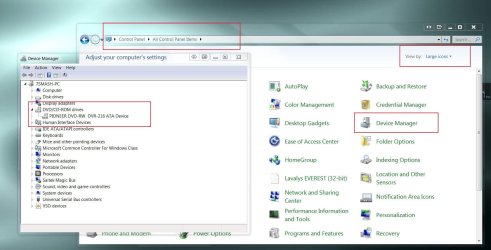
Go to your Device Manager and expand DVD/CD-ROM Drives. Is there a yellow exclaimation mark?
 

My Computer

Computer Manufacturer/Model Number
Lenovo ThinkPad T60
OS
Windows 7 Ultimate 64Bit
CPU
GenuineIntel Intel(R) Core(TM) DuoCore T2400 @ 1.83GHz
Motherboard
Intel(R) 82801G (ICH7 Family)
Memory
2.00 GB
Graphics Card(s)
Mobile Intel(R) 945 Express Chipset
Sound Card
SoundMAX Integrated Digital HD Audio
Monitor(s) Displays
ThinkPad Display
Screen Resolution
1400x1050
Hard Drives
100Gb SATA
Keyboard
Standard Keyboard
Mouse
HID-compliant Mouse
Internet Speed
Cable Broadband - 54Mbps
Other Info
Intel(R) PRO/1000 PL Network Connection
11a/b/g Wireless LAN Mini PCI Express Adapter
no...

P5Q Series is a DVD and my computer can read the DVDs

Need more detailed info on your Mobo to help you find your files... Asus is one of the better mobos because they have good support/drivers.

In your case all drivers should be available for download, but there are 25 variations of the P5Q! There's the P5Q, P5Q Deluxe, P5Q-E, P5Q-EM, P5Q Premium, etc...

Here: ASUSTeK Computer Inc.
 

My Computer

Computer Manufacturer/Model Number
Homebrew PC - "Alpha_Dawg"
OS
Windows 7 Ultimate 64 bit Steve Ballmer Signature Edition
CPU
Intel Core 2 Quad - Q9550 - 2.83GHz stock - OC'd to 3.6GHz
Motherboard
Gigabyte EP45-UD3P
Memory
4GB DDR2 800MHz (PC6400) OCZ Reaper
Graphics Card(s)
Nvidia GE Force 8800 GTS
Sound Card
Asus Xonar DX
Monitor(s) Displays
Samsung SyncMaster 2333HD
Screen Resolution
1920 x 1080
Hard Drives
WD Caviar Black 750GB - 7200RPM - 32MB cache
WD Caviar Green 1.5TB - 5400RPM - 64MB cache
WD Caviar Green 2.0TB - 5400RPM - 64MB cache
PSU
PC Power & Cooling Silencer 750
Case
Gigabyte 3D Aurora
Cooling
Case is Air - 5ea. 120mm fans (mix of Arctic and Xigmatec)
Keyboard
MS Natural Wireless KB
Mouse
MS Wireless Mouse
Internet Speed
50 mbps down/5 mbps up
Other Info
AVerMedia - AVerTVHD G2 Dual Tuner Card
no...

P5Q Series is a DVD and my computer can read the DVDs

Need more detailed info on your Mobo to help you find your files... Asus is one of the better mobos because they have good support/drivers.

In your case all drivers should be available for download, but there are 25 variations of the P5Q! There's the P5Q, P5Q Deluxe, P5Q-E, P5Q-EM, P5Q Premium, etc...

Here: ASUSTeK Computer Inc.

There have been several people with P5Q variants that are having issues with 7. Asus has provided drivers, but so far they don't seem to be working very well at all.
 

My Computer

Computer Manufacturer/Model Number
Dell XPS 15 L502x
OS
Windows 7 Ultimate x64 SP1
CPU
Core i7-2670QM
Memory
8GB DDR3 PC3-10600
Graphics Card(s)
Intel HD Graphics 3000 + GeForce GT 540M
Screen Resolution
1920x1080
Hard Drives
1TB 5400RPM Seagate
Go to your Device Manager and expand DVD/CD-ROM Drives. Is there a yellow exclaimation mark?

How to go to the Device Manager?:huh:
 

My Computer

OS
Windows 7
CPU
INTEL E8500
Motherboard
ASUS P45
Memory
Patriot Memor DDR2 4 GB
Graphics Card(s)
ASUS ATI EAH4850
Monitor(s) Displays
Acer AL1916
Keyboard
Logitech
Mouse
Razer Lachesis
Internet Speed
1024
Other Info
I'm not gay.
Go to your Device Manager and expand DVD/CD-ROM Drives. Is there a yellow exclaimation mark?

How to go to the Device Manager?:huh:

Several ways to get there:
  1. Right click on Computer and go to Properties, then click on Device Manager in upper left.
  2. Right click on Computer and go to Manage, then click on Device Manager in left pane.
  3. Finally and perhaps easiest, click START, and type Device Manager in the Start Search area at bottom.
Hope this helps!
:mad:
 

My Computer

Computer Manufacturer/Model Number
Homebrew PC - "Alpha_Dawg"
OS
Windows 7 Ultimate 64 bit Steve Ballmer Signature Edition
CPU
Intel Core 2 Quad - Q9550 - 2.83GHz stock - OC'd to 3.6GHz
Motherboard
Gigabyte EP45-UD3P
Memory
4GB DDR2 800MHz (PC6400) OCZ Reaper
Graphics Card(s)
Nvidia GE Force 8800 GTS
Sound Card
Asus Xonar DX
Monitor(s) Displays
Samsung SyncMaster 2333HD
Screen Resolution
1920 x 1080
Hard Drives
WD Caviar Black 750GB - 7200RPM - 32MB cache
WD Caviar Green 1.5TB - 5400RPM - 64MB cache
WD Caviar Green 2.0TB - 5400RPM - 64MB cache
PSU
PC Power & Cooling Silencer 750
Case
Gigabyte 3D Aurora
Cooling
Case is Air - 5ea. 120mm fans (mix of Arctic and Xigmatec)
Keyboard
MS Natural Wireless KB
Mouse
MS Wireless Mouse
Internet Speed
50 mbps down/5 mbps up
Other Info
AVerMedia - AVerTVHD G2 Dual Tuner Card
Now I'm getting confused... Is it your DVD-ROM or the DISK that isn't working?
 

My Computer

Computer Manufacturer/Model Number
home built
OS
Windows 7 Professional x64
CPU
AMD Athlon 64 X2 6000 3.1GHz
Motherboard
Asus M3A78-EM
Memory
G.SKILL 4GB (2 x 2GB) 240-Pin DDR2 SDRAM DDR2 800 (PC2 6400)
Graphics Card(s)
ATI Radeon HD4350 512mb
Sound Card
on board
Monitor(s) Displays
Samsung SyncMaster 206bw
Screen Resolution
1680x1050
Hard Drives
Seagate 250gb
WD 160gb
WD 250gb USB
Maxtor 40gb (backup)
PSU
Thermaltake PurePower 500watt
Case
Apevia
Cooling
2x120 case fans
Keyboard
wireless Logitech
Mouse
wireless Logitech
Internet Speed
DSL (best I can do in the boonies)
Other Info
Lord make my word sweet, in case I have to eat them later...
paaliaq, The P5Q is your motherboard - Not the brand of your DVD ;)

My P5Q-Pro motherboard works fine with my DVD burner.

If all your motherboard chipset drivers are installed and you've gotten all available updates through Windows Update, then the DVD drive itself may need to be updated as Mcleod55 suggested in an earlier post.

To do that you need to know what brand and model your DVD is.

If you followed Darryl's instructions, the device manager screen looks like this:

dvd.JPG

Was this DVD working in a previous version of Windows?


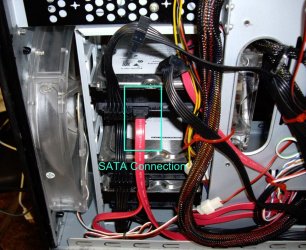
Just to confuse you further, do you know if your DVD has a PATA connection (IDE - big flat ribbon cable) or is it a SATA connection?

sata shot.JPG
 

My Computer

Computer type
PC/Desktop
Computer Manufacturer/Model Number
Systems by SmartEyeball
OS
8 Pro x64
CPU
i7 3770K 4.6GHz
Motherboard
ASUS P8Z77 WS
Memory
16GB G.Skill Trident X 2666mhz
Graphics Card(s)
x2 EVGA 780 Ti Superclocked SLI
Sound Card
SB X-FI Surround 5.1 PRO USB / ATH-AD900 Headphones
Monitor(s) Displays
x3 Dell U2410 / 58" Samsung
Screen Resolution
5760*1200/ 1920*1200
Hard Drives
2x Intel 520 240GB (RAID 0) * 2x WD Caviar Blacks 2TB (RAID 0) * 2TB WD Caviar Black * Sony Optirac DVD
PSU
Silverstone Strider Evolution 1200W
Case
Thermaltake Level 10 GT Snow Edition
Cooling
Noctua NH-D14
Keyboard
Topre Realforce // Ducky Shine MX Black // Filco Ninja TKL
Mouse
Thermaltake Theron (Highly Recommended) + Razer Imperator
Antivirus
MSE
Browser
IE, FF, WaterFox
Other Info
GT Extreme V2 Sim Racing Cockpit + 40" LCD and K/B Mouse stand ▼
Fanatec CSR Elite Wheel + Clubsport V1 Pedals + CSR shifter/7G-H ▼Saitek X52 Pro ▼ TrackIR 5 Pro
Buttkicker v2 Seat Rumbler with Dedicated 5.1 and Sub Woofer attached to frame ▼
=
Bloody Big Grin
Paaliaq please confirm...

Smarty, I believe he meant he cannot read the MB CDROM with the drivers on it... that's how I interpreted his not so great wording of the question. We have to be tolerant of those who do not speak English well, as our site is one of the best resources on the net for Win7... Also good point that he may have a PATA slave/master issue or??? We dont know if this is a new build, or an existing system he just upgraded, or what!:confused::confused::confused::confused:

But Paaliaq... HELP US TO HELP YOU AND PLEASE BE SPECIFIC AS TO WHAT YOUR ISSUE IS.

As mcleod said; have you tried other DVDs or CDs in the drive, and did they read or did none work?
 

My Computer

Computer Manufacturer/Model Number
Homebrew PC - "Alpha_Dawg"
OS
Windows 7 Ultimate 64 bit Steve Ballmer Signature Edition
CPU
Intel Core 2 Quad - Q9550 - 2.83GHz stock - OC'd to 3.6GHz
Motherboard
Gigabyte EP45-UD3P
Memory
4GB DDR2 800MHz (PC6400) OCZ Reaper
Graphics Card(s)
Nvidia GE Force 8800 GTS
Sound Card
Asus Xonar DX
Monitor(s) Displays
Samsung SyncMaster 2333HD
Screen Resolution
1920 x 1080
Hard Drives
WD Caviar Black 750GB - 7200RPM - 32MB cache
WD Caviar Green 1.5TB - 5400RPM - 64MB cache
WD Caviar Green 2.0TB - 5400RPM - 64MB cache
PSU
PC Power & Cooling Silencer 750
Case
Gigabyte 3D Aurora
Cooling
Case is Air - 5ea. 120mm fans (mix of Arctic and Xigmatec)
Keyboard
MS Natural Wireless KB
Mouse
MS Wireless Mouse
Internet Speed
50 mbps down/5 mbps up
Other Info
AVerMedia - AVerTVHD G2 Dual Tuner Card
Back
Top