DDR 3 memory chips
I have 3 x 2 and 2 x8. I noticed that memory usage was redlining and process explorer was showing 6b, so the 2 x 8 were not being recognized. This is after several years of this config. I moved the memory around and it started showing 12GB of memory, but I began having problems with windows starting and lock ups. this has not happened in a LONG time. Pulled the 2 x 8 and now the pc is OK but it's slow. This setup needs more than 6GB, it's just slow.
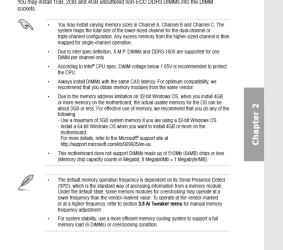
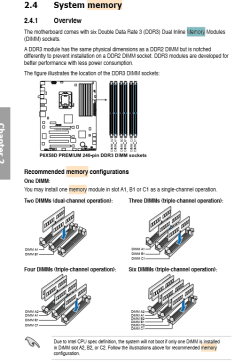
I have the 3 x 2 in a1 b1 c1. I have used the 2 x 8 before...where should they go according to the manual?
I have 3 x 2 and 2 x8. I noticed that memory usage was redlining and process explorer was showing 6b, so the 2 x 8 were not being recognized. This is after several years of this config. I moved the memory around and it started showing 12GB of memory, but I began having problems with windows starting and lock ups. this has not happened in a LONG time. Pulled the 2 x 8 and now the pc is OK but it's slow. This setup needs more than 6GB, it's just slow.
I have the 3 x 2 in a1 b1 c1. I have used the 2 x 8 before...where should they go according to the manual?
Attachments

My Computer
- Computer type
- PC/Desktop
- Computer Manufacturer/Model Number
- need to update!
- OS
- 7 Ultimate 64 bit
- Memory
- 2x4Gb DDR3-SDRAM
- Graphics Card(s)
- t750
- Monitor(s) Displays
- AOC 24" yee haw and Dell 19"
- Screen Resolution
- 1680 x 1050 @60hz
- Hard Drives
- Samsung 840EVO
- Internet Speed
- 100/20
- Antivirus
- MSE
- Browser
- Firefox