
Picture 1:
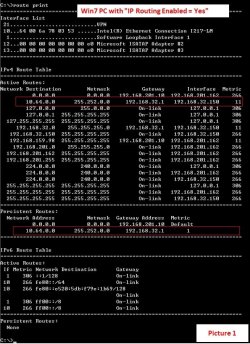
- The routing table in a Win7 PC with IP Routing Enabled (The service “Routing and Remote Access” also started)
- 192.168.201.162 is the IP of the Ethernet adapter LAN.
- 192.168.32.150 is the IP of the PPP adapter VPN.
Picture 2:
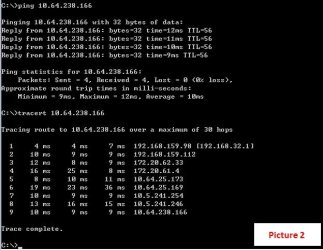
- The Win7 PC can reach a wanted destination 10.64.238.166 successfully with tracert output.
Picture 3:
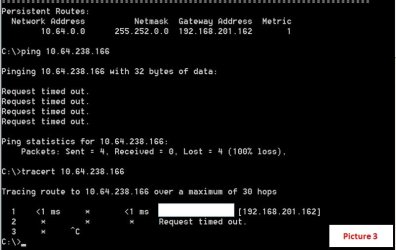
- Another WinXP PC with its gateway set as 192.168.201.162 (Win7 PC Ethernet IP) fails to reach the same wanted destination 10.64.238.166.
- The tracert output stops at the first hop 192.168.201.162.
Does someone know the reasons behind why the packet cannot be delivered to the destination in Picture 3 ?
I have been struggling this issue over some time and hope that someone here can point out the root cause.
Thanks.
- The routing table in a Win7 PC with IP Routing Enabled (The service “Routing and Remote Access” also started)
- 192.168.201.162 is the IP of the Ethernet adapter LAN.
- 192.168.32.150 is the IP of the PPP adapter VPN.
Picture 2:
- The Win7 PC can reach a wanted destination 10.64.238.166 successfully with tracert output.
Picture 3:
- Another WinXP PC with its gateway set as 192.168.201.162 (Win7 PC Ethernet IP) fails to reach the same wanted destination 10.64.238.166.
- The tracert output stops at the first hop 192.168.201.162.
Does someone know the reasons behind why the packet cannot be delivered to the destination in Picture 3 ?
I have been struggling this issue over some time and hope that someone here can point out the root cause.
Thanks.
Attachments
Last edited:
My Computer
At a glance
Windows 7 Professional 32bit
- Computer type
- PC/Desktop
- OS
- Windows 7 Professional 32bit