
Page File Encryption - Enable or Disable

How to Enable or Disable Page File Encryption in Vista and Windows 7

   Information
This will show you how to enable or disable encrypting the virtual memory page file in Vista and Windows 7.

Encrypting the page file prevents malicious users from reading data that has been paged to a NTFS disk, but will also add processing overhead for file system operations.

You must be logged in as an administrator to be able to do this tutorial.


OPTION ONE

Using a REG File Download


1. To Enable Page File Encryption
A) Click on the Download button below to download the file below.
Enable_Page_File_Encryption.reg

Download


B) Go to step 3.
2. To Disable Page File Encryption
NOTE: This is the default setting.
A) Click on the Download button below to download the file below.
Disable_Page_File_Encryption.reg

Download


3. Click on Save, and save the .reg file to the desktop.

4. Right click on the downloaded .reg file and click on Merge.

5. Click on Run, Continue (UAC-Vista) or Yes (UAC-Windows 7), Yes, and OK when prompted.

6. Restart the computer to apply.

7. When done, you can delete the downloaded .reg file if you like.


OPTION TWO

Through the Local Group Policy Editor


NOTE: This option is only available in Windows 7, and is not in Vista.
1. Open the Local Group Policy Editor.
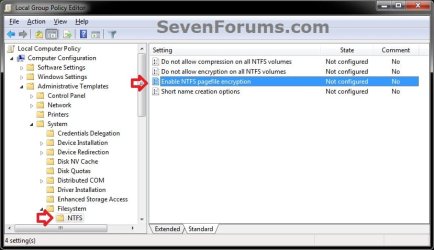
2. In the left pane, click on to expand Computer Configuration, Administrative Templates, System, Filesytem, and NTFS. (see screenshot below)
GPEDIT-1.jpg
3. In the right pane, right click on Enable NTFS pagefile encryption and click on Edit. (see screenshot above)

4. To Disable Page File Encryption
NOTE: This is the default setting.
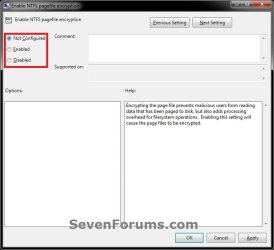
A) Select (dot) either Not Configured or Disabled. (see screenshot below step 6)
B) Go to step 6.
5. To Enable Page File Encryption
A) Select (dot) Enabled. (see screenshot below step 6)
6. Click on OK. (see screenshot below)
GPEDIT-2.jpg
7. Close the Local Group Policy Editor window.

8. Restart the computer to apply.


OPTION THREE

Using a Elevated Command Prompt


1. Open a elevated command prompt (Run as administrator).

2. To Enable Page File Encryption
A) In the elevated command prompt, copy and paste the command below and press Enter.
fsutil behavior set encryptpagingfile 1
B) Go to step 4.
3. To Disable Page File Encryption
NOTE: This is the default setting.
A) In the elevated command prompt, copy and paste the command below and press Enter.
fsutil behavior set encryptpagingfile 0
4. Close regedit, and restart the computer to apply.

5. To Verify the Page File Encryption Setting
A) Open a elevated command prompt.

B) In the elevated command prompt, copy and paste the command below and press Enter.
NOTE: 0 = disabled and 1 = enabled
fsutil behavior query encryptpagingfile
That's it,
Shawn


Attachments

Last edited:
Very nice.. as usual Shawn! :thumbsup:
 

My Computer

Computer type
PC/Desktop
Computer Manufacturer/Model Number
Custom Build
OS
Windows 10 Pro x64
CPU
Intel Core i5 4440 @Stock
Motherboard
Gigabyte Z97 D3H
Memory
4 x 4GB HyperX Fury DDR3
Graphics Card(s)
Gigabyte GTX 1050Ti O4G
Sound Card
Integrated
Monitor(s) Displays
Dell P2417H
Screen Resolution
1920 x 1080
Hard Drives
Samsung EVO 850 120GB / Toshiba DT01ACA050 1TB 7200prm 32MB
PSU
Riotoro Onyx 750W
Case
NZXT H500 Black-Red
Cooling
Stock CPU + NZXT 120mm + 2x120mm red fans
Keyboard
Modecom Volcano Lanparty
Mouse
Asus ROG Gladius / DeepCool E-Pad Plus
Internet Speed
DOCSIS 50/3 Mbit
Browser
Google Chrome
Other Info
Asus K55VJ(i5 3210M, GT635M / 2GB, 8GB DDR3, 500GB HDD)
Thank you Boshko. :)
 

My Computer

Computer type
PC/Desktop
Computer Manufacturer/Model Number
Self built custom
OS
64-bit Windows 11 Pro for Workstations
CPU
Intel i7-8700K OC'd to 5 GHz
Motherboard
ASUS ROG Maximus XI Formula Z390
Memory
64 GB (4x16GB) G.SKILL TridentZ RGB DDR4 3600 MHz
Graphics Card(s)
ASUS ROG-STRIX-GTX1080TI-O11G-GAMING
Sound Card
Integrated
Monitor(s) Displays
2 x Samsung Odyssey G7 27"
Screen Resolution
2560x1440
Hard Drives
1TB Samsung 990 PRO M.2,
4TB Samsung 990 PRO PRO M.2,
TerraMaster F8 SSD Plus NAS
PSU
Seasonic Prime Titanium 850W
Case
Thermaltake Core P3
Cooling
Corsair Hydro H115i
Keyboard
Logitech wireless K800
Mouse
Logitech MX Master 4
Internet Speed
2 Gb/s Download and 100 Mb/s Upload
Antivirus
Malwarebyte Anti-Malware Premium
Browser
Google Chrome
Other Info
Logitech Z625 speaker system,
Logitech BRIO 4K Pro webcam,
HP Color LaserJet Pro MFP M477fdn,
APC SMART-UPS RT 1000 XL - SURT1000XLI,
Galaxy S23 Plus phone
Thank you Shawn, just did it.

By the way, I think a mistake's there in language. The part in blue seems to have inter-changed.

4. To Enable Page File EncryptionA) Select (dot) either Not Configured or Disabled. (see screenshot below step 6)
B) Go to step 6.
5. To Disable Page File Encryption
NOTE: This is the default setting.A) Select (dot) Enabled. (see screenshot below step 6)
 

My Computer

Computer Manufacturer/Model Number
HCL
OS
Winbdows 7 ultimate x64 | Ubuntu 12.04 x64 LTS
CPU
Core 2 Duo e7400 @ 2.90GHz
Motherboard
Gigabyte G31M-ES2L
Memory
3GB DDR2
Graphics Card(s)
Asus Nvidia GTX 560Ti 1GB
Sound Card
On-board
Monitor(s) Displays
HCL eZeeBee 18.5" LCD
Screen Resolution
1366x768 @ 60Hz
Hard Drives
Western Digital 320GB
PSU
Corsair CX500 V2 500W
Cooling
Stock
Keyboard
Stock
Mouse
Stock
Internet Speed
15-25kBps D/L | 10kBps U/L | Hey Don't laugh
Interesting option! I tried enabling it via the registry file but it told me that "the key did not exist"? So I just configured it via the GP Editor.
 

My Computer

Computer Manufacturer/Model Number
HP DV6 1330sa
OS
Windows 7 Professional 64 Bit SP1
CPU
INTEL DUAL CORE 2.1Ghz
Motherboard
N/A
Memory
4GB DDR3
Graphics Card(s)
INTEL
Sound Card
LAPTOP
Monitor(s) Displays
2
Screen Resolution
3200x1080
Hard Drives
250GB
PSU
LAPTOP
Case
LAPTOP
Cooling
LAPTOP
Keyboard
SOLID YEAR 260U
Mouse
USB
Internet Speed
20 MB/S
Thank you Shawn, just did it.

By the way, I think a mistake's there in language. The part in blue seems to have inter-changed.

4. To Enable Page File Encryption
A) Select (dot) either Not Configured or Disabled. (see screenshot below step 6)

B) Go to step 6.

5. To Disable Page File Encryption
NOTE: This is the default setting.A) Select (dot) Enabled. (see screenshot below step 6)

Thank you Ezio. It has been corrected. :D:o
 

My Computer

Computer type
PC/Desktop
Computer Manufacturer/Model Number
Self built custom
OS
64-bit Windows 11 Pro for Workstations
CPU
Intel i7-8700K OC'd to 5 GHz
Motherboard
ASUS ROG Maximus XI Formula Z390
Memory
64 GB (4x16GB) G.SKILL TridentZ RGB DDR4 3600 MHz
Graphics Card(s)
ASUS ROG-STRIX-GTX1080TI-O11G-GAMING
Sound Card
Integrated
Monitor(s) Displays
2 x Samsung Odyssey G7 27"
Screen Resolution
2560x1440
Hard Drives
1TB Samsung 990 PRO M.2,
4TB Samsung 990 PRO PRO M.2,
TerraMaster F8 SSD Plus NAS
PSU
Seasonic Prime Titanium 850W
Case
Thermaltake Core P3
Cooling
Corsair Hydro H115i
Keyboard
Logitech wireless K800
Mouse
Logitech MX Master 4
Internet Speed
2 Gb/s Download and 100 Mb/s Upload
Antivirus
Malwarebyte Anti-Malware Premium
Browser
Google Chrome
Other Info
Logitech Z625 speaker system,
Logitech BRIO 4K Pro webcam,
HP Color LaserJet Pro MFP M477fdn,
APC SMART-UPS RT 1000 XL - SURT1000XLI,
Galaxy S23 Plus phone
Interesting option! I tried enabling it via the registry file but it told me that "the key did not exist"? So I just configured it via the GP Editor.

Hello Lost Colonist,

Was it a "file association does not exist..." type error instead?

When you right click on the REG file, did you have a Merge option in the context menu?

Were you logged in an adminsitrator account when using the REG file?
 

My Computer

Computer type
PC/Desktop
Computer Manufacturer/Model Number
Self built custom
OS
64-bit Windows 11 Pro for Workstations
CPU
Intel i7-8700K OC'd to 5 GHz
Motherboard
ASUS ROG Maximus XI Formula Z390
Memory
64 GB (4x16GB) G.SKILL TridentZ RGB DDR4 3600 MHz
Graphics Card(s)
ASUS ROG-STRIX-GTX1080TI-O11G-GAMING
Sound Card
Integrated
Monitor(s) Displays
2 x Samsung Odyssey G7 27"
Screen Resolution
2560x1440
Hard Drives
1TB Samsung 990 PRO M.2,
4TB Samsung 990 PRO PRO M.2,
TerraMaster F8 SSD Plus NAS
PSU
Seasonic Prime Titanium 850W
Case
Thermaltake Core P3
Cooling
Corsair Hydro H115i
Keyboard
Logitech wireless K800
Mouse
Logitech MX Master 4
Internet Speed
2 Gb/s Download and 100 Mb/s Upload
Antivirus
Malwarebyte Anti-Malware Premium
Browser
Google Chrome
Other Info
Logitech Z625 speaker system,
Logitech BRIO 4K Pro webcam,
HP Color LaserJet Pro MFP M477fdn,
APC SMART-UPS RT 1000 XL - SURT1000XLI,
Galaxy S23 Plus phone
Hello guys, I am wondering if I should encrypt the virtual page file... or just have it deleted on shutdown. What do you recommend? Or should I even bother with it? I just have a simple laptop..
 

My Computer

Computer Manufacturer/Model Number
Dell Studiio 1555
OS
Windows 8 Pro
CPU
Core 2 Duo P8600 2.4 ghz
Memory
4GB DDR2
Graphics Card(s)
ATI Radeon 4570 512MB
Sound Card
IDT High Definition
Monitor(s) Displays
15.6"
Screen Resolution
1920x1080
Hard Drives
250GB 7200 RPM SATA
Hello Windows 911,

Usually you would only encrpyt or delete the page file on exit if you are concerned about the possibily of someone reading it's contents. Encrypting the page file will get a small negative performance hit in Windows since it will take a bit longer to encrypt and decrypt everything in and out of the page file. Deleting the page file on exit will cause a delay at shutdown while you wait on the page file to be deleted.

I would not recommend to turn off the page file. Some programs, usually older ones though, will require the page file to be turned on for them to run properly no matter how much RAM you have installed.

Hope this helps some,
Shawn
 

My Computer

Computer type
PC/Desktop
Computer Manufacturer/Model Number
Self built custom
OS
64-bit Windows 11 Pro for Workstations
CPU
Intel i7-8700K OC'd to 5 GHz
Motherboard
ASUS ROG Maximus XI Formula Z390
Memory
64 GB (4x16GB) G.SKILL TridentZ RGB DDR4 3600 MHz
Graphics Card(s)
ASUS ROG-STRIX-GTX1080TI-O11G-GAMING
Sound Card
Integrated
Monitor(s) Displays
2 x Samsung Odyssey G7 27"
Screen Resolution
2560x1440
Hard Drives
1TB Samsung 990 PRO M.2,
4TB Samsung 990 PRO PRO M.2,
TerraMaster F8 SSD Plus NAS
PSU
Seasonic Prime Titanium 850W
Case
Thermaltake Core P3
Cooling
Corsair Hydro H115i
Keyboard
Logitech wireless K800
Mouse
Logitech MX Master 4
Internet Speed
2 Gb/s Download and 100 Mb/s Upload
Antivirus
Malwarebyte Anti-Malware Premium
Browser
Google Chrome
Other Info
Logitech Z625 speaker system,
Logitech BRIO 4K Pro webcam,
HP Color LaserJet Pro MFP M477fdn,
APC SMART-UPS RT 1000 XL - SURT1000XLI,
Galaxy S23 Plus phone
Thank you for the quick reply :) Im thinking about encrypting at least, especially that I carry my computer around frequently. Is the performance impact negligible, or obvious? I don't care if it adds a couple seconds to startup or shutdown. Do you use it on your system Brink?
 

My Computer

Computer Manufacturer/Model Number
Dell Studiio 1555
OS
Windows 8 Pro
CPU
Core 2 Duo P8600 2.4 ghz
Memory
4GB DDR2
Graphics Card(s)
ATI Radeon 4570 512MB
Sound Card
IDT High Definition
Monitor(s) Displays
15.6"
Screen Resolution
1920x1080
Hard Drives
250GB 7200 RPM SATA
No, I don't encrypt my page file.

It may vary from system to system on how much you may notice anything or not with it being encrypted. If it seems to slow afterwards, you can always unencrypt it.
 

My Computer

Computer type
PC/Desktop
Computer Manufacturer/Model Number
Self built custom
OS
64-bit Windows 11 Pro for Workstations
CPU
Intel i7-8700K OC'd to 5 GHz
Motherboard
ASUS ROG Maximus XI Formula Z390
Memory
64 GB (4x16GB) G.SKILL TridentZ RGB DDR4 3600 MHz
Graphics Card(s)
ASUS ROG-STRIX-GTX1080TI-O11G-GAMING
Sound Card
Integrated
Monitor(s) Displays
2 x Samsung Odyssey G7 27"
Screen Resolution
2560x1440
Hard Drives
1TB Samsung 990 PRO M.2,
4TB Samsung 990 PRO PRO M.2,
TerraMaster F8 SSD Plus NAS
PSU
Seasonic Prime Titanium 850W
Case
Thermaltake Core P3
Cooling
Corsair Hydro H115i
Keyboard
Logitech wireless K800
Mouse
Logitech MX Master 4
Internet Speed
2 Gb/s Download and 100 Mb/s Upload
Antivirus
Malwarebyte Anti-Malware Premium
Browser
Google Chrome
Other Info
Logitech Z625 speaker system,
Logitech BRIO 4K Pro webcam,
HP Color LaserJet Pro MFP M477fdn,
APC SMART-UPS RT 1000 XL - SURT1000XLI,
Galaxy S23 Plus phone
I just encrypted it using your first method. Thank you for these tutorials Brink, they are excellent! I also rebooted, and I think I only lost 4 seconds or so. I'll keep it on for peace of mind.:geek:
 

My Computer

Computer Manufacturer/Model Number
Dell Studiio 1555
OS
Windows 8 Pro
CPU
Core 2 Duo P8600 2.4 ghz
Memory
4GB DDR2
Graphics Card(s)
ATI Radeon 4570 512MB
Sound Card
IDT High Definition
Monitor(s) Displays
15.6"
Screen Resolution
1920x1080
Hard Drives
250GB 7200 RPM SATA
You're most welcome mate. :)
 

My Computer

Computer type
PC/Desktop
Computer Manufacturer/Model Number
Self built custom
OS
64-bit Windows 11 Pro for Workstations
CPU
Intel i7-8700K OC'd to 5 GHz
Motherboard
ASUS ROG Maximus XI Formula Z390
Memory
64 GB (4x16GB) G.SKILL TridentZ RGB DDR4 3600 MHz
Graphics Card(s)
ASUS ROG-STRIX-GTX1080TI-O11G-GAMING
Sound Card
Integrated
Monitor(s) Displays
2 x Samsung Odyssey G7 27"
Screen Resolution
2560x1440
Hard Drives
1TB Samsung 990 PRO M.2,
4TB Samsung 990 PRO PRO M.2,
TerraMaster F8 SSD Plus NAS
PSU
Seasonic Prime Titanium 850W
Case
Thermaltake Core P3
Cooling
Corsair Hydro H115i
Keyboard
Logitech wireless K800
Mouse
Logitech MX Master 4
Internet Speed
2 Gb/s Download and 100 Mb/s Upload
Antivirus
Malwarebyte Anti-Malware Premium
Browser
Google Chrome
Other Info
Logitech Z625 speaker system,
Logitech BRIO 4K Pro webcam,
HP Color LaserJet Pro MFP M477fdn,
APC SMART-UPS RT 1000 XL - SURT1000XLI,
Galaxy S23 Plus phone
Thanks Shawn, applyed the tip through local group policy editor!
 

My Computer

Computer type
PC/Desktop
Computer Manufacturer/Model Number
Custom Build
OS
Windows 7 Professional SP1 - x64 [Non-UEFI Boot]
CPU
Ivy Bridge Core i5 3570K (Delidded)
Motherboard
Asus P8Z77-V LE PLUS
Memory
G.Skill "Ares" DDR3 PC3-12800 - 1600MHz (16Gb)
Graphics Card(s)
Asus Dual-RX480-O4G
Sound Card
Creative Sound Blaster Z w/5.1 sound system
Monitor(s) Displays
Asus IPS 23"
Screen Resolution
16/9
Hard Drives
Internal:
500Go Sata 6Gb/s (x2)
500Go Sata 3Gb/s (x2)
SSD 60Go Sata 6Gb/s
PSU
In Win C 900W Series 80+ Platinum
Case
Thermaltake Chaser A71
Cooling
Custom Water Cooling Loop
Keyboard
Cooler Master QuickFire XTi
Mouse
Razer Imperator 2012 (4G)
Antivirus
MSE
Browser
IE 11.0.xxx Rtm
Other Info
"Raid0" with Intel Smart Response Technology (HDD/SSD)
You're welcome NoN. :)
 

My Computer

Computer type
PC/Desktop
Computer Manufacturer/Model Number
Self built custom
OS
64-bit Windows 11 Pro for Workstations
CPU
Intel i7-8700K OC'd to 5 GHz
Motherboard
ASUS ROG Maximus XI Formula Z390
Memory
64 GB (4x16GB) G.SKILL TridentZ RGB DDR4 3600 MHz
Graphics Card(s)
ASUS ROG-STRIX-GTX1080TI-O11G-GAMING
Sound Card
Integrated
Monitor(s) Displays
2 x Samsung Odyssey G7 27"
Screen Resolution
2560x1440
Hard Drives
1TB Samsung 990 PRO M.2,
4TB Samsung 990 PRO PRO M.2,
TerraMaster F8 SSD Plus NAS
PSU
Seasonic Prime Titanium 850W
Case
Thermaltake Core P3
Cooling
Corsair Hydro H115i
Keyboard
Logitech wireless K800
Mouse
Logitech MX Master 4
Internet Speed
2 Gb/s Download and 100 Mb/s Upload
Antivirus
Malwarebyte Anti-Malware Premium
Browser
Google Chrome
Other Info
Logitech Z625 speaker system,
Logitech BRIO 4K Pro webcam,
HP Color LaserJet Pro MFP M477fdn,
APC SMART-UPS RT 1000 XL - SURT1000XLI,
Galaxy S23 Plus phone
Hi, I saw this thread over at the Vista forum as well (and I'm running Vista Business x64 still though will be upgrading) and I posted here due to the larger traffic at this forum.

Restarting my computer turns off the paging file encryption--every time I tried it, regardless of method.

When I make the changes suggested in the first post, if I then check with "fsutil behavior query encryptpagingfile" it shows 1 until I restart or turn off and then on the computer; after the restarts it shows 0 again !

Same thing with the registry method. Though in my registry there is no [HKEY_LOCAL_MACHINE\SYSTEM\CurrentControlSet\Policies] (specifically, there's no Policies in CurrentControlSet), I did merge that .reg file, and in addition I manually modified [HKEY_LOCAL_MACHINE\SYSTEM\ControlSet001\Control\FileSystem] NtfsDisableEncryption to 1, however after every restart it gets reset to 0 !!

I tried the local group policy editor method as well, and the option to encrypt the paging file doesn't even show up in the list of entries I can modify (also the path to the filesystem settings on my system is not "Computer Configuration, Administrative Templates, System, Filesytem, and NTFS" but "Computer Configuration, Administrative Templates, System, NTFS Filesytem") !!!

How do I fix this problem? It's an issue because I am now in a situation where I need to protect certain data with TrueCrypt and so I must encrypt the paging file or risk the password being stored into it (and I am unable to use the whole disk encryption due to multi-boot configuration). Please help!

PS I have SpyBotS&D installed but I killed the TeaTimer process (the tool that prevents some registry changes) before trying these methods. I additionally tried to make these changes from within Safe Mode but the reset to no encryption still happens...
 

My Computer

OS
Business 64
Hello Prune, and welcome to Seven Forums.

Looking at the The Cipher.exe utility does not correctly detect the encryption status of the system pagefile (Pagefile.sys) on a computer that is running Windows Vista Service Pack 1 or Windows Server 2008 article at the link below, if NtfsEncryptPagingFile set to 1 at the location below, then the page file is suppose to be encrypted in Vista. I have updated the REG files in the tutorial to include this as well.

HKEY_LOCAL_MACHINE\SYSTEM\CurrentControlSet\Control\FileSystem
 

My Computer

Computer type
PC/Desktop
Computer Manufacturer/Model Number
Self built custom
OS
64-bit Windows 11 Pro for Workstations
CPU
Intel i7-8700K OC'd to 5 GHz
Motherboard
ASUS ROG Maximus XI Formula Z390
Memory
64 GB (4x16GB) G.SKILL TridentZ RGB DDR4 3600 MHz
Graphics Card(s)
ASUS ROG-STRIX-GTX1080TI-O11G-GAMING
Sound Card
Integrated
Monitor(s) Displays
2 x Samsung Odyssey G7 27"
Screen Resolution
2560x1440
Hard Drives
1TB Samsung 990 PRO M.2,
4TB Samsung 990 PRO PRO M.2,
TerraMaster F8 SSD Plus NAS
PSU
Seasonic Prime Titanium 850W
Case
Thermaltake Core P3
Cooling
Corsair Hydro H115i
Keyboard
Logitech wireless K800
Mouse
Logitech MX Master 4
Internet Speed
2 Gb/s Download and 100 Mb/s Upload
Antivirus
Malwarebyte Anti-Malware Premium
Browser
Google Chrome
Other Info
Logitech Z625 speaker system,
Logitech BRIO 4K Pro webcam,
HP Color LaserJet Pro MFP M477fdn,
APC SMART-UPS RT 1000 XL - SURT1000XLI,
Galaxy S23 Plus phone
Hi Brink, thanks for the prompt reply.

I tried setting that registry entry, but again it gets reset to 0 when I restart. So either when the computer is shutting down or when it's starting up, Windows itself or some application must be changing it. I'm really at a loss here...
 

My Computer

OS
Business 64
Prune,

I'm not sure what else may be resetting it either like that. :(
 

My Computer

Computer type
PC/Desktop
Computer Manufacturer/Model Number
Self built custom
OS
64-bit Windows 11 Pro for Workstations
CPU
Intel i7-8700K OC'd to 5 GHz
Motherboard
ASUS ROG Maximus XI Formula Z390
Memory
64 GB (4x16GB) G.SKILL TridentZ RGB DDR4 3600 MHz
Graphics Card(s)
ASUS ROG-STRIX-GTX1080TI-O11G-GAMING
Sound Card
Integrated
Monitor(s) Displays
2 x Samsung Odyssey G7 27"
Screen Resolution
2560x1440
Hard Drives
1TB Samsung 990 PRO M.2,
4TB Samsung 990 PRO PRO M.2,
TerraMaster F8 SSD Plus NAS
PSU
Seasonic Prime Titanium 850W
Case
Thermaltake Core P3
Cooling
Corsair Hydro H115i
Keyboard
Logitech wireless K800
Mouse
Logitech MX Master 4
Internet Speed
2 Gb/s Download and 100 Mb/s Upload
Antivirus
Malwarebyte Anti-Malware Premium
Browser
Google Chrome
Other Info
Logitech Z625 speaker system,
Logitech BRIO 4K Pro webcam,
HP Color LaserJet Pro MFP M477fdn,
APC SMART-UPS RT 1000 XL - SURT1000XLI,
Galaxy S23 Plus phone
Back
Top