Page file size?

skipper84

New member
Local time
3:32 AM
Messages
61
Hi. In windows 10 in performance option under virtual memory the Total paging file size is set to 3200MB. Is this fine?. I have 2 drives. 1 SSD and 1 HDD for games. My memory is 1300mhz at 8GB.
I looked and 3200MB in GB is 3.2GB of ram. Could this be using too much and that why I get a lot of stuttering in games?.
I also clicked change and recommended is 1913 MB but currently located is set to 3200 MB. Is it safe to change to recommended?
 

My Computer My Computer

At a glance

64bitintel i7 3770k 3.58GBasus strix 970gtx
Computer type
PC/Desktop
Computer Manufacturer/Model Number
Asus
OS
64bit
CPU
intel i7 3770k 3.5
Motherboard
Asus H61M-K
Memory
8GB
Graphics Card(s)
asus strix 970gtx
Monitor(s) Displays
Asus vg278he
Screen Resolution
1910x1080p
Hard Drives
ssd sandisk 120GB
Antivirus
Never tell haha
Browser
internet exploer
This is a Win 7 forum; I don't know if Win 10 is necessarily different on the page file topic.

In Win 7, you could certainly set it to a lower setting and get along fine.

I use 1024 mb minimum and 2048 mb maximum. Some people go lower than that.

You'd have to experiment to see if it makes any difference at all in the stuttering. 8 GB of RAM is typically plenty for a gaming machine.
 

My Computer My Computer

At a glance

Windows 7 Home Premium SP1, 64-bitIntel Skylake i5-6600K, not overclocked8 GB HyperX DDR4-2666 (2 x 4 GB)none; graphics are integrated on CPU
Computer type
PC/Desktop
Computer Manufacturer/Model Number
Ignatz Special; 4 speed manual gearbox; factory air conditioning; one of one
OS
Windows 7 Home Premium SP1, 64-bit
CPU
Intel Skylake i5-6600K, not overclocked
Motherboard
AsRock Z170M Extreme 4, micro ATX
Memory
8 GB HyperX DDR4-2666 (2 x 4 GB)
Graphics Card(s)
none; graphics are integrated on CPU
Sound Card
onboard: Realtek ALC1150; external: USB Behringer UF0-202
Monitor(s) Displays
Dell S2340M 23 inch IPS
Screen Resolution
1600 x 900
Hard Drives
System: Crucial MX100 series SSD, 128 GB;
Data: Samsung Spinpoint 103SJ, 1 TB;
Backup: WD Caviar Green WD30EZRX-00D8PB0, 3 TB
PSU
Rosewill SilentNight 500 watt fanless, semi-modular
Case
Antec Solo II
Cooling
Noctua NH-U12S; Noctua F12 intake, Noctua S12A exhaust
Keyboard
Microsoft 200 6JH-00001 USB
Mouse
Dell or Microsoft optical wired; USB
Antivirus
Microsoft Security Essentials and Malwarebytes Premium
Browser
Pale Moon
Other Info
All fans PWM; speeds at idle: CPU circa 500 rpm; intake circa 600 rpm; exhaust circa 600 rpm; CPU temps 27 idle and 47 C load in a warm room (27 C/81 F) when running Intel Extreme Tuning Utility stress test.
On The Contrary

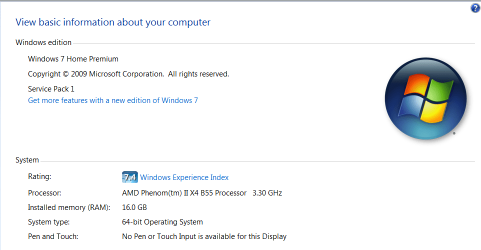
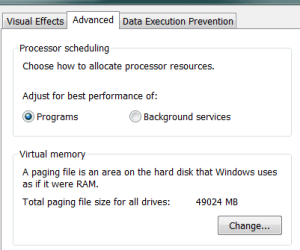
On my machine, I have 16GB of RAM. I've set my Virtual Memory (Pagefile) to 48GB. I use a 3x scheme based off of Mark Russinovich's article on these matters (Virtual Memory, specifically) with all of my machines...and the machines of people whom I infrequently assist with menial computer issues.

In my experience, this has netted the best, longest lasting effects of performance stability. Unless you have some issue with disk space, I would recommend the same for your system. Of course, I am running Windows 7, and realize that the kernel has had some memory improvements between 7 and 10, but I find it safe (like Mark) to have more than you need than less.

As an example, my laptop--which is a single-core, <2GHz proc, 2GB Ram system--has 6000MB reserved for this along...with only a 96GB SATAII SSD. I don't care.

What's more important to you? Hoarding more things...or having the things you've hoarded perform at their best?

It is a decision you have to make regarding your User Experience... Simply, if Windows believes it has more room to dump what's not needed in RAM, the more likely it'll load more of what you want to run in memory...or at least that has been my experience...

I've attached my System Properties and Virtual Memory settings to show what I mean...
 

Attachments

  • Sys Prop.PNG
    Sys Prop.PNG
    20.7 KB · Views: 0
  • Virt Mem.PNG
    Virt Mem.PNG
    6.3 KB · Views: 18

My Computer My Computer

At a glance

Windows 7 Home Premium x64Athlon X2 4200+3GB DDR2nVidia 9400GT, 128-bit 1GB DDR2
Computer Manufacturer/Model Number
Modded Gateway GT5034
OS
Windows 7 Home Premium x64
CPU
Athlon X2 4200+
Memory
3GB DDR2
Graphics Card(s)
nVidia 9400GT, 128-bit 1GB DDR2
Sound Card
SB Audigy 2 LS
Monitor(s) Displays
40" Sony Bravia 2
Hard Drives
500GB Seagate Barricuda 7200.11 (System)
750GB Seagate Barricuda 7200.12 (Data)
There is no one correct size for the pagefile you must use or you will have problems. The pagefile can vary over a wide range with no problems whatsoever. The more RAM you have the less pagefile size matters.

There is nothing special about the size Windows uses with a system managed pagefile. It is just a size that will almost always be large enough, based on the principle that your workload will be proportional to RAM size.

The only really important thing about pagefile size is that it must provide for a commit limit that is higher than the commit peak. The commit limit will be RAM size, plus pagefile size, minus a small overhead. Unfortunately Task Manager has not shown the commit peak since XP. Other utilities such as Process Explorer do.

With 8 GB and larger RAM pagefile size matters little to nothing. It would require a very heavy workload to reach a commit charge which could be supported with no pagefile at all. I do understand that some applications may complain if there is no pagefile at all.

As for 48 GB pagefile with 16 GB RAM. I find this a rather extravagant waste of disk space but other than that there should be no issues.

If you are having stuttering in games you are looking in the wrong place. It is highly unlikely that changing the pagefile in any way will help. I am not gamer so cannot help with this.
 

My Computer My Computer

At a glance

Windows 7 Pro 64 bitXeon W35208 GBNvidia Geforce 210
Computer type
PC/Desktop
Computer Manufacturer/Model Number
HP
OS
Windows 7 Pro 64 bit
CPU
Xeon W3520
Memory
8 GB
Graphics Card(s)
Nvidia Geforce 210
Back
Top