Solved Paged Memory used by Kernel getting insanely high

andreacc

New member
Local time
6:54 PM
Messages
6
Hi,

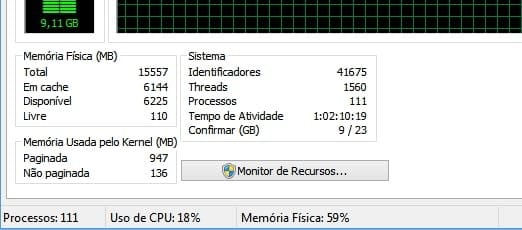
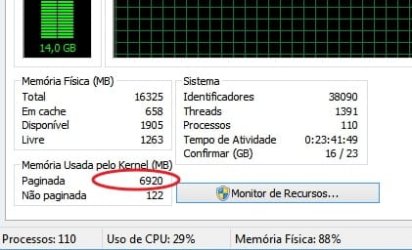
I'm having this problem where Kernel memory usage increases at very fast rates (even without me doing nothing on the computer). You can see in image below on task manager, where it gets to almost 7GB:
memory task manager.jpg


As a result I can't let the computer ON for more than about 48 hours, as it takes that time for the system to be consuming ~90% of the memory already.

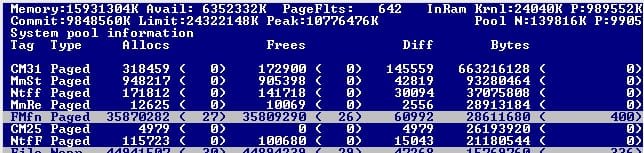
I used poolmon.exe to try to see what is consuming so much memory. The result is pic related.

memory poolmon.jpg


FMfn seems to be some system process, not a third-party driver, so I don't know what to do with that information.

What I already tried to do:

- I runned sfc /scannow. First time it corrected some errors. Second time it says there are no files corrupted anymore, although it prints lots of stuff in View attachment 400786 attached.
- I runned System Update Readiness tool / checksur. The log list lots of .manifest files as "Unavailable repair files". I don't know if that is the problem. View attachment 400787 attached.

The system is:
Windows 7 x64
AMD A10-6800K
16GB Kingston DDR3 memory
Sandisk Ultra Plus SSD 256GB

Any help is much appreciated.

Thanks.
 

My Computer

Computer type
PC/Desktop
Computer Manufacturer/Model Number
Custom
OS
Windows 7 Ultimate x64
CPU
AMD A10-6800K
Motherboard
MSI A68HM-E33
Memory
Kingston HyperX 2x8GB
Graphics Card(s)
AMD Radeon HD 6570
Hard Drives
SSD SanDisk Ultra Plus 256GB
Seagate Barracuda 7200.12 1TB
Antivirus
ESET NOD32
Browser
Mozilla Firefox

My Computer

Computer type
PC/Desktop
Computer Manufacturer/Model Number
Custom
OS
Windows 7 Ultimate x64
CPU
AMD A10-6800K
Motherboard
MSI A68HM-E33
Memory
Kingston HyperX 2x8GB
Graphics Card(s)
AMD Radeon HD 6570
Hard Drives
SSD SanDisk Ultra Plus 256GB
Seagate Barracuda 7200.12 1TB
Antivirus
ESET NOD32
Browser
Mozilla Firefox
Hi andreacc, welcome to the Forum.

As you have an SSD installed & 16 Gb of RAM you could reduce the size of the Page File if you wished. I also have 16 Gb of RAM & an SSD & I have the Page File set to a max of 1 Gb or 1000 Mb as Windows uses Mb size for the page file settings.

As far as I know Windows loads certain frequently used files into the Page File, so that there is very fast access should they be needed. This also reduces hard drive accessing as well. So unless you are actually getting problems with your computer it would probably be best to ignore it.

Computers do need to be shut down from time to time.
 

My Computer

Computer type
PC/Desktop
Computer Manufacturer/Model Number
Self built using existing case
OS
Windows 7 Home Premium 64 bit sp1
CPU
Intel i5 3570 3.4Ghz Ivy Bridge SKT 1155 quad core
Motherboard
Gigabyte Z77-HD3 SKT 1155 2xSata 3, 4x USB 3.0
Memory
G-Skill Rip Jaws 16Gb (8x2) DDR3 -1600 PC3 12800 CL 10 red
Graphics Card(s)
Gigabyte NVIDIA GT610 1Gb DDR3 810/1200 PCI-E 2.0 Silent
Sound Card
NVIDIA High Definition & Realtech High Definition Audio
Monitor(s) Displays
2 x Philips 226V4L 16:9 aspect ratio
Screen Resolution
1920 x 1080 HD
Hard Drives
Samsung 840 Pro 256gb SSD, SATA 3.
Hitachi Touro Portable 1tb, USB 3.0 HDD used for image b/ups.
PSU
Corsair VS450
Case
Codeng
Cooling
PSU fan & CPU fan
Keyboard
Logitech
Mouse
Logitech Wireless trackball M570
Internet Speed
Wireless 3G. 3mg down & 550kb up.
Antivirus
Bitdefender Internet Security 2020
Browser
Opera (Current Version) & Firefox
Other Info
MS Office 2013 Pro. Davis weather station software. MGE Nova 600 avr UPS.
Hi, Ranger4.

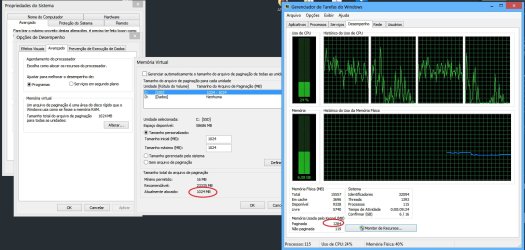
This memory that shows on task manager is not on the pagefile actually. It is memory that can be put on pagefile, but is actually on RAM.

I put pagefile at 1GB, restarted and the "kernel paged memory" usage is already at 1,2GB and increasing. :(

Captura_1505277273.jpg
 

My Computer

Computer type
PC/Desktop
Computer Manufacturer/Model Number
Custom
OS
Windows 7 Ultimate x64
CPU
AMD A10-6800K
Motherboard
MSI A68HM-E33
Memory
Kingston HyperX 2x8GB
Graphics Card(s)
AMD Radeon HD 6570
Hard Drives
SSD SanDisk Ultra Plus 256GB
Seagate Barracuda 7200.12 1TB
Antivirus
ESET NOD32
Browser
Mozilla Firefox
I always set (fix) page file the double of physical memory. In your case I would use 32G.
I also have a 128G SSD and a 1T HDD so I disabled page file on C: and set it on D:.
To set a custom page file, set MAX and min as 32000 and press Set (Definir).
 

My Computers

System One System Two

  • Computer type
    PC/Desktop
    Computer Manufacturer/Model Number
    custom build
    OS
    Windows 7 HP 64
    CPU
    i5 6600K - 800MHz to 4200MHz
    Motherboard
    GA-Z170-HD3P
    Memory
    4+4G GSkill DDR4 3000
    Graphics Card(s)
    IG - Intel 530
    Monitor(s) Displays
    Samsung 226BW
    Screen Resolution
    1680x1050
    Hard Drives
    (1) -1 SM951 – 128GB M.2 AHCI PCIe SSD drive for Windows 7 and Lubuntu
    (2) -1 WD SATA 3 - 1T for Data
    (3) -1 WD SATA 3 - 1T for backup
    PSU
    Thermaltake 450W TR2 gold
    Keyboard
    Old and good Chicony mechanical keyboard
    Mouse
    Logitech mX performance - 9 buttons (had to disable some)
    Internet Speed
    500Mb/s
    Browser
    Firefox 64
    Other Info
    TinyWall firewall
  • Computer type
    Laptop
    System Manufacturer/Model Number
    Asus Q550LF
    OS
    Windows 7 Pro
    CPU
    i7-4500U 800MHz to 3.0GHz
    Motherboard
    Asus Q550LF
    Memory
    (4+4)G DDR3 1600
    Graphics Card(s)
    IG intel 4400 + NVIDIA GeForce GT 745M
    Sound Card
    Realtek
    Monitor(s) Displays
    LG Display LP156WF4-SPH1
    Screen Resolution
    1920 x 1080
    Hard Drives
    BX500 120G SSD for Windows and programs +
    1T HDD for data
    Internet Speed
    500 Mb/s
    Browser
    Firefox
    Other Info
    TinyWall firewall
Hi Megahertz,

unfortunately messing with pagefile size does not seem to improve the situation. After 24-48 hours the windows kernel is already using most of my RAM. :(
 

My Computer

Computer type
PC/Desktop
Computer Manufacturer/Model Number
Custom
OS
Windows 7 Ultimate x64
CPU
AMD A10-6800K
Motherboard
MSI A68HM-E33
Memory
Kingston HyperX 2x8GB
Graphics Card(s)
AMD Radeon HD 6570
Hard Drives
SSD SanDisk Ultra Plus 256GB
Seagate Barracuda 7200.12 1TB
Antivirus
ESET NOD32
Browser
Mozilla Firefox
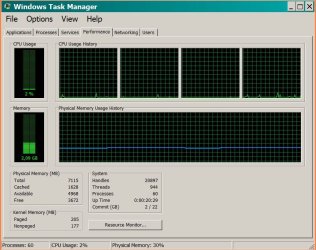
On your task manager I see that CPU usage is high. What you have running on the background?
 

Attachments

  • WTaskMan.JPG
    WTaskMan.JPG
    98.6 KB · Views: 1

My Computers

System One System Two

  • Computer type
    PC/Desktop
    Computer Manufacturer/Model Number
    custom build
    OS
    Windows 7 HP 64
    CPU
    i5 6600K - 800MHz to 4200MHz
    Motherboard
    GA-Z170-HD3P
    Memory
    4+4G GSkill DDR4 3000
    Graphics Card(s)
    IG - Intel 530
    Monitor(s) Displays
    Samsung 226BW
    Screen Resolution
    1680x1050
    Hard Drives
    (1) -1 SM951 – 128GB M.2 AHCI PCIe SSD drive for Windows 7 and Lubuntu
    (2) -1 WD SATA 3 - 1T for Data
    (3) -1 WD SATA 3 - 1T for backup
    PSU
    Thermaltake 450W TR2 gold
    Keyboard
    Old and good Chicony mechanical keyboard
    Mouse
    Logitech mX performance - 9 buttons (had to disable some)
    Internet Speed
    500Mb/s
    Browser
    Firefox 64
    Other Info
    TinyWall firewall
  • Computer type
    Laptop
    System Manufacturer/Model Number
    Asus Q550LF
    OS
    Windows 7 Pro
    CPU
    i7-4500U 800MHz to 3.0GHz
    Motherboard
    Asus Q550LF
    Memory
    (4+4)G DDR3 1600
    Graphics Card(s)
    IG intel 4400 + NVIDIA GeForce GT 745M
    Sound Card
    Realtek
    Monitor(s) Displays
    LG Display LP156WF4-SPH1
    Screen Resolution
    1920 x 1080
    Hard Drives
    BX500 120G SSD for Windows and programs +
    1T HDD for data
    Internet Speed
    500 Mb/s
    Browser
    Firefox
    Other Info
    TinyWall firewall
@ andreacc. Could you click on the Processes tab in Task Manager & provide a screen shot of it. This should shows what processes are running & how much CPU is being used & Memory allocation as well.

If you click on View in the top menu & select columns you can add columns, that might show more info as well.
 

My Computer

Computer type
PC/Desktop
Computer Manufacturer/Model Number
Self built using existing case
OS
Windows 7 Home Premium 64 bit sp1
CPU
Intel i5 3570 3.4Ghz Ivy Bridge SKT 1155 quad core
Motherboard
Gigabyte Z77-HD3 SKT 1155 2xSata 3, 4x USB 3.0
Memory
G-Skill Rip Jaws 16Gb (8x2) DDR3 -1600 PC3 12800 CL 10 red
Graphics Card(s)
Gigabyte NVIDIA GT610 1Gb DDR3 810/1200 PCI-E 2.0 Silent
Sound Card
NVIDIA High Definition & Realtech High Definition Audio
Monitor(s) Displays
2 x Philips 226V4L 16:9 aspect ratio
Screen Resolution
1920 x 1080 HD
Hard Drives
Samsung 840 Pro 256gb SSD, SATA 3.
Hitachi Touro Portable 1tb, USB 3.0 HDD used for image b/ups.
PSU
Corsair VS450
Case
Codeng
Cooling
PSU fan & CPU fan
Keyboard
Logitech
Mouse
Logitech Wireless trackball M570
Internet Speed
Wireless 3G. 3mg down & 550kb up.
Antivirus
Bitdefender Internet Security 2020
Browser
Opera (Current Version) & Firefox
Other Info
MS Office 2013 Pro. Davis weather station software. MGE Nova 600 avr UPS.
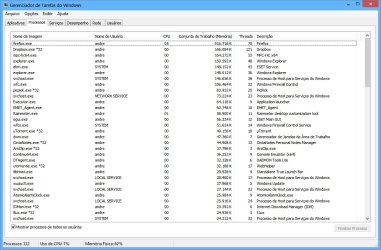
Hi, these are the process that are using more memory now.

It still is at 62% memory usage (almost 10GB) as you can see.

The problem is probably not with some process, but with some driver that is being loaded by the kernel.


Task Manager.jpg
 

My Computer

Computer type
PC/Desktop
Computer Manufacturer/Model Number
Custom
OS
Windows 7 Ultimate x64
CPU
AMD A10-6800K
Motherboard
MSI A68HM-E33
Memory
Kingston HyperX 2x8GB
Graphics Card(s)
AMD Radeon HD 6570
Hard Drives
SSD SanDisk Ultra Plus 256GB
Seagate Barracuda 7200.12 1TB
Antivirus
ESET NOD32
Browser
Mozilla Firefox
As you can see Firefox is using a lot of memory. There are a huge number of processes running on your computer & there are still more not shown on that page, which can be seen by the length of the scroll bar on the side. Do you have a need to have so many running at the same time, which is probably the reason you losing RAM all the time.

Windows Firewall Control is showing, which is does not on my computer & I use Windows Firewall. According to your System Specs you are using ESET NOD32 as your AV. Doesn't it have it's own Firewall?, if it does you might need to disable Windows Firewall.

The next thing we need to look at is System Configuration. To do that type msconfig in the Start search box, when it opens select the Startup tab & supply a screen shot of it. Then select the Services tab, tick the Hide all Microsoft Services box at the bottom & supply a screen shot of it as well.
 

My Computer

Computer type
PC/Desktop
Computer Manufacturer/Model Number
Self built using existing case
OS
Windows 7 Home Premium 64 bit sp1
CPU
Intel i5 3570 3.4Ghz Ivy Bridge SKT 1155 quad core
Motherboard
Gigabyte Z77-HD3 SKT 1155 2xSata 3, 4x USB 3.0
Memory
G-Skill Rip Jaws 16Gb (8x2) DDR3 -1600 PC3 12800 CL 10 red
Graphics Card(s)
Gigabyte NVIDIA GT610 1Gb DDR3 810/1200 PCI-E 2.0 Silent
Sound Card
NVIDIA High Definition & Realtech High Definition Audio
Monitor(s) Displays
2 x Philips 226V4L 16:9 aspect ratio
Screen Resolution
1920 x 1080 HD
Hard Drives
Samsung 840 Pro 256gb SSD, SATA 3.
Hitachi Touro Portable 1tb, USB 3.0 HDD used for image b/ups.
PSU
Corsair VS450
Case
Codeng
Cooling
PSU fan & CPU fan
Keyboard
Logitech
Mouse
Logitech Wireless trackball M570
Internet Speed
Wireless 3G. 3mg down & 550kb up.
Antivirus
Bitdefender Internet Security 2020
Browser
Opera (Current Version) & Firefox
Other Info
MS Office 2013 Pro. Davis weather station software. MGE Nova 600 avr UPS.
The Paged pool is huge and it seems likely that it is the cause of the high memory usage.

The term "Paged pool" is somewhat misleading in that it implies that it is paged out, generally to the pagefile. That isn't the case at all. This is memory that can be copied to the pagefile at the memory managers discretion. Some of this value will be in RAM, some in the pagefile, and some in both. Task manager can tell us nothing of that. But in this case it seems likely that most of it is in RAM.

The size of the pagefile won't significantly effect this value. Even if it were zero the value would be pretty much the same. Although without a pagefile the high Paged pool would impair performance sooner.

Generally the biggest users of the Paged pool are the kernel level OS components and device drivers. Processes generally use very little. Firefox memory usage may seem high but it is quite small compared to the 16 GB present. If anything process memory usage seems low, probably because it is crowded out by the paged pool.

Sorry I can't be of further help.
 

My Computer

Computer type
PC/Desktop
Computer Manufacturer/Model Number
HP
OS
Windows 7 Pro 64 bit
CPU
Xeon W3520
Memory
8 GB
Graphics Card(s)
Nvidia Geforce 210
Hi,

Managed to fix it somehow.

Uninstalled some drivers/software that were recently (past 14 days) installed.

The list of what I uninstalled: Realtek Audio Drivers, VyprVPN, HolaVPN, BitX, Wise Folder Hider, Samsung Driver Manager, Droid Manager Free, Microsoft Mouse and Keyboard Center, and some MSI motherboard software. Also uninstalled and reinstalled Dropbox.

I don't know exactly what of those was causing the problem, but now Windows has been running for almost 30 hours straight with Kernel memory usage stable around 900MB-1GB, and FMfn on poolmon is not increasing like crazy anymore, but keeping at decent size.

You can close the thread if you want. :)


Captura_1505518625.jpg

Captura_1505519154.jpg
 

My Computer

Computer type
PC/Desktop
Computer Manufacturer/Model Number
Custom
OS
Windows 7 Ultimate x64
CPU
AMD A10-6800K
Motherboard
MSI A68HM-E33
Memory
Kingston HyperX 2x8GB
Graphics Card(s)
AMD Radeon HD 6570
Hard Drives
SSD SanDisk Ultra Plus 256GB
Seagate Barracuda 7200.12 1TB
Antivirus
ESET NOD32
Browser
Mozilla Firefox
Thanks for getting back with the update & glad to hear it seems fixed.

Could you please click the Green Solved button in your Thread which will put a Green tick to let others know the problem has been solved.
 

My Computer

Computer type
PC/Desktop
Computer Manufacturer/Model Number
Self built using existing case
OS
Windows 7 Home Premium 64 bit sp1
CPU
Intel i5 3570 3.4Ghz Ivy Bridge SKT 1155 quad core
Motherboard
Gigabyte Z77-HD3 SKT 1155 2xSata 3, 4x USB 3.0
Memory
G-Skill Rip Jaws 16Gb (8x2) DDR3 -1600 PC3 12800 CL 10 red
Graphics Card(s)
Gigabyte NVIDIA GT610 1Gb DDR3 810/1200 PCI-E 2.0 Silent
Sound Card
NVIDIA High Definition & Realtech High Definition Audio
Monitor(s) Displays
2 x Philips 226V4L 16:9 aspect ratio
Screen Resolution
1920 x 1080 HD
Hard Drives
Samsung 840 Pro 256gb SSD, SATA 3.
Hitachi Touro Portable 1tb, USB 3.0 HDD used for image b/ups.
PSU
Corsair VS450
Case
Codeng
Cooling
PSU fan & CPU fan
Keyboard
Logitech
Mouse
Logitech Wireless trackball M570
Internet Speed
Wireless 3G. 3mg down & 550kb up.
Antivirus
Bitdefender Internet Security 2020
Browser
Opera (Current Version) & Firefox
Other Info
MS Office 2013 Pro. Davis weather station software. MGE Nova 600 avr UPS.
Back
Top