Paging file system will not set

h2ofun

New member
Local time
10:38 PM
Messages
29
Just love these new issues with the RTM bits. Never saw on earlier builds.

So, I have a computer that defaults to no paging file set.
No matter what I try, it will not let any paging file be set,
always goes back to nothing set.

Any ideas?

Dave
 

My Computer

OS
windows 7
Hello Dave,

It may a corrupted install. You might see if doing a repair install may help.

Hope this helps,
Shawn
 

My Computer

Computer type
PC/Desktop
Computer Manufacturer/Model Number
Self built custom
OS
64-bit Windows 11 Pro for Workstations
CPU
Intel i7-8700K OC'd to 5 GHz
Motherboard
ASUS ROG Maximus XI Formula Z390
Memory
64 GB (4x16GB) G.SKILL TridentZ RGB DDR4 3600 MHz
Graphics Card(s)
ASUS ROG-STRIX-GTX1080TI-O11G-GAMING
Sound Card
Integrated
Monitor(s) Displays
2 x Samsung Odyssey G7 27"
Screen Resolution
2560x1440
Hard Drives
1TB Samsung 990 PRO M.2,
4TB Samsung 990 PRO PRO M.2,
TerraMaster F8 SSD Plus NAS
PSU
Seasonic Prime Titanium 850W
Case
Thermaltake Core P3
Cooling
Corsair Hydro H115i
Keyboard
Logitech wireless K800
Mouse
Logitech MX Master 4
Internet Speed
2 Gb/s Download and 100 Mb/s Upload
Antivirus
Malwarebyte Anti-Malware Premium
Browser
Google Chrome
Other Info
Logitech Z625 speaker system,
Logitech BRIO 4K Pro webcam,
HP Color LaserJet Pro MFP M477fdn,
APC SMART-UPS RT 1000 XL - SURT1000XLI,
Galaxy S23 Plus phone
Just love these new issues with the RTM bits. Never saw on earlier builds.

So, I have a computer that defaults to no paging file set.
No matter what I try, it will not let any paging file be set,
always goes back to nothing set.

I have the same issue too, :(
I have Vista installed on C: and 7 on A: (partitioned from C:), Vista's page file is system managed but 7 is not set, would having Vista there make any difference? (soz for hijackin your thread :P)

It may a corrupted install. You might see if doing a repair install may help.
It's been the same for me since 7100 and i've reinstalled/repaired multiple times, no dice.
 

My Computer

Computer Manufacturer/Model Number
HP Touchsmart IQ771.uk
OS
Windows 7 Ultimate x64
CPU
AMD Turion(tm) 64 X2 Mobile Technology TL-56
Motherboard
ASUS Pheonix
Memory
3GB Nanya PC2-6400 DDR2-SDRAM SO-DIM (400MHz)
Graphics Card(s)
NVIDIA GeForce Go 7600 256MB GDDR3 SDRAM
Sound Card
High Definition Intergrated NVIDIA MCP51
Monitor(s) Displays
46" Sony Bravia HDTV
Screen Resolution
1600x1200
Hard Drives
1.5TB Samsug
320GB Seagate ST3320820AS - SATA 3Gb/s 8MB
500GB Maxtor Basics STM305003EHD301-RK
Internet Speed
↓6.32 Mb/s ↑0.35 Mb/s ↔26ms
Other Info
BIOS - American Megatrends Inc. 5.07
Ethernet Port - NVIDIA nForce 10/100/1000 Mbps
DVD Drive - TSSTcorp DVDR/RW TS-T632L
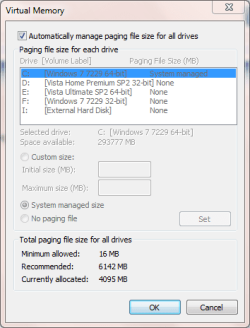
This is what I get, and it is the same in each OS (the active OS is always C:\). The other drives DO have paging files on them (except for the external, obviously), but they are only active for their respective OSes.
Capture.PNG

rsvr85 said:
I have Vista installed on C: and 7 on A: (partitioned from C:, Vista's page file is system managed but 7 is not set, would having Vista there make any difference?
Always allow your OSes to choose the drive letter they want. Invariably, this will be C:. Don't worry about conflicts - the boot manager automatically takes care of that. I'm surprised that you have managed to name a partition as A:. Both A: and B: are reserved for floppy drives, and are usually unavailable. As regards having Vista and W7 installed simultaneously, see above.
 

My Computer

Computer type
PC/Desktop
Computer Manufacturer/Model Number
Dwarf Dwf/11/2012 r09/2013
OS
Windows 8.1 Pro RTM x64
CPU
Intel Core-i5-3570K 4-core @ 3.4GHz (Ivy Bridge) (OC 4.4GHz)
Motherboard
ASRock Z77 Extreme4-M
Memory
4 x 4GB DDR3-1600 Corsair Vengeance CMZ8GX3M2A1600C9B (16GB)
Graphics Card(s)
MSI GeForce GTX770 Gaming OC 2GB
Sound Card
Realtek High Definition on board solution (ALC 898)
Monitor(s) Displays
ViewSonic VA1912w Widescreen (VGA)
Screen Resolution
1440x900
Hard Drives
OCZ Agility 3 SSD 120GB SATA III x2 (RAID 0)
Samsung HD501LJ 500GB SATA II x2
Hitachi HDS721010CLA332 1TB SATA II
Iomega 1.5TB Ext USB 2.0
WD 2.0TB Ext USB 3.0
PSU
XFX Pro Series 850W Semi-Modular
Case
Gigabyte IF233
Cooling
1 x 120mm Front Inlet 1 x 120mm Rear Exhaust
Keyboard
Microsoft Comfort Curve Keyboard 3000 (USB)
Mouse
Microsoft Comfort Mouse 3000 for Business (USB)
Internet Speed
NetGear DG834Gv3 ADSL Modem/Router (Ethernet) ~4.0 Mb/s (O2)
Antivirus
Avast! 8.0.1497
Browser
IE 11
Other Info
Optical Drive: HL-DT-ST BD-RE BH10LS30 SATA Bluray
Lexmark S305 Printer/Scanner/Copier (USB)
WEI Score: 8.1/8.1/8.5/8.5/8.25
Asus Eee PC 1011PX Netbook (Windows 7 x86 Starter)
This is what I get, and it is the same in each OS (the active OS is always C:\). The other drives DO have paging files on them (except for the external, obviously), but they are only active for their respective OSes.
View attachment 22393


Always allow your OSes to choose the drive letter they want. Invariably, this will be C:. Don't worry about conflicts - the boot manager automatically takes care of that. I'm surprised that you have managed to name a partition as A:. Both A: and B: are reserved for floppy drives, and are usually unavailable. As regards having Vista and W7 installed simultaneously, see above.


Actually this ISN'T always the best advice - particularly if your C drive (assume the OS is running from C) is getting full. With 4 / 8 / 16 GB RAM systems these days if you have the WHOLE paging file on C apart from extra hassles on C running one LARGE page file your OS might suddenly HALT if and when you do run out of disk space.

Rule of thumb typically for OS'es (Operating system design 101) is that paging file size (aka swap files in Linux) should be approx 50% the size of REAL RAM in the system.

With larger RAM systems its better to have multiple paging files over different drives -- with larger memory computers you will certainly be running more concurrent applications - but not necessarily larger ones so you don't need to have the system continually accessing a 4GB page file on C when it doesn't need to.

On a laptop with a single hard drive split into partitions its still better to split the page drive as accessing a larger 4GB file continually will / can lead to severe performance degradations once your system starts to page.

Keep I/O's down to as small as possible on things like laptops.


On servers etc the reverse is true -- if you need to access a file or data base in an application get as much of it in "one go" as you can.

Cheers
jimbo
 

My Computer

Computer type
PC/Desktop
Computer Manufacturer/Model Number
Custom built, several laptops HP/ASUS
OS
Linux CENTOS 7 / various Windows OS'es and servers
CPU
Intel i7 Intel i5
Memory
8GB, 16GB
Graphics Card(s)
On Motherboard
Sound Card
Realtek HD audio
Monitor(s) Displays
Apple Cinema display, Samsung LCD
Screen Resolution
1920 X 1080
Hard Drives
4 X 1TB SATA
Mouse
Toshiba wireless laser
Internet Speed
> 20MB up
jimbo45 said:
On a laptop with a single hard drive split into partitions its still better to split the page drive as accessing a larger 4GB file continually will / can lead to severe performance degradations once your system starts to page.
That is incorrect. If you have multiple HDDs on your system (and I mean physical drives, except for those configured into a RAID array where they count as a single entity), then you can have a paging file on each running simultaneously. If you have only a single drive that is partitioned then spreading the paging file over these partitions can actually degrade system performance because the drive head has got to move more to access the data, particularly if that data happens to straddle 2 or more sections of the paging file (i.e. the required data lies at the end of one section and the beginning of another). The best solution, if you are able to adopt it, is to have a small drive that is solely dedicated to the paging file and nothing else. However, in many systems that is impractical.
 

My Computer

Computer type
PC/Desktop
Computer Manufacturer/Model Number
Dwarf Dwf/11/2012 r09/2013
OS
Windows 8.1 Pro RTM x64
CPU
Intel Core-i5-3570K 4-core @ 3.4GHz (Ivy Bridge) (OC 4.4GHz)
Motherboard
ASRock Z77 Extreme4-M
Memory
4 x 4GB DDR3-1600 Corsair Vengeance CMZ8GX3M2A1600C9B (16GB)
Graphics Card(s)
MSI GeForce GTX770 Gaming OC 2GB
Sound Card
Realtek High Definition on board solution (ALC 898)
Monitor(s) Displays
ViewSonic VA1912w Widescreen (VGA)
Screen Resolution
1440x900
Hard Drives
OCZ Agility 3 SSD 120GB SATA III x2 (RAID 0)
Samsung HD501LJ 500GB SATA II x2
Hitachi HDS721010CLA332 1TB SATA II
Iomega 1.5TB Ext USB 2.0
WD 2.0TB Ext USB 3.0
PSU
XFX Pro Series 850W Semi-Modular
Case
Gigabyte IF233
Cooling
1 x 120mm Front Inlet 1 x 120mm Rear Exhaust
Keyboard
Microsoft Comfort Curve Keyboard 3000 (USB)
Mouse
Microsoft Comfort Mouse 3000 for Business (USB)
Internet Speed
NetGear DG834Gv3 ADSL Modem/Router (Ethernet) ~4.0 Mb/s (O2)
Antivirus
Avast! 8.0.1497
Browser
IE 11
Other Info
Optical Drive: HL-DT-ST BD-RE BH10LS30 SATA Bluray
Lexmark S305 Printer/Scanner/Copier (USB)
WEI Score: 8.1/8.1/8.5/8.5/8.25
Asus Eee PC 1011PX Netbook (Windows 7 x86 Starter)
Actually this ISN'T always the best advice - particularly if your C drive (assume the OS is running from C) is getting full. With 4 / 8 / 16 GB RAM systems these days if you have the WHOLE paging file on C apart from extra hassles on C running one LARGE page file your OS might suddenly HALT if and when you do run out of disk space.

Apart from real workhorses, i fail to see the need to have pagefile at all for >8gb systems.

RAM is not there to leave empty, otherwise just put 2gb in the thing and be done with it.
 

My Computer

Computer Manufacturer/Model Number
me and myself
OS
vista x64/ win 7 x64
CPU
phenom 9950 BE
Motherboard
ASUS M2A-VM HDMI
Memory
8 gb
Graphics Card(s)
nvidia gts 250
Sound Card
realtek HD onboard
Monitor(s) Displays
dual hd 19" tft
Screen Resolution
1440x900
Hard Drives
2 x 500 gb WDC
1 x 500 gb Seagate
1 x 1000 gb Seagate
1 80 gb raptor
1 usb 160 gb
Cooling
standard issue
Keyboard
logitech g11
Mouse
usb wireless MS laser 6000
Internet Speed
18 mb (according to my provider :)
If you have only a single drive that is partitioned then spreading the paging file over these partitions can actually degrade system performance because the drive head has got to move more to access the data, particularly if that data happens to straddle 2 or more sections of the paging file (i.e. the required data lies at the end of one section and the beginning of another).

Actually, in general, this doesn't really matter. The reason why is that in Windows, all memory is virtual memory, which means that two contiguous pages of memory may appear to look like they're next to each other in memory, but they could be anywhere in physical memory. The same is true of the swap file. Two contiguous pages of virtual memory may not be next to each other in the swap file either.

The swap file is truly random access.

The only exception to this is if your cluster size is not a multiple of the memory page size, however NTFS's default size is 4k, the same size as most virtual memory pages (Itanium, I think, uses 8k pages). In which case, a single virtual memory page may span two extents.
 

My Computer

Computer Manufacturer/Model Number
Self-Built
OS
Windows 7 64 bit SP1
CPU
Core i7 920
Motherboard
Gigabyte GA-X58A-UD3R
Memory
12 GB (6x2GB Corsair)
Graphics Card(s)
nVidia 250GTS
Sound Card
Built-in
Monitor(s) Displays
2x Samsung SyncMaster 2343 (23" Widescreen)
Keyboard
Microsoft Natural Keyboard
Mouse
Logitech Laser
I tried a repair with the upgrade reinstall, still fails.

Dave
 

My Computer

OS
windows 7
There are multiple reasons for having a pagefile - if you choose to not use one, then you'll forgoe the benefits.

FWIW - I went 6 months without a pagefile in 32 bit XP and 32 bit Vista (both with 4 gB of RAM). The system ran fine without it - but I'd done the research to understand what I was giving up.

I went back to using a pagefile when a game that I installed complained about the lack of it.
 

My Computer

Computer Manufacturer/Model Number
Home built (x64), Lenovo x61s Tablet, Samsung Netbook
OS
Win7 x64 + x86
CPU
Intel i7 920, other Intel chips, and the Atom in the netbook
Motherboard
Asus P6T Deluxe
Memory
12 gB; 4 gB Lenovo; 1 gB Samsung netbook
Graphics Card(s)
ATI 4870
Sound Card
Yes, I have one of these
Monitor(s) Displays
32" Sharp Aquos TV
Screen Resolution
800x600 - I have vision issues
Hard Drives
4 - 150 gB Velociraptors in RAID 5
Promise controller
PSU
1000 watt (can't recall the brand)
Case
Antec 300
Cooling
Big honking cooler that was rated highly at Toms Hardware
Keyboard
Microsoft Natural
Mouse
Logitech Trackman
Internet Speed
Cable
Other Info
GeekSquad UPS
CyberPower UPS
DLink DNS-323 NAS (2 tB)
Netgear wireless router as an access point
Netgear wired router FSV-318
Home network consists of
4 desktop computers (2 Vista, 2 Win7)
1 netbook (Win7)
4 laptop computers (XP, 2-Vista, Win7)
Wii and XBox 360
I tried a repair with the upgrade reinstall, still fails.

Dave

Dave,

Could you post a screenshot of the Virtual Memory settings and Computer window? Hopefully they may show something that may help.
 

My Computer

Computer type
PC/Desktop
Computer Manufacturer/Model Number
Self built custom
OS
64-bit Windows 11 Pro for Workstations
CPU
Intel i7-8700K OC'd to 5 GHz
Motherboard
ASUS ROG Maximus XI Formula Z390
Memory
64 GB (4x16GB) G.SKILL TridentZ RGB DDR4 3600 MHz
Graphics Card(s)
ASUS ROG-STRIX-GTX1080TI-O11G-GAMING
Sound Card
Integrated
Monitor(s) Displays
2 x Samsung Odyssey G7 27"
Screen Resolution
2560x1440
Hard Drives
1TB Samsung 990 PRO M.2,
4TB Samsung 990 PRO PRO M.2,
TerraMaster F8 SSD Plus NAS
PSU
Seasonic Prime Titanium 850W
Case
Thermaltake Core P3
Cooling
Corsair Hydro H115i
Keyboard
Logitech wireless K800
Mouse
Logitech MX Master 4
Internet Speed
2 Gb/s Download and 100 Mb/s Upload
Antivirus
Malwarebyte Anti-Malware Premium
Browser
Google Chrome
Other Info
Logitech Z625 speaker system,
Logitech BRIO 4K Pro webcam,
HP Color LaserJet Pro MFP M477fdn,
APC SMART-UPS RT 1000 XL - SURT1000XLI,
Galaxy S23 Plus phone
Thanks, but decided to give up. I restarted from scratch, and the pagefile
is there. Will see if I get the error as I reload. Oh well.

Dave
 

My Computer

OS
windows 7
Ok Dave. Please let us know how it turns out. :)
 

My Computer

Computer type
PC/Desktop
Computer Manufacturer/Model Number
Self built custom
OS
64-bit Windows 11 Pro for Workstations
CPU
Intel i7-8700K OC'd to 5 GHz
Motherboard
ASUS ROG Maximus XI Formula Z390
Memory
64 GB (4x16GB) G.SKILL TridentZ RGB DDR4 3600 MHz
Graphics Card(s)
ASUS ROG-STRIX-GTX1080TI-O11G-GAMING
Sound Card
Integrated
Monitor(s) Displays
2 x Samsung Odyssey G7 27"
Screen Resolution
2560x1440
Hard Drives
1TB Samsung 990 PRO M.2,
4TB Samsung 990 PRO PRO M.2,
TerraMaster F8 SSD Plus NAS
PSU
Seasonic Prime Titanium 850W
Case
Thermaltake Core P3
Cooling
Corsair Hydro H115i
Keyboard
Logitech wireless K800
Mouse
Logitech MX Master 4
Internet Speed
2 Gb/s Download and 100 Mb/s Upload
Antivirus
Malwarebyte Anti-Malware Premium
Browser
Google Chrome
Other Info
Logitech Z625 speaker system,
Logitech BRIO 4K Pro webcam,
HP Color LaserJet Pro MFP M477fdn,
APC SMART-UPS RT 1000 XL - SURT1000XLI,
Galaxy S23 Plus phone
[FONT=&quot]I have this same problem with a brand new Acer Laptop computer supplied with Windows 7.

Initially it is fine.
We then removed the pre-installed Office 2007.
We then installed a Home/Student version of Office 2007.

At all stages we rebooted and the computer was fine.

Then we installed Firefox Browser 3.5.3 and Printer drivers for Canon and HP Printers. (Both printers on the approved hardware list).
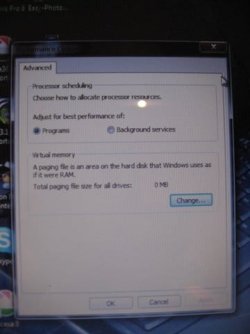
When we rebooted, the performance options screen pops-up (Picture attached), and we get a notification that there is no paging file set.
When we go into "Virtual Memory" - Change, it allows us to make a setting change, asks us to reboot, but when it reboots, no change has taken effect, and we get advised that the is no paging file set. We have tried all options.

Acer's advice was "reload the OS" - we've done that, and we have the some problem develop every time.

[/FONT]PS: the first time we did all Windows updates (374MB of them), and we installed the latest Firefox Browser 3.5.5 as well.
[FONT=&quot]

[/FONT]
 

Attachments

  • First popup - Performance Optionsmessage.JPG
    First popup - Performance Optionsmessage.JPG
    21.9 KB · Views: 18

My Computer

Computer Manufacturer/Model Number
Acer TM7730-664G32Mn LX.TPK03.067 laptop
OS
Windows 7
Back
Top