
Solved Painfully Long Boot after changing paging file ?

nikev216

New member
Member
Local time
7:27 AM
Messages
45
Everything was running brilliantly until a few days ago when I got a low memory warning on Windows 7. I ran memtest86 and my memory is healthy. Windows was installed on C:drive (SSD) and my pagefile on a seperate mechanical (HD) But since then I read that with 16 GB of ram installed you could run without a pagefile, so I (foolishly) went into the virtual memory settings and set my pagefile to 0. When I rebooted the PC it hung on the windows logo screen for ages taking about 30 mins to reach the desktop. The activity light on my PC case was blinking so I knew that windows was checking or looking for something, then it struck me - it's the damn paging file! So, I go back to the virtual memory settings and set a pagefile of 16GB on C: drive (SDD), I also unplug all my mechanical hard drives leaving only my C: drive attached, then reboot, and everything is good again. All progams are OK and CHKDSK reports no errors.

So this is my current system which runs as it should ... and boots normally

Windows 7 OS installed on C:drive (SSD)
paging file size = 16 GB on C:drive (screenshot)
Ram installed = 16 GB DDR3

But when I try to attach any of my (x7) mehanical HD's - windows reverts to the endless boot-up screen. I have no idea if windows will even reach the desktop with the HD's attached, they contain around 18 TB of media files, so I'm desperate! any help appreciated ?


.
 

Attachments
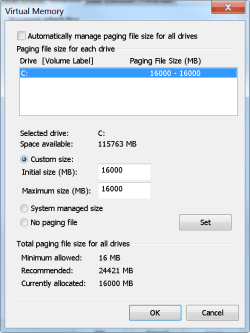
  • page -25-08-2020.png
    page -25-08-2020.png
    45.8 KB · Views: 0
Last edited:

My Computer

OS
WIN-7 x64 bit SP1
Hi nikev216,

Do you have a Restore Point or Full Disk Image backup prior to your changes?

Why are you setting a specific size for the page file?

Default is 1.5x min to 3x max of your RAM.

Endless Boot? Are you referring to endless loop at boot or you system hangs at boot?
 

My Computer

Computer type
PC/Desktop
Computer Manufacturer/Model Number
HP Desktop & Compaq Laptop
OS
Win 10 x64, Linux Lite, Win 7 x64, BlackArch, & Kali
Hard Drives
Samsung 850 Pro 256Gb,
Hitachi HDD 1Tb,
Crucial MX SSD 250Gb
Segate 3Tb USB 3.0 Ext. Backup HDD
Internet Speed
150Mbps dn, 20Mbps up
Antivirus
Avast Free, Malwarebytes Anti-Exploit & Anti-Ransomware
Browser
Firefox, Chrome, Opera, & VPN
I use Macrium Reflect, I went to my backup image and the image failed verification, why ?


I set the page file to the same size of my installed ram because that was what was recommended on the gaming forum of the game that I play, I'm flexible about the size, I can always change it if it's not large enough.


Endless boot I discovered is not a loop, it's CHKDSK scanning x7 HD's


I did a clean install of windows 7 and there were errors on x2 of my HD's (something about available space reported being the wrong size, I didn't have time to read the information as it flashed by but the errors were corrected by CHKDSK - so Macrium Reflect was right - and I have a fresh Windows 7 installation. Problem solved, lesson learned, If it 'aint broke, don't mess with it.
 

My Computer

OS
WIN-7 x64 bit SP1
nikev216

When you use Macrium to create full disk image, do you have it set to verify integrity of the image?
Do you backup to an external hard drive rather than on the system drive? Safer in my opinion.
I use AOMEI Backupper Pro, and I have it set to verify image integrity.

I agree, if it ain't broke don't fix it. And if you do play with settings, backup to external hard drive and check the image for integrity. Works for me.

With that said; glad to hear you are up and running again.

Are you aware of what a Repair Install is?

Basically you run setup.exe from within windows, it replaces the OS and preserves all you installed programs, files, folders, music, video etc.

Here's my Word doc on the subject-matter
Repair Windows Without Reformatting.docx
 

My Computer

Computer type
PC/Desktop
Computer Manufacturer/Model Number
HP Desktop & Compaq Laptop
OS
Win 10 x64, Linux Lite, Win 7 x64, BlackArch, & Kali
Hard Drives
Samsung 850 Pro 256Gb,
Hitachi HDD 1Tb,
Crucial MX SSD 250Gb
Segate 3Tb USB 3.0 Ext. Backup HDD
Internet Speed
150Mbps dn, 20Mbps up
Antivirus
Avast Free, Malwarebytes Anti-Exploit & Anti-Ransomware
Browser
Firefox, Chrome, Opera, & VPN
Back
Top