Paint in Windows 7 Customizing Default Size

tries

New member

Attachments

  • Paint in Windows 7.JPG
    Paint in Windows 7.JPG
    143 KB · Views: 446

My Computer

Computer Manufacturer/Model Number
I built it!
OS
Windows 7 64Bit RC (Dual Boot with XP)
CPU
Intel Core2 CPU 6600 @2.40GHz 2400 Mhz, 4MBCache (3 Yrs Old)
Motherboard
Gigabyte GA-965P-DS3
Memory
4GB 4 * 1GB Corsair Value Select DDR2 Ram
Graphics Card(s)
Gigabyte NVIDIA GeoForce 7600GT(Silent Heatsink)
Sound Card
Gigabyte 7 Channel
Monitor(s) Displays
BenQ E2400HD
Screen Resolution
1920 * 1080 (Full HD)
PSU
Antec Tru Power Trio 550 Watts
Keyboard
Microsoft
Mouse
Microsoft
Internet Speed
ADSL2+ 1.4MBPS (11 Mbps)
Hello Tries,

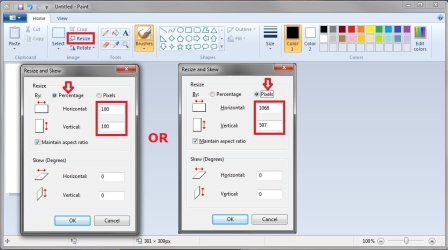
Sorry, but since the size is determined by the image file itself and not Paint, you cannot set a default like that. You can easily "Resize" the image instead of cropping though.
Paint.jpg
Hope this helps,
Shawn
 

My Computer

Computer type
PC/Desktop
Computer Manufacturer/Model Number
Self built custom
OS
64-bit Windows 11 Pro for Workstations
CPU
Intel i7-8700K OC'd to 5 GHz
Motherboard
ASUS ROG Maximus XI Formula Z390
Memory
64 GB (4x16GB) G.SKILL TridentZ RGB DDR4 3600 MHz
Graphics Card(s)
ASUS ROG-STRIX-GTX1080TI-O11G-GAMING
Sound Card
Integrated
Monitor(s) Displays
2 x Samsung Odyssey G7 27"
Screen Resolution
2560x1440
Hard Drives
1TB Samsung 990 PRO M.2,
4TB Samsung 990 PRO PRO M.2,
TerraMaster F8 SSD Plus NAS
PSU
Seasonic Prime Titanium 850W
Case
Thermaltake Core P3
Cooling
Corsair Hydro H115i
Keyboard
Logitech wireless K800
Mouse
Logitech MX Master 4
Internet Speed
2 Gb/s Download and 100 Mb/s Upload
Antivirus
Malwarebyte Anti-Malware Premium
Browser
Google Chrome
Other Info
Logitech Z625 speaker system,
Logitech BRIO 4K Pro webcam,
HP Color LaserJet Pro MFP M477fdn,
APC SMART-UPS RT 1000 XL - SURT1000XLI,
Galaxy S23 Plus phone
Hi Brink, First of all a thank you for replying.

I am sorry. I think you misunderstood me.
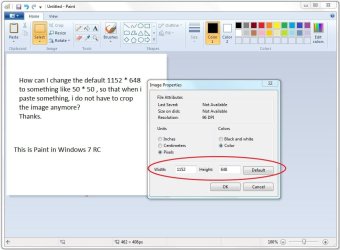
If i open a blank paint window, i want the blank window to be a small size.

Like we have a normal.dot in word? Do we have something similar in paint?
 

My Computer

Computer Manufacturer/Model Number
I built it!
OS
Windows 7 64Bit RC (Dual Boot with XP)
CPU
Intel Core2 CPU 6600 @2.40GHz 2400 Mhz, 4MBCache (3 Yrs Old)
Motherboard
Gigabyte GA-965P-DS3
Memory
4GB 4 * 1GB Corsair Value Select DDR2 Ram
Graphics Card(s)
Gigabyte NVIDIA GeoForce 7600GT(Silent Heatsink)
Sound Card
Gigabyte 7 Channel
Monitor(s) Displays
BenQ E2400HD
Screen Resolution
1920 * 1080 (Full HD)
PSU
Antec Tru Power Trio 550 Watts
Keyboard
Microsoft
Mouse
Microsoft
Internet Speed
ADSL2+ 1.4MBPS (11 Mbps)
Oh, ok. You can just resize the blank white window to the size you want in Paint, then close paint and click on "Don't Save". It should open to the same size as it was last closed as. :)
 

My Computer

Computer type
PC/Desktop
Computer Manufacturer/Model Number
Self built custom
OS
64-bit Windows 11 Pro for Workstations
CPU
Intel i7-8700K OC'd to 5 GHz
Motherboard
ASUS ROG Maximus XI Formula Z390
Memory
64 GB (4x16GB) G.SKILL TridentZ RGB DDR4 3600 MHz
Graphics Card(s)
ASUS ROG-STRIX-GTX1080TI-O11G-GAMING
Sound Card
Integrated
Monitor(s) Displays
2 x Samsung Odyssey G7 27"
Screen Resolution
2560x1440
Hard Drives
1TB Samsung 990 PRO M.2,
4TB Samsung 990 PRO PRO M.2,
TerraMaster F8 SSD Plus NAS
PSU
Seasonic Prime Titanium 850W
Case
Thermaltake Core P3
Cooling
Corsair Hydro H115i
Keyboard
Logitech wireless K800
Mouse
Logitech MX Master 4
Internet Speed
2 Gb/s Download and 100 Mb/s Upload
Antivirus
Malwarebyte Anti-Malware Premium
Browser
Google Chrome
Other Info
Logitech Z625 speaker system,
Logitech BRIO 4K Pro webcam,
HP Color LaserJet Pro MFP M477fdn,
APC SMART-UPS RT 1000 XL - SURT1000XLI,
Galaxy S23 Plus phone
Size of opening "screen" in MS Paint

What you describe used to work, but for some reason, when paint opens it is now always 480X 640 - too small for what I need to do. Resizing and closing without saving makes no difference, resizing and saving the resized blank makes no difference, resizing and pasting a large image then saving it makes no difference! I have no idea why it will no longer work.
 

My Computer

Computer type
PC/Desktop
OS
Windows 7 Professional X64
found this:


try opening Paint, resizing the window to whatever size you want and changing the IMAGE - ATTRIBUTES (or Ctrl-E)
to whatever defaults you want and then simply exiting the Paint program. It will ask you if you wish to save Untitled,
but just say no, because that doesn't affect the saving of the new defaults..


- might be worth trying..
 

My Computer

Computer type
PC/Desktop
Computer Manufacturer/Model Number
benchtec, built to personal specs
OS
Windows10 Pro - 64Bit vs.10547
CPU
i7-965 Extreme Edition (8 Cores) at 3.3GHz (no OC)
Motherboard
BloodRageX58 (Socket1366)
Memory
12G Corsair Dominator DDR3 - tripled
Graphics Card(s)
2xAMD SapphireNITRO R9 380(4G) crossfire
Sound Card
Sonar(SB)X-Fi onboard
Monitor(s) Displays
SyncMaster P2050 20"
Screen Resolution
1600x900 (widescreen)
Hard Drives
480G\OCZSolid3SSD, 64G\OCZVertex3SSD,60G\OCZVertex2SSD, 1TB\spinpointF1SATAHDD
PSU
1200w Power Station Gold
Case
ANTEC 900/2 all blue lights, etc..
Cooling
Noctua SE1366 NH-U12P - a tight fit, but a monster cooler!!
Keyboard
Logitech G19 (wired)
Mouse
Logitech G9 Laser (wired)
Internet Speed
150mb unlimited
Browser
IE11(RP)
Other Info
Xbox One, Nokia735 Windows10 mobile, LG HD/DVD/Blu-Ray r/w, CyberlinkPowerDVD15, LogitechZ5500-SS(5.1), LogitechG35Phones-SS(7.1),MSOffice 2007,CorelDrawX7,Painter2016, Wacom Intuos Pro-SE
Welcome to Seven Forums Pysifr

Open Paint> Ctrl+E ;)

Paint.jpg

A Guy
 

My Computer

Computer type
PC/Desktop
OS
Windows 10 Home x64
CPU
INTEL Core i5-750 Quad-Core 3.37GHz
Motherboard
ASUS P7P55D
Memory
HyperX Fury Black Series 8GB (2 x 4GB) 1866Mhz
Graphics Card(s)
EVGA GeForce GTX 750 Superclocked 1GB 128-Bit GDDR5
Monitor(s) Displays
LG 32MA68HY 32" IPS
Screen Resolution
1920 x 1080
Hard Drives
Samsung 840 Evo 120GB, SEAGATE 500GB Barracuda® 7200.12, SATA 3 Gb/s, 7200 RPM, 16MB cache
PSU
ANTEC TruePower New TP-550, 80 PLUS, 550W
Case
ANTEC Three Hundred Illusion
Cooling
COOLER MASTER Hyper 212 Plus, 4 x 120mm 1 x 140mm Noctua's
Internet Speed
85 + Mbps
Antivirus
Avast
Browser
Vivaldi
Back
Top