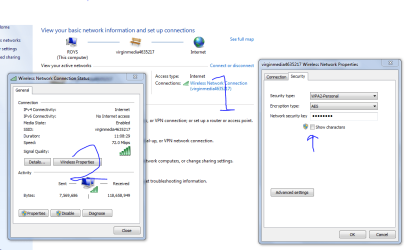
Ran the installation software and have it hooked up using (1)USB.
I have a problem when trying to set up using WiFi on my desktop.
Maybe I have a terminology problem. What is SSID? I have used this with Epson and HP: 42664A####. No password required.
My Actiontec M1000 modem says this: SSID: myqwest#### WEP Key:42664A####.
Setup Window gives me the choice of (1)USB, (2)Printers connected to the network, (3)Printers connected to a NEW wireless network. If I select (2) no printers are found. So I try (3).
First setup screen asks for SSID. I enter 42664A5767.
Next screen shows Safe Mode: Choose from None, WEP, or WPA/WPA2
If I enter SSID as 42664A#### and select None it doesn't ask for password and tries to connect but fails.
If I enter SSID as 42664A#### and select WEP it asks for a password. I have no idea what the password is.
Any help would be appreciated. Like how to find SSID password?
I have a problem when trying to set up using WiFi on my desktop.
Maybe I have a terminology problem. What is SSID? I have used this with Epson and HP: 42664A####. No password required.
My Actiontec M1000 modem says this: SSID: myqwest#### WEP Key:42664A####.
Setup Window gives me the choice of (1)USB, (2)Printers connected to the network, (3)Printers connected to a NEW wireless network. If I select (2) no printers are found. So I try (3).
First setup screen asks for SSID. I enter 42664A5767.
Next screen shows Safe Mode: Choose from None, WEP, or WPA/WPA2
If I enter SSID as 42664A#### and select None it doesn't ask for password and tries to connect but fails.
If I enter SSID as 42664A#### and select WEP it asks for a password. I have no idea what the password is.
Any help would be appreciated. Like how to find SSID password?
Last edited:
My Computer
At a glance
Windows 7 Home Premium 64-bitIntel i5 2500KRipjaws 1600, 16 GBSaphire Radeon 6770
- OS
- Windows 7 Home Premium 64-bit
- CPU
- Intel i5 2500K
- Motherboard
- Gigabyte Z68MA-D2H-B3
- Memory
- Ripjaws 1600, 16 GB
- Graphics Card(s)
- Saphire Radeon 6770
- Monitor(s) Displays
- Gateway FHX2300
- Screen Resolution
- 1600x900@60Hz
- Hard Drives
- Crucial M4 128 GB, Samsung 1.5 TB
- PSU
- CoolMaster 600 W.
- Case
- CoolMaster Storm Scout
- Other Info
- Saphire fan is noisy. Case fans are almost silent. Love the case.